


Skills presentation slides





Try Before you Buy Download Free Sample Product
 Impress Your
 Audience
 100%
100% Editable
 Save Hours
 of Time


Showcase the numerous capabilities that your team members require to survive in the dynamic field of business with this Skills Presentation Slides PPT. This social skills layout contains a skill-set that includes characteristics such as goal-orientation, creativity, assertiveness, flexibility, and team playing. Take advantage of this interpersonal skills visual and use a skills profiler for understanding employee-specific competence. Utilize this soft skills PowerPoint presentation and ensure that suitable steps are taken to recruit people in the event of uncertain or unpredictable attritions. Take the assistance of this social intelligence infographic and emphasize the importance of learning from good and bad experiences. You can further use this employee skills background image and reveal the verbal as well as non-verbal means of communication that teammates should be acquainted with. Delve deep into the emotions and desires of your employees for a better understanding of their feelings with this emotional quotient slide. Download this behavior pattern slideshow and create a harmonious relationship with your subordinates.
People who downloaded this PowerPoint presentation also viewed the following :
Content of this Powerpoint Presentation
Social skills play an important role at the workplace in achieving positive results as a team. Hiring managers often look for people who are goal-oriented, creative, flexible, and a good team player. Any management or interview panel is looking for a candidate who is willing to support their team at all costs and exhibits clear commitment to do so. Also, soft skill traits play a role in the field of business, especially during presentations and meetings. To make things easier for the selection team, we have designed clutter-free and aesthetically solid Presentation Slides on Skills which showcase some basic skills required in a team member.
In this PPT template, you can mention the employees’ traits you need for your organization that align with their job roles. You can make use of this infographic slide and list relevant communication skills. Also, you can change the layout, illustrations, and font if you want to.
You can check out PPT templates on important concepts such as Interpersonal Skills Leadership Responsibility Teamwork Motivation Communication Improvement.
Go through SlideTeam’s PPT templates on the Leadership journey model with key skills that boost organizational success rate and help with leadership and other relevant managing skills.
Skills Presentation Slides
This template can guide you to a deeper understanding of required employee traits in a visually appealing document. The infographics and the layout used also make it easier for everyone to download and use after making necessary changes; the slide is 100% editable and customizable.
Now, let us discuss the skills presentation slide given below and see what it is all about.
Template 1: Skills
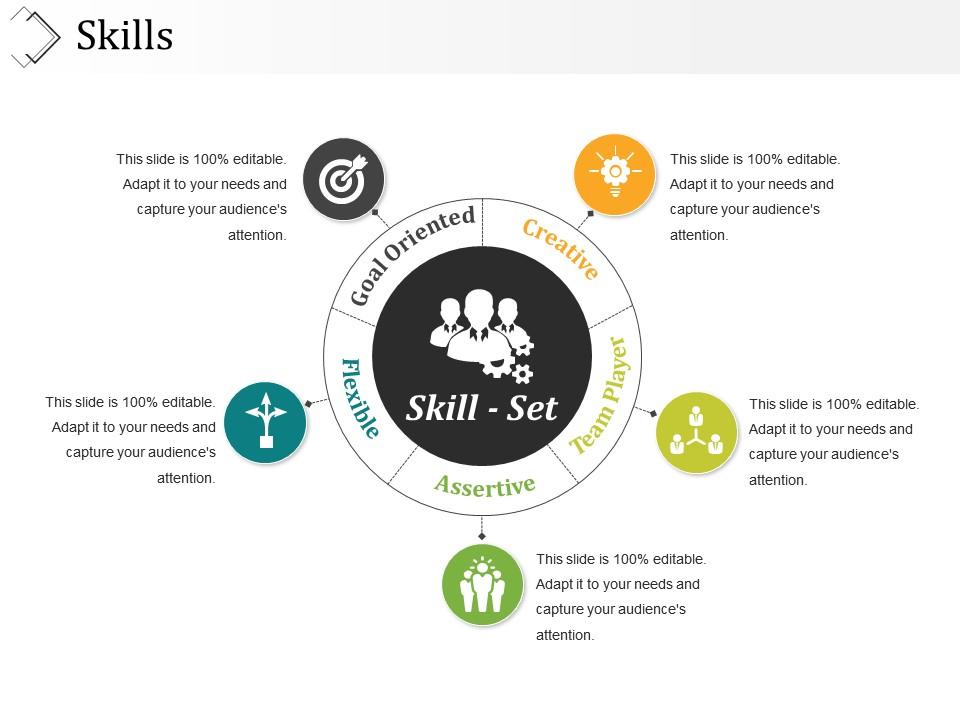
Here. in the above picture you can see that the template contains five major Skill Sets - Goal-Oriented, Creative, Team Player, Assertive, and Flexible. These are always much-sought after.
The creative illustrations not only grab your viewer’s attention but also makes it easy to express yourself with clarity, cohesion and impact.
This PPT Template presents social skill sets of employees, which are important for every organization. Based on the requirements of your office team, you can add categories of character traits.
PS Take a look at the Business Negotiation Skills Powerpoint Ppt Template Bundles.
Skills presentation slides with all 5 slides:
Get your audience to endorse your opinions. Our Skills Presentation Slides will garner their approval.
FAQs for
Hook them right away - boring openings are presentation death. Structure it so they can actually follow along without getting lost. Your content has to matter to THEM, not just you. Keep slides clean because nobody wants to read paragraphs on a screen while you're talking. Make eye contact, don't be a robot with your pacing, and show you actually care about what you're saying. Practice enough so you're not stumbling through it. Oh, and always end with what you want them to DO - like actually tell them the next step or you'll just get blank stares.
Honestly, visuals are a game-changer for presentations. People zone out super fast when you're just talking - I learned this the hard way in college. Charts and images explain stuff way quicker than rambling through explanations, plus they give visual learners something to latch onto. You'll keep people way more engaged if you break up those long talking stretches. Just don't go overboard with random graphics that don't mean anything. Keep them simple and actually relevant to what you're saying. Trust me, your audience will remember your points better when they've got something concrete to look at.
Okay so your first 30 seconds are make-or-break. I'd go with something shocking - like a crazy stat, or maybe ask them something that gets their brain working. You could tell a quick story too if it ties into your point. Honestly, I've watched so many presentations crash and burn because they opened with those mind-numbing agenda slides. Sometimes a bold statement works, or even a joke if you read the room right. Bottom line: make them think "wait, this might actually be good." Practice that opening until it doesn't sound rehearsed - people can tell when you're confident.
Oh man, this is so true from my own experience! Some cultures want you jumping straight into business stuff, but others think you're rude if you don't chat first. Eye contact's tricky too - I learned that the hard way once. Your normal confidence can look super aggressive depending where you are. Honestly, just ask someone local beforehand if you can. They'll save you from looking like an idiot. When you're not sure, go more formal than usual and watch how others present.
Dude, your body language is doing like 55% of the talking before you even open your mouth. I learned this the hard way when I bombed a presentation while slouching like a question mark. Eye contact and standing straight makes people actually listen to you. Your hands matter too – use them, but don't go crazy flailing around. Honestly, the mirror trick works wonders. Record yourself if you're feeling brave. You'll cringe at first, but you'll catch all the weird stuff you do without realizing it. When everything lines up, people trust what you're saying way more.
Okay so first thing - figure out who you're actually talking to. Engineers? Executives? Mixed bag? That changes everything about how deep you go and what examples you use. Then think about what they actually care about. Don't just dump info on them - connect it to problems they're dealing with or goals they have. Use their language and cases they'll relate to. Mixed audiences are tricky honestly. I usually acknowledge it upfront and layer the content so everyone gets something useful. Oh and always have backup slides with more detail ready. You never know when someone's gonna ask a curveball question that needs you to pivot.
Oh god, don't just read off your slides word for word - it's painful to watch. Test your tech stuff beforehand because nothing's worse than awkwardly messing with the projector while everyone stares. Make eye contact around the room instead of burying your face in notes. Keep slides clean, not crammed with text. When you're nervous you'll probably talk super fast, so consciously slow down. Practice how you'll move between topics so it flows better. Honestly, going way over time is just rude to your audience. Have some backup plan ready if the tech dies on you.
Okay so storytelling in presentations - you need setup, conflict, resolution that ties to your main point. Make it personal or relatable, not some boring case study. I always use vivid details and dialogue but keep it tight. Don't just dump the story at the beginning either - weave it through your whole presentation. Here's the thing though: you HAVE to connect each story back to your point explicitly. People won't figure it out themselves. Practice your pacing too because timing makes or breaks it. Oh and get your audience emotionally hooked, not just thinking about your content.
Hey! So first thing - repeat their question back so everyone catches it. Take a beat before answering, especially if it's tricky. Honestly, saying "I don't know but I'll get back to you" is way better than BS-ing your way through. Keep answers short and actually answer what they asked (people go off on tangents all the time). If someone's being a pain or rambling forever, just say "great point - let's chat after so we can hit other questions." Oh, and thank people at the end for asking stuff!
Dude, there's so much cool stuff out there now! Mentimeter is awesome for live polling - people vote on their phones and boom, instant results on screen. Keeps everyone awake. For demos, I always record my screen first instead of doing it live because... yeah, we know how that usually goes. Miro's clutch for brainstorming sessions where people need to collaborate. Oh and Prezi has that zooming thing that actually looks pretty slick when you nail it. Even just getting a wireless clicker lets you walk around instead of being stuck behind your laptop the whole time.
Okay so breathing exercises actually help way more than you'd expect - do them right before you go on. I always practice my opening until it's basically automatic because once you start talking, you'll get into a groove. Those power poses in the bathroom? Yeah they're ridiculous but they work better than pacing around stressed. Show up early so you can mess with the mic and get comfortable with the space. Honestly, some nerves are good - they keep you focused. The main thing is picturing it going well instead of imagining everything that could go wrong.
Okay so feedback is literally like having a mirror for stuff you can't see about yourself. Instead of asking "how'd I do?" try getting specific - like "was I talking too fast?" or "did those examples actually make sense?" Trust me, you'll get way better answers that way. I used to absolutely hate feedback but honestly? It's the quickest way to actually improve. Jot down the main stuff people tell you, then just pick one or two things for next time. Don't go crazy trying to fix everything at once - that's how you end up improving nothing.
Honestly, the best way is mixing quick checks with longer-term stuff. Right after, watch body language - are they leaning in or scrolling their phones? Use polls or quick feedback forms too. Q&A engagement tells you tons. But here's the thing - real impact happens weeks later. Follow up with surveys asking what they actually remember or changed. Did anyone request your slides afterward? Book follow-up meetings? That's when you know it stuck. People implementing your ideas is pure gold. I'd start simple though - just one post-presentation survey question to begin with.
Don't cherry-pick stats or use misleading charts - that stuff always backfires anyway. Cite your sources and be honest about any gaps in your research. Skip the fear tactics even when you're dying for people to agree with you. Your audience isn't stupid, so give them the full picture. Fact-check everything twice. Think about whether your recommendations could hurt anyone. Oh, and make sure you can defend every single claim you're making - like, would you bet money on it? Basically just don't be that person who manipulates data to win an argument.
Ugh, virtual presentations are so weird compared to regular speaking! You can't tell if people are paying attention since everyone's camera is off - they're probably scrolling Instagram tbh. Plus there's that annoying delay that messes up your rhythm, and don't get me started on tech problems. But honestly? There are some perks. I love having my notes right there on screen. Eye contact through the camera feels weirdly intimate too. My advice: keep things shorter and way more interactive. People zone out faster on screens, so you gotta work harder to grab their attention.
-
Easily Editable.
-
Illustrative design with editable content. Exceptional value for money. Highly pleased with the product.