

Stage Gate Product Development Model Powerpoint Presentation Slides





Try Before you Buy Download Free Sample Product
 Impress Your
 Audience
 100%
100% Editable
 Save Hours
 of Time


¿Está haciendo una presentación relacionada con el desarrollo de productos? ¿Y estás atrapado con nuevas ideas sobre cómo presentar esto? Llevar un registro de todas las ideas para el modelo de nuevos productos y decidir cuáles de ellas son las mejores para la tarea que impone la presentación. Es por eso que nuestro equipo de diseñadores expertos ha creado 61 diapositivas prefabricadas Stage Gate Modelo de desarrollo de productos Powerpoint Presentation Slides que lo ayudarán con un PPT profesional y nítido. Hay muchas diapositivas incluidas en esta muestra completa de la plataforma como proceso de innovación, criterios de entrada, generación de nuevas ideas de productos, fuentes externas de nuevas ideas de productos, fuentes internas, selección, alcance, fortalezas y debilidades del producto, características y beneficios del producto, análisis de la competencia, producto definición, necesidades de los clientes, tipos de clientes y muchos más. Además, también se le iluminará con varias diapositivas exclusivas como el modelo de cinco fuerzas de Porter, la investigación aproximada, la construcción de un caso comercial, el análisis de mercado como el mercado objetivo, el tamaño del mercado, la participación de mercado, la segmentación del mercado, el atractivo del mercado, la suposición de precios, etc. sample le ahorrará mucho tiempo y hará muy fácil presentar una presentación perfecta frente a la audiencia. Por lo tanto, no piense mucho y simplemente descargue nuestras diapositivas de presentación de PowerPoint del modelo de desarrollo de productos Stage Gate y presente su tema con facilidad y sorprenda a los espectadores también. Dé una cuenta inteligente con nuestras diapositivas de presentación de Powerpoint del modelo de desarrollo de productos Stage Gate. Muestre una comprensión clara de los fundamentos.
People who downloaded this PowerPoint presentation also viewed the following :
Contenido de esta presentación de Powerpoint
Diapositiva 1 : Esta diapositiva presenta el modelo de desarrollo de productos Stage Gate. Indique el nombre de su empresa y continúe.
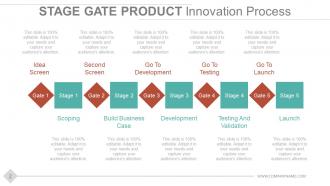
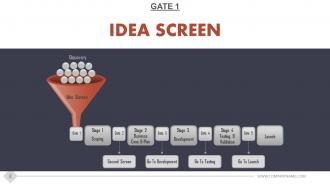
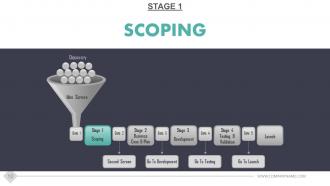
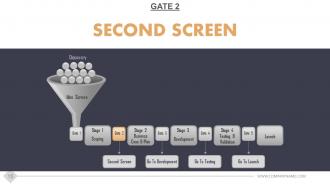
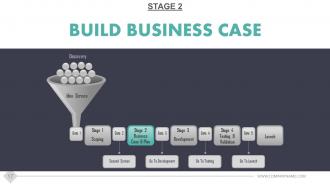
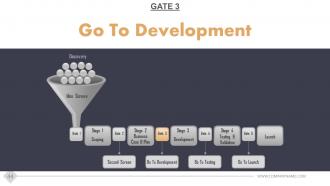
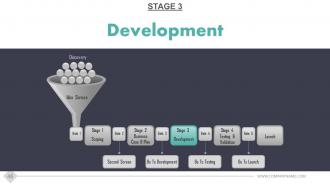
Diapositiva 2 : Esta diapositiva muestra el proceso de innovación de productos Stage Gate con las siguientes etapas y puertas: alcance, creación de un caso comercial, desarrollo, pruebas y validación, lanzamiento, pantalla de ideas, segunda pantalla, ir a desarrollo, ir a pruebas, ir al lanzamiento.
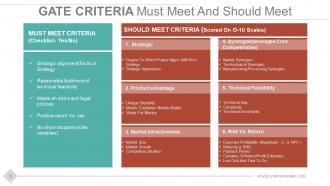
Diapositiva 3 : Los criterios de esta puerta deben cumplir y deben cumplir la diapositiva presentada como: DEBE CUMPLIR CON LOS CRITERIOS (Lista de verificación: Sí / No) Alineación estratégica (se ajusta a la estrategia de Bu, Probabilidad razonable de viabilidad técnica, Cumple con eh y sy las políticas legales, Retorno positivo vs. riesgo, no show stoppers (variables asesinas) DEBE CUMPLIR LOS CRITERIOS (puntuados en escalas O-10) 4. Sinergias (apalancamiento de las competencias básicas) Sinergias de mercado, Sinergias tecnológicas, Sinergias de fabricación / procesamiento 5. Viabilidad técnica Brecha técnica, Complejidad, Incertidumbre. 6. Riesgo frente a rendimiento Rentabilidad esperada (magnitud; EG NPV), rentabilidad (p. Ej., TIR), período de recuperación, certeza de las estimaciones de rentabilidad / rentabilidad, bajo costo y rapidez de ejecución. 1. Grado estratégico en el que el proyecto se alinea con las Bu Estrategia, Importancia estratégica 2. Ventaja del producto Beneficios únicos, Satisface mejor las necesidades del cliente, Valor por dinero 3. Atractivo del mercado Tamaño del mercado, Crecimiento del mercado, Situación competitiva.
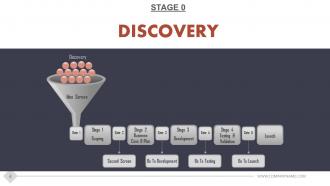
Diapositiva 4 : Esta diapositiva presenta la ETAPA 0 Descubrimiento en forma de diagrama de embudo.
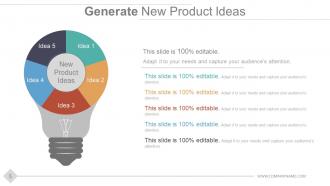
Diapositiva 5 : Esta diapositiva ayuda a generar nuevas ideas de productos con imágenes de bulbo creativas. Exprese aquí sus ideas creativas e innovadoras.
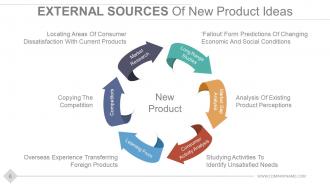
Diapositiva 6 : Esta diapositiva describe las fuentes externas de ideas de nuevos productos: nuevo producto, investigación de mercado, estudios a largo plazo, aprendizaje de, competidores, análisis de brechas de mercado, análisis de actividad del consumidor.
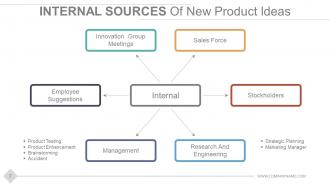
Diapositiva 7 : Esta diapositiva muestra las siguientes fuentes internas de ideas de nuevos productos: fuerza de ventas, reuniones del grupo de innovación, sugerencias de los empleados, administración, accionistas, investigación e ingeniería.
Diapositiva 8 : Esta diapositiva se titula Pantalla de ideas de la puerta 1. Puede cambiar el contenido de la diapositiva como desee.
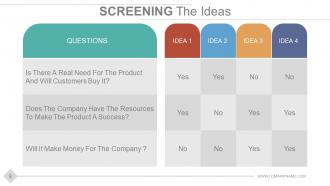
Diapositiva 9 : Esta es la diapositiva Proyectando las Ideas que contiene tres preguntas. Agregue sus propias preguntas o haga uso de las mencionadas.
Diapositiva 10 : Esta diapositiva se titula Análisis del alcance de la etapa 1. Puede modificar el contenido de la diapositiva según sus necesidades.
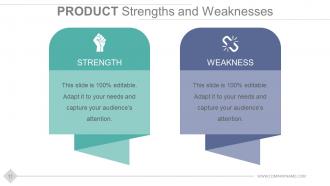
Diapositiva 11 : Esta diapositiva presenta las fortalezas y debilidades del producto. Enuncie ambos aspectos aquí.
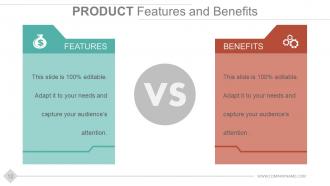
Diapositiva 12 : Esta diapositiva muestra dos aspectos del PRODUCTO: Características y Beneficios. Agrégalos aquí.
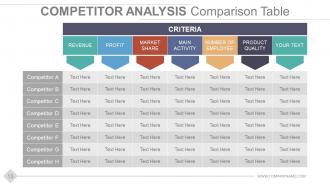
Diapositiva 13 : Esta diapositiva muestra el Análisis de la competencia haciendo uso de la Tabla de comparación que se muestra aquí. Agregue texto relevante en esta tabla y utilícelo según sus necesidades comerciales.
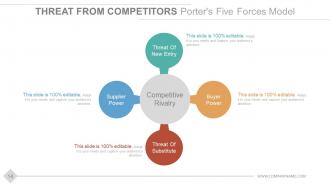
Diapositiva 14 : Esta diapositiva muestra Amenaza de los competidores Modelo de cinco fuerzas de Porter, que incluye las siguientes cuatro amenazas: Amenaza de nueva entrada, Poder del comprador, Amenaza del sustituto, Poder del proveedor.
Diapositiva 15 : Esta diapositiva muestra la segunda pantalla de la puerta 2.
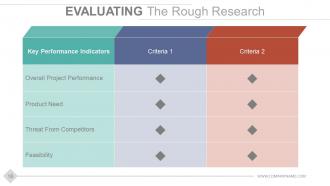
Diapositiva 16 : Esta diapositiva ayuda a evaluar la investigación aproximada sobre la base de: Indicadores clave de desempeño y diferentes criterios para establecer.
Diapositiva 17 : Aquí se muestra el proceso completo de la Etapa 2 Construir un caso comercial.
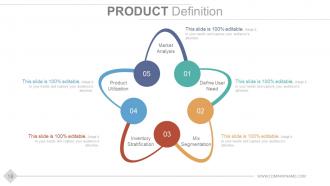
Diapositiva 18 : Esta diapositiva presenta la definición de producto con los siguientes elementos: análisis de mercado, definición de la necesidad del usuario, utilización del producto, segmentación de la mezcla, estratificación del inventario.
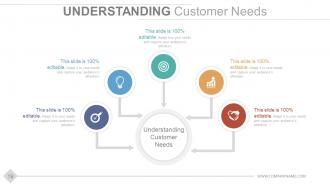
Diapositiva 19 : Esta diapositiva está inclinada Comprensión de las necesidades del cliente con imágenes de iconos. Agregue los datos que ayudan a comprender las necesidades del cliente en los cuadros de texto proporcionados.
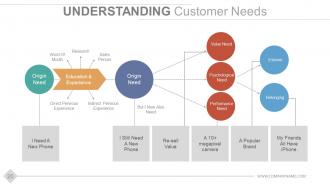
Diapositiva 20 : Esta diapositiva presenta el marco de comprensión de las necesidades del cliente con los siguientes componentes: experiencia directa indirecta, experiencia directa directa, investigación, boca a boca, vendedor, necesidad de origen, necesidad psicológica, necesidad de valor, necesidad de desempeño, pertenencia, estima, pero yo Ahora también necesito, necesito un teléfono nuevo, todavía necesito un teléfono nuevo, una cámara de más de 10 megapíxeles, una marca popular, todos mis amigos tienen iPhone, valor de reventa, educación y experiencia.
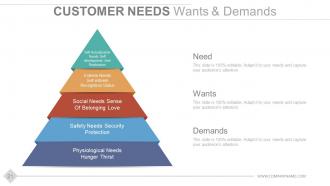
Diapositiva 21 : Esta diapositiva muestra los deseos y demandas de las necesidades del cliente categorizados como - Necesidades fisiológicas - Sed de hambre, Necesidades de estima - Autoestima, Estado de reconocimiento, Necesidades sociales - Sentido de amor de pertenencia, Necesidades de seguridad - Protección de seguridad, Necesidades de autorrealización - Desarrollo personal y Realización.
Diapositiva 22 : Esta es la diapositiva de Personas de clientes que muestra Tipos de clientes y Personas.
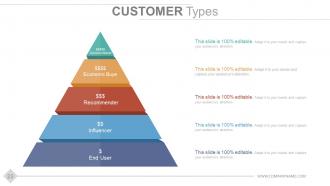
Diapositiva 23 : Esta diapositiva muestra los tipos de clientes. Estos son: Tomador de decisiones, Usuario final, Influenciador, Recomendador, Comprador económico.
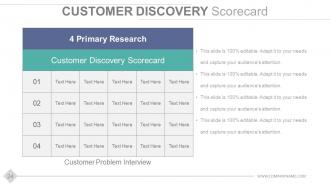
Diapositiva 24 : Esta diapositiva presenta el Cuadro de mando de descubrimiento de clientes que muestra: 4 Investigación primaria, Entrevista de problemas del cliente, Cuadro de mando de descubrimiento de clientes.
Diapositiva 25 : Esta diapositiva muestra Análisis de mercado: mercado objetivo con tres dardos y una imagen objetivo para acompañar.
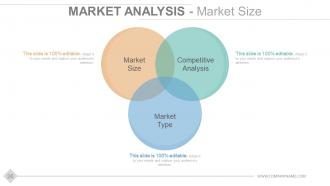
Diapositiva 26 : Esta diapositiva muestra Análisis de mercado - Tamaño del mercado en forma de imagen de diagrama de Venn. Sus factores incluyen: análisis competitivo, tamaño del mercado, tipo de mercado.
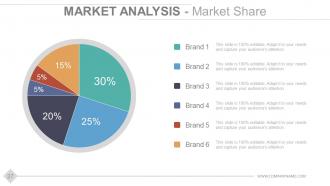
Diapositiva 27 : Esta diapositiva presenta Análisis de mercado - Participación de mercado en forma de gráfico circular. Agregue las estadísticas correspondientes a las diferentes marcas que desea exhibir.
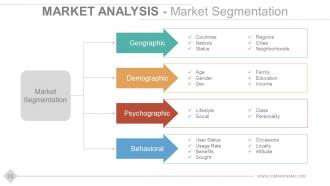
Diapositiva 28 : Esta diapositiva muestra Análisis de mercado: segmentación del mercado en categorías conductuales, psicográficas, demográficas y geográficas.
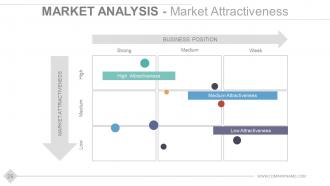
Diapositiva 29 : Esta diapositiva muestra Análisis de mercado - Matriz de atractivo del mercado que muestra - POSICIÓN COMERCIAL y ATRACTIVO DEL MERCADO.
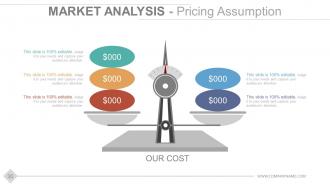
Diapositiva 30 : Esta diapositiva muestra Análisis de mercado: suposición de precios con imágenes de escala de equilibrio.
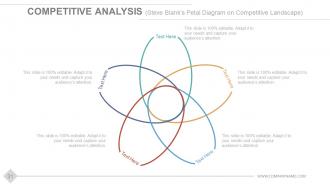
Diapositiva 31 : Esta diapositiva muestra Análisis competitivo (Diagrama de pétalos de Steve Blank sobre el panorama competitivo).
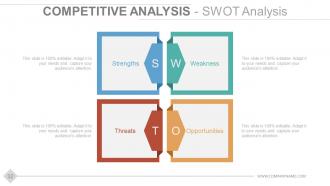
Diapositiva 32 : Esta diapositiva muestra Análisis competitivo - Análisis FODA que menciona las fortalezas, debilidades, amenazas y oportunidades.
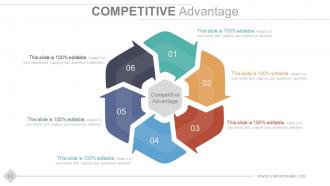
Diapositiva 33 : Esta diapositiva muestra la ventaja competitiva.
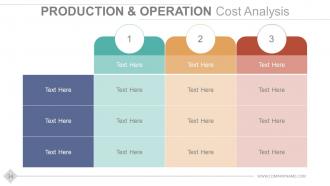
Diapositiva 34 : Esta diapositiva muestra el Análisis de costos de operación y productos.
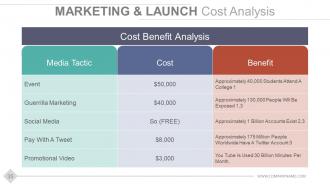
Diapositiva 35 : Esta diapositiva muestra la tabla Análisis de costes de lanzamiento y comercialización con análisis de costes y beneficios.
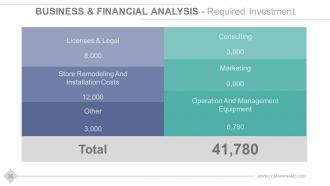
Diapositiva 36 : Esta diapositiva muestra Análisis comercial y financiero: la inversión requerida consta de: Licencias y legales, Costos de remodelación e instalación de tiendas, Otros, Consultoría, Marketing, Operación y equipo de administración.
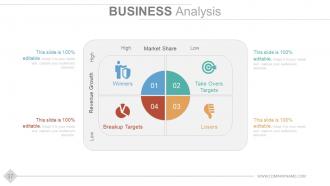
Diapositiva 37 : Esta es la diapositiva de Análisis EMPRESARIAL en forma de matriz que muestra: cuota de mercado alta-baja, crecimiento de ingresos, ganadores, objetivos de adquisición, objetivos de ruptura, perdedores.
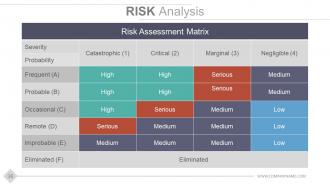
Diapositiva 38 : Esta diapositiva muestra el Análisis de riesgo con parámetros altos, bajos, medios y graves incluidos en la Matriz de evaluación de riesgos.
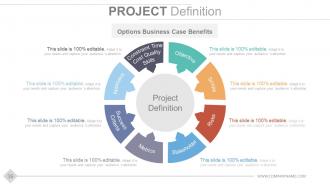
Diapositiva 39 : Esta diapositiva presenta la Definición del proyecto con opciones Beneficios del caso comercial: tiempo de restricción, calidad de costos, habilidades, objetivo, alcance, riesgos, partes interesadas, métricas, éxito, criterios, enfoque.
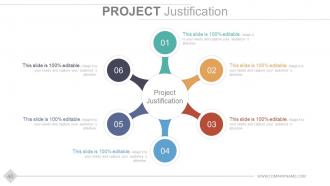
Diapositiva 40 : Esta es una diapositiva de justificación del proyecto con cuadros de texto. Proporcione justificaciones relevantes de su producto aquí.
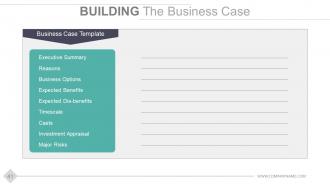
Diapositiva 41 : Esta es la diapositiva Construyendo el caso comercial con: Plantilla de caso comercial: Resumen ejecutivo, Razones, Opciones comerciales, Beneficios esperados, Desventajas esperadas, Escala de tiempo, Evaluación de inversiones, Riesgos mayores, Repartos.
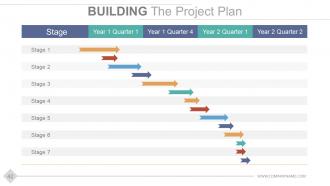
Diapositiva 42 : Esta es la diapositiva Construyendo el plan del proyecto con etapas y años para agregar.
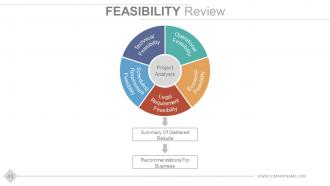
Diapositiva 43 : Esta diapositiva presenta la Revisión de viabilidad con el Análisis del proyecto que muestra: Viabilidad operativa, Viabilidad económica, Viabilidad de requisitos legales, Viabilidad de requisitos de programación, Viabilidad técnica.
Diapositiva 44 : Esta diapositiva muestra Gate 3 Ir a desarrollo.
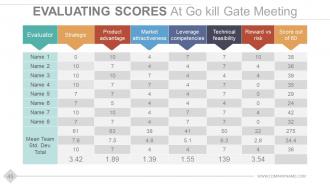
Diapositiva 45 : Esta es la diapositiva Evaluación de puntajes en Go kill Gate Meeting presentada en forma de tabla.
Diapositiva 46 : Esta diapositiva muestra la ETAPA 3- Desarrollo.
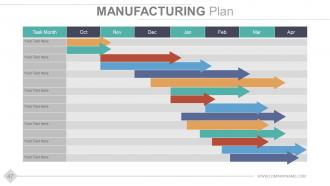
Diapositiva 47 : Esta diapositiva muestra la diapositiva Plan de fabricación. Agregue aquí los aspectos relacionados con el plan.
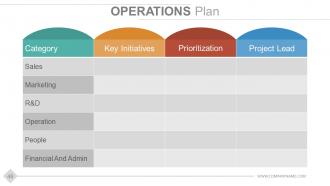
Diapositiva 48 : Esta diapositiva muestra el Plan de operaciones que indica: Categorías Iniciativas clave, Priorización, Líder del proyecto.
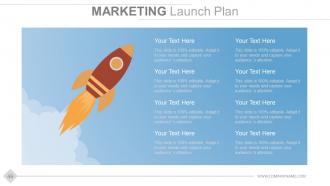
Diapositiva 49 : Esta diapositiva muestra el plan de lanzamiento de marketing con imágenes de cohetes.
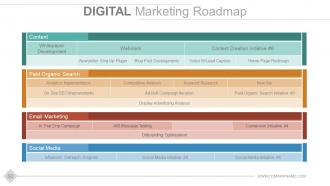
Diapositiva 50 : Esta diapositiva muestra la hoja de ruta del marketing digital.
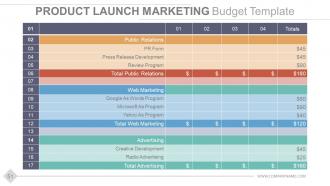
Diapositiva 51 : Esta es la diapositiva de la plantilla de presupuesto de MARKETING DE LANZAMIENTO DE PRODUCTOS presentada en forma de tabla que muestra información relacionada con las relaciones públicas, el marketing web y la publicidad.
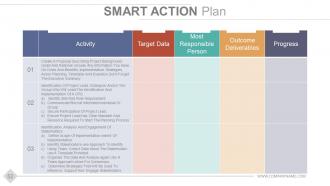
Diapositiva 52 : Esta diapositiva muestra el Plan de acción inteligente con Actividad, Datos objetivo, Persona más responsable, Resultados entregables y Progreso como subtítulos del estado.
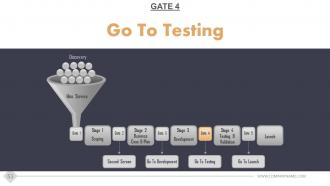
Diapositiva 53 : Esta diapositiva muestra GATE 4- Ir a la prueba.
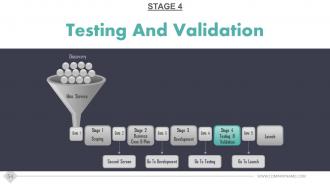
Diapositiva 54 : Esta diapositiva muestra la ETAPA 4: Prueba y validación.
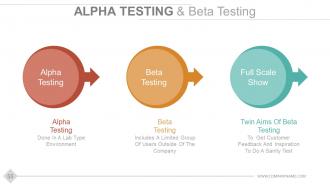
Diapositiva 55 : Esta es la diapositiva de Prueba Alfa y Prueba Beta. Presente los matices / resultados de las pruebas, etc. aquí.
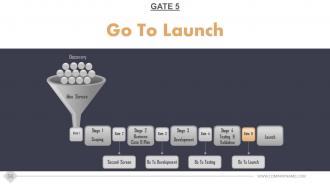
Diapositiva 56 : Esta diapositiva muestra GATE 5- Ir al lanzamiento.
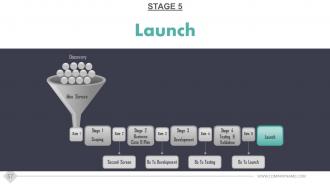
Diapositiva 57 : Esta diapositiva muestra la ETAPA 5- Lanzamiento.
Diapositiva 58 : Esta diapositiva se titula Supervisión posterior al lanzamiento.
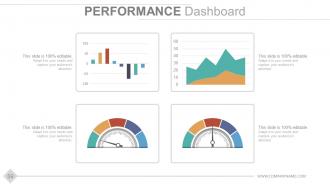
Diapositiva 59 : Esta diapositiva muestra el Panel de rendimiento. Presente los aspectos relacionados con su desempeño en forma gráfica aquí.
Diapositiva 60 : Esta es también una diapositiva del Panel de rendimiento con imágenes métricas y cuadros de texto para agregar texto relevante.
Diapositiva 61 : Esta es una diapositiva de agradecimiento con la dirección de correo electrónico, los números de contacto y la dirección que se mostrarán.
Stage Gate Modelo de desarrollo de productos Presentación de Powerpoint Diapositivas con las 61 diapositivas:
Invite a la gente a seguir un enfoque propicio con nuestras diapositivas de presentación de Powerpoint del modelo de desarrollo de productos Stage Gate. Aborde los problemas que surgen.




FAQs for Stage gate product development model
So the Stage-Gate Model breaks down into five phases: Discovery, Scoping, Build Business Case, Development, and Testing & Validation. After each phase there's a "gate" where you decide to kill the project, put it on hold, or keep going. Think of it as reality checks built into your timeline. You're forced to validate market needs early instead of finding out later that nobody wants your thing (been there). The phases make you get proper resources and test everything before launch. Honestly, the best part is how it stops you from throwing good money after bad ideas. Just define your gate criteria upfront - trust me on this one.
So the Stage-Gate thing is pretty smart - it makes you hit specific checkpoints before moving to the next phase. At each "gate," you've got to present real evidence (market research, tech studies, financials, whatever) to a review team. They decide if your project goes forward, gets killed, put on hold, or needs rework. Honestly, it's saved my team from some pretty terrible ideas we were way too attached to. Each gate has clear questions you must answer and benchmarks to hit. No more projects just wandering around burning cash without anyone really evaluating them. Just make sure you define what "winning" looks like at each stage upfront.
Honestly, the Stage-Gate thing is pretty solid for catching problems before they get expensive. Each gate lets you kill projects that aren't working instead of pouring more cash into dead ends. Cross-functional teams actually talk to each other too - no more marketing finding out what engineering built at the last minute (been there). Decision-making gets faster since you're not waffling around forever. Plus stakeholders can actually see where projects stand without constantly bugging you for updates. Maybe try it on one smaller project first to see if your team likes the structure?
Make your gates way more flexible instead of those rigid checkpoints everyone hates. Run shorter sprints in each stage, then do quick gate reviews every couple weeks rather than waiting forever between them. The governance stuff just needs to match your sprint timing - takes some getting used to but it actually works pretty well. Keep focusing on the important gate criteria like feasibility and market potential, just evaluate them ongoing instead of those big formal review meetings. Honestly I'd test this hybrid thing on just one project first to figure out what gate timing actually makes sense for how your team works.
So the metrics change at each gate, obviously. Early on you're looking at market size, customer validation, proof-of-concept stuff - basically "is this even worth doing?" Mid-stage gates get into the money side - NPV, ROI projections, what it'll actually cost to build. Later gates are all about execution: staying on timeline, hitting quality targets, being ready to launch. Most companies tweak this based on their industry though. The real trick is picking 3-5 solid metrics per gate so you're not just winging decisions. Focus on stuff that actually predicts success for your specific situation.
So basically, you just tweak the gates and deliverables to fit what you actually do. Pharma companies throw in extra regulatory checkpoints and stretch out timelines. Software teams? They'll crush stages together and obsess over user feedback instead. Start by mapping your normal project flow first - that's the key part. Then slap the Stage-Gate framework on top and change the decision points to match your real world stuff. Honestly, some companies just ditch entire stages if they're pointless. It's way more flexible than people think, and you can adjust the risk levels however makes sense for your business.
Honestly, the worst part is dealing with people who hate change. Your teams will probably grumble about new approval steps, especially if they're used to just winging it. Gate reviews can feel super slow at first while everyone figures things out. Watch out for those gatekeepers who get drunk on power and shoot down perfectly good ideas - ugh, those people are the worst. Oh, and cramming every single project through identical gates? Doesn't really work since innovations are all different. I'd say test it out small first and make sure your key people are actually on board.
Honestly, stakeholder involvement can totally make or break your Stage-Gate process. You'll get way better decisions at each gate when you bring in different perspectives early on. The trick is figuring out who needs to be where - don't drag everyone through every single review (learned that the hard way). Map out your critical people for each stage upfront. I've watched projects completely tank because teams thought they'd save time by skipping this step. Spoiler alert: they didn't save anything. Build that buy-in as you go and implementation becomes so much smoother later.
Dude, you absolutely need those cross-functional teams for Stage-Gate to work. Marketing gives you the market reality check. R&D tells you if it's even technically possible. Finance keeps you from going broke, and ops makes sure you can actually build the thing. I've watched projects crash because they ignored one of these voices early on. Short meetings work better than long ones, by the way. Don't just invite people to check boxes - actually listen when they raise red flags. Each gate review should feel like a real conversation where everyone can push back if needed.
Honestly, tech makes Stage-Gate so much easier. You can automate those gate reviews instead of doing everything manually - saves tons of time. Microsoft Project or Smartsheet work great for tracking deliverables and timelines. The real game-changer though? Real-time dashboards that actually show you what's happening without those soul-crushing status meetings every week. Set up workflows that automatically trigger reviews when you hit certain milestones. Stakeholders can see project health instantly too. My advice? Start with whatever tool your team's already comfortable with and just build Stage-Gate templates on top of it. Way less painful than switching platforms entirely.
Honestly, the worst thing teams do is turn Stage-Gate into this super rigid checklist. People get obsessed with perfect paperwork while their actual project stalls out. Gates become these annoying roadblocks instead of useful checkpoints - drives me crazy! Don't force existing projects into stages that make zero sense. Also, gate reviewers need to actually understand what they're evaluating (obvious but happens way too often). The culture change is huge too. My advice? Start with just one pilot project and tweak things as you go. Way less painful that way.
Schedule those retrospectives after every project - don't just wing it and hope they happen. Pick your team's brains about what actually worked at each gate and what was a total mess. I'd start with just one gate honestly, then build from there once you get the hang of it. Track stuff like how long cycles take and approval rates so you can spot the weird patterns. Here's the cool part though - get teams that are running projects at the same time to share their screwups with each other. Way more useful than learning everything the hard way.
So the Stage-Gate thing is actually pretty solid for managing innovation projects. Basically breaks everything down from initial idea all the way to launch. What I love about it is those decision gates - you can actually kill projects that aren't going anywhere instead of wasting months on them. It forces you to validate stuff and check if there's real market demand at each step. Plus it keeps the creative side balanced with business reality, which honestly most companies suck at. Try mapping your current projects to see where you're missing steps - bet you'll find some gaps.
Honestly, I'd go with Cooper & Associates for the formal Stage-Gate training - they're legit and cover all the basics you need. Get your team familiar with gate review templates and decision frameworks too. Don't jump into something huge right away though. Start with a pilot project first, way less stressful that way. Your gate reviewers need to actually understand what they're doing since they're making the go/kill calls. Oh, and definitely get everyone on the same page with the process upfront. It's tempting to wing it, but trust me - invest in proper training from the start instead of scrambling later.
So the Stage-Gate thing is basically checkpoints for your project - you can't move ahead until you hit certain milestones and deal with risks. Each gate makes you look at whether the tech actually works, if people will buy it, and if you have enough resources. Pretty smart since catching problems early saves you money. Bad projects get axed before you blow your whole budget, which honestly happens way too often. You can also pivot when something's not working instead of just powering through. Those gate criteria become your early warning system for when things might go sideways.
-
Editable templates with innovative design and color combination.
-
Wonderful templates design to use in business meetings.