


Successful Onboarding Buddy System Checklist




Try Before you Buy Download Free Sample Product
 Impress Your
 Audience
 100%
100% Editable
 Save Hours
 of Time


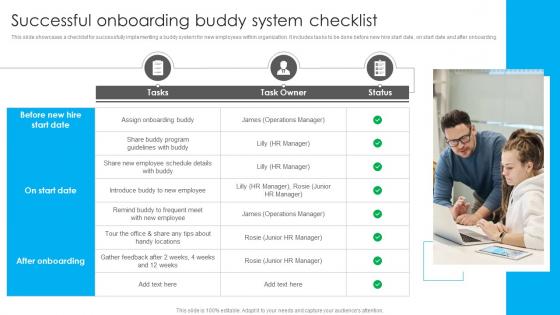
This slide showcases a checklist for successfully implementing a buddy system for new employees within organization. It includes tasks to be done before new hire start date, on start date and after onboarding.
People who downloaded this PowerPoint presentation also viewed the following :
Successful Onboarding Buddy System Checklist with all 6 slides:
Use our Successful Onboarding Buddy System Checklist to effectively help you save your valuable time. They are readymade to fit into any presentation structure.





FAQs for Successful Onboarding
So basically you want to prep stuff before they even show up, then have their first day mapped out. Get them a buddy - seriously, this is probably the most important thing you can do. People need that one person to ask stupid questions to, you know? Cover the boring practical stuff like systems and tools, but also the real culture things - like how your team actually operates day-to-day. Set up check-ins for their first 90 days with clear milestones. Oh, and make a checklist so you don't forget anything important. Trust me on the buddy thing though.
Honestly, you gotta mix up how you teach people during onboarding. Some folks are super visual - they need videos and diagrams. Others just want to dive in and mess around with stuff until they get it. Then there's the people who actually read manuals (weird, I know). Most companies just dump everyone into the same boring presentation format and wonder why half their new hires look confused. Try offering the same info in different ways - videos, hands-on practice, written guides they can bookmark. That way everyone can learn however their brain works best.
Honestly, templates are a game changer for onboarding. You'll save so much time not rebuilding the same slides over and over - company values, team structure, all that stuff. Just swap in the role-specific bits and you're done. Your presentations will look way more professional too, even when you're throwing something together last minute (we've all been there). I'd make like 2-3 different templates depending on the role. Trust me, once you have them set up, new hire prep becomes so much easier. You can actually focus on the person instead of scrambling with slides.
Remote onboarding is honestly way trickier than people think. You can't just wing it like you would in-person. Get all their tech stuff sorted upfront - nothing worse than Day 1 laptop issues. Set up those awkward-but-necessary virtual coffee chats with teammates. The big thing is remote people miss all the random conversations and cultural stuff you pick up just being around the office. So spell out team dynamics, who does what, unwritten rules - all that context that normally happens naturally. Oh, and definitely schedule more check-ins the first few weeks. They need face time with their manager and key people early.
honestly, start with the basics - time-to-productivity is huge (like how long before they're actually useful lol). Track your retention at 90 days and one year. Manager satisfaction scores help too. engagement surveys in those first few months will show if people feel prepared or just thrown to the wolves. oh and don't skip completion rates for training - if nobody's finishing your modules, they're probably garbage. quick pulse surveys about confidence levels are clutch. i'd focus on these first instead of getting all complicated right away. you can always add more fancy metrics later once you've got the foundation down.
Honestly, you've gotta make them feel wanted, not like they're just another body filling a seat. Get their desk ready beforehand - computer working, chair adjusted, the whole thing. Have someone actually greet them when they walk in because showing up to an empty office sucks. Skip the death-by-PowerPoint approach. Instead, set up casual coffee chats with teammates during their first week. Give them something small they can knock out quickly for that early confidence boost. Oh, and check in with them constantly - like, how're you feeling? What's weird? Need anything? I swear, frequent little conversations work way better than dumping everything on them at once.
Oh man, the worst thing you can do is dump everything on them day one - their brain will literally melt. Space it out over the week instead. Don't just toss them a handbook either and vanish into thin air! Get them a buddy or at least check in regularly that first month. I'd set up 30/60/90 day goals too so they actually know if they're doing well. Oh, and this part always gets forgotten - introduce them to people outside their immediate team. Like, make an actual list of who they'll need to know and set up those casual meet-and-greets early. Trust me on this one.
Pair new hires with experienced people right from day one - but make it official, not just "Bob will show you the ropes." Give mentors an actual checklist with weekly coffee chats the first month, then bi-weekly after that. They should cover practical stuff (bathroom locations, expense reports) plus bigger things like company culture. Honestly, training your mentors beforehand makes a huge difference since most people don't naturally know how to mentor well. Oh, and set clear expectations upfront for both sides so nobody's confused about what they're supposed to be doing.
Honestly, start with an LMS like BambooHR or Workday - they're lifesavers for creating training paths new hires can work through without bugging anyone. Video calls are obvious but necessary for intros and sessions. Enboarder's pretty cool if you want to gamify things (sounds cheesy but it works). Slack or Teams work great for pairing newbies with mentors too. Oh, and don't try to implement everything at once - I learned that the hard way. Pick whatever fixes your worst onboarding headache first, then add more tools gradually.
Dude, your company culture is literally the foundation for everything in onboarding. Like, if you're super collaborative, throw in buddy systems and group stuff instead of making people sit alone reading manuals. Startups? Keep it short and punchy. More traditional places can do those longer structured programs. Think about what you actually value - innovation, customer service, whatever - and hammer that home during onboarding. I've seen so many companies mess this up by having their culture say one thing but their training focus on something totally different. Figure out your core vibe first, then design everything around that.
Talk to each department head about what trips up their new people in the first week - that's your goldmine right there. Sales folks need the CRM walkthrough and quota breakdown. Engineering wants the tech stack details and how code reviews actually work. Marketing teams are obsessed with brand guidelines (seriously, they'll reference that style guide forever). For HR, focus on compliance stuff and people processes. Finance needs reporting access and who approves what. Instead of boring company overview slides, just swap in examples that actually matter to their day-to-day. Way more useful than generic presentations everyone zones out during.
Oh man, yes - you'll want to hit them at different points throughout onboarding. Quick surveys after day 1, week 1, month 1 work well. Exit interviews are super valuable too (hopefully not many though lol). But honestly? The best insights come from casual chats with their managers and onboarding buddies. People tell you way more in random conversations than formal surveys. Track completion rates and how long it takes people to actually become productive - that shows you where they're getting stuck. The trick is actually doing something with the feedback instead of just collecting it and forgetting about it.
Honestly, interactive stuff works because people can't just zone out like they do with regular presentations. You know how everyone's phones come out during those endless PowerPoint marathons? Well, polls and quizzes actually force them to pay attention. Memory retention jumps up like 60-70% compared to just sitting there listening. Short bursts work best - throw in a quick poll every 5-10 minutes or so. Plus you'll instantly know if someone's confused instead of finding out weeks later when they mess something up. It's basically turning passive listeners into active participants, which makes all the difference.
Ugh, compliance training is such a pain but you gotta do it. Anti-harassment and discrimination stuff is mandatory everywhere now. Same with workplace safety and data privacy training - that one's actually getting stricter. If you're in healthcare, add HIPAA. Finance means SOX training too. Ethics training is pretty standard across the board. Remote workers make it trickier since different states have their own labor law requirements. I learned that the hard way lol. Make a checklist for each type of role so you don't forget anything important later. Trust me, it's way easier than scrambling to catch up.
Honestly, mission statements are just words until you back them up with real stories. Like instead of saying "we care about customers," tell new hires about Sarah from support who stayed until 9pm helping a client launch on time. Our brains are wired for stories, not corporate speak - that's just facts. When people hear those examples, they can actually picture themselves doing the same thing. Plus it shows how their specific job fits into the whole company mission. I'd grab 2-3 stories from different teams that really show your values, then just work them into your onboarding stuff naturally.
-
SlideTeam never fails to surprise me with its amazing PPT designs. Thanks team for providing me with your constant support!
-
My presentations were a bit amateur before I found SlideTeam’s designs. I’ve been able to find slides for nearly every topic I’ve had to present. Thanks, Slideteam!