

Project Execution Plan Timeline With Task Priority And Budget




Try Before you Buy Download Free Sample Product
 Impress Your
 Audience
 100%
100% Editable
 Save Hours
 of Time


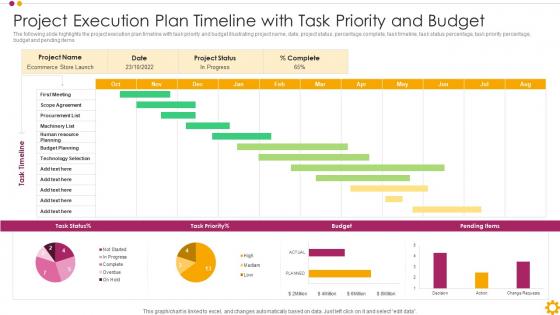
The following slide highlights the project execution plan timeline with task priority and budget illustrating project name, date, project status, percentage complete, task timeline, task status percentage, task priority percentage, budget and pending items.
People who downloaded this PowerPoint presentation also viewed the following :
Project Execution Plan Timeline With Task Priority And Budget with all 7 slides:
Use our Project Execution Plan Timeline With Task Priority And Budget to effectively help you save your valuable time. They are readymade to fit into any presentation structure.





FAQs for Project Execution Plan Timeline With Task
You need solid scope definition first, then map out your timeline with key milestones. Resource allocation and risk management come next - trust me, skipping these bites you later. Define everyone's roles upfront so there's no confusion about who does what. Communication protocols matter too, along with quality standards. Budget tracking is huge because nobody wants those awkward money conversations down the road. Build in change management processes since scope creep happens to literally everyone. Set regular check-ins for progress reviews. Oh, and make it detailed enough to actually guide decisions but flexible when things shift. Start with a template and tweak it for your project.
So the execution plan is like your field manual - it's got all the technical stuff your crew needs day-to-day. Construction methods, safety protocols, quality procedures, that kind of thing. Your PM plan is more big picture: budgets, schedules, communications, governance. Think "how do we manage this project" vs "how do we actually build it." They definitely overlap though, which honestly can get confusing sometimes. But yeah, if you need the nuts and bolts of actually doing the work, go straight to the execution plan first.
Honestly, just bake the stakeholder stuff right into your project timeline from the start. Figure out who needs to weigh in when, then block out time for those conversations at key milestones. Some people love quick check-in calls, others want everything documented - learn their preferences early. The decision-makers are the tricky ones though - you've gotta plan around their crazy schedules during crunch time. I've learned it works way better when these touchpoints feel organic, not like you're checking boxes. Oh, and don't treat it as some side thing you remember last minute. Make it a real part of your workflow.
Honestly, risk management is what holds your whole Project Execution Plan together. I always tell people to figure out what could go wrong first - then build your timeline and budget around those possibilities. It's like checking if it'll rain before you plan a beach day, you know? Your risk analysis changes everything: how much extra money you set aside, which team members handle the important stuff, backup plans. I learned this the hard way on a project last year. Start with your top 5 risks and plan backwards. Trust me, you don't want to wing it.
So basically, a Project Execution Plan is like your team's game plan - who's doing what and when. No more of those "wait, wasn't that your job?" disasters. You set up how everyone talks to each other, schedule regular check-ins, and make sure roles are crystal clear from day one. Honestly, the decision-making part is huge too - like who gets the final say when things go sideways. My advice? Hammer this out during kickoff before anyone starts working. Trust me, it'll save you from so many headaches down the road.
For your PEP, stick to four main types: schedule stuff (milestones, critical path), budget tracking (cost variance, burn rate), quality measures (defect rates, acceptance), and how well you're using resources. Don't go overboard - I've watched projects drown in metrics that sound fancy but tell you nothing useful. Pick maybe 5-7 that actually connect to whether you're winning or not. Each one needs clear targets and how often you'll check them. Weekly reviews for the critical ones, monthly for the rest. Oh, and make sure they align with what your stakeholders actually care about.
Ugh, scope changes are such a pain because they mess with literally everything in your plan. You'll have to redo timelines, shift resources around, update budgets - the whole nine yards. It's like pulling one thread and watching everything unravel. What really gets me is how people think it's just a quick fix, but you actually need to treat each change as a full plan revision. Document how it impacts other stuff and get everyone to sign off before you update anything. Otherwise you'll have stakeholders coming at you later asking why things don't match what they expected.
Check in with everyone weekly or every other week to see how things are going. Gantt charts are your friend here - they make it super easy to see what's on track and what's falling behind. Oh, and always add buffer time because I swear something unexpected pops up on every single project. When delays happen (not if, when), tell people ASAP instead of waiting until the last second. Nobody likes surprises like that. Keep notes on everything too - you'll start noticing patterns in where stuff goes wrong. The critical path stuff is boring but matters since delays there mess up everything else downstream.
Dude, project management software is a total game changer. Everything lives in one spot - tasks, deadlines, budgets, the whole mess. No more digging through email chains or trying to remember which version of the spreadsheet is current. Your team can actually see what's happening in real time, plus you get those handy deadline reminders so nothing falls through the cracks. I swear people must've been pulling their hair out before tools like Asana existed. The trick is finding something that fits how your team already works - don't overcomplicate it. Map out what's currently driving you crazy, then find software that fixes those exact problems.
Ugh, the worst thing you can do is be super vague about who's doing what and when. Risk planning is another big one - I know it seems boring but stuff WILL go wrong at the worst possible time. Don't create your plan in a vacuum either, you need input from actual people who'll be doing the work. Oh, and there's this weird balance thing - too detailed and nobody wants to update it, too basic and it's pointless. Honestly, just grab a decent template and get people to review it before you commit. Saves so much headache later.
For your PEP, break down who's handling what tasks and when they're available. Map out team roles with actual percentages - like Mike's only free 60% of the time because he's juggling other stuff. List any special equipment or software people need. Dependencies are huge here - Sarah waiting on Mike's analysis, that whole domino effect. I always think backup plans are clutch since people bail or get swamped. Don't forget external contractors or shared resources that teams fight over (printers, anyone?). Create a solid schedule with clear owners so nobody's confused later.
Honestly, the trick is building in regular checkpoints where you can actually pause and reassess everything. I learned this the hard way on my last project. Set up formal change control processes - sounds boring but trust me, it'll save your sanity when stakeholders inevitably start shifting priorities. Document every change and figure out how it impacts your budget and timeline before saying yes to anything. Get proper sign-offs too. Short updates work better than long emails when keeping your team in the loop about adjustments. Oh, and update your project docs right away or you'll forget later.
Okay so here's the thing - defining roles upfront is like buying insurance against total project meltdown. You avoid those super awkward "wait, I thought YOU were doing that" conversations. Everyone knows what they're accountable for, which honestly cuts down on people trying to dodge responsibility. Stakeholders also know exactly who to contact for updates instead of bothering everyone. Oh and decision-making becomes way clearer too. I know it seems boring to map this stuff out early, but trust me - when deadlines start breathing down your neck, you'll be so glad you did. Future you will definitely appreciate it.
Definitely dig into your old projects when planning new ones. What went wrong last time? Missed deadlines, team communication disasters, that one guy who disappeared for two weeks - write it all down and plan around it. I swear some teams repeat the exact same mistakes because they never look back. Also grab the stuff that actually worked well and do more of that. Keep notes after each project wraps up, then pull them out when you're planning again. It's basically your personal playbook for not screwing up the same way twice.
Mix up your communication channels since people absorb info differently. I'd kick off with a solid presentation or workshop to cover the big picture. Then send a visual summary they can actually use later - trust me, people love having something to reference. Email works for regular updates, but honestly? Face-to-face still wins for the complicated stuff. Dashboards are clutch for real-time progress tracking. Executives just want the highlights though - skip the weeds and stick to outcomes and timelines. Technical folks are the opposite and want all the details. It's basically about reading your audience and adjusting accordingly.
-
Their designing team is so expert in making tailored templates. They craft the exact thing I have in my mind…..really happy.
-
Crisp and neat slides. Makes it fun and easier to curate presentations.