

Swimlane Flowchart To Improve Employee Onboarding Process Effective Recruitment And Selection




Try Before you Buy Download Free Sample Product
 Impress Your
 Audience
 100%
100% Editable
 Save Hours
 of Time


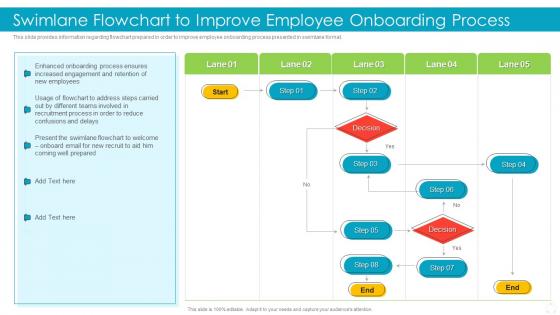
This slide provides information regarding flowchart prepared in order to improve employee onboarding process presented in swimlane format.
People who downloaded this PowerPoint presentation also viewed the following :
Swimlane Flowchart To Improve Employee Onboarding Process Effective Recruitment And Selection with all 6 slides:
Use our Swimlane Flowchart To Improve Employee Onboarding Process Effective Recruitment And Selection to effectively help you save your valuable time. They are readymade to fit into any presentation structure.





FAQs for Swimlane Flowchart To Improve Employee Onboarding Process Effective
So swimlane flowcharts are just regular flowcharts but split into lanes - like a swimming pool, which is where the name comes from (pretty obvious once you think about it). Each lane shows a different person or department handling that step. The cool thing is you can instantly see who's responsible for what, plus where work gets passed between teams. Regular flowcharts don't show that handoff part clearly. Honestly, they're a game-changer for documenting processes that involve multiple groups. You'll wonder why you didn't use them sooner when mapping out cross-functional stuff.
Oh man, swimlane flowcharts are clutch for this stuff! When multiple teams are working on the same thing and nobody knows whose turn it is, these charts literally save your sanity. I'm always using them for product launches or those brutal approval processes that ping-pong between departments. What's great is you can actually see the handoffs happening - like, visually see where things get stuck or where two people are doing the same work (happens more than you'd think). Cross-functional processes become way less chaotic. Honestly, just sketch one out next time you're dealing with messy multi-team workflows.
Okay so swimlane charts are honestly a game-changer for figuring out who's supposed to do what. No more of that "wait, wasn't that your job?" confusion. Each person or team gets their own lane, and you can literally see how tasks move between departments. The visual thing makes it way easier to spot where stuff gets stuck too - like when marketing sits on something for weeks (we've all been there). When you're mapping out new processes, everyone can actually see how their part connects to everything else. I swear these charts make project kickoffs so much less painful. You should definitely try one next time you're dealing with multiple teams.
So it's mostly your typical flowchart symbols - ovals for start/stop, rectangles for processes, diamonds for decisions. Pretty basic stuff. But here's where it gets interesting: you split everything into lanes (like a swimming pool, get it?). Each lane represents a different person or department. Game-changer is right - you can actually see where the handoffs happen between teams, which is usually where things go sideways in real life. I'd start by figuring out who's involved first, give each person their own lane, then worry about mapping out the steps. Makes the whole thing way clearer than regular flowcharts.
Yeah, they work really well! We use swimlanes all the time for mapping user stories - each lane shows different roles like devs, testers, product owners. Way better than those massive process docs we used to waste time on, honestly. During sprint planning, everyone can actually see the handoffs instead of guessing. Try making one for your next story that hits multiple people. Your standups will be so much clearer. I mean, anything that cuts down meeting confusion is worth it, right? Just map it from backlog straight through to deployment.
So for swimlane flowcharts, I'd probably go with Lucidchart first - the real-time collaboration thing is super handy when you're working with a team. Visio's still the heavyweight champion if you need all the bells and whistles, but honestly it's kinda overkill sometimes. There's also draw.io (they renamed it to diagrams.net or something) which is totally free but feels a bit wonky to use at first. I've even seen people make decent ones in PowerPoint when they're in a hurry. Really depends on whether you're flying solo or need others jumping in to edit stuff.
Honestly, just start by figuring out who actually does stuff in each step of your process. Map out the people making decisions, doing the work, or getting things passed to them - boom, there's your lanes. I always begin with the obvious ones like different departments, then add more as I find those sneaky stakeholders hiding in the background. Don't stress about getting it perfect right away. You can tweak it later. Just don't go crazy with too many lanes or you'll end up with a hot mess that nobody can read. Once you've got a rough draft, grab someone else to look it over - they'll spot the gaps you missed.
Honestly, the worst thing you can do is stuff too much into each lane - it defeats the whole purpose. Don't make roles confusing or cram multiple processes together. Those flow arrows crossing lanes everywhere? Total nightmare to follow. Keep your detail level reasonable - not crazy granular but not super vague either. Here's what actually matters though: talk to the people doing the work! I can't tell you how many times they've spotted stuff I completely missed. Oh, and resist the urge to make it perfect from day one. Start basic, get feedback from your team, then tweak it.
Dude, swimlane charts are perfect for this! Each department gets its own "lane" so you can actually see where stuff gets stuck. Like, suddenly it's obvious that approval stage always takes forever while everything else moves fine. The visual makes patterns jump out - why does accounting have 12 steps when marketing only has 3? Handoffs between teams become super clear too. Honestly I wish more people used these instead of just complaining about slow processes. Pro tip: try color-coding each lane by how long steps usually take. Makes the problem spots even more obvious.
Honestly, I'd just use different colors for each process in your swimlanes. Way easier than trying to get fancy with it. Give each one its own color, maybe throw in some different shapes if you're feeling ambitious - like rounded corners vs sharp ones. Colors work best though since they jump out at you right away. Don't forget to add a legend or people will have no clue what's going on. Oh, and stick to maybe 3-4 colors tops. More than that and it starts looking like a rainbow threw up on your flowchart. Trust me, you'll thank yourself later when everything's actually readable.
Put your swimlane chart on slide 3 or 4, right after you explain the problem. People need the big picture first. Any later and they're already lost in details. Keep referencing it during your talk - it's like your roadmap that keeps everyone on track. For reports, stick it in the executive summary. When you're making recommendations, call out specific lanes. Oh, and make sure it's big enough to actually read! I learned this the hard way when someone squinted at my tiny chart for like 30 seconds. Create a dumbed-down version for handouts since swimlanes look awful when printed small.
Honestly, swimlane flowcharts are total game-changers for compliance stuff. You can literally point to who does what when auditors show up - and trust me, they will. Perfect for SOX, data privacy, quality standards, all that fun regulatory stuff where you need to prove different people handle different parts. Regulators love the visual format too since it's way easier to follow than some boring text document. I'd start with your biggest pain-in-the-ass processes first - those are gonna save you the most stress when audit season hits. Worth the upfront work, believe me.
Update them whenever you make big process changes - like adding steps, switching who does what, or rolling out new tech. Even without major stuff happening, I'd check quarterly because those tiny tweaks pile up fast. Monthly reviews work better if things move quickly at your company. Honestly, nobody wants to be stuck with that useless diagram everyone pretends doesn't exist. Set a calendar reminder for your most important processes and just build updates into whatever change management stuff you're already doing. Saves you from scrambling later when everything's totally wrong.
Absolutely! Swimlane charts are great for that stuff. Each department gets its own "lane" so you can see exactly who's doing what. Makes handoffs between teams super obvious. I've found they're clutch for spotting where things get stuck - like when marketing finishes something but it sits in sales' inbox for days. Perfect for approval workflows or customer onboarding where everything bounces around. Just list out your departments first, then drop each step into the right lane. You'll instantly see the communication gaps. Honestly makes cross-department processes way less confusing than trying to track everything in your head.
Honestly, color coding is a game changer for swimlane charts. Your team won't have to squint at tiny labels anymore - they'll instantly know which department handles what just by the color. Handoffs between teams become super obvious, and you'll catch bottlenecks way faster. Black and white diagrams are just depressing after staring at them all day, right? I'd go with your company's brand colors if they're not too weird, or just pick colors people already link to each team. Makes the whole review process so much smoother.
-
“I've always gotten excellent slides from them and the customer service is up to the mark.”
-
Time saving slide with creative ideas. Help a lot in quick presentations..