


Creating New Hires Onboarding Process Flow




Try Before you Buy Download Free Sample Product
 Impress Your
 Audience
 100%
100% Editable
 Save Hours
 of Time


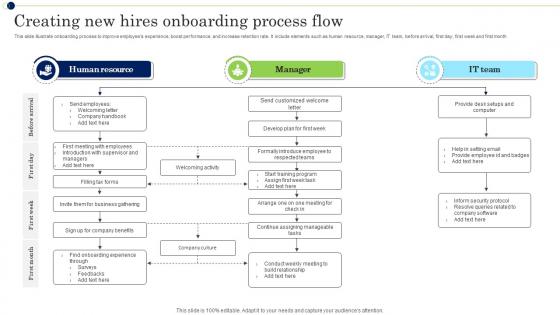
This slide illustrate onboarding process to improve employees experience, boost performance, and increase retention rate. It include elements such as human resource, manager, IT team, before arrival, first day, first week and first month.
People who downloaded this PowerPoint presentation also viewed the following :
Creating New Hires Onboarding Process Flow with all 6 slides:
Use our Creating New Hires Onboarding Process Flow to effectively help you save your valuable time. They are readymade to fit into any presentation structure.





FAQs for Creating New Hires
Hit the basics first - company culture, team intros, what their actual job looks like day-to-day. Don't skip the mundane stuff either (bathrooms, expense reports) because trust me, they'll ask later anyway. Cover your communication tools and who handles what questions. Keep it under 45 minutes or you'll lose them. I always throw in some interactive bits so it's not just me talking at them for an hour. Oh, and definitely give them something digital afterward they can reference - people forget half of what you tell them on day one anyway. Goal is confident, not confused.
Honestly, visual stuff is a game-changer for onboarding. Nobody wants to slog through those massive PDF handbooks - I swear they're designed to cure insomnia. Instead, try videos, infographics, or simple illustrated timelines. Show your company's story, walk through processes, maybe do a day-in-the-life thing. People actually watch a 3-minute culture video, you know? They'll check out visual org charts too. Way better than abstract corporate speak that goes in one ear and out the other. I'd start with whatever confuses new hires most and make simple visuals for those topics first.
Honestly, don't dump everything on them at once - that's the fastest way to make someone's head spin on day one. Stick to what they actually need right away, not your company's entire history. Make it interactive too, because nobody wants to sit through another death-by-PowerPoint situation. Different roles need different info - why bore your sales people with technical stuff they'll never use? I'd definitely run it by someone who just got hired recently to see what's confusing. Oh, and create some kind of checklist afterward so important stuff doesn't get forgotten.
Honestly, just start with the basics everyone needs - company culture, policies, the tools we all use. Then tack on role-specific stuff like tech setup for developers or client protocols for sales people. I worked somewhere that had like 40+ different templates and it was a nightmare to manage. Way better approach? Build it like Lego blocks. Make 3-4 solid base templates, then swap out maybe a quarter of the content for job-specific training. Finance gets compliance modules, engineers get different onboarding than marketing folks. Test everything with your managers first though - they'll catch the weird stuff you missed.
Oh totally - culture stuff is everywhere in those onboarding templates. You'll find whole sections on values, mission statements, how teams actually work together. Makes sense though, right? Skills are only half the battle. New people need to figure out the unwritten rules and communication styles that make or break success there. Most templates throw in team intros, company traditions, maybe some interactive culture activities. Honestly, I've seen people skip these parts when they're customizing templates, but that's usually when new hires end up feeling disconnected. Those culture slides often determine if someone really fits in or just... exists at work, you know?
Honestly, I just throw in interactive polls throughout and do Q&A breaks every 10-15 minutes. Works way better than waiting till the end. Quick pulse checks are gold too - like "thumbs up if this clicks for you" because silence definitely doesn't mean they get it! Slido's great for this, or just use chat features. Oh, and I always recap each big section then ask what's confusing. The trick is making it feel like you're actually talking WITH them, not AT them. Nobody wants to sit through a boring info dump, you know?
Dude, seriously - most onboarding presentations are brutal info dumps that nobody remembers. White space is your friend here. Break everything into bite-sized pieces with clear headings and bullet points. Visuals work way better than walls of text for explaining stuff. Throw in some polls or quick Q&As so people don't zone out completely. Here's the thing though - you've got to connect their actual job to the company's bigger story, not just rattle off policies. Oh, and always wrap up each section with super clear next steps. Otherwise people leave thinking "...now what?" which defeats the whole purpose.
Make those onboarding slides way shorter - like 30 min chunks max. Trust me, remote people zone out fast on long presentations. Throw in polls or breakout rooms between sections to wake everyone up. Record the whole thing too because they'll definitely forget their login info or whatever at midnight and need to rewatch. Oh, and schedule a one-on-one chat that first week. Half the stuff gets lost over video anyway, so you need that personal check-in to see what actually stuck. Interactive beats passive every single time.
Track the obvious stuff first - who showed up, did they ask questions, finish the activities. Quick quiz afterward to see what stuck. But honestly? The real data comes later. How fast do new hires get up to speed? Are people still around after 30, 60, 90 days? What do their managers say about how ready they felt? I'd also just ask "was this actually useful?" - sometimes the simple question gets you the most real feedback. Oh, and definitely put this all in some kind of monthly dashboard so you can catch patterns before they bite you.
Just throw some iframe codes in there for videos - Loom and Vimeo work really well for this stuff. For infographics, you can either insert them as images or make them downloadable PDFs. Trust me, anything beats making people read through endless text blocks. Short videos are clutch though - like 2-3 minutes tops. I'd start with whatever part of your onboarding confuses people the most and hit that with visuals first. You could also do clickable maps or role-specific video walkthroughs if you're feeling fancy. Keep infographics simple enough to fit on one screen.
Honestly, lead with the "why" behind your company first - that emotional hook matters way more than people think. Cover role expectations and daily tools they'll actually use. I'd definitely build in some quick wins so they don't feel useless those first few days (trust me on this one). Keep chunks short, like 10-15 minutes before switching gears. Nobody can absorb more than that anyway. Give them a clear 30-60-90 day roadmap so they know what winning looks like. Oh and don't save questions for the end - let them ask stuff throughout or you'll lose them.
Templates are a lifesaver because they stop new people from drowning in random info on day one. I'd structure everything in bite-sized pieces and keep the same format across teams. Throw in some quick knowledge checks too. Honestly, you don't want to rebuild training materials every time someone joins - that's just exhausting. Space things out: overview on day one, deeper stuff at week one, then circle back after a month so it actually sticks. Oh, and start with your absolute must-know content first. Everything else can wait.
Okay so definitely put together a company directory with all the key contacts first. Then add IT setup guides, training stuff for their specific role, and links to whatever internal tools they'll be using every day. Org charts are clutch too - I swear nobody can keep track of the reporting structure when they start! Benefits portal and PTO policies should go in there, plus any compliance training they need to knock out. Oh and make everything searchable somehow, otherwise they'll be digging through a million emails later trying to find stuff. Maybe just do a simple landing page or shared folder? Trust me, organize it by what's most urgent and they'll actually use it.
Skip the separate diversity module - that feels forced anyway. Instead, mix different faces and names into ALL your examples and case studies. I'm talking backgrounds, career paths, the works. Share real employee stories early on, not just generic company values nobody believes. And honestly? Stop using "John" for every single scenario - it's 2024. Get new hires connected with your resource groups right away. The whole experience should feel inclusive, not just that one weird bias training everyone dreads. Make people see themselves reflected everywhere, not crammed into a checkbox session.
Honestly, having the same onboarding template everywhere is a game changer. New people get consistent treatment whether they land in sales or IT - makes you look professional instead of scattered. Nothing gets forgotten since the important stuff is already mapped out. Your managers won't waste time figuring out basic logistics every single time (seriously, who has energy for that?). They can actually focus on the job-specific training instead. I'd start with one solid template, then adjust it for what each team actually needs. Way less headache for everyone involved.
-
The PPTs are extremely simple to modify. Thank you for providing the slides that are ready to be used. They assist me in saving a lot of time.
-
The designs are super attractive. Me and my team love using SlideTeam’s presentations.