


Flow Chart For Effective New Employee IT Onboarding




Try Before you Buy Download Free Sample Product
 Impress Your
 Audience
 100%
100% Editable
 Save Hours
 of Time


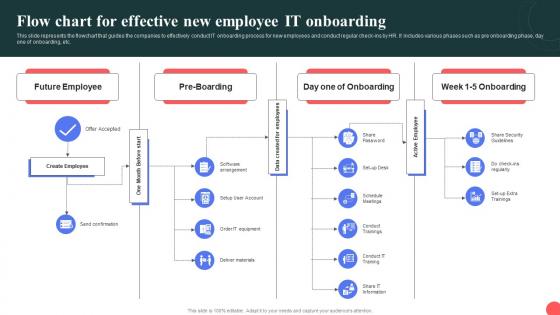
This slide represents the flowchart that guides the companies to effectively conduct IT onboarding process for new employees and conduct regular check-ins by HR. It includes various phases such as pre onboarding phase, day one of onboarding, etc.
People who downloaded this PowerPoint presentation also viewed the following :
Flow Chart For Effective New Employee IT Onboarding with all 9 slides:
Use our Flow Chart For Effective New Employee IT Onboarding to effectively help you save your valuable time. They are readymade to fit into any presentation structure.








FAQs for Flow Chart For Effective New
So you'll want to nail down a few key things first. Pre-boarding prep and HR handoff are obvious starting points. Then map out every single account they need - email, VPN, all the apps, whatever. Laptop and phone setup timing matters too. Security training is honestly such a pain but you gotta do it or compliance will lose their minds. Oh, and don't skip the policy stuff even though it's boring as hell. I'd add manager checkpoints throughout so things don't get forgotten, plus maybe a 30-day check-in to catch anything you missed. Clear owners and deadlines for each step.
Honestly, it's a game changer for avoiding that typical first-day chaos. New hires won't be wandering around wondering what comes next or who has their laptop. The visual layout shows them everything step by step - badge pickup, account setup, dev environment, whatever. Managers can actually see where things are getting stuck too, which is huge because nobody wants their new person just sitting there for hours waiting on IT tickets. I always do a quick walkthrough on day one though, makes people way less anxious about the whole process.
Honestly, tech is a game-changer for onboarding because it handles all that boring repetitive stuff automatically. Set up workflows to provision accounts and send welcome emails - you won't have to touch anything. Your HR system can talk to IT tools so data moves between them seamlessly (goodbye manual entry hell). Digital checklists are clutch for tracking where everyone's at in real-time. The coolest part? You'll catch bottlenecks right away instead of discovering them when it's too late. I'd start by writing down your current manual steps first, then figure out what's easiest to automate.
Start with the basics everyone needs - security training, system access, that stuff. Then branch off based on roles. Developers get GitHub and code reviews, while support teams need ticketing systems and escalation training. I'd map out each team's specific requirements first, honestly makes the whole thing way easier. Use different colors or swim lanes for each path. Just don't go crazy with the branching or you'll end up with something that looks like spaghetti. The key is figuring out where roles overlap with your standard process - saves you from duplicating a bunch of steps.
Don't overcomplicate it - seriously, people zone out if there's too many boxes and arrows everywhere. I always add timelines and assign someone to each step now, otherwise stuff just sits there forever (trust me on this one). Build in check-ins too so you can catch when someone's stuck. Oh, and here's something people forget - you need both the tech setup AND someone to actually walk them through using everything. Permissions mean nothing if they're confused about the login process. Test it with a couple new hires first and fix whatever doesn't work.
Honestly, new hire feedback is like your cheat sheet for fixing whatever's messy in your onboarding process. Grab feedback after week one, then again at the month mark - maybe throw in some quarterly check-ins too. What tripped them up? Which steps felt totally pointless? I've seen those crazy detailed flowcharts that everyone just ignores anyway. Ask about bottlenecks, like waiting forever for system access or approvals. Find out what resources they actually used versus what got buried in their inbox. Coffee chats work great for this stuff, or just send a quick survey. Then update your flowchart based on what's really happening.
Honestly, just track how long it takes people to get through each step and actually start being productive. That's your biggest indicator right there. Send out quick surveys after onboarding too - people won't sugarcoat it if something sucks. I'd also watch completion rates for each part of your workflow and see where folks get stuck or need extra help. Set your baseline numbers first, then check monthly. You'll spot the problem areas pretty fast. The survey feedback is clutch though - that's where you'll get the real tea about what's broken.
Color coding is a game changer - try blue for IT stuff, green for HR tasks, red for anything urgent. Icons help too, like laptops for equipment setup or keys for permissions. People can scan without reading everything (honestly saves so much time). Different shapes work great for separating decision points from regular action steps. Oh, and ditch those terrible default PowerPoint arrows if you can. The whole point is making it clear enough that new hires won't bug you with constant questions about what comes next.
Definitely get HR and IT security involved first - they handle all the access stuff and paperwork. Your facilities team too for desk setup and building access. The hiring managers are honestly the most important though, since they actually know what their people need on day one. Procurement's worth including if you order equipment, that's usually where everything gets stuck anyway. Oh, and don't skip the direct managers. I'd just do a quick kickoff with everyone to map out how things work now and figure out what's broken. Trust me, you'll find plenty of pain points once people start talking.
Think of the flowchart as your compliance cheat sheet - it maps out every step so nothing falls through the cracks. Training modules, privacy forms, certifications? All baked right in. When audit time comes around (ugh), you'll actually have documentation showing people followed the rules. Plus you can add approval checkpoints where managers review access requests before granting them. The real win is how easy it is to tweak things when regulations change - GDPR updates, new HIPAA requirements, whatever. Your onboarding process stays compliant without you having to rebuild everything from scratch.
Honestly, a good onboarding process can bump your retention by like 25-50% - pretty solid numbers. New people feel way more confident when they're not wrestling with VPN issues on day one (been there, it sucks). Map out every tech step from equipment to final certifications. The whole point is cutting down that initial "what the hell am I doing" phase that makes people regret taking the job. I'd start by figuring out where your current new hires usually get stuck. Clear setup procedures and proper system access make all the difference.
Definitely walk through it with them instead of just sending the flowchart - seriously, they'll bookmark it and never look again. I always start with the big picture first, then break down what they'll actually deal with their first week. The "who to contact" sections are gold since that's what new people reference constantly. Oh, and explain any weird IT acronyms that seem obvious to us but totally confuse them. Print a copy for their desk too, not just digital. Trust me on this one - when their computer's acting up, they're not gonna want to hunt through emails for troubleshooting steps.
Honestly? Monthly check-ins work way better than quarterly ones, especially if things change fast where you work. Get someone from IT who knows the actual day-to-day stuff to own this - not just a manager who's out of touch. New hires are goldmines for this because they're the ones actually using your flowchart and will catch outdated steps right away. Oh, and definitely set up some kind of shared doc where people can drop suggestions whenever instead of waiting around for formal reviews. Your IT person should watch for new tools, security changes, that kind of thing.
Honestly, skip PowerPoint for this - you'll hate yourself later. Grab Lucidchart or Visio if your company has it, or just use Draw.io since it's free. Start by sketching everything on paper first though, way less frustrating that way. Pull data from your HRIS system and definitely talk to recent hires - they'll catch stuff you totally missed. Your security team needs to weigh in on access stuff, and HR will have compliance requirements you probably don't know about. Check if there's existing documentation floating around too. Once you've got the flow figured out, then make it look pretty digitally.
Your flow chart basically becomes a culture machine when you do it right. Instead of just handing someone a laptop and crossing your fingers, each step shows new hires how your team actually works together. That first welcome call? Culture moment. Pairing them with a solid mentor? Another one. Honestly, the best part is when they start noticing the same vibe in every interaction - that's when you know it's working. Don't just treat it like a boring checklist though. Make each touchpoint count so they really get what your team's about.
-
Every time I ask for something out-of-the-box from them and they never fail in delivering that. No words for their excellence!
-
Informative and engaging! I really like the design and quality of the slides.