

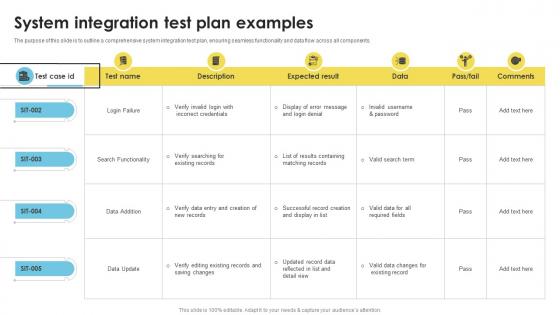
System Integration Test Plan Examples




Try Before you Buy Download Free Sample Product
 Impress Your
 Audience
 100%
100% Editable
 Save Hours
 of Time


The purpose of this slide is to outline a comprehensive system integration test plan, ensuring seamless functionality and data flow across all components.
People who downloaded this PowerPoint presentation also viewed the following :
System Integration Test Plan Examples with all 9 slides:
Use our System Integration Test Plan Examples to effectively help you save your valuable time. They are readymade to fit into any presentation structure.








FAQs for System Integration
So you're basically checking that all your pieces talk to each other properly and hit your system requirements. Test the interfaces between modules, data flowing through everything, and the whole end-to-end process. Honestly, most bugs love hiding in those handoffs between components - that's where I'd focus hard. Catch integration issues early, see how it performs in realistic scenarios, and make sure it doesn't totally break when weird stuff happens. Oh, and create test cases that actually match what users will do, not just theoretical workflows.
Look at your integration points and figure out what'll hurt most if it breaks. Authentication, payments, core workflows - that stuff comes first. Map out the paths users actually take instead of trying to test every weird edge case (trust me, that's a rabbit hole). Secondary integrations come next. Focus on high-volume transactions and anything that touches critical data flows. Your architecture diagrams are pretty helpful here - they show you where failures would be painful. Build a test matrix around these scenarios. You don't need perfect coverage, just smart coverage that protects what actually matters to the business.
Definitely focus on interface testing between your modules first - that's where most stuff breaks. Test your data flows across systems and run some end-to-end scenarios that actually match what users do. Error handling is huge too (I learned this the hard way on my last project). Performance testing under load, security for cross-system comms, and config testing in different environments are all must-haves. Honestly the trick is just mapping out everywhere your systems connect and hitting those spots hard. Start with system boundaries and build from there.
Honestly, just mirror your production setup as much as you can - same OS versions, database configs, all that stuff. I get that it's a pain, but skipping this step always comes back to haunt you. Get dedicated test servers running that match prod exactly. Load up realistic test data that actually covers your main use cases. Oh, and make sure you can wipe everything clean between test runs - nothing worse than dirty data screwing up your next test. Write down the setup process too so when someone else inevitably has to rebuild it, they're not completely lost.
Documentation for your integration tests is super important - trust me on this one. Teams constantly mess up because they're running tests differently or missing key scenarios. I've watched developers waste entire weeks just because nobody wrote down which interfaces were already tested (such a pain). You'll want to document your test scenarios, data requirements, environment setup, and what results you expect. Plus it's a lifesaver when new people join or when something breaks later. Oh, and don't save the documentation for last - you'll forget half the details by then.
Start by mapping your data flows and API calls - shows you the obvious connections right away. Document which systems talk to each other and when. I'm a big fan of dependency matrices or flowcharts because honestly, visual stuff just catches things better than walls of text. Here's the fun part though: intentionally break or delay components during testing. Sounds scary but the failures will expose hidden dependencies you had no clue about. Take notes as you discover these - trust me, you'll forget otherwise and hate yourself later when something breaks in production.
Start with what would totally screw you if it broke - core user stuff and critical data flows. Business impact first, always. Then tackle the gnarly technical bits, especially where systems talk to each other (that's where things usually go sideways). I'd run your happy path scenarios early since they catch the obvious problems fast. Error handling and weird edge cases come after. Oh, and think about dependencies - some tests need to happen before others or you'll waste time. Just make a simple risk chart to keep yourself honest. You'll adjust as you go anyway.
So first thing - get your test framework logging failures automatically with timestamps and stack traces. I hook mine up to JIRA so tickets get created without me doing anything (honestly such a lifesaver). Grab both app logs and system errors when tests run. Your reports need environment info, data states, and clear repro steps - otherwise devs just ping you back asking for more details. Set up notifications for the big failures. Oh, and definitely build a dashboard everyone can see. Makes the whole "what's broken now" conversation way easier.
Test pass rate and defect detection rate are your bread and butter - plus coverage percentage. Those three will tell you if things are actually working. Mean time to failure matters too, and honestly, environment stability is huge. Nothing's more annoying than tests failing because the infrastructure's having a bad day. Response times between components? Super important if you're doing real-time stuff. Also track how long your test suite takes to run. Nobody runs tests that take 2 hours, let's be real. Pick maybe 3-4 metrics that actually make sense for your setup and stick with them consistently.
Get everyone together early - virtual works fine. Create a simple one-pager covering what you're testing, what success looks like, and potential failure points. Business people, devs, QA, ops - they all need to be there because honestly, they'll have totally different ideas about what "working" means. Sending an email won't cut it here. Walk through everything together so it's concrete, not some vague concept floating around. Oh, and book a follow-up session too - things always change and you want to catch misalignment before testing starts, not during.
So for your integration testing - Postman's really good for API stuff, or REST Assured if you want something more code-heavy. Selenium handles UI testing well enough. Honestly, setting up Jenkins or GitLab CI is where you'll actually save yourself headaches later, trust me on that one. Docker's clutch for keeping test environments consistent (learned that the hard way). TestRail or Jira work fine for tracking everything. Don't overthink it though - pick one API tool and one automation setup first. You can always add more tools once you see what gaps you're hitting.
Look at whatever broke during unit and integration testing - that's your roadmap. Those buggy modules? Hit them hard during system integration. Performance hiccups from earlier always get worse when systems start talking to each other, trust me on that one. Also tweak your test environment based on what didn't work before. I'd dig through those old test reports and use them to figure out where to focus your time. No point testing random stuff when you already know where the weak spots are.
Honestly, the worst part is always data inconsistencies between systems - that stuff will drive you crazy. Authentication issues are brutal too when systems just refuse to talk to each other. Network problems have this annoying habit of happening at 3am when you're trying to demo something. Set up a test environment that actually looks like production, not some watered-down version. Build your test data sets early or you'll regret it later. Incremental testing is key - I learned this the hard way after trying to connect five systems at once and spending three days debugging nonsense. Oh, and add way more logging than you think you need. Trust me on this one. Always budget extra time because integration bugs are sneaky little things that take forever to track down.
Dude, regression testing is huge for your integration plan. Changes in one system can totally break stuff that was working fine before - it's like a chain reaction you don't want. You'll need to keep checking that old integrations still work when you add new ones. Honestly, I've seen teams get burned by skipping this step. Automate whatever you can so you're not running manual tests constantly (your team will thank you). It's basically catching problems before they domino through everything else.
Daily standups are your best friend here - get all teams talking about integration blockers right away. Skip the email chains (they're pure chaos) and set up dedicated Slack channels for each integration stream instead. Shared dashboards showing test status help everyone see what's actually broken. Pick "integration ambassadors" from each team who can make quick calls without waiting for approval from six different managers. Clear escalation paths matter too - when stuff breaks, people need to know exactly who to bug. Oh, and write down your communication rules upfront so nobody's left guessing. Honestly, half the battle is just getting everyone on the same page about who does what.
-
SlideTeam has helped me take my presentation to the next level. Everyone at the office is impressed! I’ll be using their designs for a long-long time.
-
The pricing page of this website is very sorted. I felt no pain while buying the PPTs.