

System integration life cycle phases sample ppt presentation




Try Before you Buy Download Free Sample Product
 Impress Your
 Audience
 100%
100% Editable
 Save Hours
 of Time


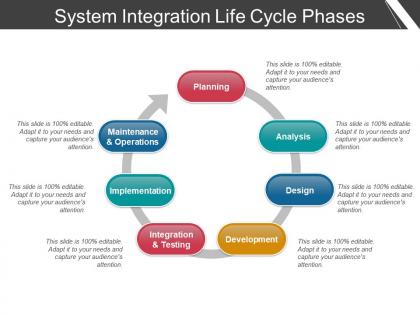
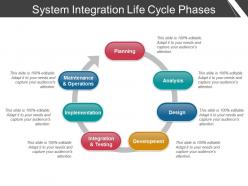
Develop a comprehensive approach using our, system integration life cycle phases sample PPT presentation. Bring together with the segments sub-systems into one system through this PowerPoint layout. We have shown a seven stage process here, covering the major system integration steps. Stages showed here are, planning, analysis, design, development, integration & testing, implementation, maintenance. Ensure that all the stages are shown here add up to deliver in favor of the system as a whole. Include your company data here by following the guidelines. Use this PPT layout to keep a record of your services, it supports in monitoring and to estimate the efficiency of all your business methods. Download, system integration life cycle phases sample PPT presentation and recognize the new and successful business opportunities. Avoid giving elements extra importance with our System Integration Life Cycle Phases Sample Ppt Presentation. Be able to handle insignificant aspects.
People who downloaded this PowerPoint presentation also viewed the following :
System integration life cycle phases sample ppt presentation with all 5 slides:
Cover up for handicaps with our System Integration Life Cycle Phases Sample Ppt Presentation. No flaw will ever effect you.


FAQs for System integration life cycle phases
So there are five phases in SILC: Planning (figuring out what you actually need), Design (mapping out how everything connects), Implementation (the fun coding part where stuff breaks constantly), Testing (making sure it all plays nice together), and Deployment/Maintenance (going live plus fixing things forever). You'll bounce between phases a lot - like, way more than you'd expect. Honestly, spend extra time on planning even though it's boring. I learned this the hard way when I had to debug integration issues at 2am because we rushed through requirements. Trust me on this one.
Dude, you absolutely have to get your requirements locked down first. Seriously - I've watched entire projects implode because teams just assumed they knew what "integration" meant without actually asking. Map out who needs what data and when. Figure out which systems have to talk to each other. The boring stakeholder conversations upfront will save you from expensive rewrites later. Trust me on this one. Scope creep happens when you skip this step, then suddenly you're three months behind building something that technically works but doesn't solve anyone's actual problem. Do the homework first.
Honestly, stakeholders are like your project's GPS - they tell you where you're supposed to be going and whether you're totally off track. Get them involved from day one to nail down requirements and validate that what you're building actually makes sense for the business. They're also your lifeline when technical stuff gets confusing because they know the domain inside out. You'll definitely need them for testing and approving changes. Just make sure you check in with them regularly (learned this the hard way). Finding out you misunderstood something major during final testing? Yeah, that's not fun for anyone.
Don't treat risk management like something you tack on at the end - that's how projects blow up. Start identifying risks right when you're gathering requirements, then keep updating that list as you move through each phase. Design risks are totally different from deployment risks, so your mitigation plans need to shift too. I always set up regular risk check-ins with stakeholders (honestly, some people hate these meetings but they're lifesavers). Make it a standard topic in every phase review. Document what you learn along the way - future you will thank you for it.
Honestly, I'd start with API testing - that's where you'll catch most of the headaches anyway. Postman's pretty solid for that, or REST Assured if you're feeling fancy. Then grab Selenium or Cypress for the UI stuff. Oh, and don't forget monitoring tools like New Relic or Datadog - they're lifesavers when things start breaking under load. Pact's good for contract testing between services too. JMeter or k6 work great for load testing once you've got the basics down. Just build it up piece by piece based on how complex your setup gets.
Honestly, I look at whether it actually does what we said it would do first - like, does it meet the requirements and work properly? Then I check performance stuff - how fast is it, any errors, that kind of thing. But here's the thing - user adoption is probably the biggest indicator. Doesn't matter how technically perfect something is if nobody wants to use it, you know? I also track support tickets after launch and system uptime. Oh, and stakeholder happiness usually matters more than staying on budget (don't tell my PM I said that). Just make sure you define what "success" looks like before you launch, not after.
Oh man, integration stuff is a nightmare - you'll deal with data formats that don't match, API versions being weird, network issues. Authentication always breaks too. Here's what actually works though: map out all your systems first and write detailed specs before touching any code. Your testing environment needs to be basically identical to production (learned this the hard way). Build in solid error handling and always have a way to roll everything back. Honestly, test in small pieces instead of doing some massive integration at the end. Trust me on this one.
Dude, whatever integration approach you pick is gonna make or break your whole project timeline. Point-to-point seems easy at first but becomes a total mess - like spaghetti code but worse. Hub-and-spoke takes way more planning upfront, though it's worth it when you're not debugging a million connections later. Some architectures let you roll things out piece by piece, others force you into those scary big-bang launches. Honestly, I've seen teams rush the architecture phase and then spend forever fixing it. Just bite the bullet and design it right from the start.
So first thing - test everything in staging before you even think about touching production. Trust me on this one. Have your rollback plan ready and do it in phases, not all at once. Documentation is annoying but you'll thank yourself later. Keep everyone in the loop with regular updates. Your support team should be ready during go-live, and check your data integrity every step of the way. Oh, and do this during off-peak hours if you can. Also have backup communication ready - learned that one the hard way!
Dude, you HAVE to document everything during system integration - seriously can't stress this enough. Requirements, design choices, testing steps, all of it. When stuff breaks later (spoiler: it will), you'll need those notes to figure out what went wrong. Plus when Sarah from your team quits next month, you don't want to lose all her knowledge about why certain things were built that way. I've watched entire teams waste weeks trying to reverse-engineer their own work because nobody wrote anything down. Start early and keep updating as you go. Future you will be so grateful when you're not pulling your hair out trying to remember some random integration decision from six months ago.
Honestly, focus on three things: hands-on practice sessions where people actually use the new system, solid documentation for reference, and someone they can bug when stuff breaks. Generic demos are useless - nobody retains that. Instead, walk through their actual day-to-day workflows and show what's different now. Set up a help desk or designate a go-to person because questions will definitely pop up. Oh, and don't just launch and disappear! Schedule some check-ins a few weeks later. The whole point is making people feel supported, not like they're drowning in a new system alone.
Skip the whole waterfall approach and tackle integration piece by piece instead. Test one component at a time, get feedback, then move on. Trust me, finding out everything's busted at the end is soul-crushing. Daily standups help track what's blocking teams from connecting their stuff. CI pipelines are clutch here - they'll catch integration failures as you go rather than later. I'd probably start with your most critical connections first, then expand from there. Makes the whole process way less stressful and you'll actually know what works.
So horizontal integration is basically connecting stuff at the same level - your CRM talking to marketing tools, different department databases syncing up, that kind of thing. Vertical goes up and down the chain instead, like operational systems feeding into management dashboards or your front-end app pulling from backend databases. I always picture horizontal as "sideways" between equals, vertical as climbing floors in a building. Most real projects mix both anyway. The tricky part with vertical is you're usually dealing with way more data transformation since different layers speak totally different languages. I'd map out what you've got first - makes it way clearer which direction you need to go.
Oh man, compliance will totally mess with your timeline from the start. You're looking at extra validation steps, tons of documentation, and approval processes that drag on forever. Healthcare stuff is the absolute worst for this - so many hoops! It also limits your architecture choices since you need specific security and audit requirements built in. Honestly, figure out which regulations hit you early and bake that into your initial design. Don't try adding it later, trust me. Get stakeholders talking about compliance right away or you'll regret it.
Honestly, continuous monitoring is like having a security camera for your integrations - it'll catch problems before they blow up in your face. You want it tracking performance metrics and spotting failures as they happen. Nobody wants a 2am phone call about something that's been broken for hours, trust me on that one. Set up automated alerts for when things hit critical levels. The data you collect helps optimize stuff over time and shows stakeholders you're actually delivering value. I'd say check your dashboards weekly so you can fix issues before they become real headaches.
-
Use of different colors is good. It's simple and attractive.
-
Illustrative design with editable content. Exceptional value for money. Highly pleased with the product.