Powerpoint Templates for Third Party Products
Save time and engage your audience with our fully editable PowerPoint PPT Templates and Slides.
-

Optimizing Product Delivery With Third Party Logistics PPT Example AT
Ditch the Dull templates and opt for our engaging Optimizing Product Delivery With Third Party Logistics PPT Example AT deck to attract your audience. Our visually striking design effortlessly combines creativity with functionality, ensuring your content shines through. Compatible with Microsoft versions and Google Slides, it offers seamless integration of presentation. Save time and effort with our pre designed PPT layout, while still having the freedom to customize fonts, colors, and everything you ask for. With the ability to download in various formats like JPG, JPEG, and PNG, sharing your slides has never been easier. From boardroom meetings to client pitches, this deck can be the secret weapon to leaving a lasting impression.
-

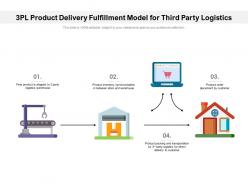
3pl product delivery fulfillment model for third party logistics
Presenting 3pl Product Delivery Fulfillment Model For Third Party Logistics slideshow. It is completely customizable and can be altered as per your needs. You can easily modify the colors, font type, font size, and background of the slide and save it in formats like JPG, PNG, and PDF. It can be projected on a standard screen and widescreen size without any fear of pixelation. It is compatible with Google Slides.
-
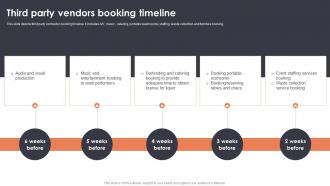
Third Party Vendors Booking Timeline Event Planning For New Product Launch
This slide depicts third party contractor booking timeline. It includes A or V, music , catering, portable washrooms, staffing, waste collection and furniture booking.Increase audience engagement and knowledge by dispensing information using Third Party Vendors Booking Timeline Event Planning For New Product Launch. This template helps you present information on three stages. You can also present information on Entertainment Booking, Bartending Catering, Waste Collection using this PPT design. This layout is completely editable so personaize it now to meet your audiences expectations.
-
Restaurant Marketing Through Third Party Platforms PPT Sample AT
While your presentation may contain top-notch content, if it lacks visual appeal, you are not fully engaging your audience. Introducing our Restaurant Marketing Through Third Party Platforms PPT Sample AT deck, designed to engage your audience. Our complete deck boasts a seamless blend of Creativity and versatility. You can effortlessly customize elements and color schemes to align with your brand identity. Save precious time with our pre-designed template, compatible with Microsoft versions and Google Slides. Plus, its downloadable in multiple formats like JPG, JPEG, and PNG. Elevate your presentations and outshine your competitors effortlessly with our visually stunning 100 percent editable deck.
-
Third Party Support Vs Vendor Costs PPT Slides AT
While your presentation may contain top notch content, if it lacks visual appeal, you are not fully engaging your audience. Introducing our Third Party Support Vs Vendor Costs PPT Slides AT deck, designed to engage your audience. Our complete deck boasts a seamless blend of Creativity and versatility. You can effortlessly customize elements and color schemes to align with your brand identity. Save precious time with our pre designed template, compatible with Microsoft versions and Google Slides. Plus, its downloadable in multiple formats like JPG, JPEG, and PNG. Elevate your presentations and outshine your competitors effortlessly with our visually stunning 100 percent editable deck.
-
Scale Business With Third Party Marketplaces PPT Summary AT
Do not compromise on a template that erodes your messages impact. Introducing our engaging Scale Business With Third Party Marketplaces PPT Summary AT complete deck, thoughtfully crafted to grab your audiences attention instantly. With this deck, effortlessly download and adjust elements, streamlining the customization process. Whether you are using Microsoft versions or Google Slides, it fits seamlessly into your workflow. Furthermore, it is accessible in JPG, JPEG, PNG, and PDF formats, facilitating easy sharing and editing. Not only that you also play with the color theme of your slides making it suitable as per your audiences preference.
-
Using Third Party Services For Accuracy PPT Summary AT
Ditch the Dull templates and opt for our engaging Using Third Party Services For Accuracy PPT Summary AT deck to attract your audience. Our visually striking design effortlessly combines creativity with functionality, ensuring your content shines through. Compatible with Microsoft versions and Google Slides, it offers seamless integration of presentation. Save time and effort with our pre-designed PPT layout, while still having the freedom to customize fonts, colors, and everything you ask for. With the ability to download in various formats like JPG, JPEG, and PNG, sharing your slides has never been easier. From boardroom meetings to client pitches, this deck can be the secret weapon to leaving a lasting impression.
-
Third Party Integration Strategies For 2023 PPT Designs AT
While your presentation may contain top-notch content, if it lacks visual appeal, you are not fully engaging your audience. Introducing our Third Party Integration Strategies For 2023 PPT Designs AT deck, designed to engage your audience. Our complete deck boasts a seamless blend of Creativity and versatility. You can effortlessly customize elements and color schemes to align with your brand identity. Save precious time with our pre-designed template, compatible with Microsoft versions and Google Slides. Plus, its downloadable in multiple formats like JPG, JPEG, and PNG. Elevate your presentations and outshine your competitors effortlessly with our visually stunning 100 percent editable deck.
-
Pros And Cons Of Third Party Delivery PPT Slides AT
Do not compromise on a template that erodes your messages impact. Introducing our engaging Pros And Cons Of Third Party Delivery PPT Slides AT complete deck, thoughtfully crafted to grab your audiences attention instantly. With this deck, effortlessly download and adjust elements, streamlining the customization process. Whether you are using Microsoft versions or Google Slides, it fits seamlessly into your workflow. Furthermore, it is accessible in JPG, JPEG, PNG, and PDF formats, facilitating easy sharing and editing. Not only that you also play with the color theme of your slides making it suitable as per your audiences preference.
-
Continuous Monitoring Third Party Risk Management PPT Template AT
Ditch the Dull templates and opt for our engaging Continuous Monitoring Third Party Risk Management PPT Template AT deck to attract your audience. Our visually striking design effortlessly combines creativity with functionality, ensuring your content shines through. Compatible with Microsoft versions and Google Slides, it offers seamless integration of presentation. Save time and effort with our pre-designed PPT layout, while still having the freedom to customize fonts, colors, and everything you ask for. With the ability to download in various formats like JPG, JPEG, and PNG, sharing your slides has never been easier. From boardroom meetings to client pitches, this deck can be the secret weapon to leaving a lasting impression.
-
Third Party Risk Management PPT Template AT
Do not compromise on a template that erodes your messages impact. Introducing our engaging Third Party Risk Management PPT Template AT complete deck, thoughtfully crafted to grab your audiences attention instantly. With this deck, effortlessly download and adjust elements, streamlining the customization process. Whether you are using Microsoft versions or Google Slides, it fits seamlessly into your workflow. Furthermore, it is accessible in JPG, JPEG, PNG, and PDF formats, facilitating easy sharing and editing. Not only that you also play with the color theme of your slides making it suitable as per your audiences preference.
-
IAM Trends Third Party Access Control PPT Summary AT
While your presentation may contain top-notch content, if it lacks visual appeal, you are not fully engaging your audience. Introducing our IAM Trends Third Party Access Control PPT Summary AT deck, designed to engage your audience. Our complete deck boasts a seamless blend of Creativity and versatility. You can effortlessly customize elements and color schemes to align with your brand identity. Save precious time with our pre-designed template, compatible with Microsoft versions and Google Slides. Plus, its downloadable in multiple formats like JPG, JPEG, and PNG. Elevate your presentations and outshine your competitors effortlessly with our visually stunning 100 percent editable deck.
-
Review Testimonials Third Party Platform Customer Feedback PPT Presentation AT
Ditch the Dull templates and opt for our engaging Review Testimonials Third Party Platform Customer Feedback PPT Presentation AT deck to attract your audience. Our visually striking design effortlessly combines creativity with functionality, ensuring your content shines through. Compatible with Microsoft versions and Google Slides, it offers seamless integration of presentation. Save time and effort with our pre designed PPT layout, while still having the freedom to customize fonts, colors, and everything you ask for. With the ability to download in various formats like JPG, JPEG, and PNG, sharing your slides has never been easier. From boardroom meetings to client pitches, this deck can be the secret weapon to leaving a lasting impression.
-
Third Party Vendor Management Insights PPT Information AT
While your presentation may contain top-notch content, if it lacks visual appeal, you are not fully engaging your audience. Introducing our Third Party Vendor Management Insights PPT Information AT deck, designed to engage your audience. Our complete deck boasts a seamless blend of Creativity and versatility. You can effortlessly customize elements and color schemes to align with your brand identity. Save precious time with our pre-designed template, compatible with Microsoft versions and Google Slides. Plus, its downloadable in multiple formats like JPG, JPEG, and PNG. Elevate your presentations and outshine your competitors effortlessly with our visually stunning 100 percent editable deck.
-
Ultimate Insights On Third Party Integrations PPT Slides AT
Ditch the Dull templates and opt for our engaging Ultimate Insights On Third Party Integrations PPT Slides AT deck to attract your audience. Our visually striking design effortlessly combines creativity with functionality, ensuring your content shines through. Compatible with Microsoft versions and Google Slides, it offers seamless integration of presentation. Save time and effort with our pre-designed PPT layout, while still having the freedom to customize fonts, colors, and everything you ask for. With the ability to download in various formats like JPG, JPEG, and PNG, sharing your slides has never been easier. From boardroom meetings to client pitches, this deck can be the secret weapon to leaving a lasting impression.
-
Mitigating Third Party Risks With Vendor Risk Management PPT Sample AT
Do not compromise on a template that erodes your messages impact. Introducing our engaging Mitigating Third Party Risks With Vendor Risk Management PPT Sample AT complete deck, thoughtfully crafted to grab your audiences attention instantly. With this deck, effortlessly download and adjust elements, streamlining the customization process. Whether you are using Microsoft versions or Google Slides, it fits seamlessly into your workflow. Furthermore, it is accessible in JPG, JPEG, PNG, and PDF formats, facilitating easy sharing and editing. Not only that you also play with the color theme of your slides making it suitable as per your audiences preference.
-
Identifying Third Party Vendor Risks PPT Slides AT
Do not compromise on a template that erodes your messages impact. Introducing our engaging Identifying Third Party Vendor Risks PPT Slides AT complete deck, thoughtfully crafted to grab your audiences attention instantly. With this deck, effortlessly download and adjust elements, streamlining the customization process. Whether you are using Microsoft versions or Google Slides, it fits seamlessly into your workflow. Furthermore, it is accessible in JPG, JPEG, PNG, and PDF formats, facilitating easy sharing and editing. Not only that you also play with the color theme of your slides making it suitable as per your audiences preference.
-
Third Party Integration Best Practices Toolkit PPT Guidelines AT
Step up your game with our enchanting Third Party Integration Best Practices Toolkit PPT Guidelines AT deck, guaranteed to leave a lasting impression on your audience. Crafted with a perfect balance of simplicity, and innovation, our deck empowers you to alter it to your specific needs. You can also change the color theme of the slide to mold it to your companys specific needs. Save time with our ready-made design, compatible with Microsoft versions and Google Slides. Additionally, its available for download in various formats including JPG, JPEG, and PNG. Outshine your competitors with our fully editable and customized deck.