

Outline powerpoint presentation examples





Try Before you Buy Download Free Sample Product
 Impress Your
 Audience
 100%
100% Editable
 Save Hours
 of Time


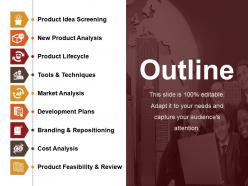
Employ this Outline PowerPoint Presentation Examples for letting your clients know about your firm. Using this marketing PPT layout, the potential customers and prospective employers can learn about your enterprise and its long term objectives. This sales and advertising PowerPoint template can showcase the entire framework of launching a product in the market. The steps like product idea screening, analysis, and screening of the product, the techniques, and tools required for product lifecycle and market analysis can be highlighted with this business PPT theme. The branding campaigns, development plans, cost analysis, and product feasibility can be showcased with this product lifecycle PowerPoint template. This company introduction PowerPoint layout aids in showcasing the unique features of your company and influence the brand presence in the market. The complete procedure of product development until it is launched in the market can be illustrated. Hence, download this article introduction PowerPoint slide on your website or blog and promote your professional brand.
People who downloaded this PowerPoint presentation also viewed the following :
Outline powerpoint presentation examples with all 5 slides:
Establish an atmosphere that fosters camaraderie with our Outline Powerpoint Presentation Examples. Create conditions for effective interaction.
FAQs for Outline
Ok so start with your title slide obviously, then do an overview of what you're gonna talk about. Break your main stuff into like 3-5 sections max - people's attention spans are trash these days. Throw in some transition slides between big sections because trust me, you WILL blank out mid-presentation and need those little reminders. Each section should stick to one main point or your audience will get lost. Oh and definitely end with takeaways plus a Q&A slide. Honestly, sketch the whole thing out on paper first before you even touch PowerPoint - saves so much time later.
Lead with your problem and solution right away - don't make them hunt for it. Walk through market analysis, timeline, budget, and ROI after that. Executives eat up competitive landscape slides, so toss one in there. Each slide should focus on just one key point. Build everything toward your final ask at the end. Oh, and definitely practice your timing beforehand - these things always run longer than you think. Nobody wants to sit through a presentation that drags on forever. End with clear next steps and actual deadlines so people know what you expect from them.
Ditch the boring bullet points and try a visual journey instead - like mapping out customer stages or creating a roadmap design. I always organize mine around simple questions: "Where are we now?" "Where do we want to go?" and "How do we get there?" Some people do before/after scenarios, which works pretty well. Or you could follow a "day in the life" of your target customer - honestly, anything's better than those agenda slides that make everyone zone out. The whole point is telling a story that actually builds excitement for each section. Trust me, people remember stories way better than random lists anyway.
Know your audience first - that's everything. Executives? Hit them with big picture results upfront, skip the weedy details. Engineers though? They want the technical meat, so give it to them. I bombed once presenting super nerdy stuff to our marketing team... crickets lol. Match what you're saying to who's listening. Short sentences work for some crowds. Others need you to walk them through the logic step by step. Honestly, I always think "what would make ME check out if I were sitting there?" Then I avoid doing that thing. What's this specific group actually hoping to learn from you?
Honestly, PowerPoint's SmartArt is decent for basic stuff - hierarchical outlines and flowcharts. But if you want something that actually looks good, Canva or Adobe have way better templates. I've been using Lucidchart lately and it's pretty solid for visual mapping. Oh, and draw.io works too if you're being cheap about it. MindMeister is cool for the whole mind mapping thing when you don't want boring bullet points. My advice? Figure out your content first, then just pick whatever doesn't make you want to throw your laptop out the window.
Stick to like 3-5 main points tops. Trust me, I bombed a presentation once with 12 bullet points and watched everyone's souls leave their bodies lol. Keep your bullets short - just phrases, not full sentences. Make sure each point flows into the next one naturally. The whole thing should tell a story from beginning to end. Here's a good test: can you explain your main points to someone in under two minutes? If not, you've got too much stuff. Oh, and definitely read it out loud before you present - you'll catch weird phrasing that looked fine on paper.
Okay so first thing - you need a hook that actually grabs people, then just tell them your main point right away. For the body, pick 2-3 solid arguments and back each one up with real evidence. I'm obsessed with the problem-solution-benefit structure because honestly? It just works every time for getting people on board. Oh and definitely tackle the obvious objections before anyone can bring them up - makes you look way more credible. Don't stuff too much into one slide though, that's where people lose focus. End with telling them exactly what to do next, and practice those transitions so you're not stumbling between points.
Think narrative, not bullet points. Open with a problem that hooks people, then walk them through finding the solution. It's like telling a crazy work story at happy hour - you build up to the good part naturally. Each section needs characters (customers, your team), some kind of conflict, then how you solved it. Three main story beats work best - I usually map those out first, then stuff all my data around them afterward. End with what changed or what you learned. Way more engaging than just rattling off features and metrics, trust me.
So basically, academic presentations are all about showing your work - tons of methodology, literature reviews, citing everything. You'll have sections like "theoretical framework" which sounds super fancy but honestly just bores corporate people to death. Business presentations? Totally different vibe. They want problem, solution, ROI - boom, done. No one cares about your research process or limitations section. Academic audiences will sit through 20 minutes of background context, but corporate folks get antsy if you don't hit the bottom line in like 2 slides. Plus corporate decks need way more visuals and less wall-of-text action. Figure out who you're presenting to first - that choice pretty much decides everything else for you.
Throw in some icons and color coding - it'll make your outline way easier to scan. I use lightbulbs for big insights, arrows for steps, that kind of thing. Different colors for each section is a game changer too. Simple flowcharts work great if you need to show how ideas connect. Just don't go overboard with the graphics or they'll distract from your actual points. I learned this the hard way lol. Start with maybe 2-3 visual elements per slide and you'll see how much clearer everything becomes.
Honestly, the worst thing you can do is make your outline super detailed - like, nobody wants to read paragraphs on slides. Just use bullet points! Also jumping around topics randomly will confuse everyone. I learned this the hard way lol. Try to stick with maybe 3-5 main points max because people's attention spans are terrible these days. Keep your sections roughly the same length too. Oh and don't overthink it at first - start simple then add details later. Makes the whole thing way less overwhelming.
Online crowds get distracted way easier, so you gotta interact with them constantly - polls, chat stuff, "questions?" breaks every few slides. Start longer too because someone's mic will definitely be broken. In-person is chill, you can read the room and go with the flow. Put your best points up front online since people zone out fast. Oh and repeat important stuff more than feels normal. Always have backup slides ready and your phone number written down somewhere - trust me on that one. The tech will fail at the worst possible moment.
Yeah totally! Here's what works for me: **Tech stuff:** Start with AI intro → show current uses → cover pros/cons → future impact → questions **Education:** Problem first → how we teach now → your solution → timeline → what you expect **Healthcare:** Patient info → treatment gaps → new approach → results → what's next You want to lead with your main point, then build from there logically. Oh and definitely throw in real examples in those middle sections - way better than just boring theory stuff. Just grab whichever framework fits and swap in your content. Haven't had it fail me yet!
Lead with your best point right after the intro - people are paying attention then. Build your middle with 2-3 solid arguments that connect logically. I've sat through way too many presentations where the speaker saves their killer point for slide 15 and half the room's already mentally checked out. Stick your weakest argument in the middle where it won't stick. Then hit them with your second-best point near the end to build momentum before your call-to-action. Think sandwich - strong pieces on both ends. Flow should go: hook → biggest impact → supporting stuff → final punch → what's next.
Your conclusion is where you pull everything together - honestly, it's what people remember most. Don't just repeat your main points word for word though, that's super boring. Instead, weave them into one clear message that shows why your audience should actually care. Oh, and always include next steps or some kind of call to action. Otherwise people just sit there like "cool story, but now what?" I learned this the hard way in college presentations. Plan your ending just as much as your intro because those last few minutes really stick with people.
-
Awesome presentation, really professional and easy to edit.
-
Amazing product with appealing content and design.