

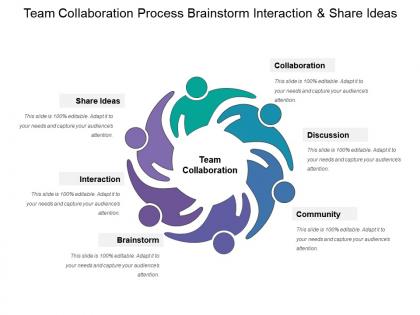
Team collaboration process brainstorm interaction and share ideas




Try Before you Buy Download Free Sample Product
 Impress Your
 Audience
 100%
100% Editable
 Save Hours
 of Time


Familiarize folks with the information gathered through our Team Collaboration Process Brainstorm Interaction And Share Ideas. Elaborate on the interrogation.
People who downloaded this PowerPoint presentation also viewed the following :
Team collaboration process brainstorm interaction and share ideas with all 5 slides:
Educate fresh healthcare assistants with our Team Collaboration Process Brainstorm Interaction And Share Ideas. Explain elements of intensive care.

FAQs for Team collaboration process brainstorm interaction
Honestly, it comes down to three things: talk constantly, use the right tools, and make everything visible. Get Slack or Teams set up for quick stuff, but don't skip video calls for bigger conversations. I've learned the hard way that overcommunicating beats awkward silence every time. Everyone should see project updates through shared docs or dashboards - nobody likes being left in the dark. Set response time expectations early so people aren't wondering if you died. Since you can't just walk over to someone's desk anymore, you have to be way more deliberate about staying connected. Ask your team what's actually working for them.
Templates are honestly a game-changer for team stuff. Your whole crew starts with the same basic setup, so nobody's wasting time on "wait, should this be bullets or a graph?" Just jump straight into the actual work. Makes combining everyone's ideas way smoother too - no clashing fonts or weird formatting disasters. I swear half our old meetings were just design debates. Try making a basic kickoff template with goals, timeline, and who's doing what. Saves you from starting from scratch every single time, which gets old fast.
Honestly, good communication can make or break a team. Without it, everyone's just doing their own thing in separate bubbles. You've gotta be upfront about deadlines, expectations, who's handling what - otherwise projects go sideways real quick. I've watched so many teams crash because people made assumptions instead of asking questions. Regular check-ins are a lifesaver. Also, pick the right medium for the conversation - don't try hashing out complicated stuff over email when a 10-minute call would solve it. Oh, and set some ground rules early about response times and preferred contact methods. Trust me on this one.
Honestly, visuals are a game changer for meetings. People actually pay attention instead of zoning out during your presentation. Charts and diagrams help everyone understand the same thing - no more "wait, what did you mean by that?" moments afterward. Different people learn differently too, so throwing in a flowchart or even doodling something on the whiteboard gets everyone on board. I learned this the hard way after way too many confused faces staring back at me. Quick sketches work just as well as fancy graphics. You'll notice people jump in with way better questions when they can see what you're talking about.
Oh man, you're so right about this! Different backgrounds = totally different ways of tackling problems. Like, someone from a completely different field will spot stuff you'd never notice. I've had those random "wait, what if we..." moments come from the most unexpected people on my team. Cultural differences especially - they'll call out assumptions you didn't even know you were making. The trick is making sure everyone actually feels safe to speak up though. Otherwise you just get the same voices. I usually start meetings asking specifically for different takes on whatever we're discussing. Works way better than hoping people will just jump in.
Okay so for team presentations, I'd go with Google Slides or Microsoft 365 - both let everyone edit at once which is pretty clutch. You'll also want Slack or Teams for quick back-and-forth stuff. Oh and Loom's great for video feedback when people can't meet up. Here's the thing though - even with all that collaboration, someone still needs to "own" each slide or it gets messy fast. I learned that the hard way last month lol. Start by picking one main platform and make sure everyone knows how to leave comments properly. Trust me on the slide ownership thing.
Start by making it super clear that no idea is dumb - like actually say that out loud. Go around the room so everyone has to talk, or try that thing where people write ideas down first before sharing out loud. Honestly, asking specific people "what do you think about X?" works way better than the whole "any thoughts?" thing that just gets awkward silence. Watch for whoever's talking too much and redirect. Oh, and set ground rules at the beginning about everyone participating. You can't just cross your fingers and hope quiet people will magically speak up - you've gotta be deliberate about it.
Honestly, I'd start simple - just track how fast you're finishing projects and if deadlines are actually getting met. Communication is huge though. Are people responding to messages quickly? Do they show up to cross-team meetings? Also worth checking how fast conflicts get resolved (because let's be real, they always happen). Quality of work matters too, obviously. Employee surveys are actually pretty revealing - sometimes the vibe is off even when all your other numbers look good. Pick maybe 2-3 things that matter most for your specific situation and track those consistently. Don't overcomplicate it at first.
Look, most workplace drama starts because people don't know how to handle disagreements without making it personal. Set up some basic ground rules - like actually listening to each other and finding middle ground before things blow up. Half these conflicts are just miscommunication anyway, which is honestly ridiculous when you think about it. Your team needs to learn how to separate work issues from hurt feelings. Once people know there's a process (maybe bring in someone neutral if it gets heated), they'll actually speak up earlier instead of letting stuff fester. Trust me, future you will thank present you.
First thing - figure out who's handling what (research, design, content). Google Slides or Figma are lifesavers for this since everyone can edit at once. Trust me, I've been in those nightmare email chains with "final_deck_v7_ACTUALLY_FINAL.pptx"
-
Visually stunning presentation, love the content.
-
The content is very helpful from business point of view.