

Today tomorrow powerpoint presentation slides




Try Before you Buy Download Free Sample Product
 Impress Your
 Audience
 100%
100% Editable
 Save Hours
 of Time


Outline a presentation and showcase your current and future state using professionally designed Today Tomorrow PowerPoint Presentation Slides. Evaluate the current state of the business to strategize future with the help of today tomorrow PPT presentation slideshow. Draw comparison between past and current scenarios, draft a business plan, strategize for the coming events by incorporating the relevant today tomorrow PowerPoint presentation templates. Add amazing designs of today tomorrow PPT slides to present gap analysis, past-present growth, current business achievements and more. Work on the current situation and improve future strategies. Create a roadmap showcasing goals and objectives using today tomorrow PowerPoint presentation templates. Get access to this ready-made today tomorrow PowerPoint presentation deck to minimize the gap between current and future state. This deck is editable. Edit color, text, icon, and font size of the templates as per your requirement. Jot down your plan using these templates. Present it to the team and work together in achieving business goals. Happily guide them with our Today Tomorrow Powerpoint Presentation Slides. They will be glad to follow behind you.
People who downloaded this PowerPoint presentation also viewed the following :
Content of this Powerpoint Presentation
Slide 1: This slide introduces Today Tomorrow. State Your Company Name
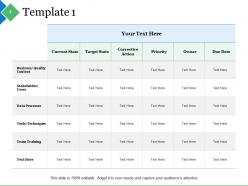
Slide 2: This slide showcases Template 1 table. You can add the data in this and make the use of it.
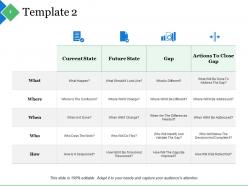
Slide 3: This slide shows Template 2 with which you can use it for the sake of current and future state.
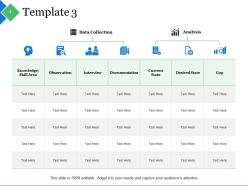
Slide 4: This slide presents Template 3 with these two parameters- Data Collection, Analysis.
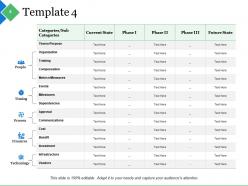
Slide 5: This slide showcases Template 4 with these paarmeters- People, Finances, Timing, Process, Technology.
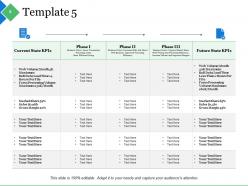
Slide 6: This slide presents Template 5. Add the data and make the use of the it.
Slide 7: This slide shows Today Tomorrow Icons Slide.
Slide 8: This slide is titled Additional slides.
Slide 9: This slide contains Our Mission, Vision, Goal with text boxes.
Slide 10: This slide helps depict Our Team with text boxes.
Slide 11: This slide helps show- About Our Company. The sub headings include- Creative Design, Customer Care, Expand Company.
Slide 12: This slide shows Comparison of Positive Factors v/s Negative Factors with thumbsup and thumb down imagery.
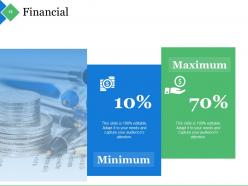
Slide 13: This is a Financial Score slide to show financial aspects here.
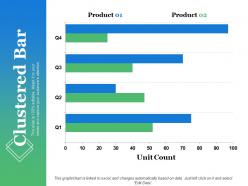
Slide 14: This slide showcase Clustered Bar. You can compare the product and use as per your need.
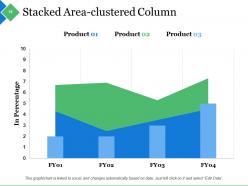
Slide 15: This slide is for Stacked Area-Clustered Column. You can compare the three product and make the use of it.
Slide 16: This is a Thank You slide for acknowledgement.
Today tomorrow powerpoint presentation slides with all 16 slides:
Using our Today Tomorrow Powerpoint Presentation Slides is a clever idea. They will magnify your ability and skill.


FAQs for Today tomorrow
Honestly, AI tools are crushing it right now for presentations - you can whip up entire decks and custom graphics in minutes. VR/AR stuff is getting pretty wild too, though I'm still not sure when I'd actually need my quarterly report in virtual reality lol. Interactive features are where it's at though. Live polls, real-time Q&A, collaborative boards that actually get people engaged instead of zoning out. Voice control is coming along too. My take? Jump on the AI presentation tools ASAP since they're already legit and will save you hours of work.
So VR turns your audience into actual participants instead of just people staring at screens. They can walk around 3D models, grab data with their hands, experience stuff firsthand - it's honestly crazy impressive. People focus way longer and remember more compared to regular presentations. You can also create virtual rooms where remote people feel like they're sitting right there with you. Oh, and don't go overboard at first. Try some 360° videos or basic interactive stuff before diving into full VR craziness. Trust me on that one.
Dude, you've gotta try adding interactive stuff to your presentations. Polls and Q&A sessions turn people from zombies into actual participants - I swear it works. Plus you'll get instant feedback on whether you're making sense or totally bombing up there. People remember way more when they're clicking buttons or raising hands instead of just staring at slides. Oh, and it makes your life easier too since you can actually tell if the room's with you. Start simple with basic polls first. Then maybe try clickable demos once you're not sweating bullets anymore.
Dude, AI's about to completely change how we do presentations. Like, you can already get slide layouts and content suggestions in minutes instead of spending hours staring at blank PowerPoint slides. Some tools even analyze your audience first and tell you what'll actually land with them - which is pretty smart tbh. The practice stuff is getting crazy too. Real-time feedback on your speaking pace and body language? That would've saved me from so many awkward college presentations lol. Honestly, start messing around with these tools now because they're advancing super fast and you don't want to be behind when everyone's using them.
Honestly, you need to get into data visualization if you want your presentations to actually land. Charts and graphs help people understand stuff instantly - way better than walls of text. Nobody's sitting through boring bullet point slides anymore, trust me. Real-time dashboards and AI visuals are where everything's headed. Even basic PowerPoint improvements make a huge difference right now. Tools like Tableau are worth learning too, though the interface is kind of clunky at first. Static presentations already feel outdated. Your audience processes visual info so much faster than reading paragraphs.
Ditch the boring data dumps and start with a hook instead - like tell a customer's actual journey, not just list features. Interactive stuff works amazing for this. Let people vote on where the story goes, or throw in video testimonials that feel more like mini documentaries. Honestly, virtual presentations give you way more storytelling options than in-person ones (screen sharing, breakouts, all that). Structure it like any good story: setup, problem, solution. Oh and try opening with "imagine if..." next time. You'll be shocked how much more people pay attention when there's actually a narrative thread they can follow.
Honestly, go with clean minimalism and bold fonts - that's where you'll see the biggest impact. People are so over cluttered slides these days. Dark mode looks incredible too, gives everything this sleek vibe. What really keeps audiences hooked though? Those subtle animations and interactive bits (just don't go overboard). Ditch the cheesy stock photos - authentic shots or simple illustrations work way better. Oh, and think conversation, not lecture. Pick one of these and just mess around with it in your next presentation. You'd be surprised how much difference it makes.
Honestly, virtual meetings have killed people's attention spans - you've got maybe 3-4 minutes before they start checking email. Interactive stuff is huge now, like polls or quick breakouts. Those marathon presentations? Dead. Your visuals need to pop way more since you're competing with their dog, kids, whatever. Camera presence is weirdly important too - I had to practice not looking like a deer in headlights on video. Oh, and master those collaboration tools because people expect to actually participate now, not just sit there. Shorter is always better these days.
Oh man, time zones are everything - don't be that person scheduling at 3am for half your team. Some cultures are super direct with feedback, others will never tell you straight up if something's confusing. Colors and gestures can be tricky too (learned this when I used thumbs up once... whoops). Build in way more Q&A time since people process differently. Actually, before you present, just grab someone from each region and run your slides by them real quick. Trust me on this one.
Honestly, the data will blow your mind the first time you see it. You can track slide views, time spent on each section, poll responses - even the exact moment people check out. I usually focus on just 2-3 metrics that actually matter rather than drowning in numbers. The real magic happens when you spot patterns across multiple presentations. Maybe your opening slides always lose people, or certain content types consistently kill it. Don't just collect this stuff though - actually review it after each presentation. It's wild how much you can improve once you know where people tune out versus where they're totally hooked.
Honestly, just go digital whenever you can - cloud tools beat dealing with printer jams at 8am. When you absolutely need paper, grab the recycled stuff. Design your slides with white backgrounds so you're not burning through ink (saves money too). Instead of those flimsy poster boards, invest in reusable props or just use digital displays. Oh, and QR codes are clutch - people can scan and get everything on their phones. Virtual options cut down on travel emissions if that's feasible. But real talk, the easiest win is defaulting to sharing links instead of printing stacks of handouts nobody reads anyway.
Hey! So definitely build accessibility in from day one - don't slap it on later. Big fonts (24pt minimum), high contrast colors, alt text for images. Can't tell you how many times I've watched people squinting at microscopic text from the back. Videos need captions, and don't rely just on color to show important stuff. Clear headings help too. Oh, and test your slides on different screens first - sometimes what looks perfect on your laptop is garbage on the projector. Send materials ahead if you can. Basically design for someone with vision/hearing issues and everyone else benefits.
Honestly, being adaptable is everything now. You've gotta get comfortable with new tech constantly - AI tools, different platforms, the whole deal. Storytelling skills matter more than ever since everyone's attention span is basically shot these days. Data visualization is huge too, and interactive stuff keeps people actually engaged instead of scrolling their phones. The tricky part? Presenting to mixed audiences where some people are in-person and others are on screens. That takes practice. My advice is start playing around with new tools now before you're scrambling to catch up later. Trust me on that one.
Okay so here's the thing - every industry has totally different expectations. Tech people want data and demos they can actually play with. Finance folks? They're obsessed with ROI numbers and want everything super conservative. Healthcare is all about evidence and making sure you won't get them sued. Creative industries are honestly the fun ones - they just want cool visuals and big ideas. But here's what really matters: match your style to the room. Engineers love getting into the weeds, but executives will tune out after 10 minutes if you're not talking strategy. I always stalk the company culture beforehand (sounds weird but it works) to figure out what actually lands with them.
Honestly, start by figuring out who's doing what - slides, research, timing, whatever. Don't let people just "help out" because that's how stuff falls through the cracks. Get everyone on Miro or something where you can brainstorm together instead of those painful email threads that go nowhere. Schedule actual run-throughs, not just check-ins. Practice your handoffs between speakers - that's where most groups look super awkward. Oh, and pick someone to play devil's advocate early on. Way better to get roasted by your teammate than bomb in front of everyone. Do a tech test the day before too.
-
Awesome presentation, really professional and easy to edit.
-
Best way of representation of the topic.