

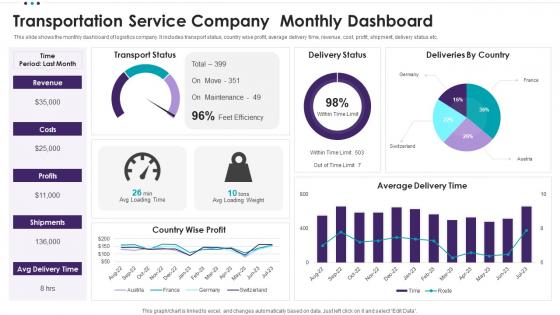
Transportation Service Company Monthly Dashboard




Try Before you Buy Download Free Sample Product
 Impress Your
 Audience
 100%
100% Editable
 Save Hours
 of Time


This slide shows the monthly dashboard of logistics company. It includes transport status, country wise profit, average delivery time, revenue, cost, profit, shipment, delivery status etc.
People who downloaded this PowerPoint presentation also viewed the following :
Transportation Service Company Monthly Dashboard with all 7 slides:
Use our Transportation Service Company Monthly Dashboard to effectively help you save your valuable time. They are readymade to fit into any presentation structure.





FAQs for Transportation Service
Track the basics first - on-time delivery, fuel efficiency, and how much you're actually using your vehicles. Those three will show you if things are working or falling apart. Cost per mile matters too, obviously. Maintenance expenses can sneak up on you (learned that one the hard way), so watch those closely along with delivery time variance. Customer satisfaction scores are worth tracking, plus driver productivity. But seriously, don't go overboard - maybe 6 KPIs tops or you'll spend more time analyzing data than actually running routes. Pick what actually helps you make decisions.
Dude, real-time data integration is where it's at for transportation dashboards. You're not stuck looking at yesterday's mess anymore - everything updates live. GPS trackers, traffic APIs, weather feeds, all that stuff feeds in automatically. Now you can actually catch problems before they blow up into huge headaches. Your ops team can reroute on the fly and give customers real ETAs instead of "sometime between noon and never." Honestly, it's night and day compared to those old static reports. The trick is connecting all your data sources so you're always working with fresh info.
Logistics dashboards track cargo stuff - delivery times, fuel costs, routes, driver performance. All about profit margins basically. Transit dashboards? Totally different beast. You're looking at passenger experience - ridership, delays, how crowded trains get, accessibility. Transit's honestly way messier since you're juggling public service goals instead of just "move thing efficiently." Before you build anything, figure out who's actually using it. Are they trying to save money or keep citizens happy? That'll shape everything else you do.
Predictive analytics can totally change your transportation game. It looks at past data, weather, and current traffic to predict delays and route problems before they hit. Super helpful for staying ahead of the chaos. Your dashboard will auto-reroute drivers around jams and schedule deliveries at the best times. Honestly, it's like having a logistics crystal ball - maybe that sounds cheesy but it really works. Start with traffic APIs and your delivery history. You'll cut fuel costs and delivery times pretty fast. Even predicts when you'll need extra trucks.
Honestly, UX can totally make or break those transportation dashboards. You want clear visual hierarchy so people can quickly spot delays or route changes without their brain melting. Make sure the fonts are readable whether someone's squinting at their phone while sprinting to catch a train or looking up at those massive station screens. I've used some that looked sleek but were absolutely terrible during rush hour madness. Keep navigation simple and intuitive. Oh, and definitely test with real users in chaotic scenarios - they'll catch issues you'd never think of. Responsive design is huge too since everyone's device is different.
Honestly, these dashboards are game-changers for cutting fleet emissions. They show you real-time data on which trucks are burning through fuel and where your routes are inefficient. Driver behavior gets tracked too – you'd be surprised how much speeding and idling costs you. The coolest part? They help identify which vehicles should go electric first instead of just guessing. I'd start with your longest routes since that's where you'll see massive improvements right away. It's wild how much you waste without realizing it. The whole thing turns vague "go green" goals into actual numbers you can act on.
You really need that historical data - it's what makes those dashboard numbers actually mean something. Like, if you see 20-minute delays but don't know your usual average is 5 minutes, you're basically flying blind. I'd grab at least 3-6 months of data to build solid baselines. That way you can spot the weird patterns and catch problems early. Honestly, the trend analysis is where the magic happens - you start seeing which bottlenecks keep popping up and can actually predict issues before everything goes sideways.
Dude, mobile apps are a game changer for transportation stuff. You'll get alerts about delays or breakdowns right on your phone, so you can reroute drivers instantly. No more being stuck at your desk all day. I swear, half my important calls happen when I'm nowhere near my computer - like yesterday I had to redirect three trucks while waiting in line at Starbucks. Just make sure whatever app you pick syncs with your main system. Nothing worse than working with outdated info and messing up customer deliveries.
Honestly, line charts are your best friend for tracking ridership trends over time. Heat maps will save your life when you're trying to spot route bottlenecks - trust me on that one. Real-time stuff like on-time performance? Gauge charts work perfectly. Bar charts are solid for comparing different routes or time periods too. Obviously you'll need geographic maps since you're dealing with actual locations and routes. Skip pie charts though - they're basically useless for transportation data. Start with your main KPIs first, then pick whatever makes the patterns jump out immediately.
So basically you want one dashboard that everyone can tap into - drivers get their route updates and delivery stuff, managers see the whole fleet picture. Your clients can actually track their own shipments instead of blowing up your phone every five minutes (which honestly is a game changer). Just make sure you're showing the right info to the right people - like drivers don't need to see profit margins, clients don't need your internal chaos. Set up some automated alerts for the big stuff. Trust me, it cuts down on so much of that "where's my package?" nonsense.
Oh man, data silos are gonna be your worst enemy here. Plus you'll have GPS updating every 30 seconds while scheduling systems refresh maybe once an hour - makes showing real arrival times a total nightmare. I'd start by mapping out all your data sources first, honestly that step saves so much headache later. Then set up standardized APIs and automated validation rules to catch the weird stuff. Create some buffer zones for delays too because transit is never perfect. Oh and make sure someone actually owns each data piece - when things break (and they will), you need someone to call!
So basically, ML algorithms look at old traffic data, weather, events - all that stuff - and predict where you'll hit congestion way better than regular GPS. Your dashboard stops just showing current conditions and starts telling you "hey, there's gonna be a mess on I-95 in 30 minutes." Takes some getting used to, but it's actually pretty sweet. The system gets smarter as it processes more data too. I'd start by figuring out which routes always screw you over, then find ML tools that focus on those specific problem areas.
Start with role-based access - only let people see what they actually need. HTTPS everywhere, obviously. MFA isn't optional anymore, trust me on this one. Set those sessions to timeout automatically, especially if you've got shared screens lying around. Hide any personal data unless someone's job literally requires it. Audit logs are your friend for tracking who looked at what. Oh, and do a quick check of what sensitive stuff you're even showing first - you might be surprised what's just sitting there visible to everyone.
So basically you want different dashboards for different people. Executives care about the big picture stuff - fleet efficiency, cost trends, whether you're hitting budget. Operations teams need the nitty-gritty details they can actually do something about - where trucks are right now, maintenance alerts, route problems. I'd honestly just ask each group what decisions they're making every day, then build around that. Your ops manager doesn't need monthly fuel reports when there's a breakdown happening. But your CEO probably doesn't want alerts every time a driver takes a bathroom break, you know?
Set up monthly reviews minimum - weekly if things change a lot around there. Clean data is everything because bad inputs will mess up your whole dashboard (learned that the hard way). Actually talk to whoever uses this thing daily - they'll tell you what's broken. Don't get attached to metrics nobody cares about anymore, just dump them. Your KPIs should change as your transportation needs shift. Oh, and make one person own this whole thing instead of letting it be everyone's job. Honestly? Just block out 30 minutes next week with your main users and start there.
-
The presentations are very helpful. I am always able to get appropriate templates for the different topics related to my profession.
-
SlideTeam is the best in the business. Their templates are engaging and customizable. You can rely on them.