

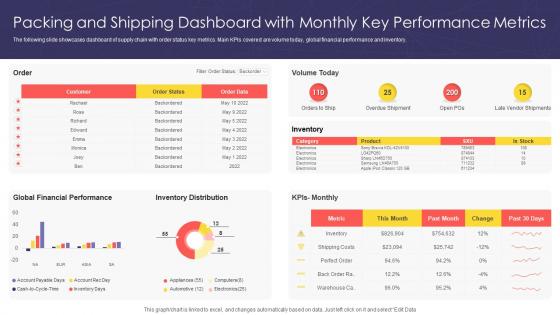
Packing And Shipping Dashboard With Monthly Key Performance Metrics




Try Before you Buy Download Free Sample Product
 Impress Your
 Audience
 100%
100% Editable
 Save Hours
 of Time


The following slide showcases dashboard of supply chain with order status key metrics. Main KPIs covered are volume today, global financial performance and inventory.
People who downloaded this PowerPoint presentation also viewed the following :
Packing And Shipping Dashboard With Monthly Key Performance Metrics with all 7 slides:
Use our Packing And Shipping Dashboard With Monthly Key Performance Metrics to effectively help you save your valuable time. They are readymade to fit into any presentation structure.






FAQs for Packing And Shipping Dashboard With Monthly
So basically you want order fulfillment rate, average pack time, shipping accuracy, and on-time delivery as your main ones. Inventory turnover and cost per shipment are clutch too - they'll catch problems fast. Return rates matter because nobody has time for pissed off customers calling about damaged packages. Your dashboard needs real-time order backlog and how productive your team is so you can bring in more people when it gets crazy. Oh and damage claims - that one's pretty obvious but still worth tracking. Start here then add whatever else based on where things are actually getting stuck.
Honestly, real-time tracking is a game changer because you can catch problems while they're happening instead of scrambling after the fact. Your customers won't blow up your phone asking where their stuff is either - they can just check themselves. I've noticed it really helps spot patterns too, like if one carrier keeps screwing up or certain routes are disasters. Short sentences work. The dashboard becomes your best friend for checking daily trouble spots. Oh and you'll figure out which packaging actually works for different destinations instead of just guessing. Pretty much transforms how you handle shipping decisions since you're working with real data.
Honestly, the worst part is usually getting your current systems to talk to each other - your warehouse software will probably throw a fit trying to connect with the new dashboard. Custom API work is such a pain. But here's what really kills projects: your team will hate it at first. People get super attached to their old ways of doing things, even if they're doing everything manually like it's 1995. Training always takes forever too. Oh, and don't go live without testing everything extensively first - learned that one the hard way. Just start small with one department.
So basically, a packing dashboard shows you where every order is in real-time - super helpful for catching problems early. Customers actually prefer knowing about delays upfront rather than being blindsided later (learned that the hard way). You can optimize your packing workflows and see which carriers are slacking off. The visibility alone speeds things up because you're not constantly wondering what's happening. Oh, and you can switch shipping providers when someone's consistently dropping the ball. I'd start by figuring out what's currently driving you crazy in your process, then build the dashboard around fixing those specific headaches first.
Dude, automation saves you from drowning in manual data entry. Your scales, scanners, and carrier systems just feed everything straight into the dashboard - weights, tracking numbers, delivery times, all of it. No more stopping mid-pack to update spreadsheets (thank god). Real-time visibility into costs and performance without the busywork. Honestly, once you see it working you'll wonder how you survived before. Your team can actually focus on shipping instead of data entry. I'd start with whatever you're still typing in manually - that's the low-hanging fruit right there.
You know how everyone always talks past each other in meetings? Visualizations fix that. Color-coded charts showing shipment status, delivery times, bottlenecks - suddenly your warehouse guys and customer service can actually communicate without those painful email threads. Way better than Excel sheets that half your team can't even read properly. Real-time dashboards are clutch here. When everyone's staring at the same live data, you'll actually solve problems instead of arguing about what's happening. It's honestly like having subtitles for your operations - everyone finally gets it.
Honestly, these cloud dashboards are pretty sweet - you can check everything from your phone without bugging IT to set stuff up. Real-time tracking across all your spots is clutch, especially when you're wondering if something actually shipped while you're grabbing coffee. No more server crashes during busy times either. The auto-updates are nice too, plus way better security than trying to handle it yourself (which, let's be real, most of us aren't great at). I'd probably focus on your messiest locations first - that's where you'll see the biggest difference right away.
Start with the basics - damaged package rates, customer complaints, and what you're spending on materials per shipment. Hook up automated feeds from your carriers because honestly, damage rates tell you everything you need to know. Cost per package and return rates by material type are solid too. I'd compare different packaging side-by-side over monthly periods rather than getting caught up in daily swings (that'll drive you nuts). Keep it simple at first - maybe 3-4 key metrics max. You can always add more once you've got a rhythm going.
Start with WMS and TMS integrations - you can't really operate without those for tracking stuff in real time. Your ERP pulls in all the order data automatically, which is clutch. Then hit up the carrier APIs (FedEx, UPS, DHL) for rate shopping - honestly saves more money than you'd think. The carrier setups are kind of a nightmare at first but totally worth pushing through. You'll need inventory management systems too so your stock levels don't get screwy. Oh, and barcode scanning plus label printing APIs make the warehouse side way smoother. Build it piece by piece though - core carriers first, then expand.
So predictive analytics basically helps you see problems coming before they smack you in the face. Think forecasting when you'll run low on inventory or which shipments might get delayed. Super helpful for avoiding those panic moments when you're suddenly out of boxes (been there). You can also spot potential bottlenecks and figure out which carriers work best for different routes. Oh, and it'll predict damage rates so you can adjust packaging accordingly. Honestly, I'd start with whatever's driving you crazy most - late deliveries, damaged stuff, whatever. Focus there first instead of trying to fix everything at once.
Focus on what your team uses most - order status, tracking, and shipping labels need to be right there when they open it. Nobody wants to dig around for the "print label" button when they're cranking through hundreds of orders. Group similar stuff together and make your search actually work well (seriously, weak filtering will drive everyone nuts). Those big actions like marking orders shipped? Make the buttons obvious. Oh, and definitely test it with your warehouse people first - they'll catch weird issues you'd never notice from behind a desk. Trust me on that one.
Dude, picking the right software is huge for your dashboard. We had this terrible system at my old place that literally crashed every other day - drove everyone insane. You want something that plays nice with your current WMS and whatever carriers you're using. Customizable views are clutch too since different people need different info. Oh, and make sure it can handle growth because nothing's worse than outgrowing your system in six months. Honestly though, write down your non-negotiables first. Makes the whole evaluation process way less overwhelming.
Definitely get real-time tracking and automated labels - those are must-haves. Carrier rate comparison will save you money too. Integration with your current platform is huge, otherwise you'll be copying order details manually and it's such a pain. Batch processing for multiple orders at once, inventory sync, and custom packing slips are solid features to look for. Oh and analytics showing shipping costs and delivery times - honestly game-changing for figuring out what's working. Multiple carrier support keeps your options open, which you'll appreciate later.
Honestly, I'd go with every 15-30 minutes when things get crazy busy, but hourly is fine during slower times. Real-time updates are total overkill unless you're doing same-day delivery (which is its own nightmare). Think about how your managers actually use the dashboard - if they're constantly checking it to make staffing decisions or reroute stuff, then yeah, 15-minute updates make sense. But for basic reporting and looking at trends? Hourly works perfectly fine. Start with hourly and see how it goes. You can always bump up the frequency if people complain they need fresher data.
Honestly, start by figuring out where your data's most screwed up right now - that'll save you tons of headaches later. Set up automated flags for the weird stuff like negative weights or impossible dates (seriously, these pop up at the worst times). Your warehouse system needs to actually talk to your carrier APIs and inventory - real-time syncing is huge here. I'd run weekly reports to catch problems early, and definitely create some rules for manual entry since people will always find creative ways to mess things up. Oh, and those data validation checks? They're lifesavers for catching outliers before they become bigger issues.
-
I want to thank SlideTeam for the work that they do, especially their customer service.
-
Such amazing slides with easy editable options. A perfect time-saver.