

Types of phishing attack ppt powerpoint presentation styles format ideas




Try Before you Buy Download Free Sample Product
 Impress Your
 Audience
 100%
100% Editable
 Save Hours
 of Time


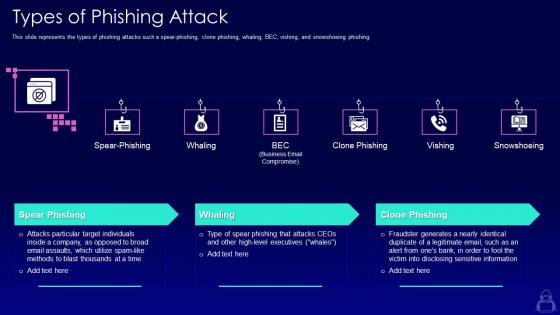
This slide represents the types of phishing attacks such a spear-phishing, clone phishing, whaling, BEC, vishing, and snowshoeing phishing.
People who downloaded this PowerPoint presentation also viewed the following :
Types of phishing attack ppt powerpoint presentation styles format ideas with all 6 slides:
Use our Types Of Phishing Attack Ppt Powerpoint Presentation Styles Format Ideas to effectively help you save your valuable time. They are readymade to fit into any presentation structure.





FAQs for Types of phishing attack ppt powerpoint presentation
Honestly, email spoofing is probably the biggest threat - scammers pretend to be people you trust. CEO fraud is everywhere right now too. They'll fake being your boss and demand urgent wire transfers. Spear phishing targets specific employees with super personalized messages, which is creepy but effective. Those fake Microsoft login pages? They look identical to the real thing now, it's insane. Business email compromise attacks love going after finance teams. Best thing you can do is train everyone to verify sketchy requests through a different channel first - like actually calling the person back.
Oh man, spear phishing is psychological manipulation but way more targeted. These attackers dig into your LinkedIn, company website, whatever they can find. Then they'll pretend to be your boss asking for an "emergency" wire transfer, or fake IT saying you need to reset your password ASAP. What makes it terrifying? They use real names from your office, mention actual projects you're working on, and they time it perfectly - like when you're swamped and likely to just click without thinking twice. My rule: always double-check through a different method. Call the person or walk over to their desk before doing anything with sensitive info.
So whaling goes after the big shots - CEOs, CFOs, board members. Way more targeted than regular phishing spam. These aren't your typical "verify your account" emails either. Attackers actually research their targets first, mentioning real meetings or deals to sound legit. The scary part? These executives can approve wire transfers or access super sensitive stuff. Honestly, the personalization is pretty impressive from a technical standpoint. Watch for urgent money requests, even from people you'd normally trust. Sometimes they'll spoof trusted contacts perfectly.
Ugh, phishing emails are getting so sneaky now! They steal logos and copy real company formats perfectly. Watch out for fake domains like "arnazon.com" or sketchy subdomains that seem legit at first. They love creating panic with "Your account expires in 24 hours!" messages to rush you into clicking. The spelling and grammar used to be terrible, but honestly they've stepped up their game lately. Before you click anything, hover over links to see where they actually go. Also check the real sender address - not just what shows up as the name. Trust me, that extra second is worth it.
Email filters are pretty solid these days - they use machine learning to catch sketchy sender patterns and weird URLs. Your browser will throw up those red warning pages when you're heading to a bad site, which honestly saves so many people. There's also real-time link analysis tools that check stuff as you click. Some programs even sandbox suspicious attachments, which is cool. The tech keeps getting better, but attackers adapt too. You've still gotta pay attention because they're always finding new ways around the security stuff. Nothing's foolproof, you know?
Honestly, regular training sessions work best - cover the usual stuff like sketchy payment requests and fake login pages. Those simulated phishing tests are surprisingly effective too (and kinda entertaining to set up). Teach people to spot red flags: bad grammar, weird URLs, random attachments. Don't make it a boring one-off presentation though - keep it interactive and ongoing. Grammar mistakes are dead giveaways, by the way. Set up an easy way for employees to forward suspicious emails straight to IT when they're not sure about something.
Dude, it's seriously bad news. You could lose money from fake transactions, get your identity stolen, or have accounts totally compromised. Your info might literally get sold on the dark web to other scammers - which is honestly terrifying when you think about it. The cleanup takes forever too, like months or years sometimes. Your credit gets trashed, they open accounts using your name, even file fake tax returns. What sucks most? Once they have some of your details, they'll hit you with even worse scams later. Always double-check sketchy emails by calling the person directly first.
So basically MFA is like having a second lock on your door. Yeah, someone might steal your password from a phishing scam, but they're still screwed without that code from your phone. Honestly it's probably the single best thing you can do security-wise - way better than trying to remember crazy complex passwords. Your bank account, email, all that important stuff should definitely have it turned on. I mean, even if hackers get your login info, they'd need to physically grab your phone too. Pretty much stops them cold.
Oh man, there've been some crazy ones lately. Remember that Twitter hack in 2020? They got Obama, Elon Musk, and tons of other big accounts for that Bitcoin scam. Wild stuff. Those Microsoft Teams phishing attacks have been brutal too, especially hitting remote workers. And honestly? That Gmail phishing campaign was so good it tricked people who really should've known better - including some tech folks I know. The fake DocuSign emails are getting scary realistic now. Same with those CEO fraud ones. My rule is always double-check through another way before clicking anything, even if it looks legit.
Ugh, scammers are honestly getting way too good at this. They mess with your head by creating fake urgency - like "your account closes in 24 hours!" They'll pretend to be your bank or IT support to seem legit. Plus they use FOMO and curiosity with vague subject lines about "your account." Sometimes they'll even make it seem like everyone else already responded. The trick is catching yourself when you feel rushed to click something. Just stop. Verify with the actual company first - I've saved myself so many headaches doing this.
Oh yeah, so phishing isn't just emails anymore. Vishing is when scammers call pretending to be your bank or whatever - they want your info over the phone. Smishing hits your texts instead. Honestly, people fall for calls and texts way more than sketchy emails because they seem more legit. My aunt got fooled by a "bank" call last month, it was brutal. All three methods are basically fishing for the same stuff though - passwords, account numbers, personal details. Just always double-check who's actually contacting you before you tell them anything.
Oh man, definitely report that sketchy email to your IT team ASAP - forward the whole thing as an attachment so they can dig into the technical stuff. Whatever you do, don't click anything! I get that you're probably curious, but seriously resist the urge. Jot down when you got it and what looked fishy. Did you already click something? Ugh, change your passwords immediately and run a scan. Also heads up your coworkers since these scammers usually spam the whole company. The quicker IT knows, the faster they can shut it down for everyone else too.
Honestly, don't trust anything on social media at face value. If someone you know sends a weird friend request, just text them directly to check. I learned this the hard way when my cousin's account got hacked and started messaging everyone sketchy links. Hover over links before clicking - even from friends - because their accounts might be compromised too. Turn on two-factor authentication for everything. Seriously, it's a pain but worth it. Keep your privacy settings locked down tight so random people can't see your personal stuff. When something feels off, it probably is.
So basically, AI can crunch through tons of email data super fast and catch phishing stuff that regular filters miss. It picks up on weird sender patterns and sketchy language that flies under the radar. The best part? It keeps learning as scammers get craftier. You can also use it to run fake phishing tests on your team - honestly, some of those simulated attacks are pretty convincing. My advice would be to get some AI-powered email security going and keep those training sessions fresh. Phishing attacks are getting scary good these days.
Oof, yeah phishing can really mess up a company legally. GDPR and HIPAA fines are no joke - those penalties get expensive quick. Plus customers will sue if their data gets stolen, which honestly makes sense from their perspective. There's also liability issues if hackers use your compromised systems to go after other companies. Regulators love to pile on extra audits and oversight after breaches too. The smart move is getting ahead of it with solid employee training and email filters. Better to spend money on prevention than lawyers later.
-
Great designs, really helpful.
-
Awesomely designed templates, Easy to understand.