

UX UI Proposal Powerpoint Presentation Slides




Try Before you Buy Download Free Sample Product
 Impress Your
 Audience
 100%
100% Editable
 Save Hours
 of Time


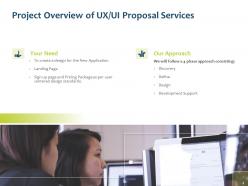
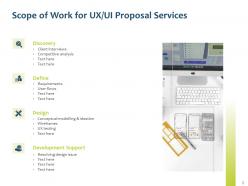
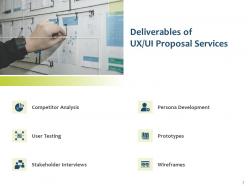
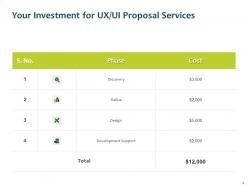
Talk about the quality of your products and services with the help of our content ready UX UI Proposal PowerPoint Presentation Slides. By using this attention-grabbing UX/UI design proposal PPT layout, you can showcase your successful UX strategies or plan to execute the best designs. Take advantage of UX and UI designer proposal presentation templates to mention the objectives of the project that includes client interaction, user surveys, UX analysis, UX documentation, wireframes, functional design prototypes, prototype testing, and final design. With the aid of this reliable and engaging UI UX design proposal PowerPoint presentation slides, you can provide clear expectations of your project to the clients that make them confident in choosing your services. Take the assistance of our interactive UX design proposal PPT theme to determine the overall project cost that a client has to invest in designing the application. Employ this creatively designed UI design project PowerPoint template to explain briefly the terms and termination of the proposed agreement that provides the client with a better understanding of your company. By using the topic-specific UI/UX design proposal presentation slides, you can outline the four approaches you use while designing that consists of the discovery, design, define, and development support. Interact more easily with your clients by showcasing your achievements and certifications with the help of this well informed UX & UI project proposal PPT theme. Use the creatively designed UX project proposal PowerPoint presentation template to showcase your additional services that will make your proposal even more impactful. Take the help of the UX and UI proposal presentation theme to portray your problem-solving approaches that increase the chances of selection of your proposal by the client. Download our creatively designed UX UI design project proposal PowerPoint presentation slides to close the deal with your new clients.
People who downloaded this PowerPoint presentation also viewed the following :
UX UI Proposal Powerpoint Presentation Slides with all 24 slides:
Use our UX UI Proposal Powerpoint Presentation Slides to effectively help you save your valuable time. They are readymade to fit into any presentation structure.


FAQs for UX UI Proposal
Start with a killer executive summary that grabs them right away. Then break down the problem you're solving, show off your user research, and lay out your design goals. Wireframes or mockups are obviously crucial - clients need to see what they're paying for. I always throw in competitor analysis too because it proves you actually know the space. Your timeline and deliverables should be crystal clear. Success metrics matter, but honestly don't go overboard with the details or you'll lose them. Balance showing expertise without making their eyes glaze over.
Connect every design choice back to actual research you found. Like if 73% of people bailed during checkout at step 3, lead with that number when pitching your new flow. Way more convincing than vague statements about "checkout issues." Honestly, the best proposals feel like detective stories - here's the problem we discovered, here's our solution. Include real user quotes too. "I got completely lost trying to find my order history" hits different than just saying navigation needs fixing. The research should justify each decision you're making, not feel tacked on afterward.
Dude, storytelling is everything with UX proposals. Don't just dump wireframes on people - they'll zone out instantly. Instead, create a character like "This is Sarah, she's trying to book a flight during lunch but your checkout flow is driving her insane because..." Way more powerful than screenshots, right? When stakeholders can picture an actual person struggling, suddenly your design changes feel urgent and necessary. I always start with the story first, then reveal how my solution fixes their pain points. It's honestly the difference between getting buy-in and getting ignored.
Dude, visuals are everything for UX proposals. Like, I've watched solid research get completely ignored because it was just paragraph after paragraph of text. Nobody wants to decode your genius ideas - they want to *see* them. Mock-ups make stakeholders go "oh, now I get it" instead of glazing over. You don't need some polished masterpiece either. Rough wireframes work fine. The whole point is showing the user journey and how your solutions actually fix their problems. Makes everything click instead of staying abstract in people's heads.
Definitely go with user-focused stuff like task completion rates and how long things take people to finish. Error rates are huge too - clients love seeing those drop. For engagement, track bounce rates and session time, plus conversion rates if that matters for their business goals. Honestly, usability surveys after launch are gold, or throw in SUS scores if you want to look extra legit. Pick maybe 3-5 metrics that actually connect to whatever problems you're fixing with the redesign. Oh, and get baseline measurements first so you can show real before/after results. Just make sure they agree on all this upfront - saves so much headache later when everyone's debating what "success" means.
So in your UX proposal, definitely call out how you're designing for disabilities and diverse users right from the start. Mention WCAG 2.1 standards and what tools you'll use for color contrast testing, screen reader stuff, all that. Here's the thing though - actually test with people who have disabilities, not just your team pretending to be blind or whatever. Cultural differences matter too, plus language barriers and people who aren't super tech-savvy. Oh, and don't forget different literacy levels! Make it clear that accessibility isn't something you'll "add later" but part of your whole process and timeline.
Honestly, stakeholder pushback is your biggest enemy here. They'll cling to the broken design like it's their baby or something. Budget fights come next - good luck explaining ROI when you can't show metrics for something that doesn't exist yet. Timeline stuff gets messy too since nobody realizes how long proper UX research actually takes. But here's what works: bring user pain points, show competitor examples, and pitch it in phases. Way less threatening that way. Oh, and maybe prep for the "why can't we just..." questions because they're coming.
Definitely add a competitive analysis with 2-3 main competitors - break down their UX/UI wins and fails. Screenshots are clutch here, clients eat that visual stuff up. Look at their specific design patterns and user flows that actually relate to your project. Don't just list features though. Connect each insight back to why your design approach makes sense. It proves you're not just winging it and actually understand what's out there. Plus it's way easier to sell your ideas when you can point to real market examples. Honestly makes the whole proposal feel more legit.
So a UX UI proposal is basically your pitch showing how you'll fix their design mess. Include your research plan, wireframes, visual stuff, timeline and budget - the whole shebang. It's like being a detective mixed with creative director, honestly. Show them you get their users' problems and how your solutions actually work. Oh, and be super specific about what you're delivering and when - people love knowing exactly what they're paying for. Otherwise they'll bug you every week asking for updates. Make sure your wireframes don't suck because that's usually the first thing they flip to.
-
The Designed Graphic are very professional and classic.
-
Unique and attractive product design.