What is hacking ppt powerpoint presentation gallery slides

Rating:
90%
What is hacking ppt powerpoint presentation gallery slides
Slide 1 of 6
Favourites Favourites

Try Before you Buy Download Free Sample Product

Audience Impress Your
Audience
Editable 100%
Editable
Time Save Hours
of Time
The Biggest Sale is ending soon in
0
0
:
0
0
:
0
0
Rating:
90%
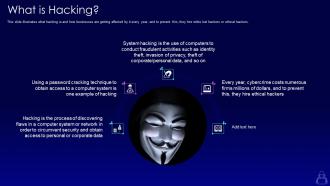
This slide illustrates what hacking is and how businesses are getting affected by it every year, and to prevent this, they hire white hat hackers or ethical hackers. Introducing What Is Hacking Ppt Powerpoint Presentation Gallery Slides to increase your presentation threshold. Encompassed with five stages, this template is a great option to educate and entice your audience. Dispence information on Hacking, using this template. Grab it now to reap its full benefits.

People who downloaded this PowerPoint presentation also viewed the following :

FAQs for What is hacking ppt powerpoint

So there are basically three types of hackers. White hat hackers do ethical testing - they're the good guys who find security holes with permission. Black hat hackers? They're doing malicious stuff for money or just to cause chaos. Then you've got gray hat hackers who are kinda in the middle - they find vulnerabilities without asking first, but they usually report them instead of exploiting them. The crazy thing is they all use pretty much the same techniques. What separates them is really just intent and whether they got permission beforehand. Oh, and if you're ever thinking about testing security stuff yourself, definitely get written permission first!

So ethical hackers are the ones who find security holes before actual criminals do. Pretty cool job honestly. You'll need to get good at penetration testing, network security, and learn coding - Python and SQL are must-haves. CEH or OSCP certifications will boost your credibility big time. The learning curve's pretty brutal though, not gonna lie. Communication skills matter too since you'll be explaining techy stuff to people who have no clue what you're talking about. Start with basic cybersecurity courses, then jump into HackTheBox or TryHackMe for practice. Those platforms are actually fun once you get the hang of it.

Honestly, phishing emails are still the biggest pain - people fall for fake login pages constantly. Ransomware's gotten worse too, plus there's all this social engineering stuff where hackers just call pretending to be IT support. SQL injection attacks hit websites with crappy security, and credential stuffing uses your old leaked passwords to break into new accounts. Oh, and those remote access trojans? Terrifying. They basically own your computer once you're infected. Keep your software updated, use different passwords everywhere, and teach your team to actually think before clicking random email links.

Honestly, start with training your people - that's where hackers get in most of the time. Those fake phishing simulations work really well, even though they feel kinda mean at first. Get email filters set up and make everyone use multi-factor authentication (yeah, I know it's annoying but whatever). The big thing is teaching your team to double-check weird requests through a different method before clicking stuff. Oh, and create an environment where people won't get yelled at for reporting suspicious emails. That part's huge.

Dude, forget about fancy firewalls - hackers go straight for your employees instead. They'll literally call pretending to be IT and just ask for passwords. Or send fake "urgent" emails from the CEO that look totally real. I swear, I've seen million-dollar security systems get wrecked by one convincing phishing email. People want to help, which is great until it's not. Just train everyone to double-check who they're talking to before handing over info. Make it clear that being suspicious isn't rude - it's smart.

Dude, don't mess around with hacking - it's illegal basically everywhere. The US will throw the book at you under some Computer Fraud and Abuse Act, and Europe's got similar laws. Even if you're just poking around out of curiosity, you could face serious jail time and massive fines. What really matters is what you accessed and if you caused damage or made money off it. Some countries are more chill about enforcement, but that's changing fast. Honestly, unless you've got explicit permission, just don't. The legal headache isn't worth satisfying your curiosity.

Okay so first thing - if your computer's running like molasses, that's suspicious. Random programs you never installed? Big red flag. Your antivirus going crazy is obviously bad news. Check if your browser suddenly has weird toolbars or a different homepage you didn't set. I'd also look at what processes are running - anything sketchy there? Files randomly appearing or vanishing is another warning sign. Oh, and if your passwords stop working out of nowhere, that's terrifying. Honestly, if you notice any of this stuff, just disconnect from wifi immediately and run a full scan before you do anything else online.

Honestly, just grab Kali Linux first - saves you from installing a million tools separately. Nmap's your bread and butter for scanning networks and finding open ports. Metasploit's great for the actual exploitation stuff, though it can be overwhelming at first. You'll probably spend half your time in Burp Suite if you're doing web app testing (seriously, that thing becomes like a second browser). Wireshark's clutch for analyzing network traffic. Oh, and get Nessus for vulnerability scans and John the Ripper for cracking passwords. Start with these basics, then add whatever weird specialized tools you need later.

Honestly, vulnerability assessments are like getting a health checkup for your tech stuff. You're scanning everything - systems, apps, network - to catch security holes before the bad guys do. Way better than scrambling after you've been hit, trust me. It's pretty straightforward: find the weak spots, patch them up, tweak your settings. I'd run these every quarter minimum, but definitely after any big updates or changes. Sometimes I think companies skip this step because it feels tedious, but it's literally your best defense. Stay ahead of the game instead of playing catch-up.

So hacking groups basically team up based on what they're good at - you've got your malware experts, social engineering people, network guys, etc. Money drives a lot of them (like ransomware crews), but some work for governments doing spy stuff, and others are those hacktivist types who think they're saving the world or whatever. The crazy thing? Some groups literally have HR departments now - it's like a twisted startup. Nation-state hackers are usually the most dangerous since they've got serious resources. For your business though, I'd worry most about the financial crews since they're probably gunning for companies like yours.

Ugh, honestly it's so scary how much hackers can mess up your life. They get into your stuff and suddenly have access to literally everything - photos, bank info, all your private texts. The crazy part? You might not even realize it happened for months. They'll steal your identity, blackmail you, or just sell your data to random people online. I was reading about this the other day and it made me paranoid. Definitely use different passwords for everything and turn on two-factor authentication. Your whole reputation and money are basically sitting ducks otherwise.

Honestly? Just train your people regularly - like every few months or so. Most hacks happen because someone clicks something they shouldn't have. Teach them how to spot sketchy emails and weird phone calls trying to get info. Password stuff too, obviously. I've seen companies get totally screwed because Karen from accounting opened some random attachment. It's wild. The trick is making it ongoing, not just some boring one-time meeting everyone forgets about. Focus on whatever threats are hitting your industry lately.

Honestly, it's getting wild out there. Ransomware groups are basically running like tech startups now - you can literally buy attack kits online. AI is making phishing emails creepy good, and don't get me started on deepfakes. Supply chain attacks are huge too - hackers just target your vendors instead of going after you directly. Remote work opened up so many new ways to get compromised. Coffee shop wifi, anyone? Defense tech is improving with zero-trust stuff, but attackers adapt faster. My take? Start simple - train your people and slap MFA on everything you can. Those two things will stop most attacks.

Okay so first thing - get unique passwords for everything and turn on 2FA wherever you can. I know, I know, it's a pain but it'll save your ass later. Keep your apps updated too, those patches fix the security holes hackers are constantly looking for. Don't download random stuff and definitely think twice before clicking links in sketchy texts or emails. Your phone already has decent security built in so actually use the screen lock and find-my-device stuff. Honestly, just tackling passwords and two-factor auth will block like 90% of the basic attacks out there.

Okay so first thing - disconnect everything that got hit right away. Figure out what data actually got stolen, then call your lawyers because some of these regulatory deadlines are insane. Document everything as you go since you'll need it for insurance and investigations later. If customer data was involved, tell them yourself before they hear it on the news (seriously, that's a nightmare). Get cybersecurity pros in there if you don't have them already - they'll patch things up and make sure you're actually secure when you go back online. Oh and don't forget your employees need updates too.

Ratings and Reviews

90% of 100
Review Form
Write a review
Most Relevant Reviews
  1. 100%

    by Harry Williams

    Good research work and creative work done on every template.
  2. 80%

    by Clint Perry

    Easily Editable.

2 Item(s)

per page: