

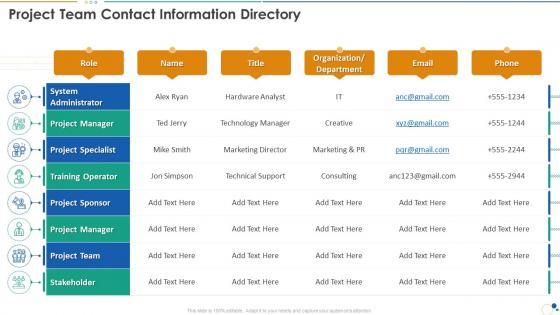
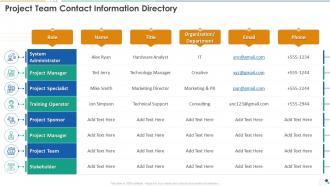
Work plan bundle project team contact information directory




Try Before you Buy Download Free Sample Product
 Impress Your
 Audience
 100%
100% Editable
 Save Hours
 of Time


Our Work Plan Bundle Project Team Contact Information Directory are topically designed to provide an attractive backdrop to any subject. Use them to look like a presentation pro.
People who downloaded this PowerPoint presentation also viewed the following :
Work plan bundle project team contact information directory with all 6 slides:
Use our Work Plan Bundle Project Team Contact Information Directory to effectively help you save your valuable time. They are readymade to fit into any presentation structure.





FAQs for Work plan bundle project team
Definitely throw in everyone's name, role, and how to contact them - email, phone, maybe their Slack if that's what you use. Time zones are a lifesaver if people are spread out, trust me on this one. I'd add what they're actually responsible for on the project too. Their department and expertise areas help, plus backup contacts for when someone's on vacation. Oh, and don't make it crazy detailed - just enough so people can figure out who handles what without bugging you with obvious questions every five minutes.
Oh man, you definitely need one! It's like having everyone's info in your back pocket instead of frantically texting "who handles the budget stuff again?" Everyone's contact details, what they actually do, their skills - all searchable in one spot. New people can figure out who's who without bugging everyone with questions. I always throw in timezones too if you've got remote folks, plus how each person likes to communicate. Some people are Slack-only, others prefer calls. Game changer for avoiding that awkward "reply all" situation where you're like... was that meant for me?
Honestly, I'd go with whatever platform you're already using - most have decent directory features anyway. SharePoint, Notion, and Airtable are all great for searchable databases with photos, contact details, roles, that kind of stuff. Google Sheets works fine too if you want simple (just won't look as polished). The real trick is picking something your team won't ignore. I've seen so many fancy directories just sit there unused because nobody wants to log into yet another tool. Start with what people already check daily - way better than building something perfect that gets forgotten about.
Make someone actually own this - like your project coordinator or whoever's most organized. Quarterly check-ins work best where you go through everyone's info. Role changes, new contact details, current projects, all that stuff. Honestly it's boring as hell but you can't skip it. Monthly calendar reminders are your friend here. People never update their own stuff even when you ask nicely, so don't rely on that. Oh and definitely send those "hey update your info" emails right before big project deadlines when people are actually paying attention.
Oh definitely make a team directory for your new hire! It's like giving them a cheat sheet for who does what. They'll know exactly who to bug about design stuff or backend issues without doing that awkward thing where they message the wrong person. Plus you can throw in everyone's time zones and how they prefer to communicate - trust me, nobody wants to accidentally schedule a 6am call with your London teammate (been there). The reporting structure stuff is clutch too since they won't figure that out naturally. Way better than watching them wander around lost for weeks.
Honestly, it makes way more of an impact than people realize! Clean design with faces and contact info helps everyone feel more connected - kind of like those old office photo walls but actually functional. People reach out more when they can match names to faces and find who they need quickly. Short sentences work. Also shows you actually care about making things user-friendly instead of just throwing together a boring list. I'd definitely add photos and maybe some fun details like skills or random facts. Makes the whole thing feel less corporate and more human, you know?
Start by grouping people by what they actually do - engineering, design, product, whatever. Break down who makes the final calls vs who just needs a heads up. Trust me, I've sat through way too many meetings where nobody knew who could actually say yes to something. Don't forget backup contacts because Sarah from product will definitely be out the exact day you need her approval. Oh, and spell out how teams work together - like when design hands stuff to engineering. Keep it dead simple and actually update the thing regularly.
Honestly, that team directory is clutch for this stuff. Check everyone's roles and how they like to communicate before you dive into drama. Some people hate confrontation, others want everything super direct. The reporting structure part is key too - half the time conflicts happen because nobody knows who's actually in charge of what. Look up who reports to whom so you know if you should handle it yourself or drag a manager in. Oh and their working styles if it's in there - saves you from accidentally approaching someone the wrong way. Trust me, spending five minutes reading profiles beats walking into a mess blind.
Definitely be picky about what personal stuff you put in there. I'd stick to just work emails and job-relevant skills - skip home addresses and personal numbers unless you absolutely need them. Get everyone's permission first, especially if people outside your team will see it. Honestly, I've watched these things turn into total oversharing disasters before. Lock down who can access it too - don't make it searchable by randos. Oh and here's the thing that helps me: before adding any info, just ask "do we actually need this?" Most of the time, you don't.
Honestly, a team directory is a lifesaver for staffing decisions. You'll know instantly who's swamped and who has bandwidth. No more awkward "wait, who knows React again?" moments during planning - been there, way too many times. It helps you spot skill gaps before they bite you, plus you can actually balance workloads instead of burning out the same three people over and over. Match people to tasks that make sense. Just keep it current or it's useless. Use it during sprint planning and you'll wonder how you survived without one.
Definitely focus on keyboard navigation and screen reader compatibility first. High contrast colors are huge too. Alt text for all photos is non-negotiable, and make sure people can bump up text size without everything going haywire. Half your team's gonna check this thing on their phones during lunch anyway, so mobile has to work perfectly. For search functionality, throw in filters by department, role, maybe even skills - people love options. Honestly though? Test it with actual screen readers before you go live. I've seen too many "accessible" sites that totally weren't.
Honestly, just start jotting down quick notes about what people are actually accomplishing right in the team directory. Like next to Sarah's name, throw in "nailed the client presentation" or whatever. During meetings, you'll have everyone's stuff right there so it's way easier to give props where they're earned. Some of these directory tools even let you add little badge things that everyone can see - kinda cheesy but people eat that up. Update it weekly with quick wins and contributions. Trust me, once people see their work getting noticed publicly, the whole vibe shifts. Works way better than you'd think.
Don't overcomplicate it - honestly, that's where most people mess up. You'll want to categorize everything but resist that urge. Just make it searchable and keep contact info updated (otherwise what's the point?). Skip all the random personal details nobody needs. Someone has to own the updates or it'll get stale super fast. Mobile formatting matters way more than making it look fancy. I'd start basic and only add stuff if people actually complain it's missing. Oh, and avoid confusing hierarchies - people just want to find who handles what without decoding some weird org chart.
Dude, definitely get your team's input on this! They'll spot all the outdated stuff you missed and actually know what info they need when they're scrambling to find someone. I made this mistake once - turned out like half our phone numbers were ancient lol. Your coworkers are way better at catching what's useful vs what's just clutter. Plus here's the thing: when people help build something, they'll actually use it and keep their details updated. Maybe throw out a quick survey or just bring it up at your next meeting. Ask what would make it more helpful for them day-to-day.
Most PM tools have APIs or built-in integrations for syncing team directories. Slack's probably your best bet to start - it'll auto-update team channels when people join or leave. Jira can auto-assign tickets based on who knows what (which honestly saves so much time). Calendar integration with Outlook shows availability at a glance. Some companies go all-out and sync with HR systems too. Time tracking and resource planning tools work well for this stuff. I'd pick whichever tool your team uses most and check their native integrations first - way easier than building something custom from scratch.
-
Qualitative and comprehensive slides.
-
Informative presentations that are easily editable.