

Project team member contact list





Try Before you Buy Download Free Sample Product
 Impress Your
 Audience
 100%
100% Editable
 Save Hours
 of Time


Our Project Team Member Contact List are topically designed to provide an attractive backdrop to any subject. Use them to look like a presentation pro.
People who downloaded this PowerPoint presentation also viewed the following :
Content of this Powerpoint Presentation
Description:
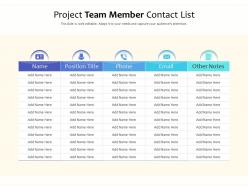
The image displays a PowerPoint slide titled "Project Team Member Contact List," which is a template for organizing and displaying contact information for team members involved in a project. The slide is designed to be fully editable, allowing users to adapt it to their specific needs.
The text elements present in the slide are placeholders for the following details:
1. Name: Placeholder for the names of the team members.
2. Position Title: Placeholder for the job titles of each team member.
3. Phone: Placeholder for the contact phone numbers.
4. Email: Placeholder for the email addresses.
5. Other Notes: Space to add any additional notes relevant to the team member, such as areas of expertise or specific responsibilities within the project.
Use Cases:
This type of slide can be beneficial across various industries to maintain organized contact information for project management purposes. Here are seven industries where such slides can be particularly useful:
1. Construction:
Use: To keep track of various contractors and subcontractors.
Presenter: Project Manager.
Audience: Construction Team.
2. IT and Software Development:
Use: For agile teams to have quick access to member contacts.
Presenter: Team Lead or Scrum Master.
Audience: Development Team, Stakeholders.
3. Healthcare:
Use: In hospital settings for staff involved in specific healthcare projects.
Presenter: Department Head.
Audience: Medical and Administrative Staff.
4. Education:
Use: For organizing contact details of faculty involved in collaborative research or program development.
Presenter: Research Coordinator.
Audience: Faculty Members.
5. Event Planning:
Use: To coordinate with vendors, sponsors, and event staff.
Presenter: Event Manager.
Audience: Event Team, Vendors.
6. Non-Profit Organizations:
Use: For organizing volunteer contacts for various initiatives.
Presenter: Volunteer Coordinator.
Audience: Volunteers, NGO Staff.
7. Marketing and Communications:
Use: To manage contacts for a marketing campaign or public relations initiative.
Presenter: Marketing Director.
Audience: Marketing Team, External Partners.
Project team member contact list with all 2 slides:
Use our Project Team Member Contact List to effectively help you save your valuable time. They are readymade to fit into any presentation structure.

FAQs for Project team
Definitely track names, titles, companies - the usual stuff. Email and phone obviously, but LinkedIn too if you can grab it. I always add a notes section because there's no way I'm remembering how I met someone after like 6 months lol. Personal details help tons for building rapport later. Also mark down if they're a decision-maker or not. Keep everything synced across your devices so you can actually access it when you need it. Honestly? Start adding people now even if they seem totally random. That weird connection from a coffee shop might end up being your ticket to something big down the road.
Honestly, just split them up by where they are in your sales process and how much they're actually responding. Hot prospects, warm leads, cold contacts - that's your foundation right there. Then add tags for stuff like their industry or company size. I always create a "dead ends" folder because, let's be real, some people are never gonna buy. Match your categories to how you actually prioritize who to call first. You can batch similar contacts together and write better messages that way. Start with maybe 4 categories, then tweak it as you figure out what works.
Zapier's honestly your best move here - it connects everything automatically so new CRM leads just show up in your email lists without you touching anything. Most email tools like Mailchimp already have decent automation built in too. IFTTT is another option but it's pretty bare bones. I'd check what your current platform can do first before adding more apps to juggle. The whole "set it and forget it" thing has been a game changer for me. Saves me like 3 hours a week, no joke. Start simple and build from there.
Definitely get consent first - learned this the embarrassing way when I shared someone's info without asking. Strip out personal stuff like birthday reminders or weird tags you've added. I usually make a clean "shareable" version with just names, work emails, basic contact details. Oh and check if your company has data sharing rules, especially with international contacts since GDPR can be a pain. Honestly though, when you're unsure just shoot them a quick message asking if they're okay being included.
Honestly, it's a huge time-saver. You can pull names, titles, and contact info straight into your slides instead of copy-pasting everything manually. When someone updates their job title, it automatically syncs in your presentation too - which is actually pretty cool. Great for personalized presentations or when you need to mention specific people during talks. Oh, and you can quickly throw together follow-up slides with contact details for networking stuff. I'd start simple though, maybe just names and emails first to test it out. You'll probably notice how much smoother everything flows once you get it set up.
Dude, go through your contacts and pick out potential leads, referral sources, plus anyone they know who'd actually care about your stuff. Always invite a few current clients - honestly, they're way better at selling you than you are. Skip the mass email thing and write personal invites explaining why they'd find it useful. Oh, and tell people to bring coworkers if they want. Your existing clients add serious credibility just by showing up. Follow up individually after the presentation while it's still fresh. Make people feel like they scored an invite to something special, not another boring sales pitch.
Ugh, definitely clean up that contact list regularly or you'll regret it. I sent a campaign to like 200 dead emails once - so embarrassing! Set a quarterly reminder to dump bounced emails and outdated job titles. People who've been MIA for months? Delete them too. But here's the thing - don't let it become this huge overwhelming project. Just spend 15 minutes this week reviewing your newest contacts. Also grab new ones right after events or meetings before you forget (I'm terrible at this). Making it a regular habit is way better than those massive cleanup sessions that nobody actually wants to do.
Honestly, most people totally skip tracking this stuff but it's a game changer. Pull your contact data into a spreadsheet and see who's actually opening emails, responding fast, or closing deals. Break your list into three groups - people who always respond, sometimes respond, and never respond. Different messaging for each group works way better. Also check which sources give you the best contacts (LinkedIn vs events vs whatever). I got obsessed with this last year and my response rates doubled. Look at patterns from the last few months - you'll spot trends pretty quick.
Don't overcomplicate your contact slide - just stick to the people your audience actually needs to reach. Names, titles, one contact method (email works best). I always list myself first since I'm usually fielding questions anyway. White space is your friend here; cramped contact info looks messy and honestly kind of unprofessional. Got more than 5-6 people? Break them into "Project Team" and "Leadership" or whatever makes sense. Skip the fancy logos - they just create visual clutter. Oh, and here's something I learned the hard way: email those contacts afterward so people aren't scrambling to take photos of your slide.
So basically, create different tags in your CRM for things like job titles, industries, or how engaged people are with your emails. Most systems make this pretty straightforward. Then write different templates - like formal stuff for executives vs something more relaxed for startup people. Trust me, your response rates will actually improve. Oh, and you can automate it too so different segments get different email sequences automatically. I'd start with maybe 2-3 groups though, otherwise you'll drive yourself crazy trying to manage everything at once.
Honestly, social media is just your phone contacts but way better. You can find people through mutual friends, industry groups, or even hashtag searches - way more interesting than old-school networking events. LinkedIn's pretty great because it automatically tells you when someone switches jobs or gets promoted, so you don't have to stalk everyone manually. The trick is actually engaging with people's posts sometimes instead of just hoarding connections. I usually spend like 10 minutes a week commenting or sharing stuff - keeps you on their radar without being weird about it. It's surprisingly effective for staying connected without much work.
First thing - figure out who actually matters in your space. Competitors, suppliers, potential clients, industry groups. LinkedIn's advanced search is clutch for finding people by company and role. Hit up industry events too, even the virtual ones (I know, they're kinda awkward but whatever). Trade publications are sneaky good - check who's writing for them since those are usually the people everyone listens to. Facebook groups and forums where your industry folks actually hang out? Join those. Way better than cold outreach. Don't go crazy though - maybe 5-10 solid connections weekly instead of just adding random people.
Don't let your contacts turn into a mess of dead emails and old numbers - I learned this the hard way trying to reach someone for a job referral. Super awkward. Throwing everyone into one giant unsorted list is another trap. What works better: clean house every few months. Delete the duplicates, test some emails, maybe group people by how you know them. I do this quarterly now while watching Netflix or something. Takes like an hour but saves me from looking like an idiot later when I'm actually networking.
Totally! Hit up your contact list for feedback - way smarter than just wondering how it went. I'd shoot a quick email to the key people within like 48 hours while it's still fresh. Ask specific stuff though - pacing, clarity, which parts were most useful. Generic "how'd I do?" questions get you nowhere honestly. Pick contacts who'll actually be honest with you, not just the people-pleasers. Oh and if you've got different types of people in that room, ask them separately - a sales guy vs an engineer will notice completely different things. Then actually write down what they tell you for next time.
For contact lists, go with CSV or Excel - they're your safest options. CSV is super universal, opens everywhere, imports cleanly into pretty much any system. Excel's nice when you want formatting or filters to make things look decent. Avoid PDF unless people are just quickly checking something. Nobody wants to manually retype contact info from a PDF (learned that the hard way). Google Sheets works too if your team's already living in there. Oh, and don't forget the basics - name, email, phone, role. You'd be surprised how many people skip the role part.
-
Great designs, really helpful.
-
Helpful product design for delivering presentation.
-
Professional and unique presentations.