

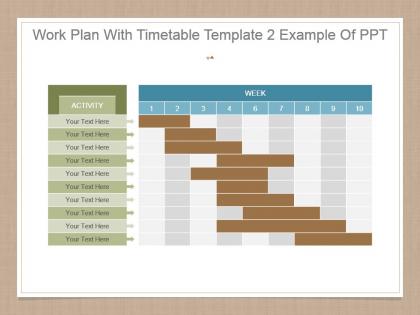
Work plan with timetable template 2 example of ppt




Try Before you Buy Download Free Sample Product
 Impress Your
 Audience
 100%
100% Editable
 Save Hours
 of Time


Drastically change circumstances for the better with our Work Plan With Timetable Template 2 Example Of Ppt. Convert angry to happy.
People who downloaded this PowerPoint presentation also viewed the following :
Work plan with timetable template 2 example of ppt with all 7 slides:
Give a boost to consumption with our Work Plan With Timetable Template 2 Example Of Ppt. Generate ideas that get inflation to fall.

FAQs for Work plan with timetable template 2
So for your work plan template, definitely include clear objectives and specific deliverables - those are non-negotiable. Timeline-wise, break things into realistic milestones and assign who's doing what. Don't forget to map out your resources and budget needs too. Here's the thing though - success metrics are huge. Trust me, you'll be scrambling later when someone asks "did this actually work?" Also throw in task dependencies and potential risks with backup plans. Honestly, the whole point is making it detailed enough that if you got hit by a bus tomorrow, someone else could run with it. Start simple, then tweak based on your team's vibe.
So basically, work plan templates are lifesavers for connecting what your company wants with what your team actually does. I've seen too many teams just spinning their wheels because nobody knows how their daily tasks tie into the big picture. The template breaks down those huge organizational goals into real, specific stuff your team can actually tackle - with deadlines and who's doing what. Once people see how their work matters to the company, they're way more invested. Oh, and start from the top with your main objectives, then work backwards. Makes the whole thing less overwhelming.
Look at your project basics first - how long you've got, team size, what you're actually delivering. Creative stuff needs way more feedback rounds built in. Technical projects? Map out all those dependencies or you'll hate yourself later. Honestly, I've watched people overthink this and spend forever on fancy templates when something simple works fine. Client work means more check-ins and approval steps - just accept it now. Agile focuses on sprints and looking back at what worked. Waterfall's more like building blocks in order. Strip out what you don't need instead of cramming everything in. Test it on something small first.
Dude, timelines and milestones literally save your sanity. Without them, you're basically throwing stuff at the wall and praying it sticks - which, trust me, never works out. They help you catch problems early instead of scrambling at the last minute. Plus there's something weirdly satisfying about checking things off your list, you know? My advice? Figure out your big deliverables first, then work backwards from there. That way you can set deadlines that actually make sense instead of just picking random dates. Oh, and those milestone celebrations are clutch for keeping everyone motivated when the project feels endless.
Honestly, work plan templates are lifesavers because everyone's looking at the same info instead of constantly asking "wait, who's handling that again?" Your team can just glance at it to see deadlines and responsibilities. No more playing phone tag about project details. The visual format makes it super easy to spot when tasks depend on each other or where things might get stuck. Oh, and definitely update it during weekly meetings - that's when people actually remember to mention if something's going sideways. Keeps everyone on the same page without those awkward "I thought YOU were doing that" moments.
Honestly? Just use Excel or Google Sheets for basic work plans - everyone already knows how to use them and you won't get stuck in some complicated software rabbit hole. Microsoft Project is solid if you're managing something massive, but most people don't need all that. Trello's pretty nice for visual stuff, and Asana works well when you've got teams tracking tasks. Google Workspace is clutch for sharing since people can edit simultaneously without that whole "which version is the latest" headache. My advice? Start with whatever your team already uses. You can always upgrade later if you actually need the fancy features.
Honestly, work plan templates are lifesavers for catching risks early. You're basically forced to think through everything upfront - tasks, deadlines, who depends on what. That's when you'll notice the sketchy stuff, like unrealistic timelines or relying too much on outside vendors. I always add risk columns right in the template to track what might blow up, how likely it is, and my backup plans. Way better than scrambling later when things inevitably go sideways (and they will). Oh, and start small - just identify like 3-5 major risks for your next project. Don't overcomplicate it.
Honestly, budgeting is like your project's reality check - separates actual plans from pipe dreams. Map out costs, team hours, tools, contractor fees, whatever you need upfront. Can't tell you how many times I've watched projects implode because nobody thought about software licensing costs or something equally dumb. Dependencies matter too. Always build in extra padding though - maybe 15% for random stuff that pops up. Oh, and spot your resource bottlenecks early so you're not scrambling later. Trust me on this one.
Honestly, just bake the feedback stuff right into your template from the start. Set up check-ins at major milestones - weekly reviews, mid-project pauses, that whole deal. I'd include sections for "what's working" and "what needs fixing" because trust me, I learned this one the hard way when a project completely derailed. Nobody wants to pause and reassess, but you've gotta make someone responsible for actually collecting feedback and setting deadlines. Oh, and try adding a simple 1-10 rating for each deliverable - sounds basic but it helps you spot patterns. The trick is making it feel normal, not like busy work.
Honestly, the trick is getting stakeholders involved instead of just updating them. Set up clear spots in your template where you actually need their input or decisions - that way they can't just ignore it. Color-coding works surprisingly well too, helps people see their piece of the puzzle. Send updates whenever you hit milestones, not just at the end. People lose interest fast if they don't hear anything for weeks. Oh, and schedule those check-ins based on your timeline - sounds obvious but you'd be amazed how many people skip this step. The whole thing falls apart without regular touchpoints.
Yeah, work plan templates definitely change depending on your industry. Healthcare ones are all about compliance and patient safety stuff - tons of documentation deadlines. Education focuses on curriculum milestones and tracking student outcomes. Tech is where it gets messy though - everything's sprint-based with development cycles and testing phases. Agile methodology makes it even more complicated, honestly. The basic structure stays the same across fields, but the actual deliverables are totally different. My advice? Just find one that's already made for your industry. Way easier than trying to twist a generic template into something useful.
Don't go crazy with details right off the bat - you'll get stuck planning forever instead of actually getting stuff done. Make sure timelines and who's doing what are crystal clear, otherwise it's just chaos. I've watched teams build these gorgeous, complicated templates that honestly nobody wants to update after like two weeks. Buffer time is clutch for when things go sideways (and they will). Start with the basics: tasks, deadlines, who owns what, status updates. That's it. Once you figure out what actually works for your team, then you can get fancier with it.
Honestly, your brain just processes visuals way faster than blocks of text. Charts, color coding, progress bars - that stuff clicks immediately. I'd throw in timelines or icons to break up sections so people can scan without drowning in details. The visual stuff sticks in your memory better too, which means your team might actually remember those deadlines (shocking, I know). Even basic things work - bullet points in different colors, simple boxes around sections. Just aim for one visual thing per major section and you'll make everything so much easier to digest.
Focus on the basics first - timeline, budget, and whether you're actually finishing what you said you would. Quality metrics are huge too, way more useful than people think. Don't go crazy tracking everything though, maybe 4-5 max or you'll drown in spreadsheets. Stakeholder satisfaction scores can be tricky to measure but they're gold when you need to prove impact. Resource utilization matters if you're juggling team schedules. Here's the thing - figure out what success actually looks like for YOUR project first, then pick metrics that measure real outcomes instead of just... activity, I guess?
Honestly, the best work plan templates have tons of wiggle room baked in. Add buffer time everywhere and schedule regular check-ins to catch problems early. Include sections for backup plans and alternative approaches - you'll need them more than you think. Oh, and always list your assumptions upfront so when things inevitably change (they will), you can spot what else breaks. Make your milestone dates adjustable too. I learned this the hard way on my last project. Weekly reviews are clutch for staying on track before everything goes sideways.
-
Colors used are bright and distinctive.
-
Really like the color and design of the presentation.