


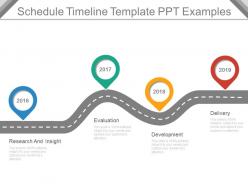
Schedule timeline template ppt examples





Try Before you Buy Download Free Sample Product
 Impress Your
 Audience
 100%
100% Editable
 Save Hours
 of Time


Your ideas will create benchmarks. Add to your credentials with our Schedule Timeline Template Ppt Examples.
People who downloaded this PowerPoint presentation also viewed the following :
Schedule timeline template ppt examples with all 7 slides:
Have full control with our Schedule Timeline Template Ppt Examples. They allow you to exercise command.

FAQs for Schedule timeline
Start with the basics - task names, dates, duration, who's doing what. Dependencies are huge though, like showing which stuff has to finish before other things can start. Milestones and deadlines matter most because that's literally what your boss will ask about every week. I'd add a progress column for completion percentages and resource allocation so you don't accidentally destroy someone's workload. Oh, and definitely include a notes section - trust me, it'll save you from answering the same questions over and over. Keep it simple at first, then tweak it.
Honestly, visuals are a game-changer for timelines. Your brain processes images way faster than text - there's actually science behind that. Color-code different project phases, throw in some progress bars, maybe add icons for task types. I'm obsessed with using arrows and milestone markers because they create this natural flow that pulls your eye through everything. Just don't go crazy with it though. Too many fonts or colors and you'll end up with something that looks like a rainbow threw up on your timeline. Pick one visual element first, then slowly add more.
Honestly, most people mess up by being way too optimistic about timing - like, we ALL do this. Don't cram tons of detail into your template or it won't work for different projects. Keep dependencies loose too because one tiny delay will wreck everything otherwise. Buffer time is huge - always add more than you think you need for random issues that pop up. Also test it on something small first before using it on major stuff. Oh and leave space for revisions because nothing ever goes perfect the first time. I learned this the hard way lol.
Honestly, just swap out the phases for whatever fits your industry. Construction? Think permits, site prep, foundation, framing - pretty straightforward stuff. Software's totally different though - you've got discovery, design sprints, testing cycles. Way more back-and-forth than construction's step-by-step thing. Time blocks matter too. Construction teams might plan weekly or monthly, but dev teams are usually stuck in those 2-week sprint cycles. Oh, and don't forget the random stuff that'll mess you up - weather delays, code reviews taking forever. Start basic and just replace the standard phases with what actually happens in your field.
Hey! So for schedule templates, Excel or Google Sheets are honestly your best bet to start - they're free and you probably already know how to use them. Microsoft Project is amazing but way too much unless you're managing like, actual big projects. Smartsheet's pretty cool if you want something between a spreadsheet and full project software. Oh, and if you need it to look good for presentations or whatever, Canva has some nice visual timeline options. Asana and Monday.com work great too if your team needs to collaborate. I'd just start simple and see what you actually need first.
Honestly, color coding is a game changer for timelines. You can spot different phases or who's responsible for what without reading through everything. I usually do red for urgent stuff, blue for design tasks, green for approvals - that kind of thing. Your team will catch scheduling conflicts way faster since overlapping colors jump right out at you. Just don't go crazy with it though. Stick to maybe 3 or 4 colors max, otherwise it gets messy and defeats the whole purpose. It's basically visual shorthand that saves everyone time.
Honestly, the instant updates are a game changer. When deadlines inevitably shift (and they always do), you just adjust everything digitally instead of crossing out half your timeline. Real-time sharing means your whole team stays in the loop automatically. I love being able to color-code different phases and link directly to files or calendars. The duplicate feature is clutch too - just copy your template for the next project. Oh, and automated reminders save me from constantly checking what's due. Trust me, once you go digital you'll feel silly for sticking with paper so long.
Honestly, these templates are lifesavers for avoiding those awkward moments where everyone needs the same person at once. Map out your tasks first, then figure out what resources each one needs. You'll catch conflicts way before they become problems - like when three different teams all want Sarah on the same day. Plus you can actually see when people are just sitting around doing nothing, which gets expensive fast. The visual aspect makes it so much easier to balance workloads and know when you need to bring in extra help. Way better than trying to keep it all in your head.
Look for a template that handles task dependencies well and has built-in buffer time. Dynamic duration fields are clutch - they'll auto-recalculate everything downstream when you change earlier tasks. Definitely add a scope change log section. I learned this the hard way when I completely forgot what we'd modified halfway through a project. Conditional formatting helps too since it'll highlight critical path issues when dates move around. Oh, and use percentage-based buffers instead of fixed timeframes. Different project types have different creep patterns, you know? I usually start with 15-20% as a baseline.
So I'd start by figuring out what's driving your team crazy first - like are people missing deadlines or just not talking to each other? Then pick tools that actually fix that. Shared calendars work great, and honestly the comment features in Asana or Monday.com are pretty solid for milestone updates. You can link everything to Slack too if that's what you're already using. Google Sheets even works if you're keeping it simple. Oh and set up those auto-notifications - people will actually thank you when they stop forgetting about stuff. Just don't try to do everything at once or it gets messy.
Honestly, getting feedback is what makes the difference between a template you'll actually use vs one that just sits there. Ask everyone who tried it - where did they get confused? What felt clunky? I totally messed this up with my first attempt because I thought I knew what worked, but nobody could figure out my system lol. Watch for the same complaints popping up repeatedly. Maybe your milestones are too tight, or people need more buffer time than you thought. The whole point is making it better each time, so I always do a quick template review after wrapping projects.
Make your milestones super obvious - I go with diamond shapes or little stars so they jump out right away. For deadlines, just draw vertical lines across your timeline and color-code by how screwed you'll be if you miss them (red = very screwed lol). Don't cram everything at the end though, that's a recipe for disaster. Always pad your deadlines because nothing ever goes as planned, trust me on this one. Pick your 3-5 biggest milestones first, then work backwards from there to figure out what tasks you need. Way easier than trying to plan everything forward.
Dude, Gantt charts are seriously worth trying. The visual layout shows you everything at once - tasks, timelines, dependencies. Makes it so much easier to spot where things might get stuck. Way better than staring at endless spreadsheets, honestly. Your team will actually understand what's happening when you show them progress visually. Oh and tracking against your original plan? Super helpful for figuring out how badly you estimated next time (we all do it). Start simple though - don't go crazy with features right away.
Honestly, don't get too specific with your templates - that's what killed mine at first. Go with broad categories like "Planning" and "Execution" instead of naming exact tasks. You'll want buffer time built in that you can adjust based on how complex things get. I made mine way too rigid and had to basically start over every time (such a pain). Throw in placeholder text for deliverables and always include review rounds - trust me on this one. The whole point is having structure without being stuck in a box. Generic milestones are your friend here.
Big picture first - show the timeline before you get into weeds. Color code different phases so it's not just a wall of text. Honestly, too much detail upfront and people just zone out. Walk through the critical path stuff, then let them ask questions. Print backup copies because someone's laptop always crashes at the worst moment. Oh, and don't just ask "any questions?" at the end - be specific about what feedback you need on dates and resources. Makes a huge difference.
-
Design layout is very impressive.
-
Great product with effective design. Helped a lot in our corporate presentations. Easy to edit and stunning visuals.