

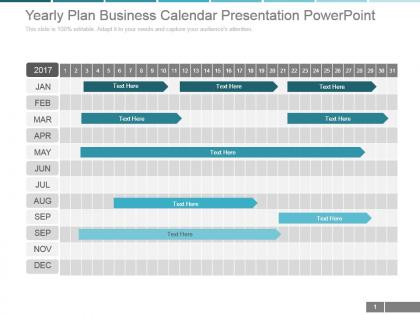
Yearly plan business calendar presentation powerpoint




Try Before you Buy Download Free Sample Product
 Impress Your
 Audience
 100%
100% Editable
 Save Hours
 of Time


Increase the competitive edge you enjoy with our Yearly Plan Business Calendar Presentation Powerpoint. Inch ahead in a decisive fashion.
People who downloaded this PowerPoint presentation also viewed the following :
Yearly plan business calendar presentation powerpoint with all 5 slides:
Presentations shouldnt really be boring except you insist on producing your slides yourself with little technical knowhow. Leave it to the pros to produce compelling presentations using Yearly Plan Business Calendar Presentation Powerpoint designed to impress.
FAQs for Yearly plan business
Okay so first thing - get all your big fiscal milestones and quarterly reviews down on paper. Tax deadlines are huge (seriously, those will bite you if you forget). Then add your budget cycles, any industry conferences you're hitting, and performance review seasons. Seasonal stuff matters too - like if you're retail and holidays crush you, or whatever your busy periods are. Product launches, marketing pushes, benefit enrollment... basically anything that eats up time or resources. I always start with the stuff you absolutely can't move, then squeeze everything else around it. Makes it way easier to catch scheduling disasters before they happen.
Honestly, it's like having one place where everyone can see what's actually going on. No more of those annoying "when works for you?" email threads that go on forever. You'll spot scheduling conflicts way ahead of time, and people won't double-book conference rooms or whatever. Everyone knows which meetings they're supposed to show up to and why they're there. The trick is getting your team to dump their big projects and blocked-out time in there first – otherwise it's just another empty calendar nobody uses. Trust me, once it's set up right, coordination gets so much easier.
Honestly just go with Google Calendar if you're using Gmail already - the integration is seamless and sharing with your team doesn't suck. Microsoft users should stick with Outlook Calendar for the same reasons. I've messed around with Calendly and Acuity but they're more for booking appointments than actual calendar management. Short sentences work better here. If you're doing project work, Monday.com or Asana might be worth it since they mix calendars with task tracking. But real talk? Whatever email you're already using probably has a decent enough calendar built in. One less password to forget, you know?
Oh man, holidays and seasonal stuff completely mess with your schedule planning. Like, retail gets absolutely destroyed during Black Friday (obviously), but even boring B2B companies see their summer months tank because everyone's on vacation. Customer demand goes crazy during peak times, then dies during slow seasons. Your staff availability changes too - good luck getting anyone to work the week between Christmas and New Year's. I'd start by just marking all the major holidays on your calendar, then look at your past data to spot those weird patterns. That way you can actually staff up when it's busy and avoid launching anything major when half your team is mentally checked out on a beach somewhere.
Okay so first thing - color code everything. Meetings, deadlines, focus time, whatever. Makes such a huge difference visually. Then block out chunks for deep work and don't let anyone mess with those times, seriously. I learned this the hard way but always add buffer time between stuff because back-to-back days are just misery. Oh and definitely share your calendar with your team so they know when you're actually free vs when you're in the zone. Review it weekly to see what's working. Maybe just start with colors this week though - don't overwhelm yourself trying to fix everything at once.
Ugh, time zones are honestly the worst part of working with global teams. You'll spend forever trying to find windows where everyone can actually meet without someone being up at midnight. I made that mistake once - scheduled a call at 6am Sydney time and felt terrible about it! What works is rotating meeting times so it's not always the same poor people staying up late. Get a scheduling tool that shows multiple zones at once, trust me on this. Map out everyone's working hours first though. Makes it so much easier to spot those sweet overlap windows.
So a business calendar is like your financial roadmap - it tracks all your important dates, seasonal trends, and when cash actually flows in and out. Mark your big revenue cycles and expense deadlines first. That'll make your forecasts way more accurate than just guessing by regular months. Use it to time budget approvals and catch those seasonal dips (January always sucks for retail, right?). Honestly, most people wing this part and then wonder why their projections are garbage. It helps you see your actual business rhythm instead of pretending every month is the same.
Just use your calendar's repeat function - super easy to customize how often things happen and when they end. Honestly though, first figure out what actually needs to repeat vs what you're just doing on autopilot. I swear half my recurring meetings could disappear tomorrow and nobody would notice. For weird scheduling patterns, I usually make one template then copy it in batches each month instead of setting up individual events. Way faster. Oh and definitely put agenda notes in the description - people forget why recurring meetings exist in the first place.
Oh dude, you'll want to sync your calendar with whatever PM tool you're using - Asana, Monday, Trello, they all do it now. I actually missed three deadlines last quarter because I didn't have this set up (so embarrassing). Auto-create tasks for recurring meetings and deadlines so stuff doesn't slip through. Your calendar should be THE place for time-sensitive deliverables. Also, buffer time around big deadlines is clutch - honestly can't stress this enough. Sprint planning and reviews should auto-populate as tasks too. Trust me, it's a game changer once you get it running.
Honestly, your calendar data is like a goldmine you're probably not even touching. Export a month's worth and start categorizing meetings by type - you'll be shocked at what you find. Those "quick brainstorms" that somehow stretch to 90 minutes? Track 'em. See when your team actually gets stuff done versus when they're just going through the motions. I started doing this last year and realized we had way too many recurring meetings that were basically time vampires. Also check for double-booking patterns and seasonal client trends. It's wild how much clearer your planning gets once you can actually see where all your time disappears.
Honestly, first figure out who actually needs to see what - your boss probably doesn't care about your daily standup times. Stakeholders usually just want the big picture stuff anyway. Keep sensitive client discussions private for sure. Pick a platform everyone can actually use without wanting to throw their laptop out the window. Set it to view-only at first - trust me on this one, people will accidentally delete things otherwise. You can always open up permissions later once you see how it goes. Start simple and build from there.
Yeah, realistic deadlines totally work as motivators - they give your team something concrete to aim for. Short wins keep people engaged way better than one huge scary deadline looming over everything. I'd say break stuff into weekly or bi-weekly chunks instead. Honestly, impossible deadlines are team killers though. You want that sweet spot where it's challenging but doable. People need structure and clear targets. Plus you'll spot problems early with regular check-ins rather than discovering everything's broken at the end.
Honestly, you need to switch to calendar view. Lists are terrible for seeing the big picture - you're constantly scrolling around trying to figure out what's actually going on. But with a calendar? You immediately see your busy weeks, dead zones, scheduling conflicts, all of it. Your brain just processes visual info way faster than reading through line items. Plus dragging stuff around when plans change is so much easier. I used to be a list person too, but once I made the switch my planning became like 10x more intuitive. Trust me on this one.
Honestly, mobile accessibility is huge for remote teams. Everyone can stay in the loop no matter where they're working from. Checking schedules from your phone, joining meetings while you're out, getting those last-minute notifications - it all just works better. I can't tell you how many awkward "wait, was that meeting today?" moments it prevents. Your team gets updates instantly and can actually respond to changes in real time. Just make sure people actually use the app though - I've seen teams set it up and then half the people never turn on notifications. Then you're back to the whole email mess again.
Dude, getting a business calendar seriously changed everything for me. It forces you to actually see where your time goes - no more work bleeding into dinner or weekends. I'm big on color-coding work stuff vs personal (maybe overkill but whatever). The key thing? Actually block out lunch and when you're done for the day. Sounds obvious but most people skip this part. When you start seeing your calendar fill up, you get way pickier about what's worth your time. I used to be awful at boundaries until I started treating my personal time like real appointments. Game changer.
-
Illustrative design with editable content. Exceptional value for money. Highly pleased with the product.
-
Nice and innovative design.