


Yearly Timeline For Waterfall Project Plan




Try Before you Buy Download Free Sample Product
 Impress Your
 Audience
 100%
100% Editable
 Save Hours
 of Time


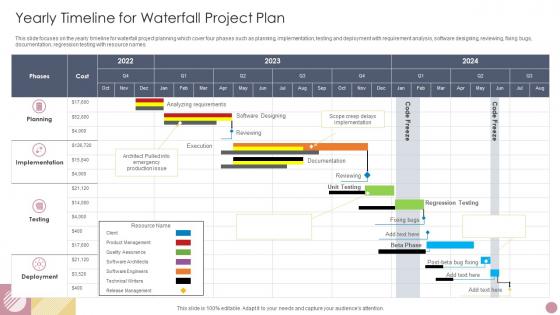
This slide focuses on the yearly timeline for waterfall project planning which cover four phases such as planning, implementation, testing and deployment with requirement analysis, software designing, reviewing, fixing bugs, documentation, regression testing with resource names.
People who downloaded this PowerPoint presentation also viewed the following :
Yearly Timeline For Waterfall Project Plan with all 6 slides:
Use our Yearly Timeline For Waterfall Project Plan to effectively help you save your valuable time. They are readymade to fit into any presentation structure.





FAQs for Yearly Timeline For
So Waterfall has six main phases you gotta hit in order: Requirements gathering, System design, Implementation/coding, Testing, Deployment, and Maintenance. Once you finish a phase, that's it - no backtracking allowed. Honestly the name makes way more sense when you think about it that way. Most of your time gets eaten up in the beginning with requirements and design work, but it's worth it because fixing stuff later is a total nightmare. Oh and make sure everyone actually agrees on the requirements first - learned that one the hard way!
Don't try estimating the whole phase at once - you'll be way off. Break everything into smaller chunks and estimate those instead. Start with requirements since that drives everything else. Got data from past projects? Use it. I always tack on 20-30% extra time because stuff just takes longer than you think it will. Testing's gonna need at least 2-3 rounds of fixes, trust me on that one. Get your team involved in the estimates too - they actually know how long their work takes better than you do. Oh, and write down what you're assuming so you can adjust when things inevitably change.
Honestly, I'd go with Smartsheet or Microsoft Project for waterfall stuff. Both handle dependencies really well and you'll need those Gantt charts. Smartsheet's probably easier to learn and better for team collaboration. If budget's tight, ProjectLibre works but man, that interface looks ancient - still does what you need though. For smaller projects you could even use Excel with a decent Gantt template. The main thing is making sure whatever you pick can show how tasks connect to each other. I keep coming back to Smartsheet because it just feels less clunky than most project management tools.
Honestly, timelines are lifesavers for catching issues before they blow up completely. Map out each phase with realistic deadlines - and I mean *realistic*, not wishful thinking - so you can spot bottlenecks early. Build in some buffer time too. When stakeholders want to change everything midway (and they will), you've got documentation showing how it'll mess up the whole schedule. Your team stays on the same page because everyone knows what's due when. The trick is being brutally honest about how long stuff actually takes. I learned this the hard way on my last project.
Honestly, the worst thing you can do is be way too optimistic with timelines - I've seen this kill so many projects. You'll totally underestimate how complex stuff gets and forget about all the dependencies between tasks. Plus stakeholders ALWAYS want to change things halfway through, which is a nightmare in Waterfall since everything's so rigid. My advice? Pad your estimates by like 20-30% because testing and rework always take forever. Get those requirements nailed down upfront with actual signatures - seriously, make them commit. Breaking big tasks into smaller pieces helps too since you'll catch problems faster. Murphy's Law is real, so just plan for things to go sideways.
Ugh, stakeholder engagement is huge for Waterfall timelines. You literally can't move to the next phase without their sign-offs - requirements, design approvals, testing feedback, all of it. When they're MIA, everything just sits there waiting. And honestly? The more stakeholders you have, the worse it gets with those never-ending approval cycles. Waterfall hates delays since it's all sequential anyway. During planning, figure out exactly who approves what and when. Then pad your timeline with extra buffer time for their review processes - trust me on this one. Book those checkpoint meetings way ahead of time.
For Waterfall projects, focus on schedule variance (SV) and schedule performance index (SPI) first - they'll tell you if you're running behind and by how much. Critical path progress is huge since everything's so sequential. Milestone completion rates are pretty straightforward to track too. Earned value management basically just compares what you planned vs what actually got done over time (sounds more complicated than it is). Phase gate completion percentages and resource utilization help round out the picture. Oh, and set up weekly dashboard updates - catching delays early prevents that domino effect that'll wreck your whole timeline. Trust me on that one.
Ugh, scope changes in Waterfall are the worst. Since everything builds on the previous step, any new requirements force you to backtrack through phases you already finished. Picture changing your house's foundation after the walls are up - technically doable but a nightmare. The timing matters too. Discover changes late in the project and you're looking at redoing tons of analysis and dev work, which gets expensive fast. Short sentences work better here. My take? Fight hard to nail down your scope at the beginning and don't let people sneak in "quick additions" without proper change control.
Honestly, waterfall projects live or die by that upfront timeline work. Get super specific about what depends on what - like if design is late, development's screwed, then testing gets crushed, you know? I do this big kickoff where we walk through the whole thing together (not just individual tasks). Figure out which deadlines are absolutely set in stone vs. the ones where you can fudge a bit. Then bug everyone with weekly updates showing actual progress against the plan. Flag problems early before they snowball. Trust me, spending extra time on the timeline at the start saves you from total chaos later.
Timeline changes in Waterfall? Ugh, that's rough. First thing - figure out how it'll mess with everything downstream. Don't try to handle the delay quietly (I've watched PMs crash and burn doing that). You've got three main options: cut scope, get more people, or push the deadline. The tricky part is Waterfall makes everything sequential, so delays snowball fast. Get leadership on board before you change anything - seriously, don't skip this step. Oh, and document the hell out of whatever you decide so there's no confusion later about the new plan.
Honestly, documentation saves your butt in Waterfall. You need those clear handoffs between phases or everything turns into chaos. Get stakeholder sign-offs on deliverables before moving forward - trust me on this one. I've watched so many projects crash when teams wing it and everyone starts making assumptions. It helps you spot delays early too. The phase gates with required approvals? That's what keeps your timeline from becoming a total mess. Without proper docs, scope creep will eat your schedule alive. It's boring work but you'll thank yourself later.
Put milestones after each big phase wraps up - requirements getting signed off, design approval, dev work finishing, testing complete. They're basically your checkpoint moments where you stop and make sure everything's still on track. Don't overdo it though or you'll drown in paperwork (learned that one the hard way). Each milestone should connect to something concrete that stakeholders can actually look at and approve. Way easier to catch problems early this way. Oh, and definitely nail down what "done" means for each milestone upfront - saves so many headaches later.
Oh dude, resource allocation is HUGE for Waterfall timelines. Like, you can plan the perfect schedule but if your developers are stuck on another project when phase 2 starts? Your timeline's toast. I learned this the hard way last year - we had this beautiful Gantt chart that meant nothing because half our team wasn't available. Since Waterfall's so sequential, one bottleneck screws everything downstream. My advice? Map out who you need and when, then double-check they're actually free. Don't just assume people will magically appear when you need them.
Your old projects are honestly the best predictor you've got. Dig into similar ones - same team size, complexity, that stuff. Testing ALWAYS runs long (I swear teams never learn), so see where delays hit before. Requirements changes? Track which ones derailed timelines the most. Build up actual data on how fast your team really works, not how fast you hope they will. Way better than just guessing dates and crossing your fingers.
So with Waterfall, you basically get customer feedback at set checkpoints - after requirements, design, that kind of thing. Not the constant back-and-forth you'd see in Agile. Customers sign off on deliverables at these predetermined gates, which honestly feels pretty old-school now. The tricky part? If they want big changes halfway through, you're kinda screwed since everything builds on the previous step. Timeline and budget go out the window. My advice - get as much input as possible upfront during requirements and be super clear about what changes will cost later.
-
SlideTeam, Please don’t stop sharing discount coupons! I love your occasional discounts and tend to buy your products around that corner.
-
Great designs, Easily Editable.