

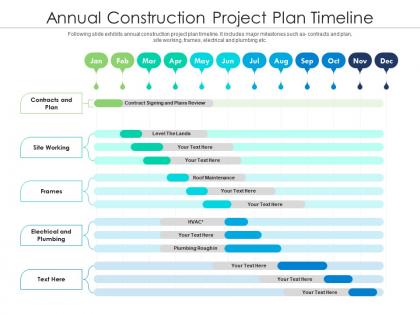
Annual construction project plan timeline




Try Before you Buy Download Free Sample Product
 Impress Your
 Audience
 100%
100% Editable
 Save Hours
 of Time


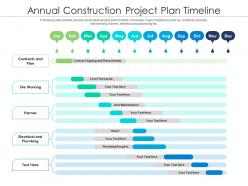
Following slide exhibits annual construction project plan timeline. It includes major milestones such as- contracts and plan, site working, frames, electrical and plumbing etc.
People who downloaded this PowerPoint presentation also viewed the following :
Annual construction project plan timeline with all 2 slides:
Use our Annual Construction Project Plan Timeline to effectively help you save your valuable time. They are readymade to fit into any presentation structure.
FAQs for Annual construction
So there's basically three big phases: pre-construction, construction, and close-out. Pre-construction is all the planning stuff - permits, contracts, ordering materials. Construction is where things get messy but exciting - site prep, foundation, framing, all your systems and finishes. Close-out covers inspections and punch lists before handover. Here's the thing though - delays in one phase totally mess up the others. Honestly, I'd map out your major milestones right away so you can catch problems before they snowball. Oh, and maybe budget extra time because construction timelines are... optimistic at best.
Look, scheduling is basically your survival guide for not losing your mind on a project. You map out which trades come when so they're not stepping all over each other. Weather delays? Unexpected problems? Yeah, those always happen - but if you've built in realistic buffers, you won't panic when stuff goes sideways. Materials show up on time, everyone knows their role, and you can actually spot trouble before it derails everything. I'd say update it weekly though, maybe over coffee Monday mornings. Trust me, spending that hour will save you from so many headaches later.
Gantt charts are your best bet for construction timelines. Microsoft Project and Primavera P6 dominate the industry, but P6 is honestly way too much unless you're building skyscrapers or something. I'd start with Smartsheet or Asana - they're so much easier to figure out. Monday.com works well too. The thing is, doesn't matter how fancy your software is if your team won't use it. I've seen crews completely ignore expensive tools because they were too complicated. Pick something simple that everyone will actually stick with.
So critical path is basically the longest chain of tasks that sets your minimum project timeline. Any delay there pushes everything back. You'll want to map out dependencies first, then spot which activities have zero buffer time - those are your critical ones. Honestly, I used to think it was overkill but it's saved my butt so many times. The bonus? You can see where non-critical tasks have float time, so when stuff inevitably goes wrong (and it will), you've got options for shifting resources around. Just keep a close eye on that critical path from day one.
Ugh, weather delays are the worst - seems like every job I've done gets hit by rain or snow at the worst possible moment. Permit issues drag things out too, and don't even get me started on material shortages. Your client will definitely change their mind about finishes halfway through, which means change orders and more delays. Labor's been super tight lately, so good luck finding crews when you need them. Oh and when one subcontractor falls behind, everyone else gets screwed over. I always pad my timeline now and keep backup suppliers on speed dial. Trust me on this one.
Dude, bad stakeholder communication will totally destroy your timeline. You'll get hit with scope creep and those annoying last-minute changes that set you back weeks. I've watched clients completely flip their requirements halfway through because no one confirmed what they actually wanted upfront - absolute chaos. Weekly check-ins are your best friend here. Document everything too, otherwise people conveniently "forget" what they agreed to. Catching problems early beats scrambling later. Trust me on this one.
Dude, resource allocation can totally make or break your timeline. Map out what you'll need for each phase ahead of time - people, equipment, materials, whatever. I've watched projects crash because someone just figured the crane would be available Tuesday (surprise, it wasn't lol). Always build in buffer time for the critical stuff. Honestly, having backup plans saved my butt more times than I can count. Check your resource usage every week or so. That way you'll catch bottlenecks before they mess up your whole schedule. Trust me on this one.
Yeah delays will absolutely wreck your budget. Equipment rentals keep charging, labor hours pile up, and don't even get me started on penalty fees. One trade falls behind? Everything else gets pushed back too - it's like dominoes. Your overhead just burns money while work sits there stalled. Then you're scrambling to catch up with rush orders and overtime pay. I learned this the hard way on my last big job. Best thing you can do is pad your timeline from the start and get solid delay clauses in every contract.
Honestly, just assume everything's gonna take way longer than planned and build in cushion time. Weather, permits, supply chain stuff - that's where projects usually get screwed. I'd stay on top of your subs and suppliers constantly so you spot issues before they blow up. Smart move is sequencing work so if one crew gets stuck, others can still hustle on different sections. Oh and definitely do weekly check-ins to track where you're at. Soon as you see things going sideways, pivot fast. Trust me on this one.
BIM's a game changer for keeping projects on track. Clash detection catches problems before crews show up - way better than finding out your ductwork hits a beam when it's already installed. Everyone works off the same model too, so the electrical guys can't claim they didn't know about the plumbing changes. It handles all those tedious scheduling calculations automatically instead of doing math on spreadsheets like it's 1995. Short sentences work. I'd honestly feel lost running a project without it now. If you're just getting started, focus on clash detection first - that feature alone will probably save you more headaches than you realize.
So there are four main things you should track: schedule variance (basically are you ahead or behind), percent complete vs. time that's passed, critical path delays, and how well you're using your resources. Change orders are huge too - honestly they're probably what kills most timelines when they start stacking up. Schedule variance is your best friend here since it shows exactly where you stand against your original plan. I'd check these weekly and if something's been going downhill for two weeks straight, that's your red flag to jump in. Way better to fix small stuff early than deal with a disaster later.
Look, you gotta bake quality checks right into your schedule from day one. Don't treat them like some afterthought. Set up regular inspections at your major milestones - trust me on this. I've watched so many projects crash because people rushed the early stuff and paid for it later with massive rework. Speed up everything else instead: get materials ordered early, run tasks in parallel when you can, keep communication tight. Honestly, catching problems early saves way more time than cutting corners ever will. Map out where you absolutely can't compromise on quality first, then figure out how to be faster everywhere else.
Dude, you NEED contingency planning - it's literally your lifeline when projects go to hell. Weather delays, permit drama, materials showing up late, that one contractor who's perpetually "5 minutes away." I usually tell people to add 10-20% buffer time to anything on your critical path. One tiny screw-up without buffers? Your whole timeline's toast and budget's blown. Figure out your biggest risk factors first and pad those areas. Trust me, you'll be so grateful you did this when everything's falling apart later. Oh, and document everything - learned that one the hard way.
Weather's gonna throw you curveballs, no doubt about it. Winter shuts down concrete work and most outdoor stuff. Spring rain can stop excavation dead in its tracks for days. Summer's your best bet, though crazy heat means shorter work days. Fall works well too, but you're basically sprinting before winter hits again. Honestly, I learned this the hard way on my buddy's deck project last year. Build in extra time - like 15-20% more if you're crossing seasons. Try to schedule the big outdoor work when weather's most reliable.
Absolutely dig into your old project data - it's the best way to get realistic timelines. Check where you always went over: permitting, weather, scope changes? Those patterns tell you exactly where to pad estimates. Electrical work ALWAYS takes longer than you think, trust me on that one. Track which contractors actually showed up on time vs the flaky ones. Don't forget seasonal stuff that bit you before either. Make a simple template capturing the biggest timeline killers from each job. Then actually use the damn thing when bidding - not just another file collecting dust.
-
Very well designed and informative templates.
-
Very well designed and informative templates.