

360 Degree Feedback Powerpoint Presentation Slides





Try Before you Buy Download Free Sample Product
 Impress Your
 Audience
 100%
100% Editable
 Save Hours
 of Time


Introducing 360 Degree Feedback PowerPoint Presentation slides showcasing the methods which help in giving the review or feedback of an individual employee. With the help of this multi-rater feedback PPT presentation template, the managers can interact with their employees regarding their behavior from a variety of points of view. There are various steps involved in this employee assessment presentation deck such as employee’s capabilities, productivity, accomplishing the target, data valuation, data visualization, quality of work, flexibility to perform various tasks, coordination with the other members, etc. depicting the overall performance or assessment of an individual. This multi-source feedback PPT template helps the higher authority to provide feedback to their subordinates in order to increase productivity and economic growth. The 360-degree feedback PowerPoint deck comprises a total of 28 slides which are really reliable and easy to understand. Therefore, download this ready-to-use performance review presentation deck and rank the performance of your employee.
People who downloaded this PowerPoint presentation also viewed the following :
Content of this Powerpoint Presentation
Slide 1: This slide introduces 360 Degree Feedback. State Your Company Name and begin.
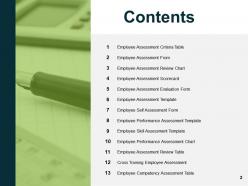
Slide 2: This slide shows Content of the presentation.
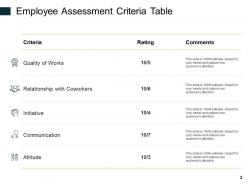
Slide 3: This slide presents Employee Assessment Criteria Table describing quality of works, relationship with coworkers, initiative, communication and attitude.
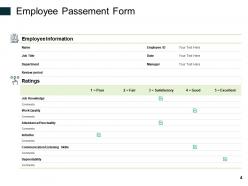
Slide 4: This slide displays Employee Assessment Form with employee information and ratings.
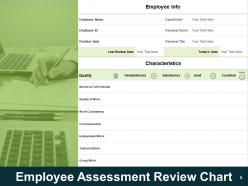
Slide 5: This slide represents Employee Assessment Review Chart with employee information and characteristics.
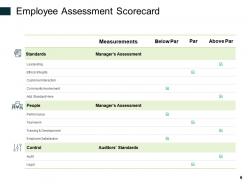
Slide 6: This slide showcases Employee Assessment Scorecard in a tabular form with categories as measurements, below par, par and above par.
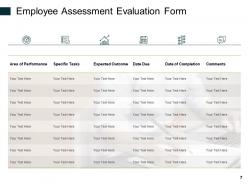
Slide 7: This slide shows Employee Assessment Evaluation Form with categories as- area of performance, specific tasks, expected outcome, date due, date of completion and comments.
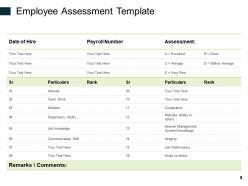
Slide 8: This slide presents Employee Assessment Template with date of hire, payroll number and assessment.
Slide 9: This slide displays Employee Self Assessment Form describing ratings.
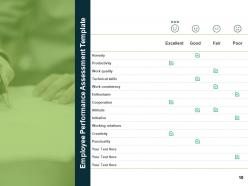
Slide 10: This slide represents Employee Performance Assessment Template.
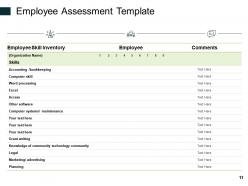
Slide 11: This slide showcases Employee Assessment Template with categories as employee skill inventory, employee and comments.
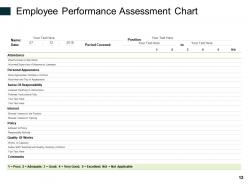
Slide 12: This slide shows Employee Performance Assessment Chart with attendance, personal appearance, sense of responsibility, interest, policy, quality of works and comments.
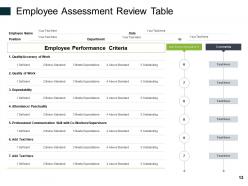
Slide 13: This slide presents Employee Assessment Review Table. You can add or edit data as per requirements.
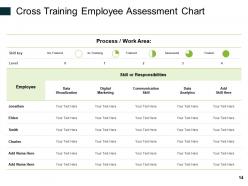
Slide 14: This slide displays Cross Training Employee Assessment Chart with process/work area and skills/responsibilities.
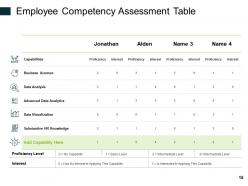
Slide 15: This slide represents Employee Competency Assessment Table with categories as- capabilities, business acumen, data analysis, advanced data analysis, data visualization and substantive Hr knowledge.
Slide 16: This slide showcases 360 Degree Feedback Icons.
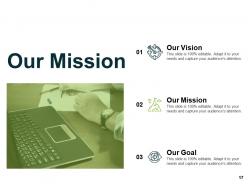
Slide 17: This is Our Mission slide with related imagery and text boxes.
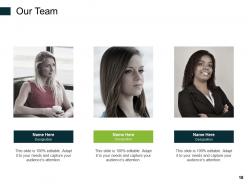
Slide 18: This is Our Team slide with names and designation.
Slide 19: This is a Financial slide. Show your finance related stuff here.
Slide 20: This is Our Target slide. State your targets here.
Slide 21: This is About Us slide to show company specifications etc.
Slide 22: This is a Bulb or Idea slide to state a new idea or highlight information, specifications etc.
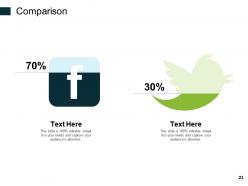
Slide 23: This is a Comparison slide to state comparison between commodities, entities etc.
Slide 24: This slide shows Mind Map for representing entities.
Slide 25: This is Our Goal slide. Show your firm's goals here.
Slide 26: This is a Puzzle slide with text boxes to show information.
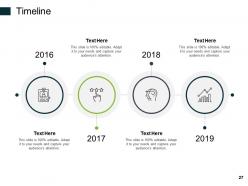
Slide 27: This is a Timeline slide to show information related with time period.
Slide 28: This is a Thank You slide with address, contact numbers and email address.
360 Degree Feedback Powerpoint Presentation Slides with all 28 slides:
Use our 360 Degree Feedback Powerpoint Presentation Slides to effectively help you save your valuable time. They are readymade to fit into any presentation structure.


FAQs for 360 Degree Feedback
Honestly, the self-awareness piece is huge - people get feedback from their boss, coworkers, and team members, so they finally see the full picture instead of just one perspective. Most folks are genuinely surprised by what they learn! It helps spot skill gaps you didn't know existed and gets everyone actually talking about performance instead of avoiding those conversations. Less bias too since you're not stuck with just your manager's view. Oh, and don't roll it out everywhere at once - that's a recipe for disaster. Test it with people who are actually excited about it first.
Three things really matter here: clear criteria, good questions, and actually doing something with the feedback afterward. Your forms should ask about specific stuff - like "gives clear project updates" instead of the usual vague "good communicator" nonsense. Make sure questions connect to skills that actually matter for their job. Here's the thing though - don't just collect feedback and throw it at people. I've watched that train wreck happen. You gotta pair it with coaching conversations or planning sessions. That's when people can actually figure out what to work on next instead of just feeling overwhelmed.
Honestly, the two big ones I see all the time are anonymity screwups and zero follow-through. People will clam up instantly if they think their feedback can be traced back to them. But here's what's worse - companies collect all this feedback and then do absolutely nothing with it. Super frustrating. You'll also want to actually teach people how to give decent feedback first. Not everyone's naturally good at being constructive vs just complaining. Oh, and terrible timing kills everything - don't launch this during layoffs or when everyone's already stressed. My advice? Figure out your post-feedback action plan before you even start collecting responses.
Honestly, tech makes 360 feedback so much less painful. First off, automated surveys mean you're not constantly bugging people for responses - total game changer. Mobile apps help too since people can actually fill them out whenever. The analytics part is pretty cool - you get instant dashboards showing patterns you'd miss otherwise. AI handles all that tedious text analysis stuff, which saves forever. I'd probably start with something that plays nice with whatever HR system you already have. Oh, and being able to track changes over time? That's where it gets really useful for development planning.
Oh man, this is such a real issue! So in places like Japan or Middle Eastern countries, people hate giving direct criticism - it's considered super rude. But Germans? They'll tell you straight up what's wrong, no sugar-coating. The power distance thing is huge too. Some cultures think it's crazy disrespectful for employees to critique their boss, which honestly makes the whole 360 thing pointless. I'd definitely do some cultural training first. Maybe tweak how you collect feedback so it doesn't clash with local styles - otherwise you're gonna get a bunch of useless responses.
Honestly, anonymity is what makes the whole thing work. People won't give you real feedback if they think you'll know who said what - like, would you really tell your boss they're micromanaging if your name was on it? No way. Without it, you just get generic "great job!" responses that are completely useless. The platform needs to actually protect people's identities (some don't, which is sketchy), and you gotta tell everyone upfront that it's truly anonymous. Otherwise you're wasting everyone's time.
Most places do 360s once a year, though some stretch it to every 18-24 months. Honestly, you don't want to spam people with surveys - they'll just start giving lazy feedback. Plus it actually takes time for someone to work on what they heard and make real changes. Companies going through big transitions might do them more often for leadership roles. But yearly is the sweet spot. Gives people enough runway to improve and show progress. Oh, and definitely sync it with performance reviews if you can - makes the whole development planning thing way more useful. Otherwise the feedback just sits there doing nothing.
Honestly, start with participation rates - low engagement is your first warning sign something's off. After 3-6 months, check if people actually changed their behavior through follow-ups or manager feedback. Development plans are huge too - are people making them AND sticking to them? Employee engagement usually bumps up when 360s are done right, though that takes forever to show up in the data. The real money shot is seeing actual improvements in leadership or team performance. Oh, and don't go crazy tracking everything - pick like 2-3 metrics max or you'll drown in spreadsheets.
Don't dump everything on them - stick to themes like "I heard I need to get better at delegating" rather than quoting specific feedback word for word. Here's what I've learned: resist explaining yourself or getting defensive (so tempting but makes things worse). Ask your team how they think you should tackle these areas. Shows you're actually listening and not just going through the motions. Oh, and definitely have concrete steps ready - vague promises won't cut it. Check in with them regularly so they know you're serious about changing, not just talking about it.
Honestly, most people are terrible at both giving and getting feedback at first - totally normal though! Your team needs practice with specific examples instead of vague personality stuff. Maybe bring in someone to facilitate the first session? I'd definitely do some awkward role-playing beforehand so people get comfortable. Templates help too - gives everyone a framework to work with. The whole thing only works if people feel safe being honest instead of just saying nice things that don't actually help anyone. Oh, and teach them how to not get all defensive when hearing criticism!
Honestly, timing is everything here. Run your 360s like 2-3 months before performance reviews so managers can actually use that feedback. Map out the competencies first though - your 360 questions should match what you're measuring in performance reviews. I learned this the hard way when we had totally different criteria and it was a mess. Get your HRIS to pull the 360 data straight into performance profiles too. Saves managers from playing detective with spreadsheets. Oh, and definitely pilot this with just one department first. You'll thank me later when you're not fixing issues across the whole company.
So here's the thing about 360 feedback - it basically makes getting input feel normal instead of this weird formal thing that happens once a year. You're pulling perspectives from your boss, coworkers, people who report to you, the whole deal. Makes everyone realize growth isn't just for "problem employees" or whatever. The cool part is you'll spot blind spots you'd never see on your own. I'd probably do it quarterly? Just make sure you actually talk through the results afterward - don't just collect surveys and call it done.
Pick people who actually know your work, not just whoever you grab lunch with. Give them a heads up so they're not caught off guard by the whole thing. I always tell them exactly what I'm trying to get better at - makes the feedback way more useful. Ask about specific behaviors and how they affected stuff, not vague personality questions. The tricky part is making people feel safe enough to be brutally honest with you. Oh, and definitely circle back after to show you're not just collecting feedback for fun - actually do something with what they tell you.
Don't make people feel ambushed - that's honestly the fastest way to kill trust. Be upfront about negative feedback and frame it around growth, not like they're in trouble. Pair any criticism with an actual plan they can follow. Honestly, the whole thing falls apart if it feels like a secret performance review. Work together to spot patterns and set goals that actually make sense. Give them coaching support too. The real win is when people don't dread these things anymore - you want them actually wanting the feedback next time. Create that safe space where it's genuinely about development.
Oh nice timing - just dealt with this last quarter! Culture Amp and 15Five are solid starting points, super easy to use. Lattice is worth it if you want the whole performance management thing bundled in. Whatever you do, don't try building this with Google Forms (learned that one the hard way). TINYpulse and Officevibe work fine if budget's tight. The real trick is getting people to actually fill the damn things out - participation beats fancy features every time. Definitely test with a small group first. Oh, and pilot it before going company-wide or you'll hate yourself later.
-
Amazing product with appealing content and design.
-
Great product with highly impressive and engaging designs.
-
Visually stunning presentation, love the content.
-
Wonderful templates design to use in business meetings.
-
Use of different colors is good. It's simple and attractive.