


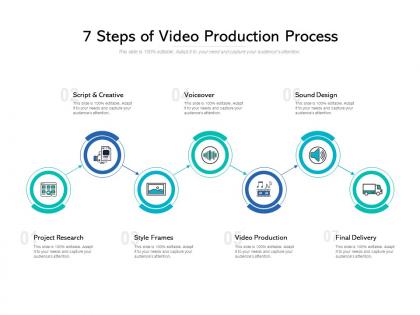
7 steps of video production process




Try Before you Buy Download Free Sample Product
 Impress Your
 Audience
 100%
100% Editable
 Save Hours
 of Time


Translate intention into reality. Enable the process with our 7 Steps Of Video Production Process.
People who downloaded this PowerPoint presentation also viewed the following :
7 steps of video production process with all 5 slides:
Our 7 Steps Of Video Production Process will keep your audience engaged. They will stay hooked onto your views.
FAQs for 7 steps of
So there's basically three phases to think about: pre-production, production, and post-production. Pre-production is all your planning stuff - scripts, storyboards, finding locations, casting, scheduling everything. Production is when you actually film, and honestly it's always chaotic no matter how ready you think you are! Then post comes after - editing, color grading, sound, graphics, all that. Oh and here's something most people don't realize: each phase takes roughly the same amount of time. So if you're trying to figure out your timeline, don't just think about the filming days - triple whatever you're thinking.
Okay so video format totally matters for keeping people watching. YouTube and desktop? Go horizontal. TikTok and Instagram Stories absolutely crush it with vertical though. Square's kinda boring but works decent on most social feeds. Don't be that person posting vertical stuff on YouTube - people will just skip right past it. Mobile's where most people watch anyway, probably like 70% of your views. Match whatever platform your audience actually uses. Oh and definitely test different formats to see what keeps people watching longer. The data doesn't lie.
Dude, storytelling is literally what makes people actually stick around and watch your stuff. Random footage? People will scroll past in like 2 seconds. But give them a story - even for a quick product demo - and suddenly they're invested. Beginning, middle, end. Takes them somewhere, you know? I always think about which videos I actually remember versus the ones that just... disappear from my brain immediately. There's always a story behind the memorable ones. Before you even grab your camera, just sketch out that narrative first. Trust me on this one.
Dude, lighting and sound can literally make or break your whole project. Bad audio? People bail in like 5 seconds, I'm not kidding. Good lighting sets the mood and makes everything look intentional instead of random. Sound design keeps people watching - dialogue clarity, background noise, all of it matters. Honestly, start with a decent mic first. That's way more important than people think. Then learn basic three-point lighting setups. Poor lighting just screams amateur, but terrible audio is what really kills it. Trust me on this one.
Honestly, figure out who you're talking to first - that'll shape everything else. Write like you're actually talking to someone, but cut the fluff. I can't stress this enough: read your script out loud or you'll catch weird phrases later. For storyboards, don't worry if you suck at drawing. Stick figures totally work. Just nail your camera angles and timing. Oh, and map out your B-roll shots early. Trust me on this one - you don't want to be frantically searching for footage at 2am. Build in spots where you can easily cut scenes if you need to trim time later.
Dude, animation totally transforms boring presentations. Motion graphics are perfect for highlighting data - way better than just pointing at numbers. Even basic animated text looks so much more professional than static slides. Transitions help smooth out those weird jump cuts too. I'd start with simple stuff in whatever editing software you're already using. Character animations work great if you want to keep people watching longer. It's clutch for explaining step-by-step processes or showing before/after comparisons. Honestly, once you start adding movement to guide viewers' eyes around the screen, you'll never go back to plain slides.
Honestly, go with Adobe Premiere Pro or DaVinci Resolve for your main editor. Premiere's what everyone uses professionally, but DaVinci's free version is ridiculously good - like, I'm still shocked they give away that much for free. You'll want After Effects too for motion graphics stuff. Audio cleanup? Audition's solid, though Audacity works if you're being budget-conscious. Hardware's huge though - get a decent monitor for color work and pile on as much RAM as you can afford. Oh, and fast storage drives will save your sanity. Start with Premiere if you're just getting into this.
Honestly, it's all about where you're posting it. Social media? Keep it under 60 seconds or people will scroll right past - I've learned this the hard way. Website or presentations can handle 2-3 minutes, but even then... For whatever reason, those first 15 seconds are make-or-break territory. That's when you'll lose most viewers, so put your best stuff upfront. If you've got time, definitely A/B test a shorter version against a longer one. Your audience might surprise you with what they actually stick around for.
Start with your titles and descriptions - stuff them with keywords people actually type into search. YouTube's basically Google's little brother, so treat it that way. Custom thumbnails are huge. Add captions too since YouTube eats that accessibility stuff up. Oh, and rename your video file before uploading - "vacation_tips_2024.mp4" beats "IMG_1234.mov" every time. Get people commenting early because engagement tells the algorithm your content doesn't suck. TubeBuddy's solid for keyword research if you want to get nerdy about it.
Honestly, the biggest thing is timing - drop testimonials right when people are gonna doubt you. Find ones that actually match the pain points you're talking about, not just generic "this is great!" stuff. I've seen way too many videos where they just randomly throw them in and it feels super forced. Split longer ones up instead of doing one massive chunk - keeps things moving. Make sure they sound like real people talking, not some corporate spokesperson. Oh and definitely get permission in writing before you use anyone's face or voice, that's just common sense. Context is everything with these.
Dude, audio problems will absolutely destroy your video - way worse than shaky cam. Monitor your levels constantly and always record scratch audio. White balance every time you switch locations (learned this the hard way after ruining an entire afternoon of shots). Shoot like 3x more B-roll than you think you'll need. Always check your memory cards aren't full before hitting record. Backup batteries are a lifesaver too. Trust me, you'll be so grateful during editing when you've got tons of extra footage and everything actually works.
Dude, audience analysis is literally everything for video content. Know your viewers and you'll nail the tone, pacing, messaging - all of it. Gen Z wants quick cuts and whatever song's trending this week. C-suite people usually prefer polished, slower content (though I've seen some executives who are surprisingly into TikTok-style stuff now). Your audience's pain points and where they actually watch videos should shape your script and visuals completely. Oh, and your call-to-action obviously. Create detailed viewer personas first - like, before you even think about shot lists.
Okay so first things first - get everyone on camera to sign releases before you roll. Seriously, this saves so much headache later. Location permits are crucial too if you're shooting anywhere that's not yours. Music rights are honestly where most people get screwed, so clear anything copyrighted upfront. Watch out for logos and branded stuff in your shots because trademark issues are sneaky. Fair use isn't the get-out-of-jail-free card everyone thinks it is either. Bottom line: document everything with proper paperwork from day one. Trust me, dealing with legal stuff after you've already wrapped is like... ten times more expensive and stressful.
So color grading is basically emotional manipulation in the best way! Warm oranges and yellows make everything feel cozy or energetic. Blues and greens? They create distance, sadness, tension. The Matrix is perfect for this - remember how different the real world looked compared to inside the simulation? That's all color work. You don't even need crazy shifts either. Subtle changes guide your audience's emotions without them noticing. Next time you're editing, push your colors warmer or cooler and see how it completely changes the vibe. It's honestly one of my favorite parts of post.
Lighting is seriously everything - it'll make your video look 10x better instantly. Get a tripod too because shaky footage screams amateur. Color grading is where the magic happens though. I swear I've watched terrible videos that looked incredible just because someone tweaked the contrast and saturation properly. Mix up your shots with rule of thirds, different angles, whatever keeps it interesting. Oh, and clean up your background! Nothing worse than random clutter pulling attention from what you're actually trying to show. Master one thing at a time instead of trying everything at once.
No Reviews