

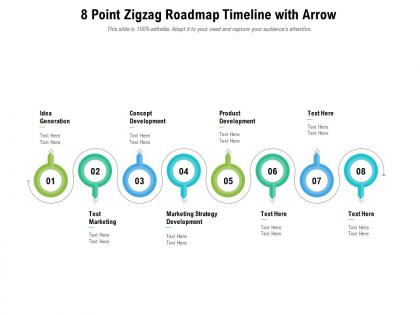
8 point zigzag roadmap timeline with arrow




Try Before you Buy Download Free Sample Product
 Impress Your
 Audience
 100%
100% Editable
 Save Hours
 of Time


Our 8 Point Zigzag Roadmap Timeline With Arrow are topically designed to provide an attractive backdrop to any subject. Use them to look like a presentation pro.
People who downloaded this PowerPoint presentation also viewed the following :
8 point zigzag roadmap timeline with arrow with all 2 slides:
Use our 8 Point Zigzag Roadmap Timeline With Arrow to effectively help you save your valuable time. They are readymade to fit into any presentation structure.
FAQs for 8 point zigzag roadmap
Honestly, zigzag roadmaps are a game changer for timelines. You get way more room to spread everything out instead of cramming it all on one line where nobody can read anything. Your stakeholders won't have to squint at tiny text anymore - they can actually scan through without their eyes glazing over. Works great when you've got a million overlapping phases too. I mean, I used to hate making those dense timeline slides. Just keep the zigzag flow consistent so people don't get lost trying to follow where things go next. Perfect for quarterly reviews.
So instead of those straight-line timelines that go on forever, zigzag ones bounce back and forth - left side, right side, left again. Way easier to read, honestly. Your screen doesn't get all stretched out horizontally, which is nice when you're stuck presenting on someone's tiny laptop. Plus it handles complex stuff with tons of milestones way better than the regular format. I started using this whenever I hit like 6+ major items and it's been a game changer. Same info, just arranged smarter.
Dude, zigzag roadmaps are perfect for software dev and manufacturing - those industries never know what's gonna hit them next. Marketing agencies love them too since clients change their minds constantly. Construction, R&D, product launches... basically anything where you're building something complicated and things keep shifting around. Oh, and consulting firms swear by them. The whole point is having enough chaos that flexibility actually helps you out. But honestly? If your project runs like clockwork with zero surprises, just stick with regular project management. Don't overcomplicate it.
Honestly, zigzag timelines are so much better than those boring straight lines everyone uses. Your audience won't zone out because the left-right pattern keeps their eyes moving naturally through each milestone. Makes everything feel way more dynamic too. You can play around with spacing between points to highlight the big moments - works great for project phases or quarterly stuff. I started using them last year and people actually pay attention now lol. The visual separation between each zigzag point tells your story better than cramming everything in a line. Definitely try sketching one out next time!
For zigzag timelines, I'd go with **Lucidchart** or **Figma** first - they handle custom shapes without being annoying about it. **Miro** is solid too, especially if your team's into that collaborative whiteboard vibe. The sticky notes are actually pretty handy for timeline stuff. **PowerPoint** works but gets messy fast with complex layouts. **Canva** has some nice templates if you just need something that looks good quickly - though honestly, their interface can be a bit much sometimes. Lucidchart probably has the best roadmap features overall, so I'd start there.
Yeah, totally! Zigzag roadmaps work really well for this. The way they alternate back and forth creates natural spots where your eye stops - perfect for highlighting big deadlines. I'd put your major milestones right at those "turn" points since they'll stand out way more than on a regular straight timeline. Plus you get more room to add details without everything looking cramped together. Throw in some different colors or icons at the key dates and you're golden. Honestly, I wish more people used this layout - it's so much easier to scan quickly than traditional timelines.
Honestly, the worst thing you can do is cram way too much stuff onto your timeline - it'll just look messy. Sharp zigzags are annoying to follow too. Pick your big milestones, not every little task (seriously, no one needs to see "sent email to Steve"). Font consistency matters more than you'd think. Oh, and if your zigzag alignment is off, the whole thing looks amateur. I always sketch out the key dates first, then worry about the actual zigzag layout after. Also leave some breathing room between sections - cramped timelines hurt my eyes.
Dude, colors and graphics are game-changers for zigzag timelines. I like using blue for development stuff, green for testing, red for those oh-shit deadlines. Icons and arrows help people actually understand what connects to what instead of squinting at text. Your stakeholders can spot problems way faster when there's visual hierarchy - trust me on this one. Keep your color scheme consistent though, and don't go crazy with fancy icons. Nobody wants to decode weird symbols when they're trying to figure out project flow. It's honestly what separates timelines people ignore from ones they'll actually use.
Yeah, zigzag roadmaps are tricky because people get totally lost if they're not paying attention. Linear stuff is easy to follow but these? Way more complex. Your audience has to actively track all the connections and pivots - honestly, I've watched presentations where everyone just zones out by slide three because they can't keep up. You need interactive bits and visual cues at every turn. Check in with people frequently too. The whole thing falls apart if they can't mentally follow along with each phase. Build in those engagement moments whenever you hit a major pivot point, or you'll lose them.
Basically, build in review points after each zigzag phase. Stop, grab feedback from your stakeholders, then pivot based on what you hear. I'm obsessed with this method honestly - it stops you from wandering into the weeds for weeks. After hitting a milestone, ask what's clicking and what's not. Those insights shape your next timeline and priorities. Oh, and definitely don't skip the feedback session after your current sprint ends. Short checkpoints work way better than trying to fix everything at the end.
Start with the "why" - explain that stuff changes based on market feedback or budget shifts, so the zigzag actually makes sense. Color coding and arrows help connect the dots between projects that look scattered. Honestly, some execs will be confused at first since they're used to those boring straight-line charts. Walk them through how it shows real agility though, and they'll get it. Focus on outcomes, not timeline weirdness. Oh, and definitely have a backup slide with the traditional view - trust me on this one, someone always needs it.
Yeah, totally works! Zigzag roadmaps are actually perfect for agile since you're constantly pivoting anyway. I'd line up those zigzag turns with your sprint boundaries - makes it super visual how priorities keep shifting. Way better than those straight-line roadmaps that basically lie to everyone about how projects actually go. The back-and-forth really shows stakeholders what agile looks like in practice. You could try it for your next quarter maybe? Oh, and it's great for showing how you pivot based on feedback between sprints.
Okay so zigzag roadmaps are actually genius for this. They show all the messy back-and-forth that really happens - like when design has to rework stuff because engineering hits a wall, or user feedback totally shifts your priorities. Way more honest than those perfect waterfall charts we used to pretend worked. Dependencies become super obvious, which means teams start talking before things blow up. I swear, those linear timelines were such fiction. Try sketching your next quarter this way and you'll spot blockers way earlier. Much better for keeping everyone on the same page.
Netflix nailed this - went from mailing DVDs to streaming to making their own shows. Looked crazy each time but totally worked. Amazon's another good one, starting with books then becoming this massive everything-store plus cloud empire. Apple did it too with computers → iPods → iPhones. Honestly, the iPhone move seemed so random at the time but made perfect sense later. Your roadmap needs those same connecting threads, even when pivots look totally unrelated from the outside. Just make sure you document why each shift ties back to your bigger vision. Otherwise stakeholders will freak out thinking you've lost the plot.
Honestly, zigzag roadmaps are great for this exact reason - they're designed around flexibility instead of pretending everything will go perfectly. Each zigzag point becomes a natural spot to pivot and reassess. When your objectives shift (and they always do), you're not throwing away some elaborate linear plan. Just tweak the next segment while your overall direction stays on track. I treat each turn as a checkpoint where I can add new stuff or ditch what's not working anymore. Map out your big decision points as those zigzag moments rather than rigid deadlines. Way less stressful than traditional planning, tbh.
-
Thanks for all your great templates they have saved me lots of time and accelerate my presentations. Great product, keep them up!
-
Easy to edit slides with easy to understand instructions.
-
Easily Editable.
-
Great product with effective design. Helped a lot in our corporate presentations. Easy to edit and stunning visuals.
-
Illustrative design with editable content. Exceptional value for money. Highly pleased with the product.
-
Great product with effective design. Helped a lot in our corporate presentations. Easy to edit and stunning visuals.
-
Appreciate the research and its presentable format.