

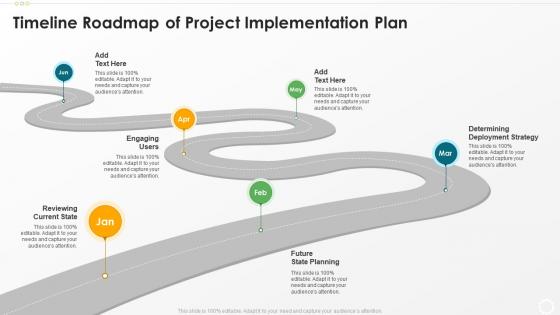
Timeline roadmap of project implementation plan




Try Before you Buy Download Free Sample Product
 Impress Your
 Audience
 100%
100% Editable
 Save Hours
 of Time


Our Timeline Roadmap Of Project Implementation Plan are topically designed to provide an attractive backdrop to any subject. Use them to look like a presentation pro.
People who downloaded this PowerPoint presentation also viewed the following :
Timeline roadmap of project implementation plan with all 6 slides:
Use our Timeline Roadmap Of Project Implementation Plan to effectively help you save your valuable time. They are readymade to fit into any presentation structure.





FAQs for Timeline roadmap of
Okay so you need five main things for a solid project roadmap. Clear milestones first - make them specific, not some vague "research done" nonsense. Then realistic time estimates and figure out which tasks depend on others finishing first. Don't forget resource allocation so you know who's doing what. Buffer time is huge though - seriously, everyone skips this and then freaks out when stuff runs late (which it always does). I'd start by listing your deliverables then work backwards from your deadline. Oh and make sure your milestones are actually measurable!
Honestly, Gantt charts are a total lifesaver for project timelines. You can see exactly how tasks connect - like when one thing has to finish before another can start. Way better than staring at some boring text list, you know? The visual aspect is clutch because you spot bottlenecks immediately. Plus your critical path becomes super obvious. As tasks get done, the bars fill in so you can track progress without hunting through spreadsheets. They're also great for explaining realistic deadlines to your boss or clients. Start simple though - Asana works well, or even Excel if you're feeling basic.
Honestly, most people just use **Microsoft Project** or **Gantt tools like Smartsheet and Monday.com** - they're pretty much the standard. **Asana** and **Trello** work well if you don't need anything too fancy. I've seen teams do fine with just Excel or Google Sheets, which is kinda funny but it works for smaller groups. **Miro** and **Lucidchart** are good picks if you want something more visual. My advice? Start with whatever your team's already comfortable with. Learning a brand new tool when your current one does basic timeline stuff seems like unnecessary work to me.
Start by chopping tasks into tiny pieces - estimating "write user stories" beats guessing at "build entire feature" any day. I dig through similar projects we've tackled and tack on 20-30% extra time because Murphy's Law is real. The devs who'll actually code this stuff? Their input matters way more than mine since they know where the landmines are buried. Oh, and definitely track your guesses against reality afterward. You'll start noticing weird patterns - like how I always lowball anything involving third-party APIs. Write down what derails you most so next time you won't get blindsided by the same stuff.
Look, stakeholder feedback is your lifeline for realistic timelines. They'll catch stuff you missed - like "oh wait, legal needs to review that first" or "our vendor actually takes two weeks minimum." Super annoying when you think you're done planning, but trust me on this one. You'll avoid those awful surprises later. Their input helps you sequence things right and build in actual buffer time. Don't just show them the finished timeline though - get them involved early on the big milestones. Way better than scrambling to fix everything after the fact.
Dude, you've gotta build in way more buffer time for remote teams - like 20% longer than you'd normally expect. Three people once sat around waiting because approvals got buried in someone's inbox (still annoyed about that one honestly). Every milestone needs a clear owner, not just a deadline. Different time zones make handoffs tricky too. Tools like Asana help since everyone can track progress in real-time. Over-communicate everything because stuff gets lost so easily when you're not face-to-face. Weekly team calls for roadmap updates are clutch. Dependencies between tasks? Make them super obvious or people will assume someone else is handling it.
Honestly, I'd start with your biggest risks - like dependencies on other teams or those annoying technical unknowns. Buffer time is your friend here, especially for critical stuff (I usually add 20-30% extra). Trust me, I got burned when our API integration took forever... way longer than anyone predicted. Regular check-ins help too - you can spot problems before they explode. Oh, and definitely have backup plans for anything you can't control. The whole thing is about catching issues early rather than scrambling later when everything's on fire.
So first thing - figure out your critical path, like which tasks will totally screw your deadline if they're late. Those are non-negotiable priorities. Dependencies come next since you literally can't start some stuff until other pieces are done. Oh, and don't be like me and forget about your team's bandwidth - your developer can't magically clone themselves to work on five urgent things at once lol. Quick wins that make stakeholders happy are worth doing too since you'll need that goodwill later. Honestly? Just draw it all out first, then rank everything.
Check these metrics weekly to see if your timeline's actually realistic. Schedule variance shows if you're ahead or behind. Milestone completion rate tracks how many key deliverables you're hitting on time. Resource utilization tells you if your team's swamped or sitting around bored - both are problems. Budget variance matters too since delays usually drain money fast. Oh, and team velocity is honestly my favorite metric because it shows whether your estimates are complete garbage or not. Use this data to fix your next timeline instead of making the same mistakes twice.
Look, milestones basically force your team to actually show what they've done instead of just saying "we're working on it." You want to break everything into smaller chunks with real deadlines – not that vague "let's make progress" stuff that means nothing. Everyone can see who's crushing it and who's falling behind, which honestly creates some healthy pressure. The trick is being super specific about what you want and who's responsible. Then you've got to check in regularly or people will just... forget about them? I've seen it happen way too many times.
Honestly, most people totally underestimate how long stuff actually takes - like it's almost embarrassing how bad we are at this. Build in buffer time or you'll hate yourself later. Also watch out for unrealistic dependencies, especially putting everything on that one person who's already drowning in work. Holidays and PTO will sneak up on you too (plus people are always juggling other projects). Oh and don't get too detailed with timelines upfront when things are still changing. Keep it loose early on, then tighten up as deadlines get closer.
Honestly? Weekly is probably your sweet spot. I do a quick check every couple days just to see if anything's gone sideways, then sit down with the team once a week for the real review. Daily feels overkill unless you're in crunch mode or have a million moving pieces. Monthly though - that's asking for trouble. You'll miss stuff and suddenly you're behind with no idea how it happened. Really depends on your project pace. Start weekly and see how much actually shifts between reviews. If it's pretty stable, maybe you can stretch it. But catching problems early beats scrambling later every single time.
Delays will absolutely wreck your timeline if you don't see them coming. I always build in buffer time - like 10-20% extra depending how messy the project might get. The worst part is that domino effect where one thing pushes everything back and suddenly you're telling people March became June (ugh, hate that conversation). Communication is huge though. Don't sit on bad news hoping it'll fix itself - I've learned that the hard way. Tell your team and stakeholders as soon as timelines shift. People actually appreciate the heads up, and it gives them space to adjust their own stuff. Way better than springing it on everyone last minute.
Honestly, project management software is a lifesaver for timelines. You just drag tasks around, set up dependencies, and boom - it shows you how everything connects. When stuff changes (and it always does), the software updates everyone automatically. No more spreadsheet hell! It'll calculate your critical path and bug people about deadlines. Plus you can see who's swamped and needs help. Start simple though - Asana or Monday.com work great. The real trick is getting your team to actually stick with whatever you pick. That's where most people mess up.
Honestly, just hit them with updates every week or two - consistency is key. Skip the long reports though, people won't read them. I'd go with visual timelines or a simple dashboard they can scan in like 30 seconds. Show what's done, what's next, and flag any issues right away. Don't wait for them to ask about problems, that never goes well. Include the big milestones so they get how one delay screws up everything else. Trust me, a one-pager beats a novel every time.
-
Visually stunning presentation, love the content.
-
Qualitative and comprehensive slides.
-
Out of the box and creative design.
-
I discovered this website through a google search, the services matched my needs perfectly and the pricing was very reasonable. I was thrilled with the product and the customer service. I will definitely use their slides again for my presentations and recommend them to other colleagues.