


Accounts receivable management for billing and collections powerpoint presentation slides




Try Before you Buy Download Free Sample Product
 Impress Your
 Audience
 100%
100% Editable
 Save Hours
 of Time


Our Accounts Receivable Management For Billing And Collections Powerpoint Presentation Slides are topically designed to provide an attractive backdrop to any subject. Use them to look like a presentation pro.
People who downloaded this PowerPoint presentation also viewed the following :
Content of this Powerpoint Presentation
Slide 1: This slide displays title i.e. 'Accounts Receivable Management for Billing and Collections' and your Company Name.
Slide 2: This slide presents agenda.
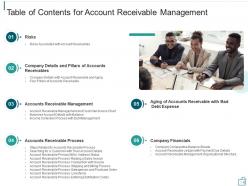
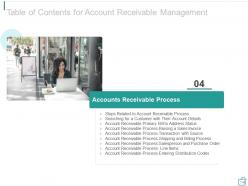
Slide 3: This slide exhibits table of contents.
Slide 4: This slide shows title for Risks.
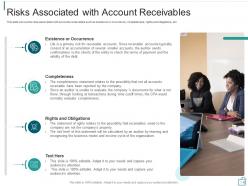
Slide 5: This slide depicts risks associated with accounts receivables such as existence or occurrence, completeness, etc.
Slide 6: This slide displays title for Company Details.
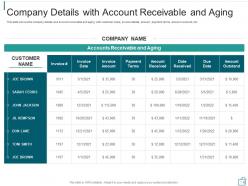
Slide 7: This slide shows the company details and account receivable and aging with customer name, invoice details, etc.
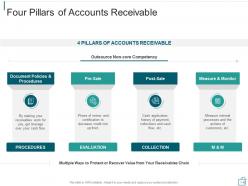
Slide 8: This slide presents four pillars of accounts receivable.
Slide 9: This slide exhibits title for Accounts Receivable Management.
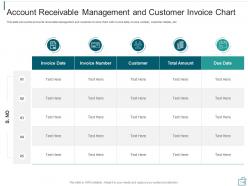
Slide 10: This slide shows the accounts receivable management and customer invoice chart with invoice data, etc.
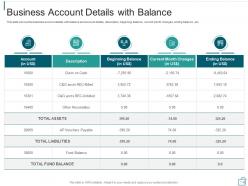
Slide 11: This slide shows the business account details with balance and account details, description, etc.
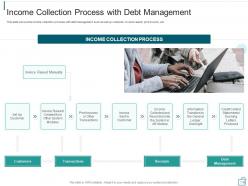
Slide 12: This slide shows the income collection process with debt management such as set up customer, etc.
Slide 13: This slide presents title for Accounts Receivable Process.
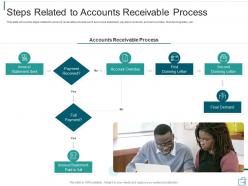
Slide 14: This slide shows the steps related to account receivable process such as invoice statement, etc.
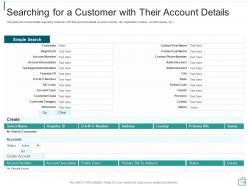
Slide 15: This slide shows the details regarding customer with their account details, account number, etc.
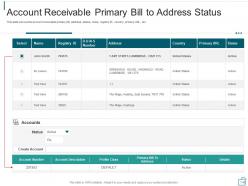
Slide 16: This slide shows the account receivable primary bill, address, status, name, etc.
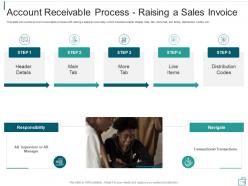
Slide 17: This slide shows the account receivable process with raising a sales invoice step which includes header details, etc.
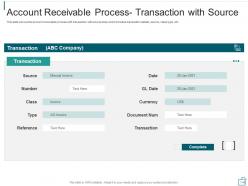
Slide 18: This slide shows the account receivable process with transaction with source step which includes transaction details, source, etc.
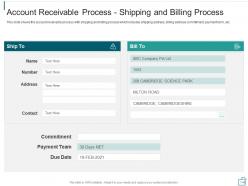
Slide 19: This slide shows the account receivable process with shipping and billing process which includes shipping address, etc.
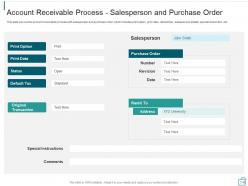
Slide 20: This slide shows the account receivable process with salesperson and purchase order which includes print option, etc.
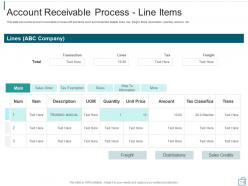
Slide 21: This slide shows the account receivable process with line items such as transaction details, etc.
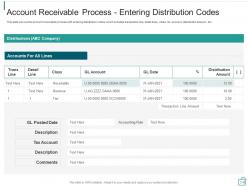
Slide 22: This slide shows the account receivable process with entering distribution codes which includes transaction line, etc.
Slide 23: This slide depicts title for Aging of Accounts Receivable with Bad Debt Expense.
Slide 24: This slide shows the aging of accounts receivable with bad debt expense such as age group, etc.
Slide 25: This slide displays title for Company Financials.
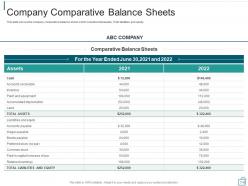
Slide 26: This slide shows the company comparative balance sheet which includes total assets, Total liabilities and equity.
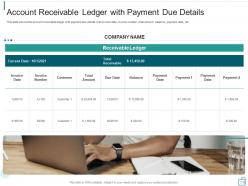
Slide 27: This slide shows the account receivable ledger with payment due details with invoice date, etc.
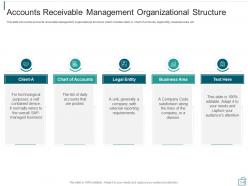
Slide 28: This slide shows the accounts receivable management organizational structure which includes client-A, legal entity, etc.
Slide 29: This is the icons slide.
Slide 30: This slide presents title for additional slides.
Slide 31: This slide shows about your company, target audience and its client's values.
Slide 32: This slide presents your company's vision, mission and goals.
Slide 33: This slide displays details of team members like name, designation, etc.
Slide 34: This slide exhibits comparison of products based on selects.
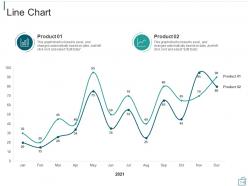
Slide 35: This slide exhibits monthly line charts for different products. The charts are linked to Excel.
Slide 36: This slide exhibits yearly timeline.
Slide 37: This slide displays venn.
Slide 38: This slide shows 30-60-90 days plan for project.
Slide 39: This slide depicts posts for past experiences of clients.
Slide 40: This slide showcases goals.
Slide 41: This is thank you slide & contains contact details of company like office address, phone no., etc.
Accounts receivable management for billing and collections powerpoint presentation slides with all 41 slides:
Use our Accounts Receivable Management For Billing And Collections Powerpoint Presentation Slides to effectively help you save your valuable time. They are readymade to fit into any presentation structure.








FAQs for Accounts receivable management for billing and collections
Honestly, focus on three things and you'll be golden. First - set your payment terms upfront and don't budge on them. I learned this the hard way with a client who kept "needing just one more week." Second, get decent AR software that tracks everything automatically. Weekly aging reports are your best friend here. Create a follow-up system too - like reminders at 30, 60, 90 days overdue. The whole point is catching issues early instead of scrambling later. Oh, and be consistent with follow-ups. Some people think being the "nice guy" helps, but trust me, clear boundaries save relationships in the long run.
Dude, just automate the boring stuff first - invoicing, payment reminders, all that tedious tracking. Takes maybe 20 minutes to set up but saves you literal hours every week. Set up those automated email sequences for late payers (honestly, people need the nudging anyway). Most systems now let you integrate payment processing right into the invoice, which is clutch. The dashboard thing is huge too - you can spot problem accounts instantly instead of digging through spreadsheets like some kind of masochist. Some AI tools even flag customers who'll probably go delinquent before they actually do. Pretty wild. Start small though - pick your most annoying repetitive task and automate that first.
Hey! So for tracking AR, DSO is your main one - basically how long it takes to get paid. Collection effectiveness index shows what percentage you're actually collecting (spoiler: it's never 100%). Aging reports break down overdue amounts by 30, 60, 90+ days. Bad debt ratio sucks to track but you gotta know your write-off percentage. Pull these monthly, compare quarter to quarter. Set benchmarks so you know when stuff's going sideways. The aging report honestly becomes your best friend once you start using it regularly.
So aging reports break down your unpaid invoices into time buckets - like 0-30 days, 31-60 days, etc. Super helpful for seeing your cash flow situation at a glance. You'll spot which customers are always late paying (those are the worst). I run mine weekly, maybe overkill but whatever. Focus your collection calls on the oldest stuff first - that's where your money's been sitting forever. The reports also help you figure out how much to set aside for bad debt, and honestly they're great for deciding if you want to keep extending credit to certain customers. Consider payment plans for big overdue amounts too.
Dude, you've gotta stay on top of customer communication - it's what separates companies that get paid from ones constantly chasing money. Set your payment terms upfront and be super clear about them. Send those friendly reminders before stuff's even due. Don't be one of those businesses that just fires off invoices and crosses their fingers (I see this way too much). When payment issues pop up, actually talk to people. Most delays have reasons behind them, and you can usually work something out if you're not being a jerk about it. Build this into your process now. Your future self will love you for it.
Dude, you gotta get way more aggressive with follow-up. Set those automated reminders at 30, 60, 90 days, then start making actual calls. The squeaky wheel thing is so real here - I learned that the hard way. Don't just write off customers who can't pay right away though. Offer payment plans instead. After 120 days? Time for collections or factoring companies. Your success rate totally tanks after 90 days, so move fast. Oh and set up weekly reviews of your aging receivables - sounds boring but it'll save your butt.
Hey! So cash flow stuff - first thing I'd do is tighten up those collection processes. Offer early payment discounts like 2/10 net 30, works surprisingly well. Don't let invoices sit around forever either (I used to be terrible at this). Get them out right after delivery. Set up automated reminders for late payments and actually follow up consistently. For sketchy new customers, maybe require deposits or shorter terms until they prove they're not flakes. Oh, and check your aging report weekly - sounds boring but it'll save your butt. Being proactive beats scrambling later.
Look, credit policies are like your bouncer for AR - they decide who gets in and on what terms. Tighter standards mean fewer bad debts, but you'll lose sales to customers who don't qualify. Go too loose and you're chasing payments for months (been there, not fun). You want that middle ground where you're approving solid customers without killing your cash flow. Short sentences work here. Check your current approval process and see how often people default - that'll tell you if you need to adjust things. Oh, and don't forget some customers are worth bending rules for if they've got good history.
Honestly, most companies mess up the credit checks right from the start - they just wing it and pay for it later. Then they wait way too long to chase down payments, which totally kills cash flow. Clear payment terms matter too; vague invoices just give people excuses to stall. Oh, and not checking aging reports regularly? That's how small problems turn into disasters. I'd say set up those automated reminders early, do decent credit screening upfront, and review your aging weekly. Sounds boring but it'll save you so much headache down the road.
Dude, analytics totally changed my AR game - no more guessing which customers will actually pay on time. Now I can see payment patterns and predict who's gonna be a problem before they even miss a deadline. Risk scores help me figure out who needs a gentle email versus who gets the immediate phone call treatment. Honestly, the dashboards become addictive once you start seeing the trends. You'll stop treating every late invoice the same way and start getting strategic about it. DSO tracking weekly is where I'd begin - gives you the baseline to work from. Way better than the old "squeaky wheel" approach we used to do.
Get your invoices out the door right after finishing the work - don't let it sit around. NET 30 is pretty standard for payment terms, and break down exactly what they're paying for with detailed line items. Companies can be super weird about payment methods, so offer a few options if you can. Here's the thing though - follow up at like 15 days overdue, but keep it chill. Nobody wants angry phone calls out of nowhere. I'd set up automatic reminders so you don't have to be the one constantly bugging people. Makes the whole thing way less awkward.
Dude, AR management is basically free money sitting in your business. Set up automated reminders so you're not chasing people manually - that stuff gets old fast. Better cash flow means you can actually reinvest without hitting up the bank for loans. Track your DSO religiously (days sales outstanding) and run aging reports to see who's dragging their feet. Early payment discounts work great too - people love saving a few bucks. Honestly, a decent invoicing system with auto follow-ups pays for itself in like a month. It's wild how much working capital you'll free up just by staying on top of collections.
Dude, AR is like the biggest cash flow killer. When customers drag their feet paying you, it's basically a free loan to them while you're scrambling to cover payroll and supplier bills. I've seen companies with amazing sales numbers that can barely keep the lights on because of this. Plus it makes your balance sheet look bloated and your ratios terrible - investors hate that stuff. You gotta watch your DSO like a hawk. Once it starts climbing, time to get aggressive with collections or you'll be in trouble fast.
Okay so first figure out what rules even apply to you - GDPR if you handle data, SOX for financial stuff, HIPAA if you're in healthcare, whatever. I know it's a lot but don't try to tackle everything at once. Start with basic policies around data and privacy, then write it all down (trust me on this part). You'll want to do quarterly check-ins to spot problems early. Oh and definitely get a lawyer involved - they can help you make a checklist that won't drive you crazy. Way better than trying to wing it.
Honestly, outsourcing AR is pretty solid for three reasons. Cash flow gets way better since these companies actually know what they're doing - they've got all the systems and tricks down already. Your team can finally focus on the actual business instead of hunting people down for money all day. The cost thing is huge too - no full-time staff, no software licenses, no training costs. I mean, my cousin's company saved like 40% when they switched. Just don't go with some random firm though. Find one that gets your industry and won't treat your customers like garbage.
-
Easily Editable.
-
Excellent template with unique design.
-
Great quality slides in rapid time.