

Agile development flowchart powerpoint images





Try Before you Buy Download Free Sample Product
 Impress Your
 Audience
 100%
100% Editable
 Save Hours
 of Time


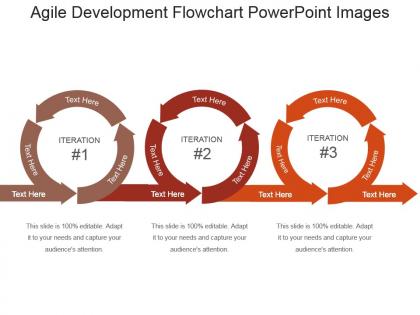
Agile technique eliminates sequential phases in favour of concurrent, incremental work across several departments. Teams execute work in sprints, which are often divided into two-week increments. Throughout the project, many checkpoints allow the team to modify course as needed. You can provide a better end result if you constantly take the temperature of the project during the process.Putting Agile technique into practise is really straightforward, and you may already be using a variation of this method without even realising it. Making to-do lists, prioritising stuff, and then putting their nose to the grindstone to tick things off is something that everyone is acquainted with. The Agile technique is nothing more than a more thorough and ordered to-do list. Agile development has revolutionized the way software is developed and released. If your business wants to stay competitive, it’s important to understand how this methodology works. The agile development flowchart we’ve provided should give you a good overview of the process. And if you want more information, be sure to download our agile PowerPoint presentations. They include detailed explanations of each step in the agile process as well as helpful tips on how to get started with agile development for your own business.
People who downloaded this PowerPoint presentation also viewed the following :
Agile development flowchart powerpoint images with all 5 slides:
Use our Agile Development Flowchart Powerpoint Images to effectively help you save your valuable time. They are readymade to fit into any presentation structure.

FAQs for Agile development
So most Agile flowcharts follow this basic pattern: Product Backlog → Sprint Planning → Sprint Execution → Daily Standups → Sprint Review → Sprint Retrospective. Then it loops back around. Pretty straightforward cycle that usually runs 1-4 weeks per sprint. A lot of teams also add backlog refinement as its own stage - honestly that's smart because you're always tweaking those stories anyway. The cool thing is you can jump in anywhere and adjust as you learn what works. Oh, and definitely map out how your specific team does it since everyone's got their own twist on the process.
Agile lives and dies by constant feedback loops - that's the whole point. After each sprint, you're getting input from users, stakeholders, your team, whoever. Then you actually DO something with it instead of just nodding along. Honestly, it becomes pretty addictive once you see how fast you can pivot. Why wait three months to realize you built garbage? Course-correct every couple weeks based on real data. The trick is you can't just collect feedback and ignore it (learned that one the hard way). Otherwise you're basically doing waterfall but pretending you're not.
So the main ones you'll always see are Product Owner, Scrum Master, and the dev team. Product Owner handles backlog stuff and requirements. Scrum Master runs ceremonies and clears blockers - honestly that role can be kinda hit or miss depending on who's doing it. Dev team builds and tests everything obviously. Most flowcharts throw in stakeholders or end users too, especially for feedback loops. Really depends what you're mapping though. Sprint planning flows are totally different from release stuff. I'd start with those core three and just add whoever else based on your specific workflow.
Honestly, flowcharts are game-changers for team communication. Instead of everyone having their own mental picture of how things work, you get one clear visual everyone can reference. Sprint planning gets so much smoother when you can actually see bottlenecks and handoffs mapped out - way better than trying to explain everything verbally. Stakeholders love them too since they don't need to be experts to follow along. My advice? Start with sticky notes on a wall or whiteboard. It's messier but you can move stuff around easily before making it digital.
Honestly, I'd go with Lucidchart first - their Agile templates are solid and it plays nice with Jira. Miro's really fun for team collaboration though, like when everyone's building the flowchart together live. That gets chaotic but in a good way. Visio works but feels old and clunky compared to the newer tools. Draw.io is decent if you're broke. I've used all of these and Lucidchart just feels the most polished for this stuff. Start with their free trial and see how you like it.
So Agile ceremonies basically run alongside your main dev work - they're not part of the actual workflow but more like regular check-ins. Daily standups happen while you're in sprint mode to catch blockers. Sprint planning starts each cycle, then reviews and retros wrap it up. I always think of them as checkpoints you overlay on your flowchart rather than sequential steps. Honestly, retros are where the magic happens because that's when you actually fix what's broken in your process. Just stay consistent with scheduling them - otherwise you're basically doing waterfall with extra meetings.
Start with velocity and burndown charts - they're super easy to set up and everyone loves watching that burndown line drop. Track how many story points you're finishing each sprint, plus cycle time from when work starts to when it's actually done. Honestly, the burndown visual gets people way more engaged than spreadsheets. After that, add defect rates and how many stories get blocked (that's where things usually fall apart). Team happiness from retros matters too, though some people think it's fluffy. Lead time from backlog to deployment tells the real story about your process.
Okay so user stories are literally the backbone of your whole sprint. During backlog refinement, you groom them, then grab the top priority ones for sprint planning. They flow through your usual stages - to-do, in progress, review, done. The thing is, when stories are written well, everything just clicks better. Stories set your acceptance criteria and definition of done, so everyone knows exactly what you're building. Oh and keep them small enough to finish in one sprint - I've seen teams get burned trying to carry massive stories across multiple cycles. Trust me, it's not worth the headache.
Dude, flowcharts are actually a game changer for sprint planning. Map out your tasks and dependencies first - saves you from those "oh crap, we can't start this yet" moments later. I'm probably obsessed with ours (check it like 10 times a day lol) but it really helps track where stuff gets stuck. Your team will thank you because everyone can see what's coming next instead of guessing. Plus stakeholders love the visual thing - way easier than explaining some convoluted process verbally. Seriously, just try making one for your next sprint. It'll totally change how your planning meetings go.
So WIP limits basically force you to cap how much stuff can sit in each column - like "In Progress (3/5)" to show you're using 3 out of 5 slots. Your team has to actually finish things before grabbing new work, which sounds obvious but trust me, it's not. Design your flowchart with clear visual warnings when columns hit their max. Short bursts work better than long explanations here. You'll want bottleneck alerts too - maybe red borders or something when things get stuck. The trick is making sure your board actually blocks people from ignoring the limits, otherwise it's just decoration.
Don't go overboard with details - that's the main trap. You'll create this monster flowchart nobody wants to deal with. Stick to the big picture stuff: planning, sprints, reviews, retrospectives. Mapping every tiny meeting? Total overkill and just confuses people. Also, avoid making it too rigid. Agile's whole thing is flexibility, right? So show those iterative loops instead of some straight-line waterfall mess. I'd say start with the basic cycle first. You can always add more later if your team actually asks for it, but honestly most won't.
Get your stakeholders actually participating in sprint ceremonies, not just watching from the sidelines. Sprint reviews are obvious, but also pull them into backlog refinement so they can prioritize stuff as it comes up. Daily standups are probably too much (honestly, who has time for that?). Weekly check-ins work way better. The real trick is building feedback loops throughout your whole process, not just dumping everything on them at the end. Map out who needs to weigh in when, set up good communication channels, and - this is huge - define their decision-making power upfront so there's no confusion later.
Think of your product backlog like a giant prioritized to-do list - honestly, it's probably the most important part of your whole Agile setup. All your user stories and features live there, ranked by what matters most. During sprint planning, you just grab stuff from the top and pull it into your current sprint. Your product owner should be constantly shuffling priorities around based on feedback and business changes (which happens more than you'd think). Regular backlog grooming sessions are clutch here - they'll save you so much headache later when you're trying to plan sprints. Trust me on this one.
Just draw arrows between your task boxes - super straightforward. Shows exactly what needs finishing before other stuff can start. Color coding saved my butt last sprint actually, used red for critical dependencies and blue for the optional ones. Honestly prevents so many "wait we needed THAT first??" moments during planning. Map out your current sprint this way and you'll catch bottlenecks right away. Also helps spot weird sequencing issues you didn't notice before. Game changer for keeping everything flowing smoothly.
Agile handles scope changes pretty smoothly, actually. You just tweak your backlog priorities and keep rolling with the iterative cycle - way better than waterflow where you'd have to start over. Each sprint becomes a natural checkpoint for folding in changes without totally screwing up your timeline. Your features might shuffle around between iterations, and yeah, sprint planning gets a bit more involved, but that discover-plan-develop-test loop stays the same. Honestly beats the alternative by miles. Just don't skip communicating the changes clearly during planning - learned that one the hard way.
-
Professional and unique presentations.
-
Use of different colors is good. It's simple and attractive.
-
Qualitative and comprehensive slides.
-
Great product with effective design. Helped a lot in our corporate presentations. Easy to edit and stunning visuals.