

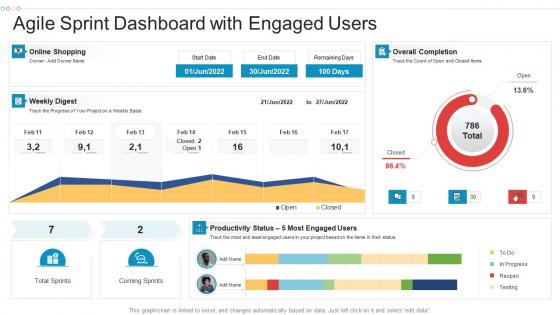
Agile sprint dashboard with engaged users




Try Before you Buy Download Free Sample Product
 Impress Your
 Audience
 100%
100% Editable
 Save Hours
 of Time


Our Agile Sprint Dashboard With Engaged Users are topically designed to provide an attractive backdrop to any subject. Use them to look like a presentation pro.
People who downloaded this PowerPoint presentation also viewed the following :
Agile sprint dashboard with engaged users with all 7 slides:
Use our Agile Sprint Dashboard With Engaged Users to effectively help you save your valuable time. They are readymade to fit into any presentation structure.





FAQs for Agile sprint dashboard
Honestly, just start with the basics - burndown charts for sprint progress, backlog status, and team velocity. Blockers need to be super visible too since those always bite you later. I'd throw in cycle time data and maybe defect rates if your team cares about quality metrics. But here's the thing - don't go crazy cramming everything onto one screen. Keep it visual and simple so people actually look at it during standups instead of ignoring it completely. You can always add more stuff later once you see what your team actually uses day-to-day.
Dude, agile dashboards are honestly a lifesaver. You get real-time visibility into what everyone's doing without having to hunt people down for updates. The visual aspect makes it super obvious when work's piling up somewhere or you're falling behind. Burn-down charts, task progress, team velocity - it's all right there. No more awkward "so... what's happening with that thing?" moments during standups. I'd start simple with just a Kanban board. You can always add more metrics later once your team gets the hang of it. Trust me, once you start using one you won't want to go back.
Start with velocity, sprint burndown, and cycle time - they'll show you how much work gets done, if you're hitting sprint goals, and actual task duration. Don't go crazy though. I've watched teams create these massive dashboards with like 15 charts that just sit there gathering dust. Throw in defect rate and team satisfaction scores too since they catch problems early. Keep it tight - maybe 5 or 6 metrics tops. Everyone should actually understand what they're looking at. Begin with these basics and only add more if people are genuinely using the dashboard regularly.
Honestly, agile dashboards are a lifesaver for avoiding those "wait, where are we on this?" moments. Everyone can just check one place instead of hunting through Slack threads or scheduling another meeting (because who needs more meetings, right?). Your developers, designers, and PM folks can all see what's moving, what's stuck, and who's doing what. The visual setup makes it dead simple for non-tech people to follow along too. Just make sure everyone actually knows where to look - otherwise you're back to square one with people asking for updates.
Jira's literally everywhere - kind of a pain to learn but super powerful once you do. Azure DevOps is solid too. For simpler stuff, Trello works great, and if your team isn't tech-heavy, Monday.com or Asana are way more user-friendly. Honestly? Visual people still love Miro or even physical sticky notes (I know, sounds ancient but it works). My take: just start with whatever your team already knows. You can always switch later once you actually figure out what you need. No point making everyone learn something new right off the bat.
So agile dashboards are great for catching bottlenecks since they show your workflow in real-time. Look for columns where tasks pile up - like when "In Review" is totally swamped but "In Progress" sits empty. Those cumulative flow diagrams? Total game-changer honestly. They'll show you exactly where stuff gets stuck over time. You might notice certain people always seem buried or that specific task types drag on forever. Check it daily and watch for any column that keeps growing without work moving out. That's your bottleneck - pretty obvious once you see it happening.
Look, real-time data is what separates useful Agile dashboards from fancy decoration. You'll catch problems way earlier when sprint progress and blockers update live instead of waiting around. Making decisions off stale data is like trying to drive using your rearview mirror - good luck with that. Honestly, I've seen too many teams manually refresh their dashboards which just... why? Set up automatic updates so you can actually course-correct quickly when things go sideways. The whole point of being agile is reacting fast to what's happening now.
Dude, visuals are a game-changer for dashboards. People get the project status instantly instead of squinting at boring spreadsheets. I swear, I've watched executives zone out during text-heavy meetings, but throw up a clean burndown chart? They're suddenly paying attention. Progress bars and color coding help everyone spot problems fast. The trick is keeping it simple - stick with red/yellow/green for status stuff so even non-tech people get it right away. Charts make sprint velocity way easier to digest too. Trust me, your stakeholders will actually want to check these updates.
Honestly, just ask each team what they're actually checking every day - not what they think they *should* be tracking (there's always a gap there, I swear). Dev teams usually want sprint burndowns and bug counts. Marketing cares more about campaign stuff and content deadlines. Set up different permission levels so people aren't drowning in irrelevant data. Oh, and create separate views for the higher-ups versus the people doing actual work - they need totally different info. Start with maybe 3-4 key metrics, then build from there once you see what's working.
Honestly, agile dashboards are game-changers for tracking sprint progress in real-time. You'll spot blockers fast and see if you're actually gonna hit your goals. Those burndown charts? Weirdly satisfying to check (probably just me being nerdy). The real magic happens when you look at trends across multiple sprints during retros. Your team starts noticing patterns - like always overcommitting or certain features taking way longer than expected. Instead of just guessing what went wrong, you've got actual data to back up your discussions. Use those insights to tweak your planning next time around.
Honestly, the worst thing you can do is jam every possible metric onto one screen. Nobody knows where to look and it's just chaos. Skip the vanity metrics too - they look cool but won't help anyone make real decisions. I've literally seen dashboards that are just fancy digital decorations at this point! Make sure your team can find critical stuff without clicking through a million screens. And here's the thing - if only you understand how to use it, you've already failed. Test it with actual team members first. They'll tell you what's broken way faster than you'd figure it out alone.
Yeah, most dashboard tools hook up with Jira, Trello, Azure DevOps, GitHub - all the usual suspects. APIs and webhooks handle the heavy lifting. Your sprint data and burndown charts sync automatically, which is honestly a game changer. I remember when you had to manually update everything - what a nightmare that was. Built-in connectors make it pretty straightforward now. Just make sure your data sources stay consistent with each other. Start with one integration to get the hang of it, then add more once you're comfortable.
Honestly, stakeholder feedback is what makes or breaks your Agile dashboard. They'll tell you which metrics actually matter to them and call out when visualizations are useless for decision-making. You're basically doing user research on your own internal tools. Their input shapes everything - which KPIs to spotlight, burndown chart layouts, even color schemes (sounds minor but trust me, it matters). Don't wait around for people to complain though. Schedule regular dashboard reviews with your main stakeholders so you get consistent feedback instead of radio silence followed by "this sucks."
Focus on what your team actually checks every day - sprint progress, blockers, burn-down charts. That stuff matters for real work. Velocity and cycle time are gold too, way better than those flashy metrics that just impress the higher-ups but don't help anyone. Honestly, half the dashboards I've seen are total eye candy. You want data that spots problems fast so you can pivot. Here's my test: if nobody mentions it during standups or retros anymore, just delete it. Keep what drives actual decisions and conversations. Everything else is just noise.
Honestly, most dashboards turn into complete garbage after like 3 months. Set up monthly reviews to kill off the useless widgets - be ruthless about it. Add stuff that actually matches what your team's working on right now. Early development vs pre-launch needs totally different metrics, you know? Ask everyone what they genuinely look at versus what's just cluttering the screen. I always tell teams: if a metric hasn't changed anyone's mind about something in two months, trash it. Your dashboard should feel alive, not like some museum of charts nobody cares about anymore.
-
Top Quality presentations that are easily editable.
-
Very unique and reliable designs.