



 0 Comment
 Customer Reviews

Planning a sprint without a proper dashboard is similar to planning a performance without a way to see where you are relative to the goal. You might know your goal, but you have no way to stay on track. In agile environments, we need to understand that having a Sprint Dashboard is vital, not optional. Sprint Dashboards provide you with insights around your team's workflow, progress, and performance - which is necessary.
And yet, so many organizations struggle to implement Sprint Dashboards properly. Consequently, teams are left to provide disjointed updates, deadlines are missed, and work is not synchronized, where teams are working on the same tasks unknowingly.
Even teams who have adopted agile frameworks often bypass the dashboard altogether, or rely on makeshift tracking practices that lack clarity and organization. Project Managers are then left to try to track burndown rates, velocity, and task completion with minimal visibility to effectuate real results. Without a meaningful dashboard and real-time visual presentation of progress, even the highest performing teams can easily lose impetus and implementation fidelity.
The real challenge is time, resources, and having good templates that actually work in different project contexts. That is the gap SlideTeam seeks to fill.
Refer to our blog on Top 10 Agile Sprint Templates to work in short, focused cycles, delivering small, incremental improvements that can be quickly tested.
Introducing the "Top 10 Sprint Dashboard Templates with Examples and Samples" - a practical, ready-to-use collection for agile teams who need to get work done, not just build reports. Our templates encapsulate clarity, functionality, and visual design that gives you everything you need to stay organized, aligned, and on time.
Our include all kinds of project management layout options including task trackers, team collaboration, burndown, user stories and velocity metrics, kanban boards, etc., comprehensively covering the functionality of agile project execution through each of the templates. Each dashboard is editable, content-friendly, downloadable in PNG and JPG formats, and easy to use, even for the less technical users.
If you are looking to run sprints with structure, transparency, and ultimately better teams, get started by checking out our blog to see how these templates can help change the way your team plans, tracks, and delivers.
Get to our blog on Top 10 Sprint Summary Templates to guarantee that every single sprint is in line with the project objectives.
Template 1: Devops Dashboard Snapshot It Devops Sprint Management Dashboard PPT Template
This presentation slide shows a quick overview of sprint activity and how well the team is performing. It covers work progress planned vs. realized, allowing managers to quickly receive feedback on sprint progress and/or offset. Further, covers sprint velocity and bug status and also active bugs by severity for estimating team productivity. Teams can see how their deliveries have trended and make data-informed decisions. Download it now.

Template 2: Project Management Agile Sprint Dashboards PPT Template
This PPT template covers project management including sprints in multiple projects, for an easy way to follow team productivity. Further covers metrics such as total worked hours, sprint velocity and completed story points provide instant visibility. The dashboard shows tasks by status, by type of task and it tells you which pending task is next to be worked on according to the project. Download it now.

Template 3: Agile Sprint Dashboard with Task Monitoring PPT Template
This presentation slide offers vital information including time worked, planned tasks and work to-be-done, making it easier for teams to monitor who is working hard versus who is hardly working in the moment. Further, includes quarterly velocity and task cycle time estimates, which can aid project managers in gauging productivity. Use this dashboard to keep your team in sync and better focus energy on agile dashboard goals. Get it now.

Template 4: Agile Software Development Dashboard with Sprint Progress PPT Template
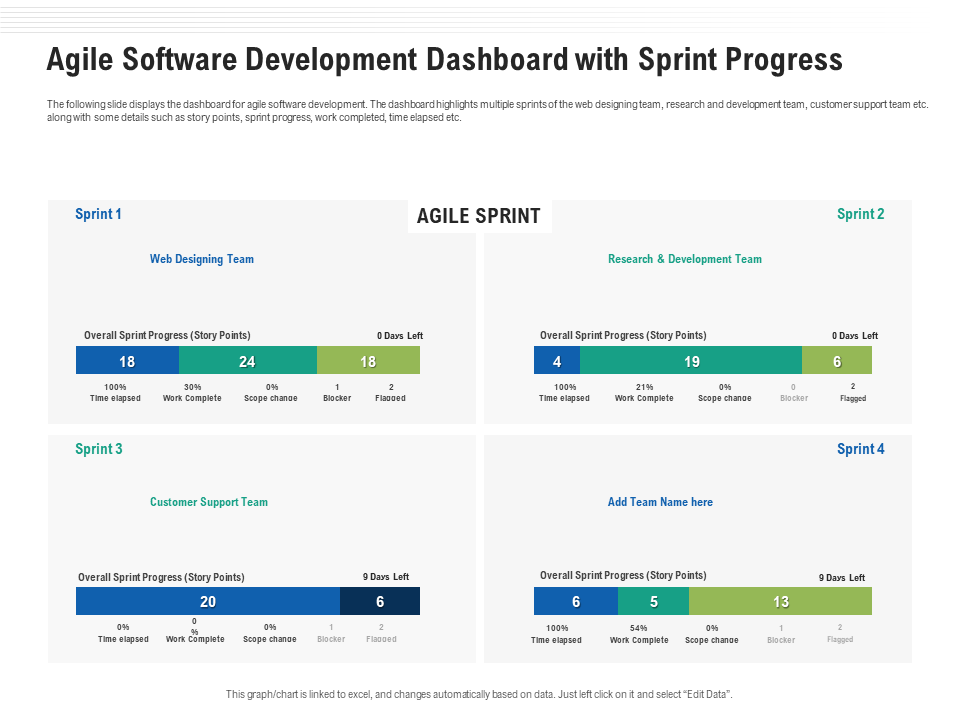
This presentation template provides a live view of sprint review for multiple teams. From the web design team to R&D and customer service staff, it allows all teams to view the sprint progress through a clean view. It covers story points progressed, work completed, and time past using which stakeholders can judge on how teams are progressing towards their sprint goals. It allows managers to overcome obstacles sooner. Claim it now.
Template 5: Agile Sprint Management Summary Dashboard PPT Template
This PPT template offers compact view of sprint planning for agile teams. It covers hours worked, rate of sprint velocity and story points, providing project managers with a way of measuring how close you are to fulfilling sprint objectives. It shows how teams can easily identify delays and juggle workloads. It also makes scope changes so that everyone is aware of what changed during the sprint. Claim it now.

Template 6: Agile Sprint Dashboard with Different Business Unit PPT Template
This presentation theme shows key elements of sprint retrospective like total budget, total forecast, total actuals, and remaining budget to provide you accurate money of your agile investments. It offers critical measurements such as health score, scheduled health, overall health and budget health, this dashboard allows you to assess risk and see what needs attention. It is great for portfolio managers to see across multiple teams. Download it now.

Template 7: Agile Metrics Dashboard to Evaluate Sprint Management PPT Template
This presentation slide covers sprint velocity, range change, finished story points over time, providing valuable insights into the productive capability of the team and the stability of their sprint. It helps to build out how many unfinished tasks you have by project and priority – a critical feature to identify workflow backlog management. It allows you to track performance with extreme precision . Get it now.

Template 8: Using Agile Software Development Agile Dashboard PPT Template
This presentation theme d provide teams with real-time status view by kpis such as total sprint progress, statistic by priority and statistic by scrum board. It also reports on the total unique issues in the sprint and who is responsible for them, which takes out the guess what you want when it comes to assigning accountability and getting things done. It helps the team achieve goals such as continuous delivery. Get it now.

Template 9: Agile Sprint Dashboard with Workload and Story Status PPT Template
This PPT Slide provides a snapshot look at your sprint progress in these three critical performance areas. It contains information on burndown chart (a gauge of how much work is being done versus what was planned) and workload distribution. It also displays story status, which includes in progress, completed, and testing status. Use this template to task tracking all sprint milestones visibility. Get it now.

Template 10: Optimizing Tasks and Enhancing Development Dashboard with Sprint Progress PPT Template
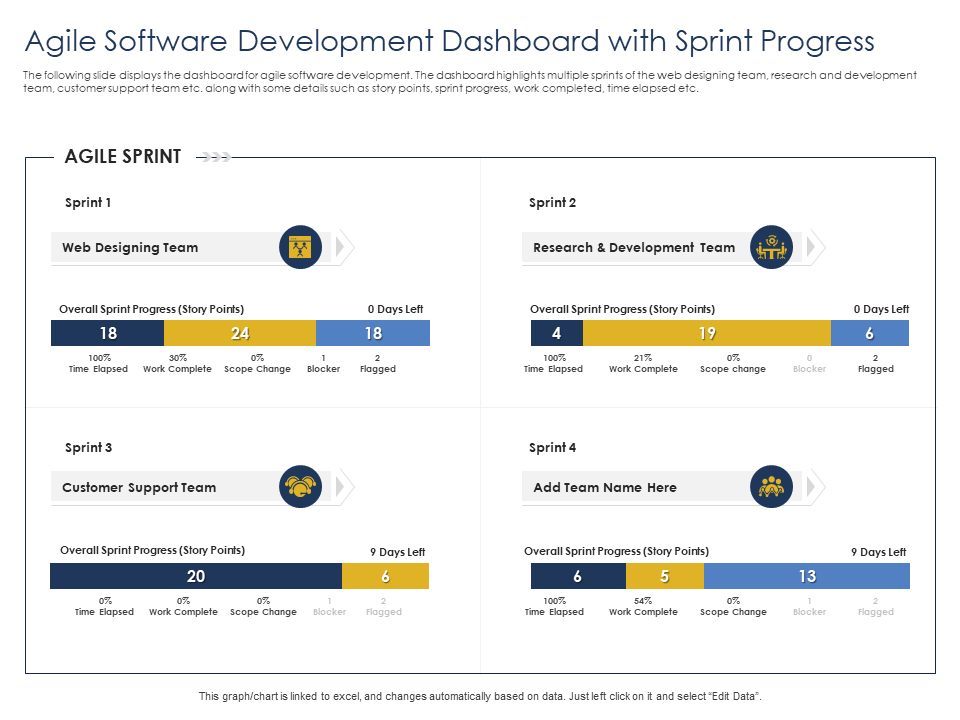
This PPT Theme links the sprint graphics for the web designing, research and development, and customer service delivery team which enables the leadership to time tracking delivery. It displays story points, sprint progress, work done and time elapsed, providing PMs with an easy way to monitor productivity. Give your teams the knowledge of where they stand and where they need to your sprint planning. Download it now.
Real Agile Velocity with Sprint Dashboards!
Speed and clarity are key to Agile project management. Your sprint dashboards act as the visual engine room of your workflow, offering a detailed view of what’s been completed, what’s outstanding, and which way your teams need to throw the wheel. It might be the task prioritization watching velocity charts, or the performance metrics ensuring backlog progress is aligned with business needs. In either case, the right dashboard will elevate your team from good to great!
The 10 sprint dashboard templates included in this blog are more than accountability tools meant to drive decisions in real-time and improve future performance. Our templates create productivity enhancements and a renewed focus on from looking at tracking story points and team velocity to visualizing where blockers are. Download our templates to collaborate faster, deliver smarter, and sprint stronger.
PS: Don't miss our blog on Top 10 Infographic Dashboard Templates to improve the understanding of information and decision-making.
Sprint Dashboard FAQs
1. Why is a sprint dashboard important in Agile project management?
Sprint dashboard is an integral part of Agile. It gathers details surrounding whether work is being completed, how teams are functioning, and why a sprint exists. It enables Agile teams to make decisions fast and informed, and work toward achieving the sprint goals. This increases visibility and accountability across the team to foster collaboration.
2. What key metrics should be displayed in a sprint dashboard?
The sprint dashboard will typically be an effective sprint dashboard if you have some (or all) of these data elements available: Sprint burndown chart Task status (to-do, in-progress/done) Velocity Capacity Remaining work. The defect number, Story points closed, Blocker issues are few which provide useful metrics. They also assist in gauging how things stand, what to expect, and in controlling the risk.
3. How does it help in tracking sprint progress and team performance?
The dashboard for tracking the sprint advisers on how the effort done so far weighs against the work remaining. It presents performance characterization, bottleneck detection and recognition, and task scheduling. Velocity ratings and distribution of tasks can be used by teams to track team performance and individual performance. This helps to make planning more concise and the following sprints more effective.