

Sprint timeline template powerpoint slide information




Try Before you Buy Download Free Sample Product
 Impress Your
 Audience
 100%
100% Editable
 Save Hours
 of Time


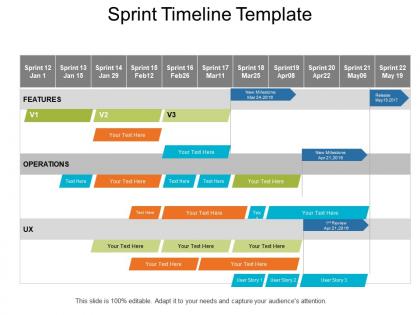
Here’s a ready-to-use Sprint Timeline Template PowerPoint Slide Information PPT to present any timeline based report. A timeline is a prerequisite for every project. It is difficult to imagine a task, project or process without any deadlines. Our sprint timeline layout PPT slideshow makes it easy for you and your team to visualize time-related metrics, synchronize tasks, set deadlines and define potential delays. You can utilize the matrix in such a way that all the tasks and the output linked with it are synchronized with the timeline. Our sprint roadmap PPT is easy to work with and simple enough to understand for the viewers. This template is much more versatile than any ordinary template found in PowerPoint. We provide many extra functions to utilize the creativity of the user in the sprint linear process so as to have a maximum impact on the user. Using our sprint timeline PPT, you can establish a seamless link with user experience and with the operations. Demonstrate forethought with our Sprint Timeline Template Powerpoint Slide Information. They can act like a crystal ball.
People who downloaded this PowerPoint presentation also viewed the following :
Sprint timeline template powerpoint slide information with all 5 slides:
Enjoy the benefit of combined effort with our Sprint Timeline Template Powerpoint Slide Information. It helps forge a good coalition.
FAQs for Sprint timeline template
So a sprint timeline template is just a pre-made schedule that lays out your whole sprint - planning, standups, retro, all of it. Honestly, it's a lifesaver because nobody has to guess when stuff happens. Your team stays in sync and you don't get those awkward "wait, what are we doing today?" moments. Plus it helps you catch problems early before they blow up. I'd start with a basic 2-week setup - we tried 3 weeks once and it was way too long. Just customize it for your team's schedule and time zones. Makes everything run way smoother.
Honestly, having a solid sprint timeline is a game changer. Your team stops walking into meetings like "uh, what's happening again?" Everyone knows when planning happens, when standups are, when reviews go down. People actually prep instead of winging it. Short sentences create momentum. The timeline gives you built-in moments to sync with designers and stakeholders too - no more awkward timing issues. I've seen teams waste so much energy just figuring out logistics. Map out your next sprint's key dates and stick them somewhere everyone can find. Trust me, it's worth the 10 minutes upfront.
Start with sprint duration and your daily standup times - that's your backbone. Then slot in planning sessions, reviews, and retros with actual dates. Honestly, the most important thing? Build in buffer time because blockers are inevitable. I learned this the hard way lol. Map out task dependencies and who's doing what, plus any holidays or PTO that'll mess with your timeline. Keep it visual so you can tweak things easily when stuff changes. Don't overthink the format initially - just use whatever keeps your team aligned and actually works.
Dude, sprints are totally different from regular project planning. You're working in these super tight 1-4 week bursts instead of mapping out some massive months-long timeline. The cool thing is they're designed for change - like when your boss inevitably switches priorities halfway through (we've all been there). Daily standups become your thing, plus you get retrospectives to actually improve. Requirements can shift mid-sprint and that's... normal? Wild concept. If you're just starting out, go with 2 weeks - gives you enough time to get stuff done but keeps the feedback loop tight.
First thing - figure out your team's actual velocity instead of copying some random template. Most teams do fine with two-week sprints, but honestly if your project's super complex or you've got a huge team, three weeks might save your sanity. Block out time for your specific stuff - code reviews, client calls, whatever weird ceremonies your company does. Your template should match reality, not some perfect textbook version of Scrum. Oh, and customize your story point scale so it actually makes sense for how you guys estimate. Run it for 2-3 sprints, then fix whatever's broken.
Honestly, just throw all your tasks and deadlines onto a visual timeline so everyone can see what's going down. Color-code by person or priority - trust me, it makes a huge difference when you're trying to figure out who's swamped. Plot your user stories, testing, reviews, all that stuff. Daily standup updates work best (though we sometimes skip weekends, oops). The cool thing is stakeholders love it because they get the big picture without reading through boring status reports. You'll catch bottlenecks way earlier this way, which has saved our team's butt more times than I can count.
Honestly, there are so many good options depending on what you're already using. If your team's on Jira or Azure DevOps, stick with those - they've got everything from backlogs to burndown charts built in. Trello with the calendar add-on works surprisingly well for simpler stuff. Google Sheets is actually my go-to when I just need basic sprint tracking without all the bells and whistles. Notion's pretty decent too, and Monday.com sits somewhere in the middle. My advice? Go with whatever your team actually opens every day. Best tool in the world won't help if nobody updates it.
Honestly, sprint timeline templates are a game changer for retros. Instead of everyone sitting there like "um, what happened again?" you've got everything mapped out visually. Makes it way easier to spot patterns - like if you're always hitting the same blockers at week 2 or whatever. The conversations get so much more concrete when you can point to actual dates and say "remember this decision on Tuesday?" Rather than just wandering around vague memories. I'd throw your key wins, blockers, and major events right on there before the meeting. Trust me, it'll keep things focused and you won't have those painful silences.
You definitely need to get stakeholder input early when you're setting up sprint timelines. They know stuff you don't - like random deadlines coming up or if resources are about to get pulled. Get their feedback when you're drafting the template, especially around big milestone dates. I've seen so many sprints blow up because someone forgot to mention the CEO needed a demo in two weeks or whatever. They'll also tell you which features actually matter vs the fluff. Keep checking with them during sprint planning too - honestly, their assumptions change constantly so you gotta stay on top of it.
Yeah definitely! Remote teams can actually work better with sprint templates tbh. I'd go with something like Jira or Trello - even a Google Sheet works if that's what your team prefers. Just make sure you account for different time zones if people are scattered around. Build in some extra time for async stuff since Slack responses aren't instant. Oh and set up those automated reminders because people will forget milestones otherwise - I learned that the hard way. The main thing is picking one tool everyone will actually use consistently.
Don't treat your template like it's set in stone - that's the biggest mistake I see. Teams always cram way too much into sprints and then wonder why everyone's exhausted. Dependencies will absolutely wreck your timeline if you're not watching for them. Oh and here's something people hate hearing - you still need those retrospectives even when everything feels smooth. Honestly though? The game changer is building in buffer time for the random stuff that always pops up. Use your template to actually track what your team can realistically handle sprint after sprint.
Dude, visual stuff is a game changer for sprint timelines. Color-code your task statuses and throw in some progress bars so you can actually see completion rates. I swear, half the teams I know are still buried in spreadsheets trying to decode where they stand. Burn-down charts and Gantt views make spotting bottlenecks way easier. Your velocity trends become obvious instead of hidden in rows of data. Plus you'll catch timeline risks and dependencies before they blow up. Trust me, once your team sees sprint progress laid out visually instead of in boring lists, they won't want to go back.
So mixing sprint timelines with other methods is actually pretty smart - gives you way more flexibility. You can run Agile sprints but throw in some Kanban for steady workflow, or add Waterfall stages when you need those annoying regulatory sign-offs. What's cool is stakeholders who don't get Agile can still follow along using whatever they're used to. Better resource planning too since you're not stuck in just the sprint mindset. My advice? Map your current sprint stuff to whatever framework your bosses already love - makes life easier.
Build buffer time right into your sprint template - like, actually block it out. Only plan for 70-80% of what you think you can handle because there's always some random production fire or scope creep that'll mess things up. I learned this the hard way watching teams constantly scramble when they packed sprints at 100% capacity. Schedule those mid-sprint check-ins too so you can pivot early if needed. The whole point is making flexibility your default, not scrambling when things go sideways (which they will).
Honestly, just bake feedback sessions right into your sprint schedule from day one. I do retrospectives after every sprint plus quick mid-sprint check-ins - trust me, catching problems early beats scrambling later. Put these on the actual calendar or they'll vanish when deadlines hit (and they always do). Keep notes somewhere everyone can see them, then actually look at that stuff during your next planning session. Weekly retros work for most teams, but honestly? Some teams need more, some need less. The trick is making it automatic, not something you remember to do when things are already falling apart.
-
Attractive design and informative presentation.
-
Amazing product with appealing content and design.