

Sprint timeline layout powerpoint presentation




Try Before you Buy Download Free Sample Product
 Impress Your
 Audience
 100%
100% Editable
 Save Hours
 of Time


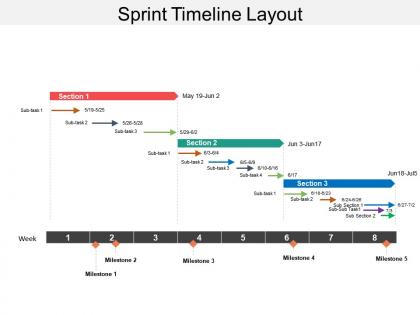
A timeline is the required basement of every project. It is difficult to imagine a task, project or process without any deadlines. Our sprint timeline layout PPT slideshow makes it easy for you and your team to visualize time-related metrics, synchronize tasks, set deadlines and define potential delays. The sprint timeline layout presentation template is useful for managers who want to get a high-level look at their tasks or view any time-related metrics. After each sprint, it’s important for your team and stakeholders to connect for a sprint review to assess the tasks completed. Showcase the results of the sprint by incorporating our sprint timeline layout PPT graphic. All what is required from your end is to just download, save and insert in the working presentation. We also have collection of other timeline PowerPoint designs which can be perfect for your business. Go at a gallop with our Sprint Timeline Layout Powerpoint Presentation. Your thoughts will breast the tape.
People who downloaded this PowerPoint presentation also viewed the following :
Sprint timeline layout powerpoint presentation with all 5 slides:
Handle inefficiency with our Sprint Timeline Layout Powerpoint Presentation. Get folks to develop a better attitude.

FAQs for Sprint timeline
Start with your sprint goals at the top, then map out milestones chronologically. Daily standups, reviews, and retro dates need to be crystal clear. Always build in buffer time - seriously, something will break. Dependencies between tasks are crucial, plus flag any blockers that could mess things up. Make assignments visible so nobody's confused about ownership. Color-coding helps if you're running multiple tracks. Oh, and update the damn thing regularly or your team will ignore it completely. Keep it visual - people actually look at those instead of walls of text.
Sprint timelines are honestly game-changers - they show everyone what's due when without all the back-and-forth messages. I can spot bottlenecks early and actually see how my stuff connects to everyone else's work. It's perfect for avoiding those awkward "hey, where are we on this?" Slack pings. Make sure yours has owners and deadlines clearly marked. Status updates too, so people can just check instead of asking. The visual aspect makes it obvious when things are getting crazy tight or someone's drowning. Way better than those endless email chains we used to do.
Honestly I'd just stick with Miro or Figma - both are stupid easy to use and everyone can jump in to edit stuff. If your team's already using Notion for everything else, that works too since you can drop timelines right into your sprint pages. PowerPoint actually looks decent if you spend like 10 minutes making it not ugly (though I know that's kinda old school). The main thing is picking whatever won't make people groan when they have to update it. Don't get stuck choosing the "perfect" tool for weeks. Clear info that stays current beats fancy features every time.
Dude, color coding totally saves your life on sprint timelines. Green for done, yellow for in-progress, red for blocked stuff - you get the idea. Makes standups way faster since you can just scan and immediately see where things are at. I usually throw blue in there for planning phases too, though that might be overkill. Your team won't have to squint at tiny text trying to figure out what's happening. The best part? When everything's the same color system across boards, nobody has to ask "wait, what does orange mean again?" Trust me, it's one of those small things that actually makes a difference.
Look, milestones are basically your sprint's GPS checkpoints. You'll know exactly where you stand instead of guessing if you're behind. Break that big scary sprint goal into smaller wins your team can actually get excited about. Nobody wants to be *that person* who missed their milestone in standup – it's super awkward. The best part? When you attach specific deliverables to each one, there's no confusion about what "finished" means. Honestly, just pick dates and assign owners. Your sprint tracking will be so much clearer it's ridiculous.
Honestly, just build it into your sprints from the start - don't tack it on later. Daily standups are perfect for quick vibe checks. Mid-sprint reviews help you pivot before it's too late. And yeah, obviously do your retrospectives. I'm obsessed with "feedback Fridays" (or whatever day works for your team). Keeps things flowing instead of waiting till the end when everything's already baked. Make these touchpoints predictable so people actually show up rather than dodging them like meetings from hell. Start with just one extra feedback moment per sprint. Build from there based on what actually works for your team.
Dude, charts and visuals are total game changers for sprint timelines. Your team can actually see what's happening instead of drowning in text. I swear, burndown charts make bottlenecks so obvious - like why didn't we spot that earlier? Progress bars and milestone icons keep people engaged during reviews (nobody wants to stare at spreadsheets). Plus you'll catch velocity patterns way faster. Simple Gantt charts work great too. The visual hierarchy thing is clutch because everyone knows what needs fixing first. Honestly makes handoffs between teammates way less messy. Try it on your next sprint board!
Honestly, the worst thing you can do is pack your sprint way too tight. I've seen teams burn out fast that way. Things ALWAYS take longer than you think - bugs come out of nowhere, someone gets sick, whatever. Build in buffer time, like 15-20% at least. Block out time for code reviews and testing upfront too, don't just squeeze them in later. Oh, and resist adding those "quick" tasks mid-sprint. They're never actually quick! Keep your timeline visual so everyone can see what's realistic. Trust me on this one.
Yeah so sprint timelines are super flexible - just mess around with duration and how often you do ceremonies. My team's only 3 people so we do 1-week sprints with pretty minimal check-ins, but bigger teams usually need 2-3 weeks plus more structure. Complex stuff? Go longer so you have time for research and technical deep-dives. I've watched teams crash and burn when they rush this part lol. Simple features can move way faster though. Start by figuring out your team's velocity first. Then just try different sprint lengths until something feels right - honestly takes some experimenting.
The length of your sprints totally changes how your timeline looks. Short sprints (1-2 weeks) are way cleaner since there's just less stuff to cram in there. Longer ones? They get messy quick - like, nobody wants to stare at an endless wall of tasks. Here's what I'd do: match your detail level to sprint length. Short sprints can handle showing more info per task. Longer sprints work better with those summary views where you collapse things down. Honestly, just throw some real sprint data at it and see what doesn't make your eyes glaze over.
Honestly, just put everything on shared boards - Miro, Figma, whatever works for your team. You can't peek over shoulders anymore, so you've gotta overcommunicate like crazy. Google Docs work too if you're keeping it simple. Include time zones for meetings (learned this the hard way), and set up handoff points so people aren't sitting around waiting for someone three time zones away. Daily check-ins are non-negotiable. Trust me, stuff disappears into the void way too easily when everyone's remote. Keep that timeline updated religiously or you'll be scrambling to figure out where everything stands.
Honestly, sprint timelines are pretty clutch for catching bottlenecks. When work starts piling up or gets stuck somewhere, it's super obvious on the visual. You'll spot overloaded team members fast. Same with tasks that always run long or dependencies screwing up your flow. Testing crunch at the end? Yeah, you'll see that pattern clear as day. Code reviews dragging things down sprint after sprint? That shows up too. Here's the thing though - don't wait until retros to look at this stuff. Check mid-sprint and you can actually fix issues while they're happening instead of just talking about them later.
Dude, you've gotta spell out how your sprints actually tie to the big picture milestones. Like, don't assume your team will figure it out - they won't. Make it super obvious during planning how finishing this sprint moves you closer to that Q3 launch or whatever. Trust me, it totally changes the energy. Nobody wants to feel like they're just grinding through random tickets (been there, it sucks). But when people can see their daily work actually building toward something real? Game changer. Short version: connect the dots for them explicitly.
Honestly, I always throw in like 20% extra time from the get-go because something always goes sideways. Prioritize your backlog hard so you can ditch the less important stuff when things run long. Daily standups are a lifesaver - they catch problems before they snowball into disasters. Break big tasks down small so you're not scrapping whole features mid-sprint. Your timeline should flex, not be carved in stone. Oh and here's something most people skip: start sprint planning by literally asking "what's gonna break?" It sounds pessimistic but it works.
Check your sprint velocity and see how long stuff actually took vs what you planned. Testing phases are usually the worst offenders. Track when blockers hit and which story types always go over - honestly, integration work screws me every time so I just pad those now. Your burndown charts will show if the team starts strong or procrastinates (mine definitely procrastinates lol). Set up milestones based on that pattern. Throw it all in a spreadsheet and you'll start seeing trends after like 3-4 sprints. Super helpful for realistic buffers.
-
Best Representation of topics, really appreciable.
-
Presentation Design is very nice, good work with the content as well.