


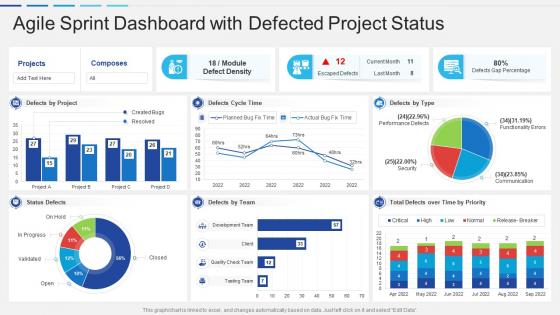
Agile sprint dashboard snapshot with defected project status





Try Before you Buy Download Free Sample Product
 Impress Your
 Audience
 100%
100% Editable
 Save Hours
 of Time


Our Agile Sprint Dashboard Snapshot With Defected Project Status are topically designed to provide an attractive backdrop to any subject. Use them to look like a presentation pro.
People who downloaded this PowerPoint presentation also viewed the following :
Agile sprint dashboard snapshot with defected project status with all 7 slides:
Use our Agile Sprint Dashboard Snapshot With Defected Project Status to effectively help you save your valuable time. They are readymade to fit into any presentation structure.





FAQs for Agile sprint dashboard snapshot with
Track these key ones: sprint burndown, velocity, and story completion rate. Burndown shows if you're hitting your committed work. Velocity helps plan future sprints based on your team's average story points. Blocked items count is huge too - seriously, nothing derails a sprint faster. Oh and cycle time. Story completion rate just gives you the % of stories you actually finished vs committed to. Throw in a red/yellow/green status indicator for quick health checks. Keep everything visual and update daily so issues don't sneak up on you.
Your dashboard needs to be scannable in like 10 seconds max. Color coding is huge - green for done, red for blocked, you know the drill. Progress bars for burndowns work way better than just numbers sitting there. Icons help too, especially for priority levels or task types. Honestly, charts save so much time over digging through data tables. Nobody wants to do math when they're checking sprint health. Font sizes matter more than you'd think - make the important stuff bigger so people's eyes go there first. The whole point is anyone should glance at it and immediately get what's happening.
Jira's probably your best bet since most teams already use it for tracking stuff anyway. Azure DevOps is solid if you're already in Microsoft land. Monday.com and ClickUp have really nice visual dashboards - stakeholders eat that up. Budget tight? I've honestly seen teams do crazy things with Notion or even Google Sheets that worked surprisingly well. The main thing is finding something that pulls from your current workflow automatically. Nobody wants to update dashboards manually, trust me on that one. Just start with whatever plays nice with your existing tools. You can always switch later if it sucks.
Daily updates work best - do it right after standup while everything's fresh in your head. Trust me, teams that wait until weekly? Total mess. Issues pile up and you're basically flying blind. Your burndown charts and task statuses become useless if they're stale. Most project management tools can automate some of this stuff anyway, which honestly saves you from tedious manual updates. The key is making it routine instead of that thing you panic-update before sprint reviews. Oh and velocity metrics - those need fresh data to mean anything for planning.
Team dashboards need all the messy stuff - burndown charts, who's stuck on what, task statuses. That's your daily operational reality. Stakeholders? Totally different story. They want the 30,000-foot view: are we hitting milestones, shipping on time, making progress toward the big goals. Think of it like this - your team asks "why is this user story blocked?" while stakeholders ask "are we still launching in March?" Keep stakeholder views super clean and outcome-focused. Honestly, too much detail just stresses them out anyway. Your team actually needs those weeds to get work done.
Honestly, sprint dashboards are a game changer for keeping everyone on the same page. No more "wait, what are you working on again?" moments during standups. Everyone can see who's doing what, what's blocked, and where help is needed - all in one spot. Makes those daily meetings way smoother since you're not trying to remember yesterday's mess. Just make sure people actually look at the thing, otherwise you've got fancy charts collecting digital dust. Oh, and put it somewhere everyone can see it easily. Short sentences hit different sometimes. The whole point is having that shared view so nobody's flying blind on progress and priorities.
So burndown charts are like your sprint's pulse check - they show if you're gonna hit your deadline or crash and burn. There's this line that should go down as you finish tasks, plus your actual progress vs where you should be. Look, they're kinda brutal when you're falling behind (been there), but that's the whole point. You get early warning before everything goes sideways. I'd peek at yours during daily standups. Way better to catch problems early than scramble at the end, trust me.
Definitely start with velocity charts from your last 6-8 sprints - that's your bread and butter. Burndown comparisons are clutch too. I throw together a basic table with story points completed, bugs, team capacity stuff. Color-coding sounds dumb but honestly saves so much time when you're scanning quickly. Track those retrospective action items too, otherwise you'll never know if changes actually worked. Oh, and don't go overboard with details - focus on trends that'll actually help your team make decisions. Velocity and burndowns will get you 80% there.
Honestly, just focus on the basics that'll actually help your team. Burn-down charts, remaining story points, sprint goal progress - that's your foundation. Red/yellow/green indicators are clutch for spotting problems fast. I've watched teams build these elaborate dashboards that look amazing but collect dust because they're too complicated. Individual workloads and velocity trends matter too, but don't go overboard. Oh, and definitely get your team's input when designing it - they're stuck looking at this thing every day, so they should have a say. Simple beats fancy every time.
Honestly, start simple with maybe 3-4 key visuals. Burndown charts are clutch - they show work left vs time at a glance. Velocity charts track how much your team's actually delivering each sprint. I'm obsessed with sprint progress bars for standups, they're such game-changers. Cumulative flow diagrams will spotlight bottlenecks fast. Don't forget cycle time and defect trends so people see quality AND speed. The whole point is making it dead simple - anyone should be able to walk by and instantly get where you're at. Resist cramming everything onto one crazy dashboard.
Oh man, the worst thing you can do is cram like 15 different metrics on there - total information overload. Skip the vanity stuff too, like individual velocity or hours worked. That just makes people competitive instead of actually helping each other out. Focus on maybe 3-5 things that matter: sprint burndown, story completion, blockers. And honestly? Make sure your team actually looks at it during standups. I've seen so many dashboards that just sit there collecting digital dust. Pick stuff that gets people talking about how to work better, not metrics that make them feel judged.
Honestly, just talk to your team constantly while building this thing. Run quick testing sessions where they actually click around and complain about what sucks. Daily standups are gold for this - trust me, people will roast your dashboard whether you ask or not! Set up a Slack channel for random feedback, or dig deeper in retros about which metrics actually matter vs the ones that just look fancy. Small changes work better than big overhauls. The whole point is fixing stuff based on how they really use it, not what you think they need.
Honestly, this dashboard is perfect for retros. It shows your sprint velocity, burndown charts, story points completed vs planned, plus any blockers that popped up. You can finally see patterns - like if you're always over-committing or certain tasks consistently take forever. No more sitting there trying to remember what happened three weeks ago (we all know how that goes). Just pull it up during your retrospective and you've got real data to work with. Way better than the usual "I think maybe we had issues with..." conversations. You'll actually spot specific problems and fix them next sprint.
So you'll definitely want responsive design that adjusts to your screen automatically. Touch-friendly buttons and charts are huge too - nothing worse than trying to tap tiny elements on your phone. Offline sync is clutch when your wifi's being weird. Most decent dashboards have swipe navigation and focus on the essential stuff like burndown charts and blockers instead of cramming everything in. Oh, and customizable widgets are super handy since you probably don't need to see every metric when you're just doing a quick check. The good ones honestly feel more like actual apps than janky web pages.
Dashboard customization is honestly a game-changer - your team can focus on what actually moves the needle instead of drowning in random metrics. Maybe you're all about burn-down charts, or maybe those just collect dust while you obsess over velocity tracking. Both are fine! The whole point is showing data that helps during standups and sprint planning. You can switch up which KPIs display, adjust sprint views, modify layouts for dev work vs QA bottlenecks. I'd start by just asking your team what numbers they actually look at versus what gets ignored. Don't overthink it.
-
good
-
Awesome presentation, really professional and easy to edit.
-
Visually stunning presentation, love the content.