


Api example template




Try Before you Buy Download Free Sample Product
 Impress Your
 Audience
 100%
100% Editable
 Save Hours
 of Time


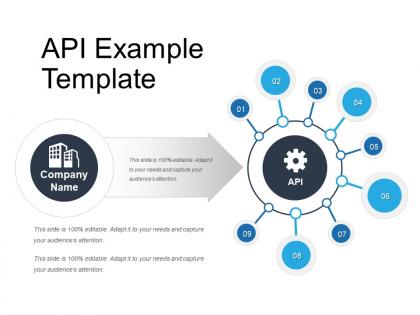
Showcase how the interface between the two applications takes place by using this Api Example Template. Use this communication protocol PPT slide to explain the working of API. Display the framework of API by taking advantage of the computer program PowerPoint graphic. Make a knowledgeable presentation by giving some examples of the application programming interface. Showcase the comparison between web services and API in order to make your presentation effective. Also, showcase the methods involved in API testing such as GET, POST, Delete, and PUT by utilizing this interface PPT layout. There are various high-quality icons present in the slide which will make your presentation informative and reliable. Describe the usage of API by explaining the concept of libraries and framework, operating system, remote API, web API. Mention the interface between client and server by downloading this ready to use Application Programming Interface PowerPoint Presentation.
People who downloaded this PowerPoint presentation also viewed the following :
Api example template with all 5 slides:
Be identified as a favorite with our Api Example Template. Folks will gun for your advice.



FAQs for
For API docs, start with auth details and endpoint descriptions - include the HTTP methods too. Request/response examples are a lifesaver. Parameters need to be super clear about what's required vs optional, plus data types. Error codes and status codes are boring but necessary. Oh, and rate limiting info if that applies to your API. Getting started guides help people actually use the thing instead of just staring at it confused. SDK examples are nice if you've got them. Honestly, error handling documentation is where most people (including me) get lazy, but developers will thank you later.
Honestly, templates are a game-changer for API docs. Your developers won't have to dig around looking for basic stuff like auth details or error codes - everything's in the same spot every time. It's like having a checklist so you don't forget the important bits. I've used APIs where the docs were all over the place and it's just annoying. You'll save people so much time when they can predict where to find examples and parameters. Plus if your docs are clean and consistent, developers will actually stick around instead of jumping to whatever competitor has their shit together. Trust me on this one.
Yeah so API versioning is basically what makes or breaks your docs template. You've gotta show version-specific endpoints clearly, plus all the breaking changes and deprecation stuff. Most teams totally mess this up if they don't think it through early - I've seen some real disasters lol. Your template needs version selectors so devs can jump between versions easily. Migration guides are clutch too. Oh and decide upfront whether you're doing separate docs for each version or one unified thing with tags. Trust me, that decision will save you headaches later. Keep the formatting consistent across versions so people aren't hunting around confused.
Good examples in API docs are honestly a game-changer. Developers want to see real code snippets - how to auth, make requests, handle responses. That stuff cuts onboarding time in half, no joke. When you show use cases too, people actually understand *when* to use endpoints, not just the mechanics. Makes your docs feel like a guide instead of some dry reference thing. I'd start with just one solid example per endpoint. You'll be amazed how many fewer "wait, how do I..." messages you get.
Okay so first thing - group by what actually makes sense, like user stuff, payments, admin controls, whatever. Authentication goes first because devs literally can't test anything without logging in first. Then within each group, follow how people would actually use it: create something, read it, update it, delete it. That flow just clicks better than random alphabetical order (seriously, who thought that was helpful?). Make your naming consistent and stick the HTTP method right up front where people can see it. The whole point is making it brain-dead easy to find what you need.
Oh totally! Visuals are a game changer for API docs. When you're showing auth flows or request/response stuff, diagrams just click way faster than reading through dense paragraphs. Sequence diagrams are especially clutch for showing how endpoints work together - saved me so much time debugging integrations. I'd focus on the spots where people usually get stuck, like multi-step workflows or error handling. Those flowcharts can map out decision trees that would otherwise be a nightmare to follow. Just sketch out your most confusing sections first and you'll see the difference right away.
Honestly, automation is your best friend here. Get your CI/CD pipeline generating docs straight from code comments and API specs every time you push. OpenAPI generators will save your sanity. Make doc updates part of your definition of done - like, actually required before you can merge. I've watched so many teams skip this step and then six months later they're staring at completely useless documentation wondering what happened. The trick is making it easier to update docs than to ignore them. Pick one automation tool this week and just start. You can always add more later, but at least you'll have something that doesn't lie to you.
Oh this is actually easier than it sounds! Embed feedback forms right in your docs and run usability tests with real developers. Track your support tickets too - they'll show you exactly where people get stuck. Honestly, devs are super honest about crappy documentation once you give them a way to complain. Set up feedback loops at different stages: template design, after testing, post-launch. The trick is making it dead simple to give feedback AND actually fixing stuff based on what you hear. Otherwise people just stop bothering to tell you what's broken.
Honestly, Markdown is clutch for API docs. Most devs already know it (takes like 10 minutes to learn if you don't), so your whole team can actually contribute without fighting some nightmare formatting tool. It's super readable as plain text and works great with Git. You can write it anywhere - even Notepad if you're feeling masochistic. Converting to HTML or PDF is dead simple when you need it. The syntax keeps things clean since you're focusing on content instead of making everything look pretty. Just grab a basic template and you'll have docs that people might actually update for once.
Break it into layers - quick overview first, then deeper stuff for advanced users. I always throw in "Quick Start" sections for beginners plus the detailed reference docs. Those collapsible sections are clutch for this. Code examples at different levels work really well too. Just explain your parameters clearly and let people pick their path. Beginners stay surface-level while experienced devs skip straight to the complex implementations. Honestly, I've seen teams overthink this part. Simple beats fancy every time.
For API docs, I'd go with Swagger/OpenAPI if you want that interactive testing stuff - SwaggerHub and Redoc are both solid. Postman's documentation is actually way better than I expected, been using it more recently. GitBook and Notion work if you're doing more explanatory docs, but they're not really built for APIs. Already using GitHub? Docusaurus is pretty nice, or just throw some markdown files on GitHub Pages. Honestly though, whatever you pick needs to be something your team will actually update. Dead API docs are literally worse than having nothing at all.
Look, decent API docs are basically a lifeline for new devs who don't want to rage-quit your platform. Consistent structure helps - put your quick start, auth examples, and common use cases in the same spots every time. Nothing kills motivation faster than digging through scattered docs just to make one stupid API call work. Your template should guide people through that first success quickly. Real copy-paste examples are clutch here. When devs can grab working code and tweak it, they'll actually stick around instead of bouncing to your competitor. Trust me on this one.
Yeah, definitely throw in authentication methods and rate limiting - HTTPS is a must too. Input validation's huge, show devs how to handle data without screwing up. API key management is honestly where most people mess up, so spend time on that. Security headers are worth covering, plus error handling that doesn't accidentally expose sensitive stuff. If you've got compliance requirements, document those too (ugh, I know). Code examples help a ton - show the right way to make requests instead of just talking about it. Makes everything way clearer.
Just throw a search bar on there that crawls through all your endpoints, parameters, and examples. GitBook and Notion already have this stuff built in. Or you could go custom with Algolia - though honestly that might be overkill depending on your setup. Good search is literally what makes or breaks documentation. I've seen too many APIs with garbage search that only finds exact matches. Make sure yours actually works when someone types "auth" and pulls up everything authentication-related. Method names, response fields, common use cases - all of it should be searchable.
Dude, good API docs can make or break you. I've watched developers bail after like 5 minutes when the documentation sucks. But give them clear examples and proper error handling? They'll actually stick around and integrate your stuff. It's wild how APIs with mediocre functionality crush it just because their docs are solid, while genius-level APIs flop because nobody can figure them out. Start working on your documentation early - and definitely test it with someone who's never touched your API. Trust me on this one.
-
Much better than the original! Thanks for the quick turnaround.
-
Understandable and informative presentation.