

As is to be mapping process ppt example




Try Before you Buy Download Free Sample Product
 Impress Your
 Audience
 100%
100% Editable
 Save Hours
 of Time


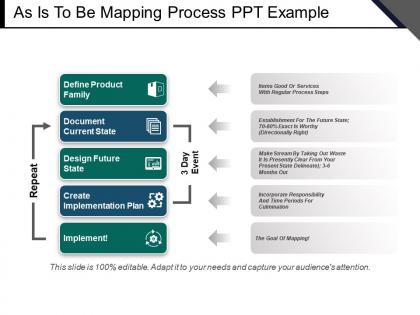
Talking about process improvement, you can always make use of as is to be mapping process PPT example. The provided process improvement model PPT presentation graphic has been designed under expert supervision to ensure that all the essentials of a professional plus educational presentation are maintained while delivering the slideshow. In the given as is to be PPT model, define product family, document current state, design future state, create an implementation plan and implement are the list of elements mentioned. The provided PPT slide will let your audience comprehend the topic in a very easy manner, thus helping you make the presentation session a fruitful one. Since the PPT slide is pre-designed it will save a lot of your precious time, which otherwise gets wasted in designing the presentation from scratch. A great deal is certain with our As Is To Be Mapping Process Ppt Example. Your ideas will find favor with them.
People who downloaded this PowerPoint presentation also viewed the following :
As is to be mapping process ppt example with all 5 slides:
Continue on course to your destination with our As Is To Be Mapping Process Ppt Example. Ensure your agenda doesn't get derailed.
FAQs for As is to be mapping
So you've got four main pieces to tackle. First, document how things *actually* work right now - not the official process, but what really happens day-to-day. Then sketch out your ideal future state based on what you're trying to achieve. Gap analysis comes next, and honestly? This part's where you'll have your biggest breakthroughs because it shows exactly what's broken. Finally, build a roadmap with concrete steps and deadlines. Oh, and definitely start with just one small process as a pilot - trust me, you don't want to bite off more than you can chew right away.
Start by collecting data from different places - process docs, user interviews, actually watching how work gets done. Honestly though, don't trust those written procedures too much because they're usually outdated or just wishful thinking! The people doing the daily grind know where things really break down and what shortcuts actually work. Map out your current systems and data flows, plus all the pain points. Process mining tools help if you've got access to them - gives you hard data instead of guesswork. Really, you just need that brutally honest picture of what's actually happening, not the fantasy version.
Honestly, just grab Lucidchart or Visio for this - they're solid choices. Miro's pretty decent too if your team's into the whole collaborative thing. Start with a basic flowchart since they show exactly how stuff works without overcomplicating it. Swimlane diagrams are clutch when you need to map out who does what (saves so many headaches later). Value stream mapping is actually amazing for manufacturing processes, though I've seen it work for random other stuff too. My take? Keep it simple at first - you can always make it fancier if needed.
Honestly, just talk to people directly - that's where you'll find out what's really happening versus what the manual says. Everyone's got workarounds they've figured out, plus those annoying pain points nobody talks about in meetings. Finance sees things totally differently than ops does, which is actually pretty useful. Ask them to walk through their actual process, not the "official" one. People love venting about their day-to-day struggles anyway! Don't go in thinking you know what they'll say though. Those open-ended questions work way better than trying to confirm stuff you think you already figured out.
Honestly, the hardest part is people getting weird about having their work "analyzed" - like you're judging them or something. Plus everyone describes the ideal process, not what actually happens when Karen's out sick and everything's chaos. Getting good documentation is nearly impossible since most places have outdated process maps (if any). Time's always an issue too - good luck getting busy people to sit down for interviews. Oh, and resistance to change is real. Start with just one small process to prove it works. Being upfront about your goals helps a ton - people worry you're trying to eliminate jobs or whatever.
Think of your To-Be state as your GPS destination - every decision gets easier when you know where you're headed. Does this project actually move us toward that future process? That question becomes your best friend. Budget meetings get way less painful too because you've got real criteria instead of just arguing about pet projects. I've seen teams completely flip how they handle trade-offs once they start using their To-Be map in leadership meetings. It's honestly pretty satisfying watching priorities suddenly make sense. Timeline planning becomes more logical, and you'll catch yourself naturally filtering out the stuff that doesn't matter.
So you map out your current process step-by-step and suddenly all the waste jumps out at you. Bottlenecks become obvious. You'll see redundant steps, weird handoffs that take forever, approval loops that don't actually add value. It's pretty eye-opening honestly. Then you design the "future state" version - cutting out the junk and making things flow better. Teams regularly save 30-40% of their processing time this way. They find tasks that could run at the same time instead of waiting around. Start with whatever process currently makes you want to pull your hair out.
Look, data analysis is basically your gut check - shows you exactly where you're at versus where you need to be. You're gonna use it to find gaps in current processes and spot those annoying bottlenecks everyone complains about. Honestly? I've watched so many projects crash because teams skip measuring their baseline performance first. Big mistake. Once you map your future state, the data proves whether your solution actually fixes anything. Plus you need those numbers to show progress and justify the whole thing later. My advice - start collecting baseline data now, even if you're still figuring out the end goal.
Get your stakeholders involved from day one - and I mean everyone who'll feel the impact, not just the obvious people. Regular workshops work great where folks can see the current mess and help design what comes next. Being super transparent about how broken things are now actually gets you more support, weirdly enough. Short check-ins keep momentum going. Document your decisions as you make them because trust me, someone will ask "wait, why are we doing this?" months later and you'll want that answer ready. The key is making people feel heard throughout the whole thing, not just at the end.
Start with flowcharts and process maps - visuals are way easier to follow than walls of text. Write out each step clearly, who's doing what, and where decisions get made. The key thing? Document WHY you changed stuff from the old process. I can't tell you how many times I've looked at documentation months later and wondered what we were thinking. Put it all somewhere everyone can access with version control. Oh, and make a quick cheat sheet too - trust me, you'll actually use that way more than the full docs when you're training someone new.
Look, change management is what actually makes your process mapping work instead of becoming another useless PowerPoint deck. Most projects crash and burn here because everyone gets obsessed with the technical stuff and forgets real people have to deal with these changes every single day. You've gotta figure out who's impacted, what pushback you'll get, and how to win them over. Honestly, I've seen too many "perfect" maps fail because nobody bought into them. Start talking about your future state early - like, day one early. Get the actual users involved and listen to their feedback. Otherwise you're just wasting time on pretty diagrams.
Honestly, you'll want to track both the hard numbers and the softer stuff. Look at things like time saved, costs cut, error rates dropping - the usual suspects. But here's what I've learned: user feedback can totally make or break you. I've seen processes that looked amazing on paper but everyone absolutely hated using them. Also check adoption rates and whether people are actually following the new way. Oh, and definitely see if you're hitting those original goals you set out with. Just pick maybe 4 metrics tops that actually matter to your business and stick with tracking those consistently. Don't get lost in the data weeds.
Honestly, I'd start with something simple like Lucidchart or even Miro - they're way better than wrestling with PowerPoint forever. Map out your current process first, then design the future state right next to it. Makes collaboration so much easier when everyone can see both versions side by side. If you want to get fancy, process mining tools can actually build current state maps from your system logs automatically (pretty cool stuff). But seriously, don't overthink it at first. Pick one tool, map one process end-to-end, and go from there. You can always dig into analytics later to find your bottlenecks.
Dude, you absolutely need customer feedback for your To-Be process. Think of it as your sanity check - will these changes actually work in real life? Ask users about their current headaches and what would genuinely help them out. I've watched so many gorgeous process maps totally flop because nobody bothered asking the people who'd actually use them! Their input helps you figure out which improvements matter vs. which ones just look pretty on a flowchart. Oh, and don't wait until the end to collect feedback - get it early and keep asking throughout the whole mapping thing.
Honestly, quarterly works for most people, but it really depends on your industry. Tech and healthcare move crazy fast - I'd probably check monthly if I were you. More stable stuff? Maybe twice a year is fine. Watch for the big triggers though - new regulations, major process changes, strategy shifts. Those should make you update right away. Oh, and definitely check after finishing any big project. I always set calendar reminders because otherwise I'll totally forget (learned that the hard way). The worst thing is realizing your mapping's been outdated for months.
-
Amazing product with appealing content and design.
-
Design layout is very impressive.