

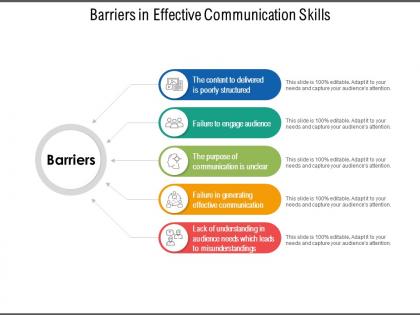
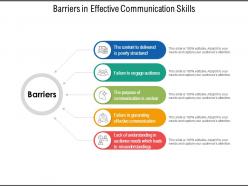
Barriers in effective communication skills




Try Before you Buy Download Free Sample Product
 Impress Your
 Audience
 100%
100% Editable
 Save Hours
 of Time


Bank balance grows with our Barriers In Effective Communication Skills. Greater assets get added on.
People who downloaded this PowerPoint presentation also viewed the following :
Barriers in effective communication skills with all 5 slides:
Have an invigorating influence with our Barriers In Effective Communication Skills. Increase the intensity of enthusiasm felt.

FAQs for Barriers in
Honestly, nerves are the biggest culprit - you end up rushing or mumbling your way through everything. Bad structure kills presentations too. Like when you cram way too much info without any clear flow and people just zone out halfway through. Tech problems always happen at the worst possible moments, obviously. Plus sometimes your audience is totally wrong for your content level or they're just distracted. Oh, and not knowing your transitions well enough. Practice those beforehand! Have backup plans ready for when stuff inevitably breaks. Do a quick vibe check on your audience first - saves you from bombing completely.
Look, visual aids are total game changers for getting people actually engaged. Charts and videos grab attention way better than walls of text - I mean, who doesn't zone out reading paragraphs these days? They're perfect for visual learners who'd otherwise mentally check out. Complex stuff becomes way easier to understand when you can see it instead of just hearing about it. Language barriers? Not as big a deal with good visuals. My advice is figure out where you're losing people first, then pick visuals that fix exactly that problem. Works every time.
Oh man, cultural stuff trips people up all the time in presentations. Eye contact that feels normal to you? Might make someone super uncomfortable. Same with being direct vs. beating around the bush - some cultures hate bluntness while others think you're being fake if you're too polite. And don't get me started on humor translating badly. Language barriers are the obvious thing, but honestly the subtle communication style differences are way harder to navigate. I'd definitely look up your audience beforehand and leave tons of time for questions so you can catch weird miscommunications early.
Watch people's faces and body language - crossed arms or phone scrolling means you're losing them. Call out resistance right away: "I bet some of you think this sounds way too complicated." Honestly, just naming what everyone's thinking works magic. Tell stories they can actually relate to, not generic examples. Always explain WHY you're asking them to change something (people hate being told what to do without reason). Oh, and build in those awkward pause moments where you actually wait for questions. Trust me, it works way better than just steamrolling through your slides.
Definitely test your setup beforehand - trust me on this one. I had a projector completely die on me once and it was mortifying. Get to the room early if you can and do a full tech run. Bring your own cables, adapters, maybe even a backup laptop if that's realistic. Your slides should be super simple with big fonts everyone can actually read. Oh, and save everything offline too - wifi always seems to crap out at the worst moments. Handouts aren't a bad backup either. If tech fails during your talk, just acknowledge it quickly and keep going instead of fumbling around trying to fix stuff.
Honestly, good templates solve like 80% of this problem. Make your headers way bigger than body text - I'm talking obviously bigger, not subtly bigger. Stick to maybe 3 font sizes total. Then go crazy with white space between sections. Trust me, it'll feel like too much at first but it's not. Here's the key though: build in limits from the start. Max 6 bullets per slide, or better yet, one main point only. When your template makes it awkward to cram everything in, people won't. They'll naturally break stuff up instead.
Oh man, room setup is everything! Those theater-style rows make people feel like they should just sit there quietly instead of actually participating. Tables between you and the audience? Total conversation killers. People need to see each other's faces to feel comfortable speaking up - it's weird but true. Go with round tables or a U-shape instead. And ditch the podium if you can! I know it feels safer behind there, but getting closer to people makes such a difference. When everyone can make eye contact and you're not hiding behind furniture, suddenly people actually want to jump in.
First thing - figure out who you're talking to. Just ask them straight up how much they already know about this stuff. When you've got mixed groups (which happens all the time), do this layered thing where you start basic then build up complexity. Don't use jargon without explaining it right away - I've watched so many presentations bomb because the speaker thought everyone was on the same page. Analogies really help bridge those gaps. Ask "make sense?" every few minutes. Oh, and definitely have backup slides ready with extra details in case someone wants to dig deeper.
Start by asking what communication styles people actually want instead of guessing based on age. Mix things up - use both digital tools and in-person conversations, plus different formats like visuals and audio. I'm telling you, the cross-generational mentoring thing works surprisingly well when you pair up older and younger teammates. Skip the stereotypes completely. Focus on what everyone cares about: doing good work and seeing real results. Finding that common ground matters way more than pointing out differences. Honestly, some of my best project insights have come from those unexpected team pairings.
Oh totally, language barriers can kill a presentation. I've seen people just completely check out when they can't follow along - it's painful to watch honestly. Slow down your speech way more than feels normal. Ditch the fancy words for simpler ones. Visuals are your best friend here, like way more slides with pictures and diagrams. Build in extra time for questions too. If you can swing it, maybe send out materials beforehand in different languages? I know that's extra work but it helps. The whole thing is about not assuming everyone's English is perfect - which sounds obvious but we all forget sometimes.
Start with big, readable fonts and always describe what's on your slides out loud. Videos need captions or transcripts - trust me, it's way easier than you think. Give people options to participate since not everyone's comfortable speaking up (chat is clutch for this). Mix up your examples so they're not just the same perspectives over and over. Oh, and build in extra time for questions because accessibility takes patience. Honestly, planning this stuff upfront saves you from scrambling later when someone can't access your content. It's really about anticipating different needs before you even open PowerPoint.
Fear and anxiety literally hijack people's brains - they can't think straight when they're panicking. I've watched so many meetings where someone's announcing layoffs and half the room just... zones out completely. You've got to call it out right away. Don't dance around the elephant in the room. Say something like "I know this is stressful" before diving into details. Keep your voice calm, break things down so it's not overwhelming. Give them space to ask questions too - honestly, that's huge because it makes people feel less helpless. Once they're not spiraling, they can actually hear what you're saying.
Ugh, time pressure is such a killer for presentations. You end up racing through everything and totally glossing over people's concerns instead of actually dealing with them. Your audience needs space to absorb what you're saying and ask questions - otherwise those doubts just sit there festering, you know? I learned this the hard way when I rushed through a pitch once and could tell everyone was lost but had no time left. Now I always carve out like 15 minutes just for pushback and questions. Makes such a difference between leaving people scratching their heads vs actually getting them on board.
Get feedback right after you present - surveys work, but honestly? Just grab people for quick chats. Way more honest that way. Ask stuff like "what would stop you from actually doing this?" or "where do you see this falling apart?" If three people mention the same problem, boom - there's your barrier. Don't try to fix everything though, that's overwhelming. Pick the top 2-3 issues that keep coming up and tackle those first. Could be clarification, extra resources, or removing actual roadblocks. The informal conversations always give you the real tea, not the polite survey responses.
Check out the presenter resource hub first - it's got sections for tech problems, engagement stuff, and accessibility. But honestly? The peer mentorship program is where you'll get the real gold. Those experienced presenters have been through it all and their advice is way more useful than reading some manual. Quarterly workshops are decent too if you like interactive learning. I'd start by figuring out what your biggest challenges are on the hub, then find a mentor who's dealt with the same headaches. That combo usually works best for getting actual solutions you can use.
No Reviews