



 0 Comment
 Customer Reviews

Figuring out where things slow down in a process can feel like searching for a missing puzzle piece. Too many approvals? Repeated tasks? A mix-up in responsibilities? That’s where Six Sigma flowchart templates come in. They lay everything out step by step so you can instantly see what’s working and what’s causing trouble.
With these slides, mapping out workflows is quick and simple. Do you want to show how a service line operates or need a clear breakdown for your team? These flowcharts make complex processes easy to follow. Also, they’re a great way to educate stakeholders, spot unnecessary steps, and tighten up operations.
Looking for more ready-to-use PPT templates? Check out our top 10 quality control PPT templates designed to simplify process monitoring and improvement. These templates break down complex concepts into easy visuals to let you educate the nature of clients and track progress. You can even highlight problem areas and change strategies for better results.
In theory, there are many strategies, a few, however, stand out. Of these, Six Sigma is one. Allowing you to find the bottlenecks and loopholes is a strategy that can help you redefine the process in the simplest manner.
If you are looking to explain this concept to your stakeholders easily, explore the must-have Six Sigma process flow chart templates here.
In addition to these, you also need a good and effective Six Sigma dashboard. So, let us understand what this is and why you need it here.
Six Sigma dashboards give you clarity on what’s happening, help spot cumulative sales, and keep everything running the way it should. Let’s break down why they’re so important.
1. See Everything in One Place
Ever had that moment when you realize something went wrong, but it’s too late to fix it? Maybe a project is behind schedule, customer complaints are piling up, or costs are creeping up without warning. It happens when important details are scattered across different reports. A sales monitoring dashboard brings everything together.
2. Stop Wasting Time and Money on Fixable Problems
Small problems add up fast. A machine running slower than usual, repeated customer returns, or too much raw material getting wasted. These little things chip away at profits. A Six Sigma dashboard highlights exactly where time and money are being lost. No more digging through endless reports to figure out what’s going wrong. You can spot and fix issues early so they don’t turn into expensive headaches later.
3. Keep Quality High Without Constant Stress
Six Sigma dashboards help you stay ahead of quality issues. If defects start creeping up or customer satisfaction drops, you’ll catch it early. It keeps everything on track without turning every workday into a firefight.
4. More Productivity
Nobody likes wasting time on repetitive tasks. Manually tracking data, double-checking numbers, and piecing together reports? That’s hours of work that could be spent on something more valuable. Everything updates automatically, so your team can focus on solving problems and making improvements instead of getting buried in spreadsheets.
5. Catch Problems Before They Get Out of Hand
Most big problems don’t appear suddenly — there are warning signs. Maybe a factory’s error rate starts creeping up, or sales numbers take a dip before crashing. The issue? These patterns usually go unnoticed until it’s too late. A Six Sigma dashboard catches those early warning signals with statistical analysis.
6. Keep Teams Accountable Without Micromanaging
A Six Sigma dashboard ensures that everyone from employees to managers can see exactly where things stand. No more endless meetings just to figure out what’s done and what’s not.
You now know the need for this dashboard. It helps you in performance tracking and process optimization, which are the keys to building a successful business. But before we explore the template, there is something important that you must know here. Whenever a business plans to invest in any new plan or process, there is a need to submit a proposal, which can help stakeholders evaluate potential and success expectations.
Template 1: Sales Monitoring Dashboard for Six Sigma PPT PowerPoint Slide
Tracking sales shouldn’t feel like a never-ending numbers game. Sales Monitoring Dashboard for Six Sigma takes the headache out of data tracking by giving you a clear, visual breakdown of your sales trends. With pie charts and bar graphs, you can explain lean methodology. But that’s just the beginning. The PPT allows you to track all Six Sigma metrics, such as service line sales, regional sales, last 5 week sales, nature of clients, and cumulative sales. All these metrics are important not just for the quality control but also for the continuous improvement to grow the business and earn profits. It helps you educate your team, back up decisions with solid data, and even impress stakeholders with well-organized reports.
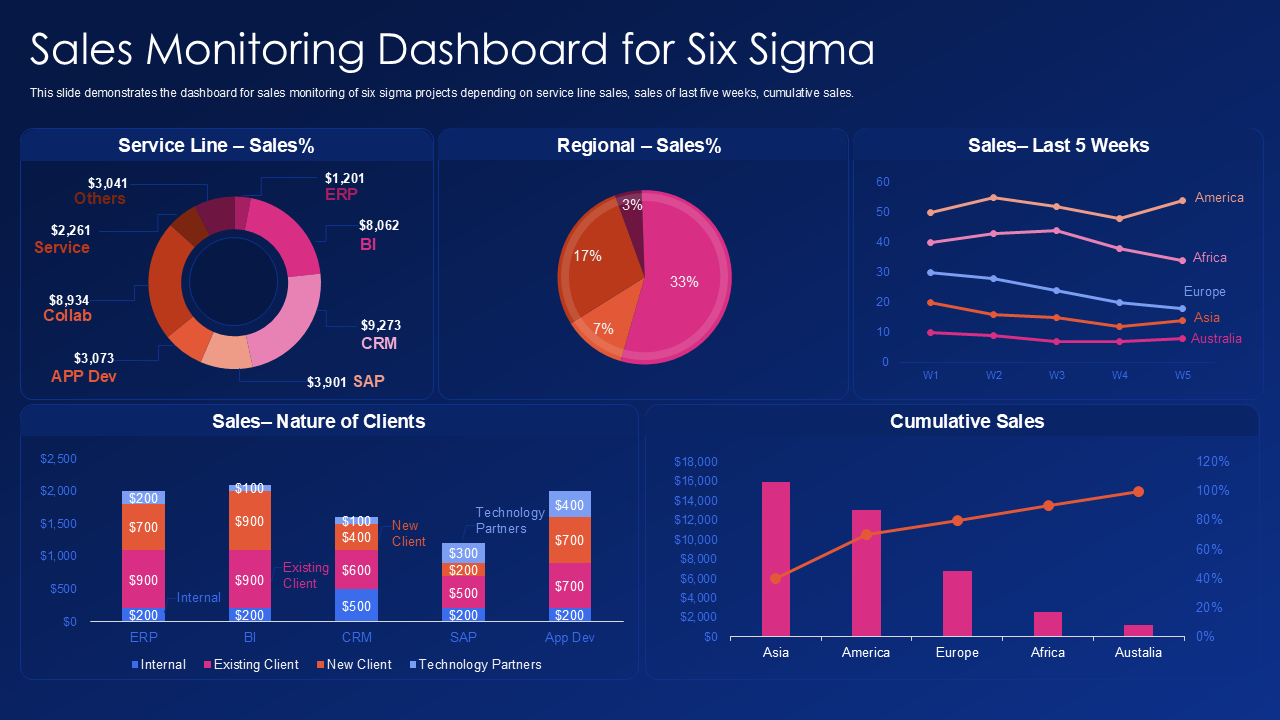
No more wasting hours adjusting numbers; just input data, and everything updates instantly. With SlideTeam’s Six Sigma and DMAIC templates for lean manufacturing and process improvement presentations, you can prevent reporting mistakes and present accurate insights.
Manage Business Processes With Right Templates
Six Sigma dashboards give you a clear way to identify issues and improve outcomes. It allows you to identify the most complex details like Defects per million opportunities (DPMO). But building dashboards from scratch is time-consuming, and getting the layout right is frustrating. That’s where you can use these Six Sigma templates for process control. They help teams analyze trends and make decisions without endless spreadsheets. With examples and samples included, you’ll see exactly how to apply them in real business scenarios for efficient root cause analysis, which is the baseline of why we use Six Sigma.
PS Use these Six Sigma proposal templates that can help you share minute details linked to the process.