


 0 Comment
 Customer Reviews

Imagine you went to a fine-dining restaurant one day, and the waiter served you the wrong order. Of course, it would ruin your dining experience, but what would make you hate the restaurant more is when no one came to resolve your complaint. You would rate it one star with an upset face and stomach. A similar thing happens at another restaurant, and the manager not only apologizes and corrects your order but also offers you a complimentary dessert.
Dissatisfied customers, for one reason or another, are part and parcel of a business. Even the best companies get some of their orders wrong. You mention companies like Starbucks and even their baristas sometimes do not make the desired coffee, either due to miscommunication or lack of expertise. This is why Starbucks and other renowned organizations have a help center, a key component in their commitment to handling customer feedback professionally.
Just as our fingers aren’t all the same length, customer complaints also vary in severity and complexity. This is where the different levels of customer support in a business come into play. They work together coherently to address and resolve as many customer issues as possible.
While most companies aim to resolve issues at the basic level to prevent escalation, this isn't always feasible. Some complex complaints require the attention and expertise of a major incident manager, while agents at a lower level can resolve others without needing to reach the CEO's desk.
Recognizing the importance of a support escalation structure at work is crucial. We at SlideTeam understand this need and, therefore, provide you with the most reliable, relevant, and attractive presentation templates to help you navigate this.
Before we explore these templates, check out to implement some of the best support escalation process flowcharts in your business.
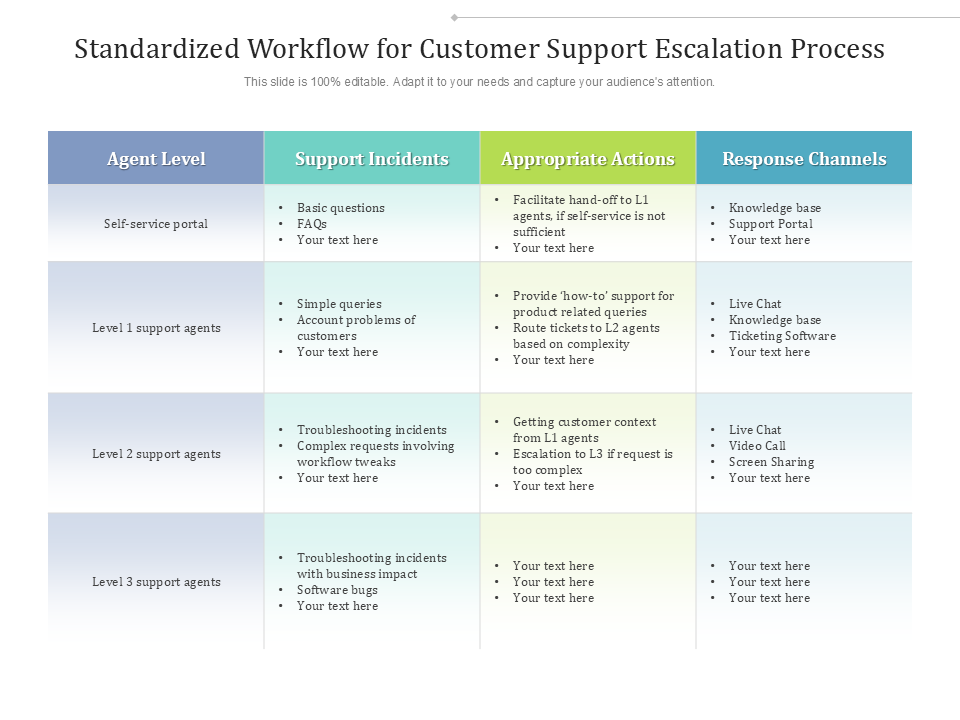
Template 1: Standardized Workflow for Customer Support Escalation Process
This template divides the entire customer support process into different categories and addresses each one separately. Use this as an introductory flowchart to define different support incidents and the actions necessary to tackle them based on the problem’s complexity. Utilize this information to assign these issues to the appropriate support agent levels with matching skills and knowledge. Applying this workflow chart saves time on both sides and pleases the customers.
Template 2: Problem Escalation Matrix With Multiple Support Levels
Like the first template, this slide categorizes the necessary support and assigns it to distinct levels based on several parameters. It describes the roles, responsibilities, and functions at every level, which minimizes the overlapping chances, meaning no two levels indulge in solving the same complaint. This schema chart ensures that the problem escalation takes place only when necessary and also mentions the timeframe to measure the severity of the problem.

Template 3: Customer Support Call Flow Chart with Escalation and Resolution Process
What do you do when someone rings your number? You check the caller and deal with the call based on their importance. This process flow diagram implements the same strategy. It creates a roadmap for your qualified customers. Grab it and use it as a guidebook in your organization on when to escalate the call to a level 2 engineer or the supervising team and when to close the ticket.

Template 4: Overview Of Support Escalation Process With Service Level Agreement
The template discussed outlines the complete structure required to resolve or amplify a concern. It begins with the customer raising a support ticket, and the assigned agent resolves it using the service level agreement. Only when the concern becomes beyond the agent's control does it reach the manager, who takes further action to counter it? Get and edit this accordingly to mention your own procedures to bring more clarity.

Template 5: Escalation Management Process With Various Support Levels
This layout adds more depth to the whole support incidents process by providing a comprehensive outline of the complaint resolution structure at every level. It highlights the role of a support agent in resolving basic to complex problems by following accurate methods, such as recording bugs and informing the customer or getting the customer’s approval for product enhancement. This structure ensures transparency and effective client dealing.

Template 6: Service Level Objectives Escalation Matrix Using Help Desk Management Advanced Support Services
Are you having problems with dealing with critically important support tasks as a priority? Do you upset your most loyal customers by taking too much time to respond to their concerns? How about making a matrix that not only ranks the tasks based on their severity but also determines your response, resolution, and escalation time objectives? Our PPT template offers multiple utility features to smoothen your customer support process.

Template 7: IT Support Level Escalation Matrix
The all-inclusive nature of this particular matrix makes it a vital resource for streamlining your IT department's functioning. It does not focus on only one aspect but rather includes everything an IT department functions with. Additionally, it divides major areas like lead development, communication, and, of course, support escalation into different levels. It helps create an effective business strategy where the companies attend each level separately.

Template 8: Support Escalation Matrix With Application Migration
Application migration from one environment to the other can sometimes be confusing for app users and, therefore, create several support tickets. While the support system at the basic level often tackles these issues, the most customer-friendly organizations construct a matrix to ensure the customer gets a satisfactory response regardless of the nature of the problem. Create your own project support levels and assign competent engineers to those roles.

Template 9: Process Flow Diagram For Incident Support Escalation
As the name suggests, this layout outlines a complete blueprint of potential problems and their fixes in a single slide. This process workflow chart is far more effective if the business uses it by aligning its customer support team and developers. Implement it to create a technical roadmap for bug fixing, pushing out new templates, or meeting the demands for new objects by successfully coding and testing them.

Template 10: Escalation Matrix Customer Support Technician Supervisor Manager
Our final PPT slide in this list uses a basic but informative approach to providing customer support. It follows a flow diagram of the different levels the business has dedicated to ensuring a smooth support escalation program. Combine it effectively with Escalation matrix customers technical support and managers and display your commitment to the customer. Customize the template by adding pictures of responsible people and make it visually appealing.

Why should you use the Support Escalation Matrix?
The reason is simple. While a client's complaint can range from the taste of their soft drink to the defective component of their personal computer, your business must also be ready to resolve or escalate it using the right guidelines and resources. As we discussed in this blog, nothing better than a support escalation matrix fixes this requirement.
Click here to learn about and explore other escalation matrixes besides the ones we have added to our list.
Want to learn the best practices to handle the customer support escalation process professionally? Check out these customer escalation process templates.