


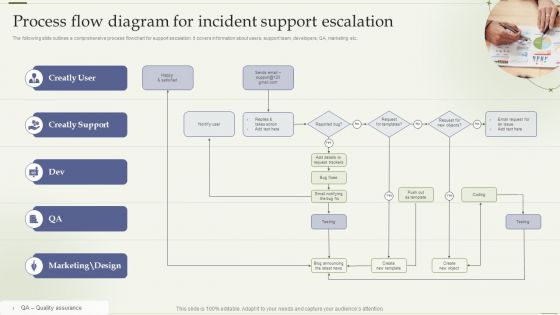
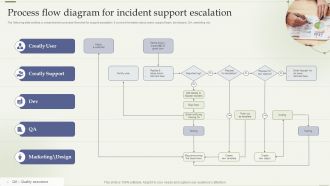
Process Flow Diagram For Incident Support Escalation




Try Before you Buy Download Free Sample Product
 Impress Your
 Audience
 100%
100% Editable
 Save Hours
 of Time


The following slide outlines a comprehensive process flowchart for support escalation. It covers information about users, support team, developers, QA, marketing etc.
People who downloaded this PowerPoint presentation also viewed the following :
Process Flow Diagram For Incident Support Escalation with all 6 slides:
Use our Process Flow Diagram For Incident Support Escalation to effectively help you save your valuable time. They are readymade to fit into any presentation structure.





FAQs for Process Flow Diagram For
Escalate when it's beyond your skills or you don't have the right access. SLA time running out? Pass it up. If the problem's spreading or customer-facing stuff is broken, that's usually an instant escalation. I learned this the hard way - don't be stubborn like me and waste hours trying to fix something solo. Business-critical systems or anything hitting revenue needs immediate attention. Also, if you're just going in circles, call for backup. Trust me, escalating early beats looking like a hero who made everything worse.
Look at how decisions actually get made in your company, not just the org chart. Flat teams might only need 2-3 levels before you hit the top. Bigger hierarchical places? Could be 4-5 steps through all those management layers. Figure out who can actually approve stuff at different severity levels - honestly, the real power structure is often totally different from what's on paper. If you're spread across time zones, that complicates things too. Start by writing down who makes the calls for different types of incidents right now. Then build your escalation plan around those people.
Communication can make or break an incident response - I've seen small problems turn into complete disasters because someone didn't explain things clearly. When you escalate, spell out the severity, what's broken, and what you've already tried. That way the next person can jump right in without wasting time. Include specifics: which systems are down, how many customers are affected, timeline so far. Be thorough but don't write a novel - nobody wants to decode paragraphs during an outage. Oh, and if your team has escalation templates, actually use them. Sounds obvious but you'd be surprised how often people wing it.
Make your escalation stuff super visible, not buried in some random wiki. Use flowcharts instead of walls of text - way easier when people are panicking. Run practice drills regularly because honestly, everyone forgets this stuff until crisis hits. Quick reference guides in Slack channels work great too. The 30-second rule is key: if someone can't find the process that fast during an outage, you've already failed. We do quarterly refreshers which... yeah, sounds boring but it actually helps. Oh, and definitely add escalation paths right into your incident runbooks so it's all in one place.
Oh man, biggest mistakes? Waiting way too long before escalating - like seriously, don't be the person who waits until everything's completely falling apart. When you finally do escalate, give them context: what you've tried, how bad things are, timeline stuff. Skip your boss and go straight to the top only if it's genuinely business-critical. Also - and this drives me crazy - people blast the same message to like five different channels at once. Just creates chaos. Keep it factual, not dramatic. Oh, and set up your escalation plan before you actually need it, not during the crisis!
Honestly, automation is a game changer for this stuff. Set up alerts that fire based on how bad things get, and use chatbots to handle the first wave of tickets. Workflow tools can route everything to the right people automatically - saves so much back-and-forth. There's even AI now that spots which incidents might blow up before they actually do. Real-time dashboards help too since nobody has to chase people down for updates anymore. Just make sure whatever you pick actually plays nice with what you're already using. Nothing worse than adding another system that doesn't talk to the rest.
Honestly, just think about business impact and how urgent it really is. P1 is for when everything's broken - outages, security stuff, anything that kills critical functions. P2 hits multiple users but isn't a total disaster. Minor bugs or one-off user issues? That's P3 territory. The trick is staying consistent so your whole team gets it. I always tell people to imagine this happening to your biggest client right now - how fast would your boss want it fixed? That usually clears things up pretty quick. Oh, and don't overthink it too much, happens way more than you'd expect!
Okay so you'll want to track escalation time first - like how long it takes to actually bump things up the chain. Also look at first-call resolution rates because honestly the best escalations are ones you avoid entirely. Then check if resolution time actually improves after escalating or if you're just adding more steps. Track escalation frequency by team too - some teams escalate everything which is... not great. Pull your last quarter's data and see where you're stuck in handoff limbo. Those patterns will tell you if your process actually helps or just creates more work.
Map your escalation triggers to whatever SLAs and priority stuff you've already got set up. ServiceNow and Jira have these workflows built in - most people just never bother tweaking the default settings, which is honestly kind of a waste. Build your automation around incident priority and time limits, plus business impact obviously. Oh, and make sure it actually plays nice with your change management process. Otherwise you'll have tickets bouncing around everywhere. Start by writing down how you currently handle escalations, then automate the parts that don't suck.
So grab the basics first - what broke, when it started going sideways, which systems got hit. Screenshots are clutch because nobody wants to play 20 questions later. Document what you've already tried fixing it, plus any janky workarounds you rigged up (trust me, they'll ask). Business impact matters too - like are people actually unable to work or is this more of an annoyance? Don't stress about making it pretty, bullet points are totally fine. The whole point is giving them enough info so they can dive right in instead of interrogating you for 15 minutes.
Get everyone talking in one place first - set up a dedicated Slack channel or whatever you use. Map out who's responsible for what before chaos hits. Regular check-ins during incidents are clutch so teams aren't just doing their own thing in circles. The post-incident reviews with all departments? That's where the real learning happens, honestly. Half the mess comes from people not knowing who to call when things go sideways. Oh, and having those escalation contacts ready beforehand will save your sanity. Trust me on that one.
Start with communication training - your people need to share critical info clearly when things go sideways. Decision-making frameworks come next so they know when to escalate vs handle stuff themselves. Role-playing is clutch here, nothing beats practicing those "should I wake up the VP?" moments lol. Keep escalation flowcharts and contact lists current. Don't forget the technical side - incident tracking tools, documentation standards, crisis communication templates. Monthly drills work well. I've seen teams gain confidence pretty fast once they start practicing regularly.
Dude, you gotta nail the timing on escalations first. Set up automated rules - like 15 minutes for P1 stuff - so tickets don't just sit there. Your on-call schedules need solid backup contacts too, because escalating to someone who's MIA is the worst. Document when to escalate vs when to keep grinding on it yourself. Honestly, this part saves so much confusion later. Run practice drills regularly - you'll find weird gaps in your process before they screw you during an actual outage. Trust me, it's way better to look silly in a drill than panic when everything's on fire.
Look, root cause analysis is basically how you figure out what's broken in your escalation process. Dig into why incidents happened and you'll start seeing patterns - alerts hitting the wrong people, tickets bouncing between teams for no good reason, that kind of stuff. I know it's tempting to skip this step when you're constantly firefighting, but don't. Those patterns will show you exactly where your escalation paths are screwing up. Then you can actually fix your routing rules instead of dealing with the same mess over and over.
Yeah, cultural stuff totally throws off escalation processes. Direct cultures want immediate action, but others need consensus first - which obviously takes forever. I've literally watched incidents drag on because someone felt awkward "bothering" their boss. Authority dynamics are weird that way. Language barriers don't help either, and time zones make everything messier. What works is setting super clear escalation rules with actual timeframes. Then get regional people who know both the local culture and your company's process to bridge that gap.
-
SlideTeam’s pool of 2Million+ PPTs has really benefited my team, everyone from the IT department to HR. We are lucky to have crossed ways with them.
-
Satisfied with the way SlideTeam resolved my query regarding the right business PPTs that I was having difficulty finding. I found the perfect match with their assistance.