category-banner

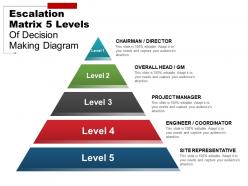
Escalation matrix 5 levels of decision making diagram example of ppt

Rating:
90%
Escalation matrix 5 levels of decision making diagram example of ppt
Slide 1 of 5

You must be logged in to download this presentation.

Favourites Favourites

Try Before you Buy Download Free Sample Product

Audience Impress Your
Audience
Editable 100%
Editable
Time Save Hours
of Time
The Biggest Sale is ending soon in
0
0
:
0
0
:
0
0
Rating:
90%
Stunning escalation matrix 5 levels of decision making diagram PPT template. Presentation slides can be viewed in standard and widescreen view. Fast to download, share and insert in the presentation. PowerPoint designs goes well with Google slides. They provide high-quality performance. They have time-saving abilities. Convertible into Jpeg and Pdf document. Add logo, image and icon as per the requirement. Suitable for business leaders and managers. Awesome slides which attract the attention of the audience.

People who downloaded this PowerPoint presentation also viewed the following :

Content of this Powerpoint Presentation

One-third of consumers worldwide believe that first contact resolution is the most important component of customer service. This necessitates the implementation of an established escalation management system to ensure complete consumer satisfaction.

McDonald’s, Starbucks, JW Marriott, KLM Royal Dutch Airlines, and practically every other company in the world has implemented escalation mechanisms to help customers negotiate difficult interactions and provide support when necessary.

Browse and download SlideTeam’s carefully curated collection of the Top 10 Downloadable Escalation Matrix Templates to help you become a problem solver.

An escalation matrix depicts multiple escalation channels for resolving customer complaints. It aids in the evaluation and prioritization of escalations, in addition to the provision of working-level support.

Need to build a manual for dealing with escalations? Click here to visit our blog.

This blog outlines a clear decision-making chain to reduce friction that can lead to escalation management issues. This helps prevent confusion and delays in resolution. Use this PowerPoint Presentation to illustrate the lines of accountability and communication needed for wise decision-making.

Need to design the steps to effective Escalation Management? Check out our complete deck.

Template 1: Escalation Matrix 5 Levels of Decision Making

A clear hierarchical system is required to ensure accountability in an effective escalation management process. Use this PowerPoint Template to demonstrate the pre-designed escalation matrix’s five stages of decision-making. This will help you and your team in identifying, tracking, monitoring, and managing situations requiring enhanced awareness and prompt action. This speeds up decision-making by involving higher-level staff. Download this presentation to resolve each escalation.

The well-defined chain of command

This escalation matrix demonstrates a methodical strategy to identifying and initiating suitable procedures to resolve organizational concerns. Use SlideTeam’s PPT Templates to set clear escalation levels and responsibilities within your firm.PS Check out SlideTeam’s pre-designed template on Escalation Level Matrix for Effective Incident Management.

FAQs for Escalation matrix 5 levels of decision making diagram

So an escalation matrix is basically your contact list for when stuff hits the fan on a project. It maps out exactly who to call at each level when you can't fix something yourself. Why bother? Well, you don't want to be scrambling around trying to figure out who actually has the power to make decisions when you're already dealing with a crisis. The structure's pretty straightforward - team lead first, then project manager, department head, and finally the executive sponsor if things get really bad. Honestly, set this up way before you think you'll need it. Future stressed-out you will thank present you for doing the legwork ahead of time.

Honestly, escalation matrices are lifesavers – they kill that whole "um, who do I tell about this disaster?" panic mode. Your team knows exactly when to escalate and who gets the call. No more hot potato nonsense with problems bouncing around forever. Junior people won't freeze up when something's actually breaking because the path is crystal clear. Issues hit the right person immediately instead of wandering through three wrong departments first. Just map out trigger points for each level and keep contact info updated. Trust me, it'll save you so many headaches down the road.

You need five things for a solid escalation matrix: clear triggers (like SLA breaches), escalation paths showing who to contact, specific timeframes, everyone's contact info, and who makes decisions at each level. The timeframes thing is where most people mess up though. Can't just say "escalate when it gets bad" - you need actual numbers like "manager after 2 hours" or "VP for P1 issues hitting 4+ hours." I'd start by mapping what you're doing now, then spot where stuff usually falls through the cracks. That'll show you exactly what needs fixing.

Okay so basically you want to figure out what actually breaks your business vs what's just annoying people. Start with your regular support team handling the easy stuff. Technical problems go to specialists, customer complaints hit up managers, and save executives for when you're losing serious money or big clients are pissed. Don't create like 15 different levels though - I've seen that disaster and tickets just bounce around forever. Set clear rules like "bump it up after 2 hours" or "anything worth $10K gets escalated immediately." Oh and definitely test it with real examples first because what sounds good on paper sometimes makes zero sense in practice.

So an escalation matrix is basically your backup plan when stuff hits the fan - it shows who to call at what point based on how bad things get. You set up clear triggers so there's no guessing game about when to loop people in. Your PM might handle the small fires, but anything threatening the budget? That goes straight to your director. I learned this the hard way on my first project actually - waited too long to escalate and nearly got roasted for it. The whole thing only works if people actually stick to the plan when chaos breaks out.

So basically, escalation matrices are game-changers for customer service speed. Your team stops wasting time wondering "who handles this?" because everyone knows exactly when to bump issues up and to whom. Severity level, customer type, complexity - whatever your triggers are, just map them out clearly. No more ping-ponging tickets around the office (honestly, that drives me crazy). Set specific timeframes too - like, if X isn't resolved in 2 hours, it goes to Y person. You'll see resolution times drop pretty quickly once people aren't fumbling around trying to figure out the chain of command.

Honestly, getting leadership on board is the hardest part - they always think escalation processes are overkill until something blows up. Most people are terrible at knowing when to escalate too. They either panic over small stuff or let things get completely out of hand before saying anything. Oh, and good luck keeping everyone's contact info updated! Start small though - pick one team to test it with first. That way you can figure out what doesn't work before rolling it out everywhere. Training's crucial because people need to know not just who to call, but how to actually explain what's wrong.

Honestly, start with something like ServiceNow or Jira - they'll automatically ping the right people when your SLAs get blown. Set up triggers based on severity and how long tickets sit around. I'd throw Slack integration in there too since everyone lives in it anyway. Zapier works if you're on a budget, but the big platforms handle routing way better. Don't go crazy at first though - pick one tool that plays nice with whatever ticketing system you're already using. Once your team stops hating change, you can add dashboards and fancy reporting stuff.

So basically, timing is everything here. Reactive escalation happens after stuff hits the fan - server's down, angry customer on the phone, you know the drill. You're scrambling to figure out who to call. Proactive is where it gets interesting though. Instead of waiting for disasters, you set up triggers based on early warning signs. Like escalating when response times reach 85% of your SLA instead of after you've already blown past it. Honestly, reactive feels like you're always behind the eight ball. If you can swing it, build both systems - but proactive will save your sanity.

Check it quarterly for sure, but honestly? Do it after every major incident too. People quit, teams get shuffled around, and before you know it your escalation path leads to Jim who left in February. Been there way too many times. Also update when you get new leadership or change support structures - those shifts always mess with the flow. Oh, and when escalations start feeling clunky or broken, that's your cue. Set a recurring reminder and make someone actually own it, otherwise it'll just sit there forever getting more and more outdated.

Track your resolution times first - that's the big one. How fast are issues getting solved at each level? Also watch escalation frequency and first-contact resolution rates. Customer satisfaction scores tell you if people actually feel heard. Adherence rates matter too - is your team even following the escalation paths you set up? Honestly, I've watched so many of these matrices look perfect on paper then completely bomb in real life. Maybe it's because teams don't buy into the process? Anyway, measure this stuff monthly and tweak based on what you're seeing.

Honestly, just tailor it to whatever industry you're in. Healthcare needs clinical supervisors involved and way tighter deadlines since people's lives are literally on the line. Financial companies? They'll want compliance people at every single step - those regulations are brutal. Manufacturing focuses more on production managers and QC folks. Start by figuring out who actually makes decisions in your field and what timeframe won't kill your business. Map out your industry's weird stakeholders first, then work backwards from there. Oh, and don't forget regulatory stuff - that'll bite you later if you skip it now.

Look, an escalation matrix is basically your cheat sheet for when shit hits the fan. You'll know exactly who to loop in based on how bad things get - no more guessing or awkwardly texting your boss at 9pm. It stops conflicts from dragging on forever OR from you accidentally pissing off executives over something minor. Both are career killers, trust me. The key thing? Your team needs to actually understand these pathways beforehand. Can't be figuring this out mid-crisis. Also helps people know what they should handle solo versus when to call for backup. Honestly wish more companies did this properly.

Start with real scenarios they'll actually face - way better than theoretical stuff. Walk through the decision process: escalation triggers, who to call, what details to include. Role-play it so they're not panicking when it's actually happening. Most people mess this up initially. They either sit on issues too long or freak out and escalate every tiny thing. Clear severity levels help a ton. I'd make them a quick reference guide they can bookmark. Oh, and quarterly refreshers with new examples keep everyone sharp - otherwise they forget the process exists until they desperately need it.

Start by figuring out clear rules for when stuff gets escalated - like severity levels or time limits. Keep your contact list updated with backup people too, because escalating to someone who's out of office is the worst. I'd stick to maybe 3-4 levels max so it doesn't get confusing. Set realistic response times for each level and include phone, email, Slack - whatever works. Oh, and actually test this thing regularly! People change jobs all the time, so you'll need to update contacts. Maybe do a quarterly review? Run through it with your team so everyone knows how it actually works when things go sideways.

Ratings and Reviews

90% of 100
Write a review
Most Relevant Reviews
  1. 80%

    by Johnson Morris

    Enough space for editing and adding your own content.
  2. 100%

    by Dirk Kelley

    Great product with highly impressive and engaging designs.

2 Item(s)

per page: