

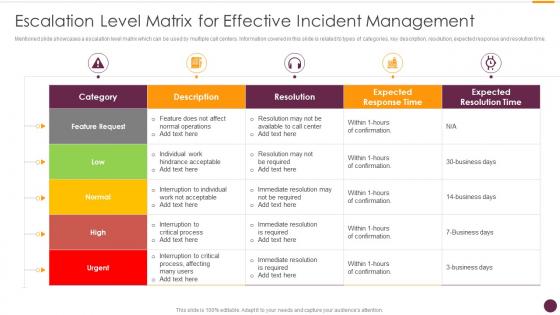
Escalation Level Matrix For Effective Incident Management




Try Before you Buy Download Free Sample Product
 Impress Your
 Audience
 100%
100% Editable
 Save Hours
 of Time


Mentioned slide showcases a escalation level matrix which can be used by multiple call centers. Information covered in this slide is related to types of categories, key description, resolution, expected response and resolution time.
People who downloaded this PowerPoint presentation also viewed the following :
Escalation Level Matrix For Effective Incident Management with all 6 slides:
Use our Escalation Level Matrix For Effective Incident Management to effectively help you save your valuable time. They are readymade to fit into any presentation structure.





FAQs for Escalation Level Matrix For
So there's basically five phases you'll deal with: detection, response, investigation, resolution, and post-incident review. Detection's pretty straightforward - alerts go off or users start complaining. Response means figuring out how bad it is and getting the right people involved. Then comes investigation, which honestly is where everything goes to hell and takes way longer than you think it will. After that you actually fix the damn thing and make sure it stays fixed. Post-incident review is just fancy talk for "what went wrong and how do we not screw up again." Oh, and write everything down as you go - trust me on this one.
Set up a basic severity matrix - impact vs urgency. P1 for critical stuff hitting everyone, P2 for major features broken, P3 for smaller bugs. Honestly the naming doesn't matter much as long as you're consistent. Get your team to agree on clear rules beforehand, like "payment issues = always P1" so nobody's arguing during a real incident when everyone's freaking out. Oh, and make sure whoever's doing triage can actually make quick decisions without needing approval from five different people. Document everything so you can tweak the process later - you'll definitely need to.
Dude, communication can totally make or break your incident response. Keep everyone updated - stakeholders, customers, your team. Otherwise it's just chaos and people doing the same work twice. Set up your channels beforehand and figure out who tells what to who. Honestly, there's nothing worse than customers finding out about outages from Twitter instead of you. Get automated status updates running if you can. Your internal team needs a dedicated war room or chat channel too. Oh, and always wrap up with a post-incident summary afterward.
Honestly, automation saves you so much time on incident response. Set up automatic ticket routing first - that alone cuts out tons of manual work. Your system can handle notifications and escalations based on severity while you're still figuring out what's broken. I'd start with basic stuff like ticket assignment rules, then build up to fancier workflows. The cool part is it can run initial diagnostics and grab baseline data before anyone even looks at the incident. Oh, and automated status updates are a lifesaver - no more manually updating every stakeholder group when things hit the fan.
Track MTTD and MTTR first - how fast you catch problems and fix them. Also watch your incident volume and severity patterns over time. Customer impact metrics matter too, like how many users got hit and what the downtime actually cost. Here's the thing though - everyone obsesses over resolution time but totally ignores prevention stuff, which is kinda backwards if you ask me. Don't forget escalation rates and whether teams are actually doing post-incident reviews. Start simple with these basics. You can always get fancy with more detailed metrics later once you've got solid data coming in.
Honestly, the worst part is when everything's on fire and nobody knows who's supposed to do what. Communication falls apart completely. I've seen teams just running around in circles - total nightmare. Get your escalation procedures sorted out first. Figure out who's incident commander, who talks to the higher-ups, all that stuff. Templates help too, though they're kinda boring to set up. Oh and practice! Run those tabletop scenarios before you actually need them. Document what you're doing now and spot the obvious holes. Way easier to fix this stuff when you're not panicking.
So the ITIL framework has five stages you should map to: identification, logging, categorization, prioritization, and resolution. First thing - actually log everything properly. Sounds basic but tons of teams blow this off when they're swamped. Get your priority matrix sorted so critical stuff gets handled first, obviously. Communication workflows are usually where you'll see the biggest improvement though. Make sure your escalation paths are crystal clear. I'd audit what you're doing now against ITIL and tackle the worst gaps first. Oh, and don't try to fix everything at once - you'll just create more chaos.
So PagerDuty, Opsgenie, and ServiceNow are the heavy hitters - they'll save your sanity when everything's on fire. Real-time alerts, auto-escalations, dashboards that actually make sense. Jira Service Management is solid if you're already using Atlassian stuff. But here's the thing - whatever you pick needs to ping your team where they actually hang out, like Slack or Teams. Nobody checks email at 2am, you know? I'd honestly just grab PagerDuty's free trial first. It's pretty straightforward and you'll figure out fast if it works for your setup. Make sure it connects with your existing monitoring tools though.
Post-incident reviews are basically damage control meetings done right. Get everyone in a room and walk through what happened - but no finger pointing allowed. The good stuff happens when you dig into why things broke and start connecting dots. Like if you've had three database crashes this month, maybe your monitoring sucks. Honestly, half these sessions turn into "oh yeah, we noticed that pattern too" moments. Document whatever action items come out of it and actually assign someone to own them. Otherwise you'll just have the same fire drill next month and wonder why nothing ever gets fixed.
Look, don't just fix the symptom - dig into WHY it broke in the first place. Server crashed? Cool, but what caused it and how'd it get that far? Write everything down so you start seeing patterns. I get it, when everything's on fire you just want to slap a bandaid on it and call it done. But that's how you end up fighting the same stupid issues every month. Set up monitoring around stuff that likes to break. Automate whatever you can. Actually do something with those post-incident reviews instead of filing them away forever.
Honestly, you can't just rely on reading playbooks and hoping for the best. Do tabletop exercises where your team actually walks through realistic scenarios - like when everyone freaked out because nobody knew who should call the vendor. Run fake incidents so people get comfortable with the real process under pressure. Train on your actual tools and procedures, not some generic stuff that doesn't apply. Cross-train everyone so you're not totally screwed when your main person is out sick. Oh, and definitely do quarterly refreshers. After real incidents, always debrief what went right and what was a total disaster.
So continuity planning is like incident management's big brother - it kicks in when everything goes sideways and your normal fixes aren't working. Picture your main datacenter burning down or getting hit by ransomware. Fun times, right? Without it, you're basically running around screaming when the real disasters hit. The key is figuring out your most critical stuff first, then mapping backup plans for each scenario. You'll want backup systems ready to go and clear escalation steps so nobody's guessing what comes next. Honestly, most companies think they can wing it until something actually breaks catastrophically.
Honestly, just get ahead of it with regular updates - when you first spot the issue, after you figure out the damage, during fixes, and when it's done. Figure out who needs what info first though. Your CEO probably just wants "we got this handled" while your tech leads want all the messy details. I'd hit them up through email, Slack, whatever works - phone calls if it's really bad. Don't make them chase you down for updates, that's the worst. Push info out before they ask. Oh and maybe throw together a quick status page they can check themselves - saves you from answering the same question fifty times.
Capture everything - timeline, who was involved, what broke, and how you fixed it. Write it like you're telling someone who wasn't there but might deal with this mess later. I've seen way too many tickets that just say "fixed network thing" which is completely useless! Screenshots and error messages are your friend here. Here's the thing though - document what DIDN'T work too, not just your miracle solution. Trust me, when this same issue pops up at 3am, you'll be grateful you wrote down those failed attempts. Oh, and use a template so you don't forget the important stuff when you're rushing.
Look, regulations aren't optional - they're basically the law when it comes to incident handling. GDPR gives you 72 hours to report, HIPAA has its own rules for healthcare, finance deals with SOX compliance. Each one's a total pain with different paperwork requirements. Some need direct regulator notification too. The trick? Don't wait until you're in crisis mode to figure this out. Map which regulations hit your company first, then bake those reporting requirements right into your incident response plan. Way easier than scrambling later when everything's on fire.
-
Placing an order on SlideTeam is very simple and convenient, saves you a lot of your time.
-
I came across many PowerPoint presentations with excellent creatives and I believe they would be beneficial to my work.