



 0 Comment
 Customer Reviews

When you think about Apple, Netflix, Zappos, and Amazon, pause and reflect on what makes them your favorites beyond their fantastic products and services. Undoubtedly, it's the exceptional customer experience they deliver. It's their dedication to customer-centricity that shapes unforgettable user journeys.
Let’s take the example of an iPhone. Apple creates a remarkable experience throughout the customer journey. It begins right from the exploration phase (featuring a user-friendly website). It continues till the communication of product delivery (engaging email and SMS updates after or during the purchase decision). An essential part of the journey, which people often don’t realize, is when you open a new iPhone. Even though it only takes a few seconds to lift the lid, it's filled with excitement, anticipation, and happiness. This moment is a big part of what makes buying the iPhone enjoyable. And not to forget, people enthusiastically share "Unboxing iPhone" moments through reels and stories, underscoring the profound impact of a user journey.
Crafting and communicating a map, therefore, is crucial for optimizing sales and marketing processes. But how can you create one that addresses the pain points and creates a loyal fanbase and returning clients?
If you're a marketing or sales professional or a UX designer tasked with sculpting an offline or online user journey map for your organization, our solution awaits you— the User Journey Map Templates.
Explore these Pain Point Templates to identify and resolve business and customers problems
User Journey Map Templates to Create Memorable Customer
ExperiencesRevolutionize your customer insights with our cutting-edge User Journey Map Template—a strategic resource for effective user interactions. From initial engagement to ultimate conversion, this template presents a visual storyline of emotions, requirements, and touchpoints, directing your business strategies toward unprecedented achievements. Harness the power of personalized engagement, fine-tune pain points, and cultivate loyal customer relationships.
The unique part? The 100% customizable nature of the templates provides you with the desired flexibility to edit your presentations. The content-ready slides give you the much-needed structure.
Let’s begin!
Template 1: End-User Journey Mapping PowerPoint Presentation
Introducing a comprehensive solution for all your user journey mapping requirements. This all-inclusive toolkit is designed to assist you in creating and conveying crucial aspects, such as comprehending the customer mapping process, essential statistics, and mapping elements. It will lead you through the stages, steps, and layers of user journey mapping while showcasing touchpoints. With its content-rich tables, graphs, flowcharts, and other visuals, this PowerPoint Presentation guarantees a seamless experience. Download it now!

(Explore these Improvement Plan Templates providing a structured roadmap for setting goals, implementing actions, and monitoring progress to enhance performance and foster a culture of continuous improvement.)
Template 2: User Journey Mapping for Software Development
Initiating your software development journey begins with crafting a precise User Journey Map. Start on the right foot with our PowerPoint Slide, offering a structured flowchart for team onboarding, customer onboarding, and user activities. It also incorporates a section outlining software user tasks like creating logins, verifying customer details, and inviting colleagues to the portal. You can tailor the journey on this slide to meet your client's specific needs. Get it now!

Template 3: Addressing User Journey Based on Customer Requirement
This PPT Slide portrays a user journey the project manager can use to map the customer journey across stages. It also includes details about the channels and critical metrics. Encompassing five stages, this template is a great option to educate and entice your audience. Use this template to document Awareness, Consideration, Convert, and Loyalty information and highlight the channels and critical metrics to incorporate. Grab it now to reap its full benefits.

Template 4: Multiple User Journey Map PPT Slide
For those seeking to showcase the journeys of multiple users on a single page, this PPT Slide is the perfect choice. It allows you to emphasize the journey starting with user sign-up, progressing through onboarding, and then monitoring the following behavior — whether the user abandons the tools, continues as a free user, or upgrades instantly. It's a foolproof method for presenting user journeys based on which you can make strategic decisions. Download it today!

Chart Success with Precision
Now you know that the User Journey Map is the backbone of differentiating your brand from the rest. Each touch point with the customer matters whether it be early in the journey or towards the end. Customers value and appreciate a consistent journey, and yours can be a brand that does this exceptionally well. Simply download these popular User Journey Map Templates and gain raving fans and repeat customers.
PS. Explore this handy guide with the most popular Customer Journey Map Templates, with content-ready samples and examples.
FAQs on User Journey Map
What is a user journey map?
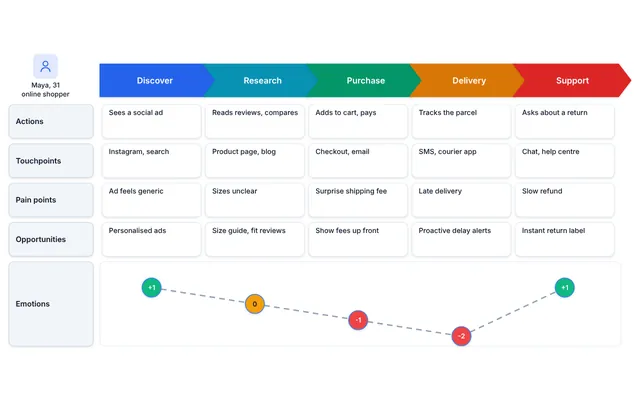
A user journey map is a visual representation that illustrates the steps, experiences, emotions, and touchpoints a user goes through when interacting with a product, service, or system. It helps organizations understand and optimize the user's experience.
How do I create a user journey map?
Creating a user journey map involves several steps:
Define Your User Persona: Start by identifying your target user or customer persona.
Research and Data Collection: Gather data on user behavior, pain points, and emotions.
Map the Journey: Create a visual representation of the user's experience, including stages, touchpoints, and emotions.
Identify Pain Points and Opportunities: Analyze the map to pinpoint areas for improvement and opportunities to enhance the user experience.
Implement Changes: Develop strategies and initiatives to address the identified issues and improve the user journey.
Test and Iterate: Continuously test and refine the user journey map based on user feedback and evolving needs.
What are the four stages of journey mapping?
The 4 stages of journey mapping typically include:
Research: Gather data about user behavior, needs, and pain points through methods like surveys, interviews, and analytics.
Mapping: Create a visual representation of the user journey, highlighting key touchpoints and emotions.
Analysis: Analyze the map to identify pain points and opportunities for improvement.
Implementation: Based on the insights gained, develop and execute strategies to enhance the user experience.