

Building a customer journey map powerpoint presentation slides





Try Before you Buy Download Free Sample Product
 Impress Your
 Audience
 100%
100% Editable
 Save Hours
 of Time


Fulfill your client’s expectations by using Building A Customer Map PowerPoint Presentation Slides. With the help of this customer journey PPT template, you can highlight consumer's needs & expectations. By using the customer purchase cycle PowerPoint complete deck, an employee can create a framework that includes the user experience, overall satisfaction, and recommendations. This user journey PPT deck comprises of a total of seventeen slides. There are certain stages of customer experience that involves awareness, consideration, decision, delights, etc. which you can describe using our professionally designed simple customer journey map PPT visuals. The client satisfaction management PPT contains high-quality icons with which you can make your presentation even more engaging. With the help of this user journey mapping example PowerPoint presentation deck, an individual worker can evaluate the experience which not only increases the business growth but also satisfies the consumer needs. Therefore, download this ready-to-use customer experience map PPT template and provide the guaranteed service to your clients.
People who downloaded this PowerPoint presentation also viewed the following :
Content of this Powerpoint Presentation
Slide 1: This slide introduces Building a Customer Journey Map. State Your Company Name and begin.
Slide 2: This slide shows Content of the presentation.
Slide 3: This slide presents Scope of Customer Journey Map describing- Decide your Objectives, Identify areas of Opportunity, Focus on Global regions sequentially.
Slide 4: This slide represents Creating a Framework for the Map describing- User Experience, Overall Satisfaction, Recommendations.
Slide 5: This slide showcases Analyze the Map describing various stages as- Awareness, Consideration, Decision, Delight.
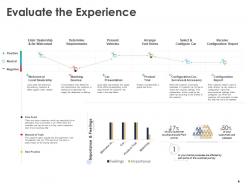
Slide 6: This slide shows Evaluate the Experience with related diagram and text.
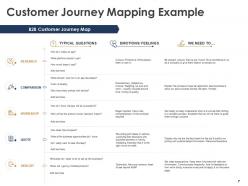
Slide 7: This slide presents Customer Journey Mapping Example.
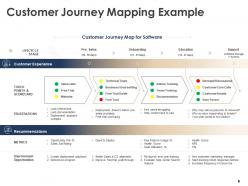
Slide 8: This is another slide showing Customer Journey Mapping Example.
Slide 9: Thos slide displays Building a Customer Journey Map Icons.
Slide 10: This slide is titled as Additional Slides for moving forward.
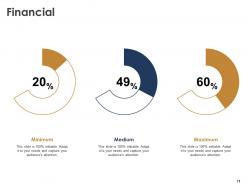
Slide 11: This is a Financial slide. Show your finance related stuff here.
Slide 12: This slide shows Mind Map for representing entities.
Slide 13: This is a Puzzle slide with text boxes.
Slide 14: This is a Venn slide with text boxes.
Slide 15: This is a Target slide. State your targets here.
Slide 16: This is Our Team slide with names and designation.
Slide 17: This is a Thank You slide with address, contact numbers and email address.
Building a customer journey map powerpoint presentation slides with all 17 slides:
Enthuse across generations with our Building A Customer Journey Map Powerpoint Presentation Slides. Age is no bar for them.






FAQs for Building a customer journey map
Honestly, just focus on five main stages and you'll be good. Start with awareness - that's when people first hear about you. Then consideration where they're comparing you to competitors (this part can drag on forever btw). After that comes the actual purchase, then onboarding to get them started right. Finally retention where you keep them around long-term. Sure, some frameworks go crazy with 12+ stages but that's overkill for most businesses. What really matters is figuring out what your customers are thinking at each point and where they typically bail out. These five stages give you a solid foundation - you can always dive deeper once you see what's actually happening with your specific audience.
Honestly? Just put yourself in your customer's shoes and walk through everything they experience. Start from when they first hear about you - ads, social media, your website, sales calls, emails. Don't forget the weird stuff like packaging and receipts either. Those matter more than you'd think! Talk to your customers directly and ask your team what they're seeing. They'll catch touchpoints you totally missed. Yeah, it's a lot of work mapping everything out, but once you have the full picture, you can figure out which ones actually move the needle.
Customer interviews are your best bet to start - get that real data first. I personally love Miro for mapping everything out since your whole team can jump in and collaborate. Honestly though? Sometimes I still prefer the old sticky note workshop method, it just feels more natural. Google Analytics and your CRM will give you the hard numbers to back up what people are actually telling you. Mix those qualitative insights with real data points. Don't overthink it - pick one persona, map one journey, then build from there once you've got the hang of it.
Honestly, customer journey mapping is a game-changer for figuring out where your users are getting stuck. Map out every single touchpoint - discovery, purchase, support, all of it. You'll uncover pain points you never even realized were there. It's wild how much stuff you miss otherwise. Your team will finally be on the same page about what users actually go through instead of everyone having different assumptions. Then you can fix the problems that genuinely matter to people. I'd start with just one user flow this week - don't overthink it.
Honestly, customer feedback is like your reality check for journey mapping. You think you know what customers go through, but their actual experiences? Totally different story. Surveys and support tickets will show you the real pain points - not what you assumed they'd be. I always compare my current map to recent feedback first, then mark the biggest gaps. Those disconnects tell you which moments actually make or break the experience. Some touchpoints you think are minor end up being huge deals to customers. Start there and work backwards from their perspective.
So instead of just guessing what your customers are doing, you can actually see the real data - where they click, how long they hang around, when they bounce. It's honestly like night and day compared to flying blind. You'll spot patterns that would've taken forever to notice otherwise. Plus you can figure out where people are actually dropping off (not where you think they are) and which channels are legit driving sales vs just looking fancy in reports. I'd start by combining your web analytics with customer data - that's where the good stuff usually hides.
Oh man, the classic mistake? Sitting in a conference room making assumptions instead of actually talking to customers. You'll just end up with fiction. Don't go overboard mapping every tiny interaction either - honestly, it gets overwhelming fast. Focus on what actually moves the needle for your business. Too many cooks in the kitchen will turn it into committee hell, trust me. The other thing - people treat this like a one-and-done project when it should evolve. Start small, interview real humans first, then keep tweaking it as you discover new stuff.
Honestly? Every 6-12 months is the sweet spot, but it really depends on your industry. Tech and retail move crazy fast, so I'd say quarterly makes way more sense there. Stable industries can get away with yearly updates - lucky them lol. The biggest red flag is when you notice your map doesn't match what customers are actually doing anymore. That's your cue right there. Also update after big product launches or policy changes. Oh, and definitely when customer feedback starts telling a totally different story than your current map. Pro tip: set a calendar reminder or you'll totally forget about it.
Personas are like your roadmap for the whole thing - they tell you which touchpoints actually matter and what emotions to dig into. Think about it: mapping a Gen Z mobile experience is completely different from how boomers interact with your brand (one's swiping, one's calling). Pick your top 2-3 personas first and map them separately. Otherwise you're just making stuff up about what customers feel. They'll show you the real goals and pain points at each stage. Honestly, trying to map without personas is like driving blindfolded - you might get somewhere, but probably not where you wanted to go.
You'll get way better customer journey maps when different teams work together - each department catches stuff the others totally miss. Marketing sees the early awareness stuff, sales knows exactly where prospects bail out, and support deals with all the post-purchase headaches. Honestly, most companies just let one team handle mapping and wonder why it feels incomplete. Three departments minimum in your next session, trust me. The blind spots disappear fast when everyone's sharing what they actually see happening. It's like... finally having the whole story instead of random chapters.
Track 3-5 key metrics consistently for 6-12 months. Customer satisfaction scores and NPS at major touchpoints tell you if the experience actually got better. Business-wise, watch conversion rates, retention, and customer lifetime value. Support resolution time matters too - nobody wants to wait around forever for help. Here's something people forget: measure internal stuff like employee satisfaction and how well teams work together. Journey mapping usually breaks down those annoying silos between departments. Don't go overboard with metrics though. Pick a few good ones and stick with them.
Dude, AI totally changes the game here. You can dump all your customer data - support tickets, social media stuff, website clicks, purchase history - and it'll find patterns you'd never catch yourself. Takes what used to be weeks of manual work and does it automatically. The really neat part? It predicts where people bail out and spots pain points across different touchpoints. Some platforms even suggest real-time fixes for struggling customers. Honestly beats staring at spreadsheets for hours. Just find a journey mapping tool with AI built in and feed it your existing data - it'll start building those maps right away.
Dude, B2B customer journeys are such a pain compared to B2C. With B2C, one person just buys something - boom, done. But B2B? You've got like 5 different people who all need to sign off, plus it takes months instead of minutes. Think about it - buying a latte vs buying software for your entire company. Totally different animals. You're dealing with committees, procurement teams, budget approvals... the whole nine yards. My advice? Figure out who all the players are first. Then map out what's driving each person crazy in the process. Trust me, there's always someone in accounting making everything way more complicated than it needs to be.
So basically, customer journey mapping shows you where to actually spend your marketing budget instead of just throwing money around randomly. You can see exactly where people are getting frustrated or excited during their experience with your brand. Honestly, this stuff is way more useful than I thought it'd be when I first heard about it. It helps you figure out which touchpoints need more attention and what messages work at different stages. Your whole team gets on the same page too - sales, marketing, customer service, everyone. I'd start with just one customer segment and use what you learn to plan your next quarter's campaigns.
Dude, mapping out the customer journey is honestly a game changer. Gets everyone looking at the same picture instead of arguing about completely different things. Once stakeholders see those pain points laid out visually, they finally understand what's actually broken. Your team will catch gaps they totally missed before too. Those alignment meetings? Way less painful when you're not just talking in circles. Different departments start seeing how their stuff affects customers - which yeah, sounds obvious but apparently it's not. Honestly just pick one touchpoint to start with and you'll see conversations get so much more real.
No Reviews