


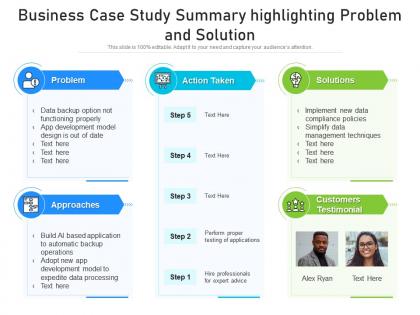
Business case study summary highlighting problem and solution




Try Before you Buy Download Free Sample Product
 Impress Your
 Audience
 100%
100% Editable
 Save Hours
 of Time


Our Business Case Study Summary Highlighting Problem And Solution are topically designed to provide an attractive backdrop to any subject. Use them to look like a presentation pro.
People who downloaded this PowerPoint presentation also viewed the following :
Business case study summary highlighting problem and solution with all 2 slides:
Use our Business Case Study Summary Highlighting Problem And Solution to effectively help you save your valuable time. They are readymade to fit into any presentation structure.
FAQs for Business case study summary highlighting
Okay so you need five things: the client's problem, how you fixed it, actual numbers for results, and what you learned. Oh, and context upfront so people get why it mattered. Walk them through what you actually did - don't just say "improved efficiency" because that's meaningless. Get specific with metrics. Honestly, the surprising insight at the end is what makes people remember your case study and want to share it. Keep everything scannable with bullets or short chunks. I usually wrap up by showing how others can steal your approach for their own stuff. Works every time.
Honestly, visuals are a game-changer for case studies. They stop people from zoning out when they hit those massive text blocks. Charts work great for showing your results, but screenshots and process diagrams can be just as powerful. I always throw in some icons too - sounds basic but it actually helps highlight your main points. You want maybe 3-4 key insights max, then figure out what visual makes each one memorable. I've sat through way too many boring presentations where I'm checking my phone by slide 5. Short sentences mixed with longer explanations keep things moving. Your visuals become like breadcrumbs guiding people through your story without making their eyes glaze over.
Oh man, the biggest trap is trying to cram every tiny detail in there - seriously, resist it! Skip the chronological retelling too. Instead, organize around what the business actually learned. Most cases don't have one perfect answer anyway, so don't make it sound that neat and tidy. Business is messy, right? Keep it tight and focused on the core problem plus key decisions. Short sentences work. Longer ones can flow naturally when you're explaining the main outcomes. Always finish with the "so what" though - your reader needs to walk away with something concrete they can actually use.
You gotta match your audience's vibe, honestly. Tech people want to hear about user adoption and scalability. Healthcare? They're all about patient outcomes and staying compliant. Financial services lives and breathes ROI and risk stuff. Don't use boring corporate language that could work for literally anyone. Manufacturing cares about efficiency. Retail obsesses over customer experience. Here's what works: figure out the 3 biggest headaches your target industry deals with right now. Then build your whole case study around fixing exactly those problems. Use their actual terminology too - it shows you get their world instead of just throwing generic business jargon at them.
Look, data analytics is what separates actual business insights from just random opinions. It helps you spot patterns, track how things measure up against benchmarks, and put real numbers behind whatever problem you're tackling. Executives will tune out fast if you don't have the data to back up your points - learned that one the hard way. The numbers let you dig into root causes and forecast what might happen next. Oh, and definitely open your summary with your most compelling data point. Grabs attention right away.
Think of your case study like a good story - conflict, journey, resolution. Start with what was going wrong for your client and why it actually mattered. Paint that picture first. Then show how you solved it, hitting the major turning points along the way. Don't just list what you did - include the messy human stuff like what people were thinking or worried about. Honestly, those details are what make readers give a damn. End with real numbers and impact, not vague "success" claims. The whole thing should flow like you're telling someone about a project over coffee, not reading from a manual.
Here's the thing - your problem statement is what keeps everything focused. Without it, you're just throwing random solutions around (which, let's be real, happens all the time in corporate life). It gives readers the actual "why" behind your whole analysis. People need to quickly grasp what's at stake and how urgent things are. Think of it like your hook that gets them invested enough to read the rest. Oh, and make yours super specific with real numbers instead of being vague. Otherwise your recommendations won't actually fix anything meaningful.
Start with the big numbers right up top - "300% ROI in 18 months" should be in your first paragraph, not buried somewhere. Executives scan fast, so make those financial wins impossible to miss. Charts and callout boxes work great for this stuff. Structure it as a clear before/after story - what you invested vs what you got back. I always cringe when I see case studies where the ROI gets lost in all the operational fluff. Oh, and throw in a quick calculation at the end showing your math. Readers like being able to check your work.
Pick 2-3 insights that actually matter to your audience first. Everything else? Just fluff. I always do the "So what?" test - if I can't explain why someone should care, it gets cut. Your summary needs clear headers and bullets because dense paragraphs are the worst when people are swamped. Start with your main point, then back it up. Skip the jargon and use real examples instead of vague concepts. Oh, and always end with next steps - otherwise you'll get that annoying "okay... so what do we do now?" response in meetings.
Honestly, formatting can make or break whether anyone actually reads your summary. Dense paragraphs are the worst - I've watched executives just skip right over them. Break things up with headers and bullet points. White space is your friend here. Put your main recommendation right at the top, then back it up with organized proof points they can scan quickly. Bold text works, but don't go crazy with it. Just hit the most critical stuff. Your readers are slammed, so make it easy on them. I learned this the hard way after burying some great insights in a wall of text that nobody bothered reading.
Cite stuff as you go—don't just throw all your sources at the end like an afterthought. When you reference data or quotes, include company names, report dates, and page numbers so people can actually check your work. Pick Harvard or APA, whatever, just don't mix them up (trust me, it looks messy). Go for annual reports and SEC filings over random articles when you can. Oh, and keep a running list of your sources while researching. You'll thank yourself later when you're not frantically googling "where did I find that revenue number" at 2am.
Dude, you should totally use shared docs for your case studies - makes real-time editing so much easier when everyone's contributing. Project boards help track where you are in the process, and comment threads beat endless email back-and-forth any day. Version control will literally save your life when multiple people are working on drafts. I'm obsessed with dedicated Slack channels for each project because nothing gets buried that way. Teams works too if that's what your company uses. The whole setup just keeps everyone on the same page with deadlines and findings without the usual chaos.
Honestly, watch how much people are actually engaging - are they asking questions, taking notes, jumping into discussions afterward? That's your best indicator. Ask them to summarize the main points back to you or quiz them on key takeaways. I've totally bombed presentations before by rushing the ending, so don't do that lol. See if they can actually use your insights in their real situations. The true test though? Hit them up a week later and see what they remember. If they've actually tried any of your suggestions, you nailed it.
Look, case studies are basically cheat codes for business planning. They show you what actually worked and what totally bombed - way better than just guessing. You'll start noticing patterns in successful moves and can dodge the same mistakes others made. Market timing, internal drama, all that stuff becomes clearer when you see how it played out for real companies. It's not magic, just good data. Here's what I'd do: make a basic template to jot down key takeaways from each one you read. Then actually use it when you're planning your next big move. Sounds obvious but most people skip that step.
Build checkpoints right into your process - after each summary goes out, grab stakeholders for quick review sessions. Ask what clicked, what was confusing, stuff they'd change. Even a 5-minute survey catches blind spots you'll miss otherwise. I always watch which sections get the most questions during presentations. That's your red flag right there. The trick is making feedback automatic, not something you remember later (spoiler: you won't). Actually block time on your calendar right after finishing each summary. Otherwise it just becomes another thing on your endless to-do list that never happens.
-
I discovered this website through a google search, the services matched my needs perfectly and the pricing was very reasonable. I was thrilled with the product and the customer service. I will definitely use their slides again for my presentations and recommend them to other colleagues.