

Business digitalization powerpoint presentation slides





Try Before you Buy Download Free Sample Product
 Impress Your
 Audience
 100%
100% Editable
 Save Hours
 of Time


Gain new experience and design innovative business models with the aid of our topic-specific Business Digitalization PowerPoint Presentation Slides. By using this visually-appealing business innovation PPT layout, you can explain the importance of adopting new technologies to existing infrastructure. Highlight the core elements of business digitalization such as performance management, process digitization, top-line growth, customer understanding, customer touch points, and digitally modified business. Use this presentation template to explain the barriers of digital transformation and what are the measures should be taken to resolve them. Employ our creatively designed technology transformation PPT slide to create a roadmap that consists of assessment, opportunity scan, commitment, business-cases, and many more. Describe the overall budget that will need to transform the offline business into a complete and transformed digital business. Take advantage of this eye-catching online business change PowerPoint theme to mention the steps that help to improve the customer service experience. Download our ready-to-use business digitalization PowerPoint presentation template and increase the lead generation of your organization.
People who downloaded this PowerPoint presentation also viewed the following :
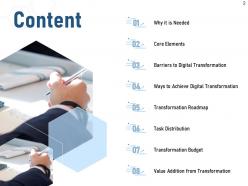
Content of this Powerpoint Presentation
Change is the only constant is a well known adage; anybody resisting change should have good enough reason to explain to themselves why they were stampeded while the rest of the world embraced it. Businesses, in particular, experience frequent change in their operations; those who embraced it and learnt its ropes, flourished, while those adamant at sticking to the old ways went under water, quickly.
Digitization is one such aspect that has taken the world by storm and businesses are no stranger to its impact. While companies like Netflix, Nike, Amazon, and Airbnb, embraced and harnessed its forces, others like Kodak and Blockbuster archived themselves. The latter didn’t consider at all the benefits that a digital transformation could bring along in the future. Fast forward to the future: The old techniques are redundant, and digitization is the only way to excel and grow.
But, is it an easy journey for those wishing to step in? With the willpower and perseverance it is going to be. To fuel this inspiration to act on, here’s a content-ready PPT Presentation to lead the way.
Prepare a team of digital enthusiasts who will help your business propel to greater heights and use this PPT Toolkit to guide them in bringing about digital transformation. Address areas of production, distribution, logistics, and customer support with digitization. With this investment, expect sales, brand image, and business relevance to magnify manifold. Let’s quickly go through its top presentation slides.
Implement a month by month digitization plan for your business with this compact PPT Design
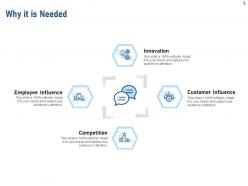
Template 1: Why It is Needed
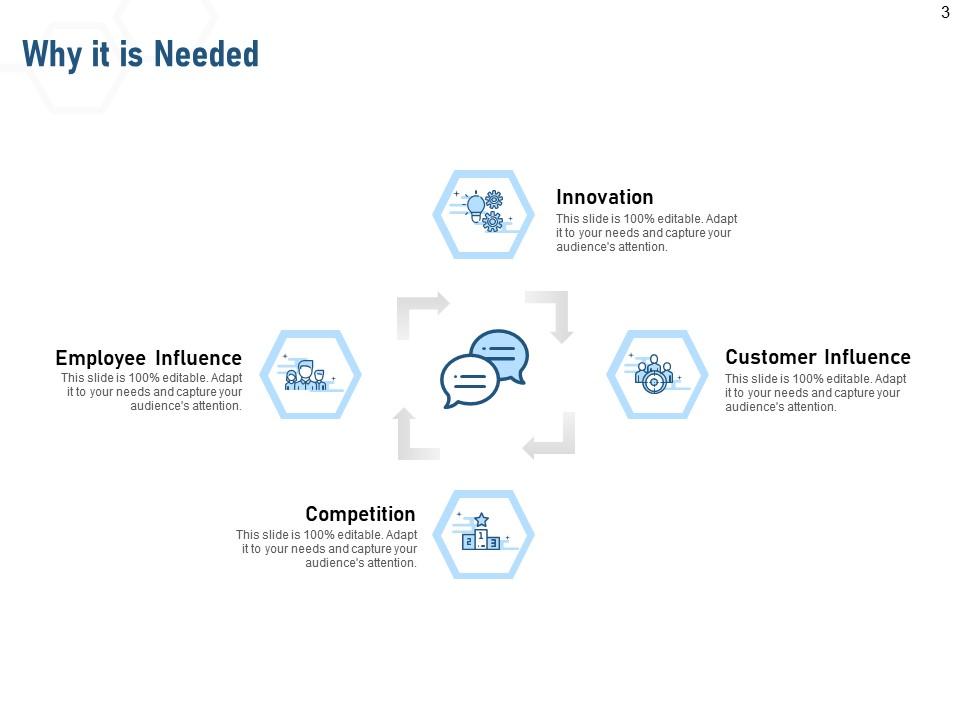
Introduce the importance of undergoing digital transformation in this former PPT Slide. Highlight the business aspects that’ll be directly impacted by its implementation. These will be technical, customer relations, staff-related, and the business competition. Pin these areas using icons, and briefly explain how digital transformation will elevate your brand image in these core areas.
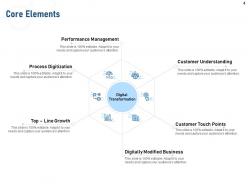
Template 2: Core Elements
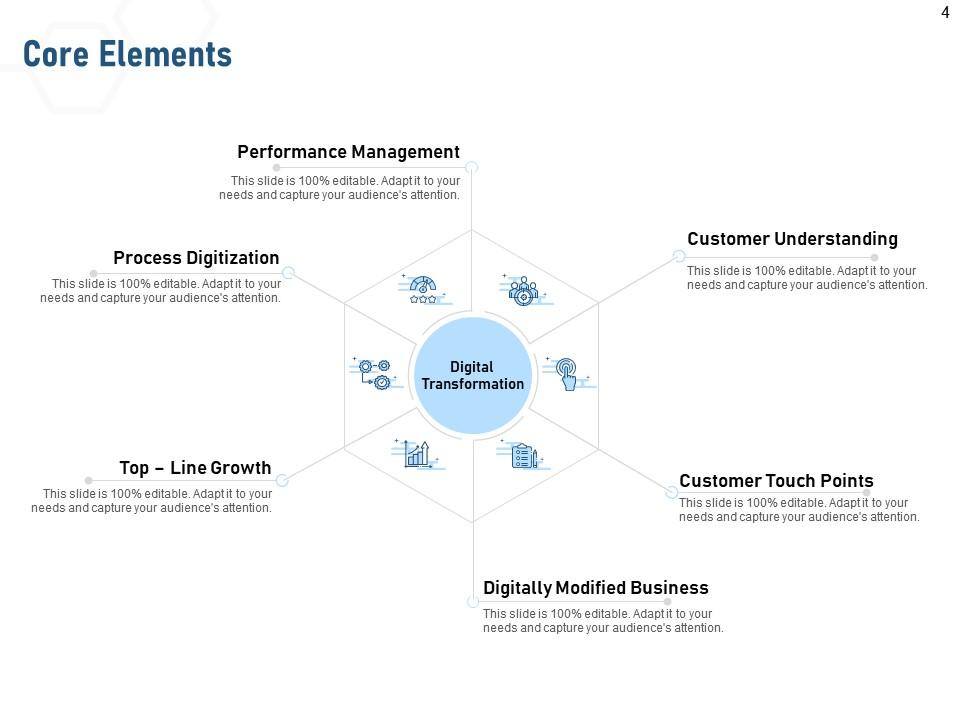
Once the need is clear, discuss the benefits of digital transformation with this PPT Diagram. From the staff point of view and that of the customer, discuss how your day-to-day communication and operations will be improved, thus the perception of your business image enhanced. Discuss technological advancements that will be imminent as a result of its implementing and business growth that will follow next.
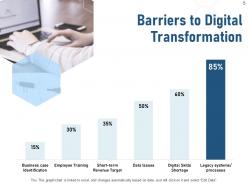
Template 3: Barriers to Digital Transformation
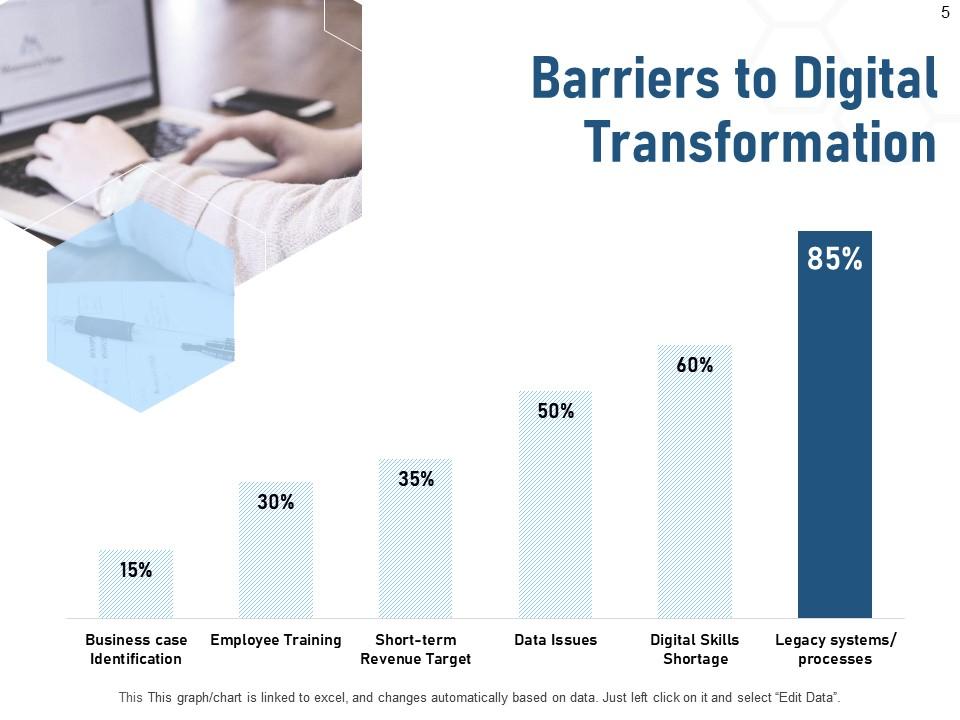
This PPT Layout gives you a fact-check of implementing digital transformation, in practice. There are always thorns with the rose. Point out what those bottlenecks will be for your business by giving a statistical estimate of those factors. Common barriers that businesses identify are employee training, short-term revenue target, data issues, skills incompetence, etc
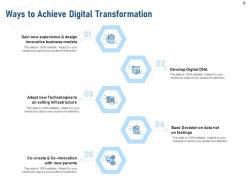
Template 4: Ways to Achieve Digital Transformation
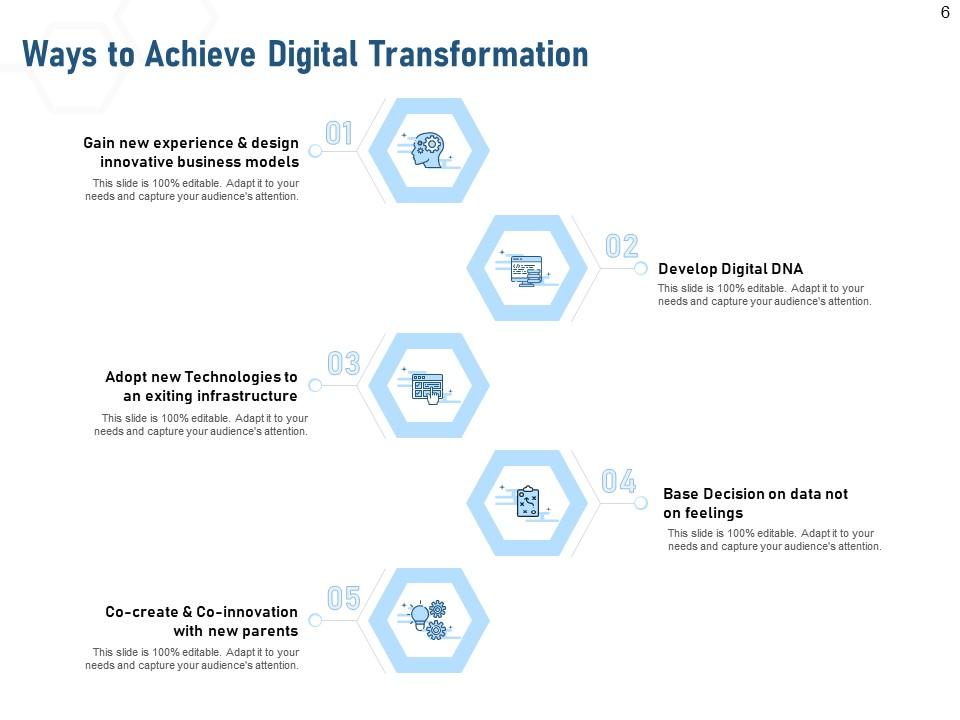
Craft a simple procedure to achieve business transformation in digitization with this presentation design. This visually powered PPT Slide will help you create an outline of steps involved in achieving digital transformation. Begin with designing and digitization-feasible business models, followed by focusing on practices and technologies that are imperative to the transformation. Finally, take data-centric decisions while making strategies and pave the way to innovation and excellence.
Plan an impactful IT strategy for digitizing your business with this content-ready PPT Deck.
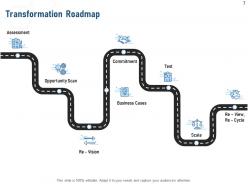
Template 5: Transformation Roadmap
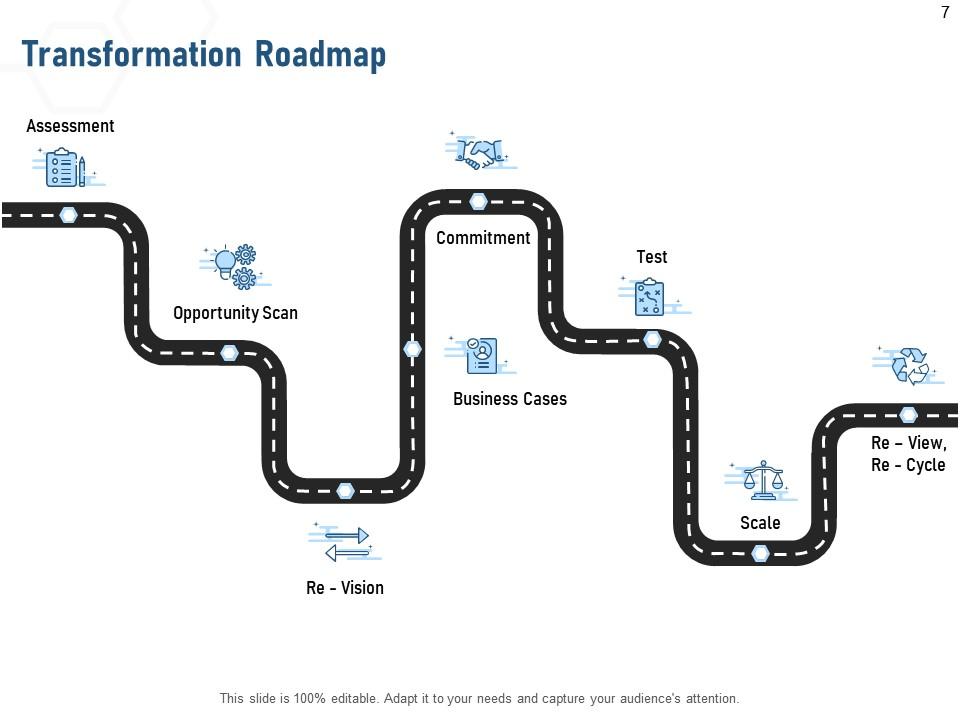
A roadmap offers a more realistic insight into implementing transformational plans.
Moreover, teams will be motivated to achieve goals by knowing about the milestones as they checklist these along the way. This roadmap diagram will help you create both specific and generic-framework as teams are guided to pursue digital transformation.
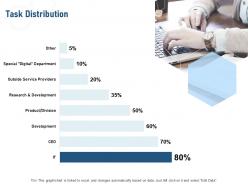
Template 6: Task Distribution

With this PPT Template, leaders will be able to highlight newest distribution of responsibilities among departments and business areas. Share an estimated proportion of tasks that will fall under this next phase of business evolution and development, with the IT department undergoing the maximum transformation.
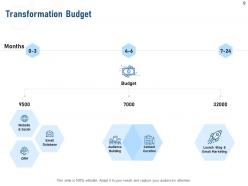
Template 7: Transformation Budget
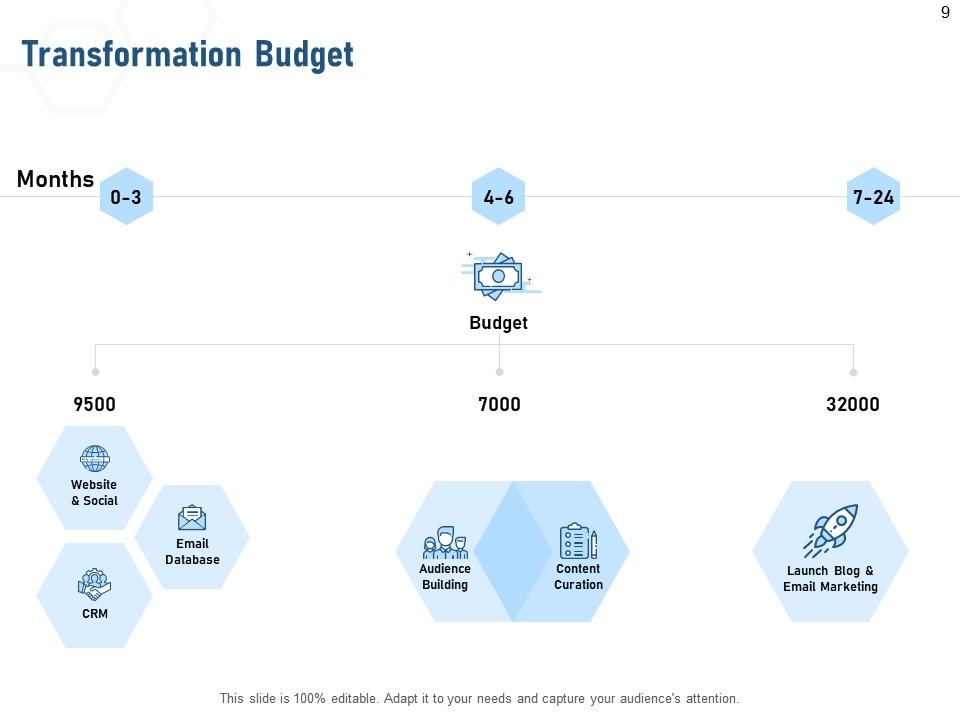
Equally realistic while charting a transformation journey is to estimate the budget and expenses of implementing this new plan. Identify changes and upgrades in tools and technologies that will follow a digital transformation and estimate the cost over two years. Identify areas that will have a share in this budget and these will be CRM, digital media, audience building, and program launch etc. Share a quarter-wise predicting of budget expenditure using this design-ready PPT Layout.
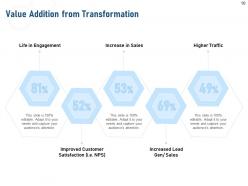
Template 8: Value Addition from Transformation
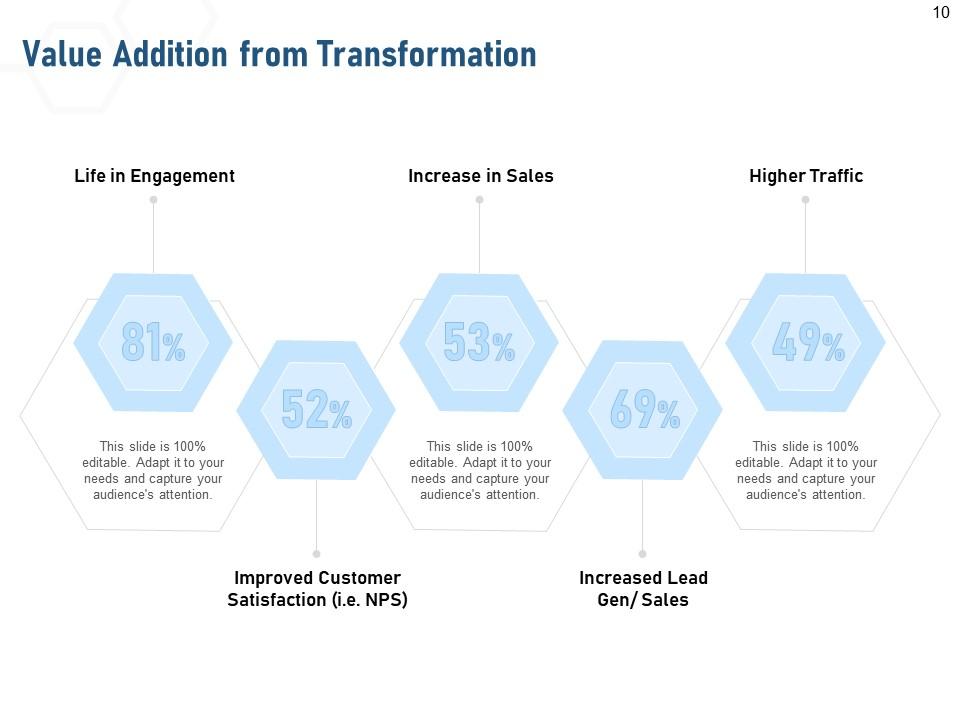
Based on how other businesses have fared as a result of implementing digitization., forecast good things for your business as a result of your efforts. Mention these Key Performance Indicators, prominent among which are engagement, customer satisfaction, sales, leads, and traffic formance. Post implementing a transformative plan, you can use this PPT Layout to report a summary of your performance.
Hand-hold Your Team Through a Transformative Journey
Plan a bullseye-digital transformation strategy while evaluating feasibilities, budget constraints, and expertise at hand using this PPT Utility. Forecast business perks that lie on the other side of this digital transformation to ignite enthusiasm in your team to take this project forth. Grab this power-packet PPT Deck now!
PS: Ace your digitization strategy to accelerate business transformation journey with this all-encompassing PowerPoint Presentation.
Business digitalization powerpoint presentation slides with all 20 slides:
Use our Business Digitalization Powerpoint Presentation Slides to effectively help you save your valuable time. They are readymade to fit into any presentation structure.
FAQs for Business digitalization
Honestly, going digital is a game changer for small businesses. You'll save money and your customers will actually enjoy dealing with you more. All those boring repetitive tasks? Gone. Your team can focus on stuff that actually matters instead of drowning in paperwork. The data insights alone are worth it - way better than guessing what's working. You can suddenly compete with the big guys too, especially on customer service. My advice though? Don't try to do everything at once. Pick one thing, get it right, then move on to the next.
Honestly, just grab any decent digital maturity framework - there's like a million of them but they all cover the same stuff: tech infrastructure, data capabilities, digital skills, culture. Don't overthink which one to pick. Survey your teams about pain points and how much they actually use digital tools (vs pretending to). Then audit your tech stack to see what's genuinely working. Be ruthless about identifying gaps - that's where the magic happens. I always tell people this part sucks but it's necessary. Once you've got that reality check, prioritize the biggest problem areas and build a roadmap that won't make everyone quit.
Honestly, the biggest pain points are usually your team pushing back on changes and budget issues. New systems never play nice with existing tech either - total headache. Training's where most companies mess up though, because people get overwhelmed super quick. Executives freak out about data security too, which I get. Oh and don't even get me started on picking the right tools without chasing every new shiny thing. Start with small pilot programs first. Get your team in on decisions early so they don't hate you later. Budget way more time and cash than you think - trust me on this one.
Look, don't make security an afterthought - build it in from the start. Zero-trust is the way to go (assume everything's already hacked). Encrypt your data everywhere and make everyone use multi-factor auth. Train your people too because, let's be real, most hacks happen when Dave from accounting clicks on something sketchy. The trick is finding security that actually helps your digital stuff instead of just getting in the way. Oh, and definitely get a security audit before you dive into any big projects - trust me on this one.
Honestly, training makes or breaks the whole thing. Your team will hate any new system if they don't get it - doesn't matter how amazing the tech is. People freak out about change, especially when they feel clueless. Good training actually gets them pumped instead of panicked. Oh, and here's what worked for us - train your eager people first. They'll spread the knowledge way better than any formal session. Confidence spreads fast once a few people start loving the new tools. Skip this step and you're basically throwing money at frustrated employees.
Banks, retailers, and healthcare companies are absolutely killing it with going digital. Mobile banking apps are everywhere now, Amazon basically showed everyone how omnichannel should work, and doctors finally figured out telehealth (took a pandemic though, right?). Here's what they did smart: picked one customer problem instead of trying to fix everything. Built solid data systems first. Ditched old processes that sucked. The key thing? They focused on making life easier for customers, not just saving money. My advice - find your most annoying customer journey and start there.
So here's what works - start with just one feedback method and actually get decent at it before adding more. I'd go with post-purchase emails or maybe a simple widget on your site. Make it crazy easy for people to tell you stuff while they're still thinking about their experience. Social media monitoring helps too, but honestly, the biggest mistake is collecting all this feedback and then doing nothing with it. People definitely notice when their suggestions vanish. Use some basic analytics to find patterns, then actually respond or make changes. Once you've got that down, add surveys or whatever makes sense for your business.
Honestly? Pick one tool that fixes your biggest headache first. Going all-in from day one is a recipe for disaster. Get your team excited by showing them it'll make life easier - I learned this the hard way when everyone pushed back on changes. Map your current processes before digitizing anything (boring but necessary). Budget for training too, because skipping that step always bites you later. Test everything twice before rolling out. Oh, and make sure whatever you choose plays nice with your existing systems. Nobody wants five different places to check for the same info.
Dude, AI and IoT are like rocket fuel for going digital. They automate stuff you never thought could be automated and give you crazy data insights that were impossible before. Your customer service gets chatbots, supply chain gets predictive analytics - IoT connects everything so your devices actually talk to each other and optimize themselves. It's honestly pretty wild how much they change operations. Oh, and don't try to do everything at once - that's a recipe for disaster. Just pick one manual process and see how these techs can streamline it. You'll spot other opportunities fast.
Track both the operational stuff and financial numbers - you need both sides. User adoption rates matter, plus customer satisfaction and how much smoother your processes get. Revenue impact and cost savings are obvious ones to watch. Don't fall into the vanity metrics trap though. I've watched companies get obsessed with meaningless numbers that look impressive but don't actually move the needle. Pick 5-7 metrics that directly connect to what you're trying to achieve business-wise. Monthly dashboard reviews work well - you'll catch trends before they become problems. Oh, and time-to-market improvements are huge if you're launching products regularly.
Dude, going digital changes everything for your customers. They get faster service, personalized stuff, and can reach you 24/7 through chatbots or whatever. People literally expect this now - if your site feels clunky, they're gone. You can send targeted recommendations based on what they've bought before, plus the data helps you predict what they'll want next. Honestly, I'd start by looking at your customer journey and finding the most annoying parts to fix first. It's kinda overwhelming but worth it.
Honestly, leadership has to be on board first or you're screwed from the start. Train people properly - I can't stress this enough because nothing tanks morale faster than employees fumbling around with tech they hate. Start small with pilot projects where failing is totally fine, then make a big deal about celebrating wins. Oh, and definitely reward the early adopters since peer pressure works wonders here. Track real metrics too so you can prove the new tools actually make life easier. People need to see concrete benefits, not just more work on their plates.
Don't try to do everything at once - that's where companies screw themselves over. Pick your most straightforward processes first, the ones you know inside and out. Less risky but you'll still get some wins under your belt. I've watched too many places try to overhaul everything simultaneously and it becomes a total mess. Test the bigger stuff as pilots while your main operations stay solid. Oh, and never roll out major changes during your busiest times - learned that one the hard way. Start with one process this quarter, test it properly, then expand from there. Baby steps work better than you'd think.
GDPR is gonna be your biggest pain point - start there. Healthcare? You're dealing with HIPAA. Finance means SOX compliance. Employment laws get tricky too when you're changing how people work, especially if you're adding any employee monitoring stuff. God, regulations change so fast it makes my head spin. But seriously, loop in your legal team before you do anything major. Cross-border data transfers and cloud decisions especially - that stuff gets messy quick. Oh, and do your compliance audit upfront. Trust me on this one - fixing things after you've already built everything is way more expensive.
Honestly, just grab Google Workspace and Canva to start - they're free and handle the basics. Buffer has a decent free plan for social media scheduling too. I'd throw in Zapier to connect everything since having apps that don't talk to each other is super annoying. Don't get sucked into the expensive enterprise stuff yet (trust me, I've been there). Pick maybe 3-4 tools that actually solve your biggest headaches first. You can always upgrade later when you're making more money. Way better to have fewer tools that work together than a bunch of random apps.
-
Qualitative and comprehensive slides, Informative design
-
Content of slide is easy to understand and edit.
-
Illustrative design with editable content. Exceptional value for money. Highly pleased with the product.
-
Informative design.
-
Qualitative and comprehensive slides.
-
Designs have enough space to add content.