


Business operational challenges powerpoint presentation slides





Try Before you Buy Download Free Sample Product
 Impress Your
 Audience
 100%
100% Editable
 Save Hours
 of Time


Looking to present your business operational challenges PPT. Look no further as we have come up with a pre-made 80 slides deck “Business Operational Challenges PowerPoint Presentation Slides” Just check out or readymade slide presentation to accurately present your PPT in front of the audience. Using this Business Operational Challenges PPT example you can lay emphasis on all the challenges that are faced in business operations and slides like our agenda, business operation summary, operational highlights, company objectives, operational challenges, risk associated with strategic alliance, customer service challenges, risk mitigation strategies and many more such slides will assist you put your point through. Going further, this PowerPoint slide deck will help you explain topics like checklist for effective business partnerships, operational setup challenges, current sources of revenue, potential sources of revenue, risk associated with sales & marketing etc. in a very visually appealing manner. Additionally, utilizing our PowerPoint show you can not only share your business challenges but can also train your employees on changes in competitive environment, key performance indicators, calculating customer lifetime value (CLV). Good thing is that this pictorial show comprises of selected creative presentation templates like hiring plan, team goals, risk mitigation strategies etc. are just a few to name here. Simply click to make sure you choose the right business operational challenges presentation PPT before it’s too late. Get across created barriers with our Business Operational Challenges Powerpoint Presentation Slides. They enable you to break through the glass ceiling.
People who downloaded this PowerPoint presentation also viewed the following :
Content of this Powerpoint Presentation
Slide 1: This slide introduces Business Operational Challenges. State Your Company Name and get started.
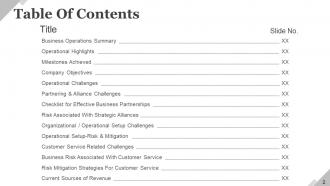
Slide 2: This slide presents Table of Contents. The constituents are- Business Operations Summary, Operational Highlights, Milestones Achieved, Company Objectives, Operational Challenges, Partnering & Alliance Challenges, Checklist for Effective Business Partnerships, Risk Associated With Strategic Alliances, Organizational / Operational Setup Challenges, Operational Setup-Risk & Mitigation, Customer Service Related Challenges, Business Risk Associated With Customer Service.
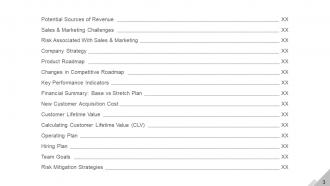
Slide 3: This slide contibunes Table of Contents. The constituents are- Potential Sources of Revenue, Sales & Marketing Challenges, Risk Associated With Sales & Marketing, Company Strategy, Product Roadmap, Changes in Competitive Roadmap, Key Performance Indicators, Financial Summary: Base vs Stretch Plan, New Customer Acquisition Cost, Customer Lifetime Value, Calculating Customer Lifetime Value (CLV), Operating Plan.
Slide 4: This is Our Agenda slide. State your company agendas here.
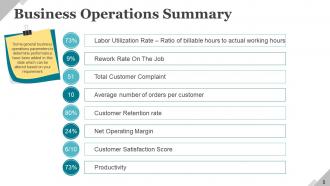
Slide 5: This slide presents a Business Operations Summary with the following points- Total Customer Complaint, Customer Satisfaction Score, Net Operating Margin, Average Number Of Orders Per Customer, Productivity, Rework Rate on the Job, Customer Retention Rate, Labor Utilization Rate. Some general business operations parameters to determine performance have been added in this slide which can be altered based on your requirement.
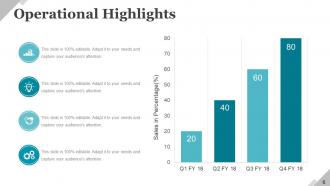
Slide 6: This slide showcases Operational Highlights for four quarters.
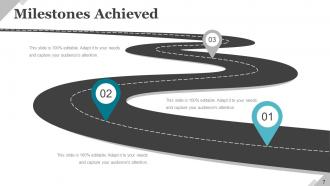
Slide 7: This slide showcases Milestones Achieved in terms of years.
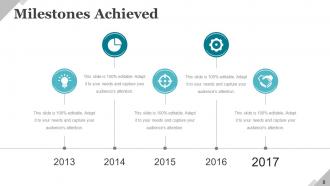
Slide 8: This slide too showcases Milestones Achieved in terms of years.
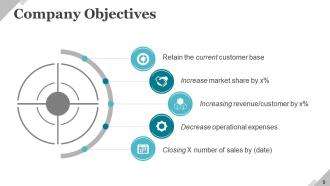
Slide 9: This slide presents Company Objectives. These are some of the common objectives which are discussed during the review meetings and can be altered as per user requirements. Some listed examples are- Retain the current customer base, Increase market share by X%, Increasing revenue/customer by X%, Decrease operational expenses, Closing X number of sales by (date).
Slide 10: This slide presents Operational Challenges divided into two parts: 1. Customer facing 2. back office challenges which are further classified in to 5 sub-categories- Entering the market: sales / marketing / PR, Customer care / CRM, Organizational / operations setup, Optimize revenue sources, Partners & alliances.
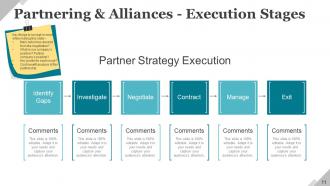
Slide 11: This slide showcases Partnering & Alliances - Execution Stages with the following points- Identify Gaps, Investigate, Negotiate, Contract, Manage, and Exit as part of Partner Strategy Execution.
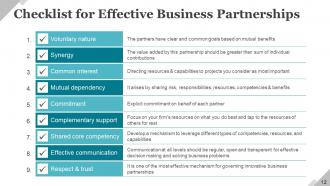
Slide 12: This slide showcases Checklist Effective Business Partnerships. The content includes- Common Interest: Directing resources & capabilities to projects you consider as most important. Mutual Dependency: It arises by sharing risk, responsibilities, resources, competencies & benefits. Complementary Support: Focus on your firm’s resources on what you do best and tap to the resources of others for rest. Shared Core Competency: Develop a mechanism to leverage different types of competencies, resources, & capabilities. Effective Communication: Communication at all levels should be regular, open and transparent for effective decision making & solving business problems. Respect & Trust: It is one of the most effective mechanism for governing innovative business partnerships. Voluntary Nature: The partners have clear and common goals based on mutual benefits. Synergy: The value added by this partnership should be greater than sum of individual contributions.
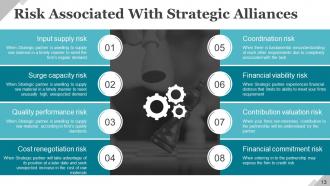
Slide 13: This slide presents Business Risk Associated With Strategic Alliances. The content includes- Coordination Risk, Financial Viability Risk, Contribution Valuation Risk, Financial Commitment Risk, Input Supply Risk, Surge Capacity Risk, Quality Performance Risk, Cost Renegotiation Risk.
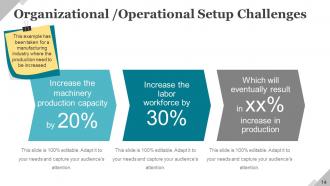
Slide 14: This slide presents Organizational/Operational Setup Challenges such as- Increase the Labor Workforce, Increase the Machinery Production Capacity as examples.
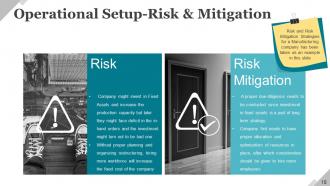
Slide 15: This slide shows Operational Set-up Risk& Mitigation with the following subnheadings- Risk, Risk Mitigation.
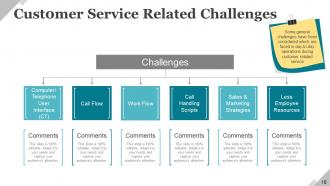
Slide 16: This slide displays Customer Service Related Challenges with the following subheadings- Work Flow, Computer/ Telephone User Interface (CTI), Call, Handling Scripts Less Employee Resources, Marketing Strategies, Cash Flow.
Slide 17: This slide presents Business Risk Associated With Customer Service such as- New methods to improve customer service and reduce related costs are not utilized, Lack of visibility of the order status along the whole supply chain, Inability to respond to market demands caused by lack of integration among order-entry systems or due to infrastructure, Lack of true integration of SCM and CRM systems, Inefficient routing protocols send voice calls and emails to useless contact details where they are never retrieved or responded to, Inadequate staffing provides for an overloaded workforce where responses to inquiries may be unacceptably delayed or never answered at all, Web pages are static (not constantly updated), thus they do not respond to customer needs and demands.
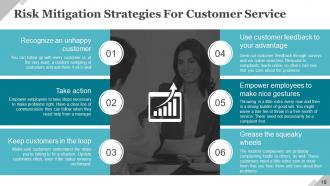
Slide 18: This slide showcases Risk Mitigation Strategies For Customer Service. Listed points are- Recognize an unhappy customer, Take action, Keep customers in the loop, Use customer feedback to your advantage, Empower employees to make nice gestures, Grease the squeaky wheels. Some general challenges have been considered which are faced in day-to-day operations during customer related service.
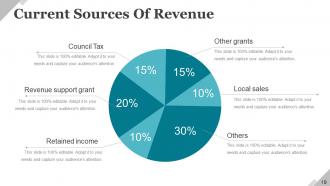
Slide 19: This slide showcases Current Sources of Revenue such as- Other grants, Local sales, Council Tax, Retained income, Revenue support grant, Others.
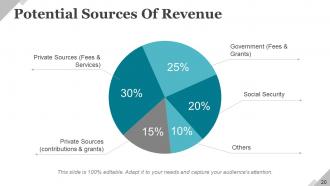
Slide 20: This slide presents Potential Sources of Revenues such as- Government (fees & grants), Social security, Private Sources (contributions & grants), Others, Private Sources (fees & services).
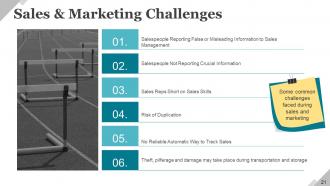
Slide 21: This slide showcases Sales & Marketing Challenges such as- Sales Reps Short on Sales Skills, Salespeople Reporting False or Misleading Information to Sales Management, Salespeople Not Reporting Crucial Information, Risk of Duplication, Theft , Pilferage and Damage may take place during transportation and storage, No Reliable Automatic Way to Track Sales, Some common challenges faced during sales and marketing. You can alter content as per need.
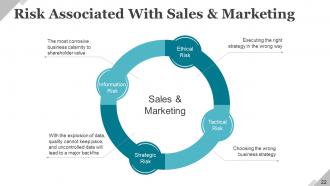
Slide 22: This slide presents Risk Associated With Sales & Marketing such as- Information Risk, Strategic Risk, Ethical Risk, Tactical Risk, Sales & Marketing.
Slide 23: This slide presents Company Strategy to be implemented. Showcase strategies etc. here.
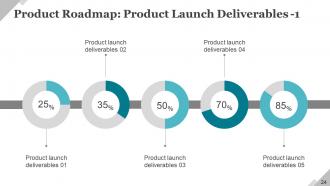
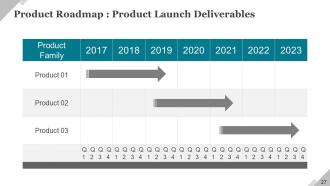
Slide 24: This slide displays Product Roadmap: Product Launch Deliverables in terms of years.
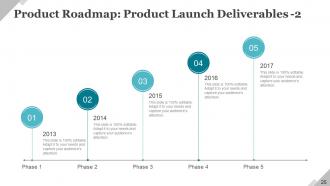
Slide 25: This slide showcases Product Roadmap: Product Launch Deliverables in terms of years.
Slide 26: This is a Coffee Break slide to halt. You can change the slide content as per need.
Slide 27: This slide presents Product Roadmap: Product Launch Deliverables in terms of different products.
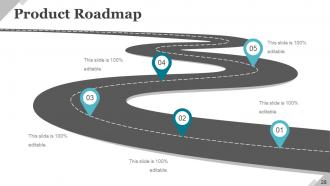
Slide 28: This slide presents a Product Roadmap with imagery to go with.
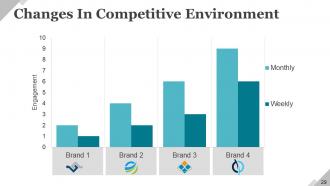
Slide 29: This slide presents Changes In Competitive Environment in graph form.
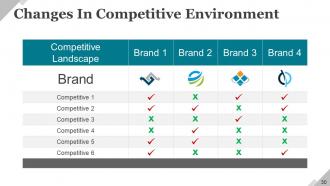
Slide 30: This slide presents Changes In Competitive Environment in table form.
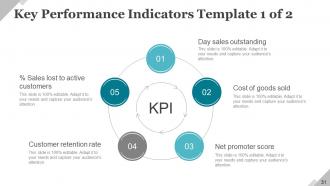
Slide 31: This is Key Performance Indicators Template slide with the following points- Day Sales Outstanding, % Sales Lost to active customers, Customer Retention Rate, Net Promoter Score, Cost of goods sold.
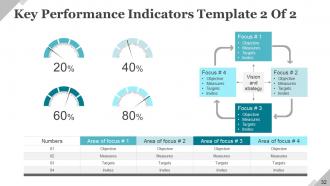
Slide 32: This is Key Performance Indicators Template slide with meter imagery and text boxes.
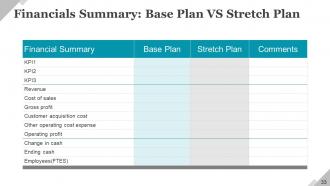
Slide 33: This slide presents Financials Summary: Base Plan VS Stretch Plan.
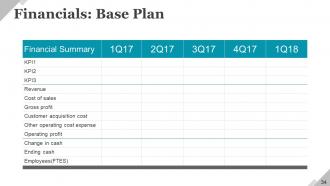
Slide 34: This slide showcases Financials: Base Plan. State base plan here.
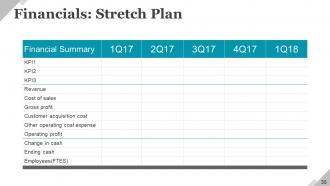
Slide 35: This slide showcases Financials: Stretch Plan. State stretch plan here.
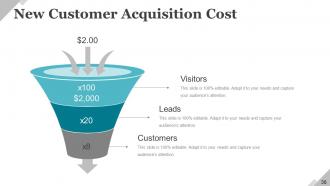
Slide 36: This slide presents New Customer Acquisition Cost with the following points- Visitors, Customers, Leads, Cost Per Customer Is.
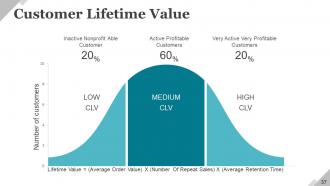
Slide 37: This slide presents a Customer Lifetime Value crest graph.
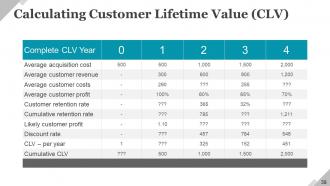
Slide 38: This slide showcases Calculating Customer Lifetime Value (CLV) table.
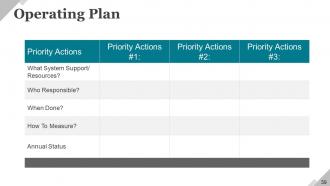
Slide 39: This slide showcases an Operating Plan.
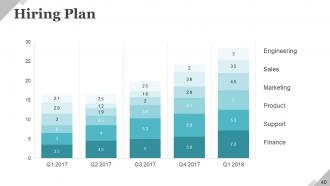
Slide 40: This slide showcases a Hiring Plan displaying- Sales, Marketing, Support, Product, Finance, Engineering.
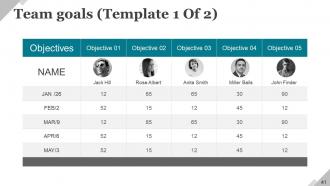
Slide 41: This slide presents a Team Goals Template. State goals etc. here.
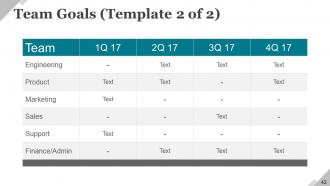
Slide 42: This slide presents a Team Goals Template. State goals etc. here.
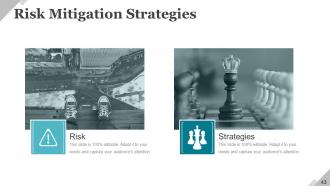
Slide 43: This slide presents Risk Mitigation Strategies with imagery and text boxes.
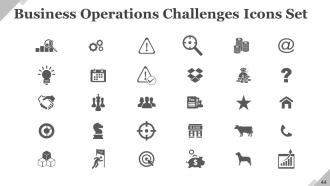
Slide 44: This slide showcases Icons For Business Operational Challenges. Use them as per need.
Slide 45: This slide is titled Additional Slides to move forward. You can change the slide content as per need.
Slide 46: This is Our Mission slide. State mission aspects here.
Slide 47: This is Our Team slide with image boxes to fill name, designation.
Slide 48: This is About Our Company slide. State team/company specifications etc. here.
Slide 49: This is Our Goal slide. State goals etc. here.
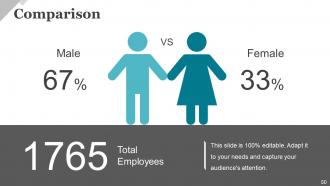
Slide 50: This is a Comparison slide to compare product/enitities etc.
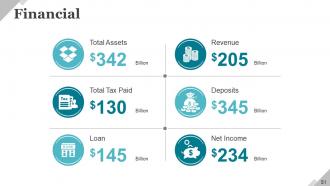
Slide 51: This is a Financial score slide. State financial aspects etc. here.
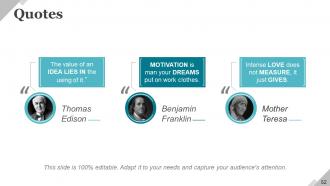
Slide 52: This is a Quotes slide. State business message, beliefs etc. here.
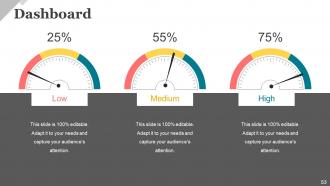
Slide 53: This is a Dashboard slide to show growth factors in terms of High, Low, Medium.
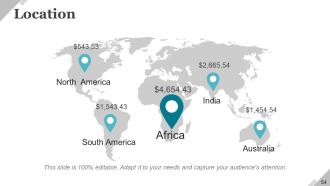
Slide 54: This is Location image slide of world map image to show global growth, presence etc.
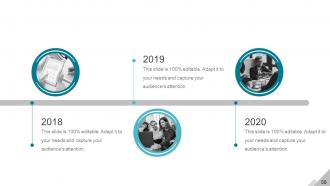
Slide 55: This is a Timeline image slide to show Beginning growth factors, milestones etc.
Slide 56: This is a Timeline image slide to show Ending growth factors, milestones etc.
Slide 57: This slide showcases Important Notes to be displayed. Show events, important piece of information, events etc. here.
Slide 58: This slide showcases Newspaper image. Show events, important piece of infromation, events etc. here.
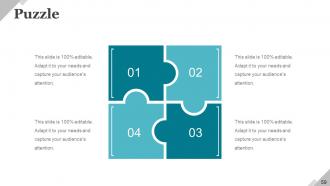
Slide 59: This is a Puzzle image slide to show information, specifications etc.
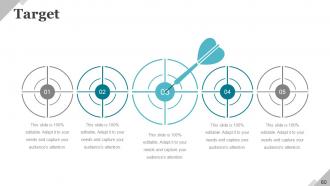
Slide 60: This is a Target image slide to show targets, goals, information, specifications etc.
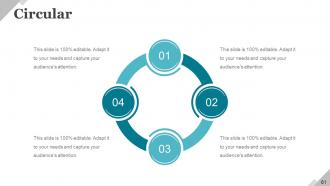
Slide 61: This is a Circular image slide. State information, specifications etc. here.
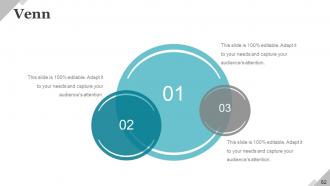
Slide 62: This is a Venn Diagram image slide to show information, specifications etc.
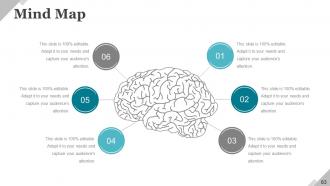
Slide 63: This is a Mind map image slide to show information, segregation, specifications etc.
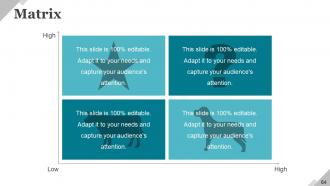
Slide 64: This is a Matrix slide (BCG) to show information, comparison specifications etc.
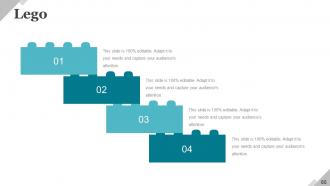
Slide 65: This is a Lego image slide to show information, specifications etc.
Slide 66: This is a Silhouettes image slide to show people related information, specifications etc.
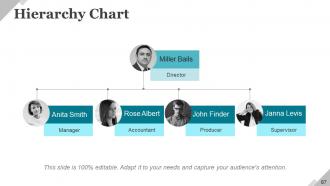
Slide 67: This is a Hierarchy slide to show information, organization structural specifications etc.
Slide 68: This is a Generate Idea human head bulb image slide to show information, innovation specifications etc.
Slide 69: This slide shows a Magnifying glass image with text boxes. State information etc. here.
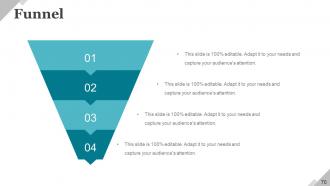
Slide 70: This slide displays a Funnel image. State information, funneling aspects etc. here.
Slide 71: This slide is titled Our Charts to move forward. You may alter/change the slide content as desired.
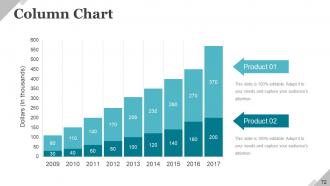
Slide 72: This slide presents a Column Chart for showcasing product/company growth, comparison etc.
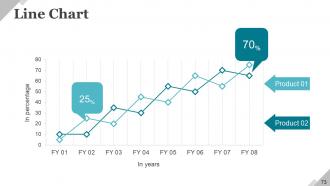
Slide 73: This slide presents a Line Chart for showcasing product/company growth, comparison etc.
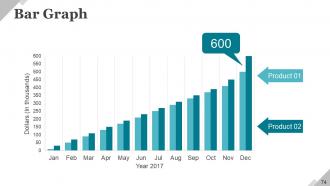
Slide 74: This slide presents a Bar Graph for showcasing product/company growth, comparison etc.
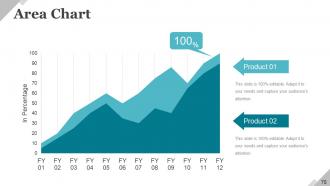
Slide 75: This slide presents an Area Chart Bar for showcasing product/company growth, comparison etc.
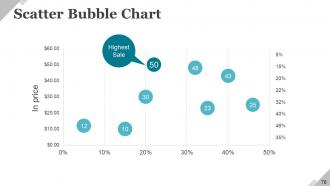
Slide 76: This slide presents a Scatter Bubble Chart for showcasing product/company growth, comparison etc.
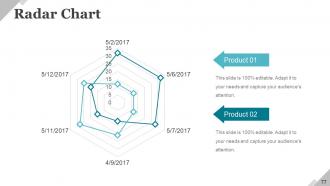
Slide 77: This is a Radar chart slide to show product/entity growth, comparison etc.
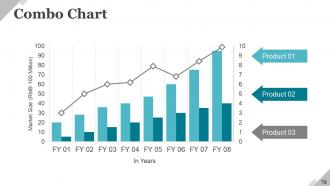
Slide 78: This is a Combo chart slide to show product/entity growth, comparison etc.
Slide 79: This is a Contact Us slide with Address# street number, city, state, Contact Number, Email Address.
Slide 80: This is a Thank You slide for acknowledgement or to end a presentation.
Business operational challenges powerpoint presentation slides with all 80 slides:
Our Business Operational Challenges Powerpoint Presentation Slides bring you to the forefront. Get the boost to go ahead.














FAQs for Business operational challenges
Honestly, start with getting your systems to actually talk to each other - CRM, accounting, project management, the whole mess. Manual data entry between platforms is soul-crushing and such a waste of time. Real-time dashboards are clutch for catching problems early. Cloud setup is basically mandatory now for remote work, plus you need decent cybersecurity (obviously). Oh, and automated workflows will save your sanity. I'd audit what you're currently using first. Figure out where you're bleeding hours on repetitive stuff, then tackle those pain points. Good data management ties it all together.
Honestly, just start with one annoying process that's driving you crazy - don't try to fix everything at once. Workflow tools and CRM systems are great for cutting out repetitive stuff. Cloud-based is the way to go since everyone can jump in from wherever. I'm obsessed with systems that actually talk to each other, so you're not constantly copying data around. Chatbots handle basic customer questions pretty well now. Automated invoicing saves me so much time it's not even funny. Project management tools with notifications are clutch too. Pick something this week and just try it out.
Track both efficiency and effectiveness - that's the key. Efficiency stuff like cycle time, resource utilization, cost per unit, throughput. Then effectiveness: quality scores, customer satisfaction, on-time delivery, hitting your goals. Honestly, don't go overboard with KPIs though. I've watched teams drown in metrics that just sit there looking pretty on dashboards. Pick maybe 5-7 that actually help you make decisions. Figure out what's really broken in your operations first. Then choose metrics that tell you if you're fixing those specific problems. Way more useful than tracking everything under the sun.
So basically, start by mapping out what you're actually doing right now - you'll probably find a bunch of steps that don't really matter. Look for stuff like waiting around, doing the same work twice, or just pointless busy work. There's this thing called 5S that's pretty solid - sort, set in order, shine, standardize, sustain. Sounds cheesy but it works. Ask your team what's bugging them regularly. Make small tweaks every week instead of waiting for some massive change. I swear, half the stuff we do at work is just... there for no good reason. Quick wins keep people motivated too.
Here's the thing - training your team is probably the fastest way to fix those annoying bottlenecks you're dealing with. Skilled employees make way fewer mistakes and work faster without you hovering over them. They don't bail for other jobs as much either, which honestly saves you a fortune on constantly hiring new people. I've seen it firsthand - trained workers actually solve problems instead of creating them. Look at your biggest operational headaches first and see if some targeted training could knock them out. Trust me, it's worth the upfront cost.
Honestly, you gotta build backup plans before shit hits the fan. Multiple suppliers for anything critical - don't put all your eggs in one basket like we did during COVID (total disaster). Geographic diversity helps too, plus keep some buffer stock around. Real-time tracking tools are worth the investment so you can catch problems early. Map out alternative suppliers and shipping routes now, not when you're scrambling. Oh and this might sound obvious, but treat your suppliers well. When things get crazy, they'll take care of partners who've been good to them first.
First thing - make your team feel safe throwing out crazy ideas without getting shut down. Give them actual time for side projects (Google's 20% thing sounds great but most places totally botch it). Let people fail quickly and move on. Cross-department brainstorming sessions work wonders - different perspectives spark better ideas. Honestly, rewarding the creative process matters more than just celebrating wins. Monthly demo days are solid too, where teams can show off their experiments. Short version: create space, remove fear, and celebrate the weird stuff.
So basically AI handles all the boring repetitive stuff way faster than we ever could. Your team gets freed up for the actual strategic work. It's crazy good at finding patterns in how customers behave, plus it cuts down on those annoying human mistakes in invoicing and inventory. The data analysis part is honestly where it really shines - it'll spot insights in huge datasets that you'd miss completely. Supply chain optimization too. I'd say start small though, maybe pick one process that's currently sucking up hours of manual work and just automate that first. You don't want to bite off more than you can chew.
Focus on three main things: communication rhythms, clear accountability, and decent project management tools. Daily standups are solid, but honestly don't go meeting-crazy or nobody gets actual work done. Everyone needs to know their deliverables and deadlines - sounds obvious but it's where teams mess up most. Tools like Asana help keep everything visible to the whole team. Remote work means being way more deliberate about staying in touch than when you're all in the same office. I'd start by looking at your current setup and figuring out where the gaps are, then build some systems around those problem areas.
Don't just slash materials or labor costs - that usually backfires. Map out your workflows first and ask your team where they're getting stuck. Those frustrating bottlenecks? That's where the real money gets wasted. Look for redundant steps, teams that aren't talking to each other, or ancient systems slowing everything down. Automation helps, but honestly, start small with one process before you go nuts with it. Test changes first - I've seen too many companies mess this up by rolling out "improvements" everywhere at once. Focus on fixing inefficiencies and you'll cut costs while actually making things better.
Dude, scaling fast is brutal - your systems just implode. What worked for 50 people? Totally useless at 200. Communication turns into chaos, quality goes out the window, and cash flow gets weird because you're spending on new people before money starts rolling in. I swear it's like trying to fix a car while driving down the highway. Document everything like your life depends on it. Build systems that can actually grow with you from day one. Sometimes you gotta pump the brakes on hiring if your processes are falling apart - learned that one the hard way.
Honestly, data analytics is a total game-changer because you're making decisions based on actual patterns instead of just guessing. You'll spot bottlenecks you didn't even know existed and predict demand way better. The crazy part? Areas burning money are usually not what you'd expect. Real-time insights mean you're not constantly reacting to problems after they've already hurt your profits. Like, instead of wondering why everything went sideways last quarter, you can actually see issues coming and fix them early. My advice - start small though. Pick one process and just track the key metrics around it first.
Honestly, your customers are doing half the work for you already. They're literally pointing out every broken process - slow shipping, confusing checkout, whatever's driving them nuts. Instead of guessing what's wrong, just listen to what they're actually telling you. Set up surveys and track support complaints, but here's the thing - don't let that feedback just sit there collecting dust. I'd prioritize the stuff people complain about most. Makes way more sense than fixing random things that might not even matter. Those patterns in their complaints? That's your to-do list right there.
Honestly, you gotta bake compliance right into your processes from day one. Don't try to slap it on later - I've watched companies do that and it's a nightmare. Start by mapping out what regulations you actually need to follow, then build everything around those rules. Automate whatever you can - reporting, monitoring dashboards, approval workflows that catch problems early. Make it everyone's job, not just something legal worries about. Oh and definitely run regular audits. My advice? Pick one small area first and nail it down before expanding. Way less overwhelming that way.
Honestly, you can't go wrong with Asana, Monday.com, or Clickup for tracking stuff. Notion's amazing if your team's into customization - though sometimes people get way too obsessed with making it pretty instead of actually using it. Trello keeps things super simple with those kanban boards. Bigger company? Smartsheet's got more heavy-duty features. The trick is matching whatever tool to how your people actually work, not what demos make look cool. Oh, and definitely test out free versions of like 2-3 options first. Don't just jump into paying for something right away.
-
Awesome use of colors and designs in product templates.
-
Informative presentations that are easily editable.