


Call Center Agent Activity Report




Try Before you Buy Download Free Sample Product
 Impress Your
 Audience
 100%
100% Editable
 Save Hours
 of Time


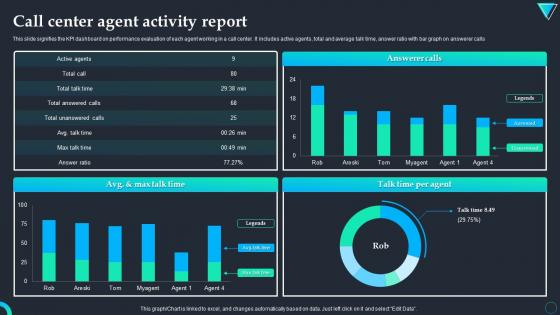
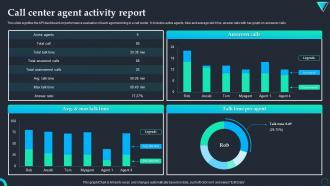
This slide signifies the KPI dashboard on performance evaluation of each agent working in a call center. It includes active agents, total and average talk time, answer ratio with bar graph on answerer calls.
People who downloaded this PowerPoint presentation also viewed the following :
Call Center Agent Activity Report with all 7 slides:
Use our Call Center Agent Activity Report to effectively help you save your valuable time. They are readymade to fit into any presentation structure.





FAQs for Call Center
Honestly, just focus on the big ones first - average handle time, first call resolution, customer satisfaction, and service level. Those will tell you everything you need to know about how things are actually running. Don't forget abandonment rate either because nobody wants customers hanging up on hold. Agent utilization matters too, though I always think it's weird how obsessed some managers get with that one. Quality scores are probably the most important since speed means nothing if your team isn't actually helping people. Start there and add more later if you need to.
Honestly, your call center reports are goldmines for figuring out what's actually broken. Look at your most common complaints first - pull the top 5 from last month and start there. You'll spot weird patterns, like maybe complaints always spike on Tuesdays when IT runs updates (happened to us once, super annoying). Check wait times too. Some agents might need help, while others have tricks worth stealing. I'd track which issues keep coming up and how long people sit on hold. Way better than just guessing what's wrong and hoping for the best.
Honestly, most places still run on Excel even though everyone acts like it's ancient. Tableau and Power BI are the fancy options everyone talks about. Your CRM probably has decent reporting built in - Salesforce, Zendesk, whatever you're using. Contact center platforms like Genesys or Five9 have solid dashboards too. Oh, and Google Analytics if you're doing web-to-call stuff. Here's the thing though - figure out what data you actually need first. Then just pick whatever doesn't fight with your current setup. Way easier than trying to force some tool that looks pretty but breaks everything.
For most call center stuff, daily reports hit the sweet spot - you'll catch trends fast enough to actually do something about them. Weekly works better for bigger picture analysis and team meetings. Monthly reports? Good for executives and long-term planning, though half the time leadership doesn't even read them lol. Keep real-time dashboards running for the urgent stuff like queue times. Here's the thing - match your reporting to how fast you can make decisions. If you can't act on data within that timeframe, you're just creating busywork. I'd start with daily core metrics and see what sticks.
Ugh, staring at spreadsheets is the worst - but charts and graphs? Game changer. You'll actually see patterns jump out at you, like when your call volume spikes or which agents are crushing it. I was literally dreading those weekly reports until we got dashboards set up. Now problems are obvious right away and decisions happen faster. Bar charts work great for comparing stuff, line graphs show trends over time. Oh, and figure out what story your data's trying to tell before you pick which visual to use - saves tons of headache later.
Your call center data is like having a time machine - seriously, the patterns are wild once you start digging in. Look for seasonal trends, peak hours when everyone calls at once, and how your marketing pushes affect volume. You'll need at least a year's worth of data, maybe 18 months if you can swing it. The sweet spot for staffing becomes super obvious after analyzing this stuff. Customer behavior is weirdly predictable when you have enough history to work with. Just don't forget to account for any big business changes coming up that might mess with your usual patterns.
Ugh, data inconsistency is the absolute worst part. Your ACD will show completely different call numbers than your CRM - it's like they're living in parallel universes. And abandoned calls? Every single platform calculates them differently, which makes zero sense. Real-time data never matches what you see in historical reports either. Plus agents constantly forget to update their status codes (classic). Honestly, just set clear definitions from day one and audit everything regularly. Otherwise your monthly reports will be a disaster and nobody trusts the numbers.
Yeah so inbound and outbound reports are totally different beasts. With inbound, you're tracking how fast you answer calls - wait times, abandonment rates, first-call resolution stuff. Outbound is more about results and productivity - completion rates, how many contacts per hour, conversions. I always think it's weird when companies try to use the same dashboard for both because honestly? You're measuring completely opposite things. One shows how well you handle what's coming at you, the other shows how good you are at going out and making things happen. Don't mix those metrics or your team won't know what they're actually supposed to be doing well at.
Honestly, focus on the big three first: handle time, first call resolution, and customer satisfaction scores. Those tell you everything about efficiency and quality. Schedule adherence matters too - you don't want agents vanishing for hour-long "bathroom breaks" lol. Transfer rates show if your team can actually solve stuff instead of just passing problems around. Quality scores from call monitoring are solid too. Don't go crazy with too many metrics though. Pick maybe 4-5 that actually matter for your goals and stick with those.
Just tailor each report to what people actually need to see. Executives want the big picture stuff - customer satisfaction, cost per call, revenue impact. Managers care more about day-to-day operations like agent performance and queue times. Supervisors need real-time dashboards they can check during their shift (trust me, nobody's reading through tons of data when calls are piling up). Most platforms let you set up different templates for each role and automate the delivery. Oh, and definitely use permission levels so people only see their relevant data. Schedule everything to send automatically - saves everyone from having to ask for reports constantly.
Here's what's worked for me - start with agent training because that's where you'll see the biggest impact. Get everyone logging calls the same way since inconsistent data entry screws everything up. Then add some automated validation rules to catch the obvious stuff like missing fields or weird timestamps. Oh, and give agents real-time feedback on their data quality instead of waiting for those monthly reviews nobody reads anyway. Regular audits are kind of a pain but they're necessary. Trust me, fix the training first and the rest gets easier.
Honestly, call center reports are where you'll find all the good stuff about training gaps. Look at handle times, escalation rates, and customer satisfaction scores - they show you exactly who's struggling. Some agents consistently take longer or get worse ratings? That's your answer right there. People hate admitting they need help, but the numbers don't lie. I'd also check what types of calls are coming in most - sometimes there's knowledge gaps hitting everyone. Run these monthly (I know, another thing to remember) and build training around whatever patterns pop up.
Demographics are like having x-ray vision for your call data, honestly. You'll spot stuff that totally gets buried in overall numbers. Track age, location, customer type - maybe 2-3 to start so you don't go crazy with data overload. Perfect example: your average wait times look decent, but turns out seniors are sitting on hold way longer because they can't navigate your phone tree. That's gold right there. Plus you can staff better, figure out training gaps, even predict which regions will blow up your call volume. Game changer for sure.
Dude, automation will save your sanity on those weekly reports. You know how you spend forever copying data and making charts? Set up workflows that pull everything automatically from your call center system. Teams I know went from 2-3 days of report hell to getting it done in minutes. Pretty wild honestly. You can schedule them to run themselves and show different metrics to different people - which is clutch for keeping executives happy without overwhelming them with details. I'd pick your most annoying report first and start there.
So you'll need to think about GDPR and CCPA stuff - basically scrub any personal info before sharing those reports. Payment data's a whole other beast with PCI compliance, so definitely don't include full card numbers or anything like that. Healthcare calls? HIPAA applies there too. Your legal team probably loses sleep over this kind of thing, honestly. Also check your call recording consent laws depending on where you are. I'd say when you're not sure, just redact it. And yeah, always loop compliance in on the sensitive reports first - saves headaches later.
-
It’s really cool, and you can find pretty much everything you could need for your work or school.
-
Thank you for offering such fantastic custom design services. The team is really helpful and innovative. In a very short time, I received my personalized template.